
Workflow · Transaction coordinator operations
The transaction coordinator’s daily work queue
Work contract dates due in the next 48 hours first, then anything you asked for and have not received, then decisions only the agent can make, then signatures, returned compliance and undated admin. Clear every red item before you open the inbox, and keep your own log of who you are waiting on, because no task list does.
What do you check first thing?
Deadlines. Open the deadline view before the inbox and work everything due today and in the next 48 hours, in date order. Allyson Kurak, a transaction coordinator writing on the Stitched Real Estate blog, checks every deadline due that day before she reads a single email, then gives the inbox about 30 minutes. Freedom Real Estate Services puts its daily deadline report at 8:30 AM with one question: which files have deadlines in the next 48 hours?
Red next. Open To Close colors anything due today red on the health bar on every property, and its help page’s rule for the end of the day is “No red before bed.” Paperless Pipeline’s Tasks page colors overdue red, due soon yellow and later gray. ListedKit’s dashboard labels its Overdue bucket “Handle these first.” The tools agree with the practitioners. Nothing red survives the morning pass, and nothing in the inbox gets opened until it is gone.
The inbox comes third, with a timer on it. Sort each message as you read it: a new contract gets set up today, a reply from the lender or title closes something you were waiting on, a question from an agent goes to the agent’s pile. Then send the day’s outgoing requests in one batch, earnest money receipts, inspection reports, HOA documents, lender status, so the answers arrive while you work the rest.
How do you order the files?
By what cannot move. The calendar goes first because a contract date does not care that the lender is slow. Second comes anyone else’s silence that is about to become a deadline problem. Third, the choices only the agent can make. One transactions manager on r/realtors, carrying 40 or more contracts at a time and closing about 20 a month, named the whole skill as “Understanding urgency and what can wait.” The six queues make that judgment the same on a Tuesday as on a Friday.
Step 1: Deadline-bound: today, the next 48 hours, this week
A contract date falls inside the band. Work these in date order, and tell the agent in writing the same day if one is at risk.
Step 2: Waiting on a counterparty
You asked the lender, title, the co-op agent or the HOA for something and have nothing back by the next business day.
Step 3: Waiting on the agent’s decision
Proceed or terminate at the end of an option period, the terms of an extension, how to answer a repair request: you own the ask and the agent owns the answer.
Step 4: Waiting on a client
An envelope is out unsigned or a disclosure has been requested. You prepare, send and remind, and the agent owns the relationship.
Step 5: Broker review returned
Compliance sent an item back with notes, or an agent marked a task done and an admin still has to confirm it, which is what Paperless Pipeline’s Agent Checked filter lists.
Step 6: Admin and undated
Anything without a date. Give it one and it moves to the first queue, or it waits for the afternoon block and the weekly sweep.
Undated items are invisible to the tools. Paperless Pipeline drops a checklist item with no due date from its Tasks page, and Open To Close parks it in an Unscheduled column at the far end of the board. Date it, or accept that nobody will see it.
What does your software call today?
A list sorted by due date. Paperless Pipeline’s Tasks page pulls every overdue and upcoming task across every transaction onto one screen, and its daily email lists what is overdue, due today and due tomorrow. Open To Close’s Task Pipeline is a board of ten columns: Past Due, Today, Tomorrow, In 2 Days through In 7 Days, and Unscheduled. SkySlope splits a Task you can check off from a Reminder that only arrives by email, and lets you opt in to a daily email of the Tasks due that day. ListedKit’s dashboard calls itself a morning snapshot: Overdue, Upcoming deadlines, Active transactions.
What each tool shows you as today
| Surface | DeedSpring | ListedKit | Open To Close | Paperless Pipeline | SkySlope |
|---|---|---|---|---|---|
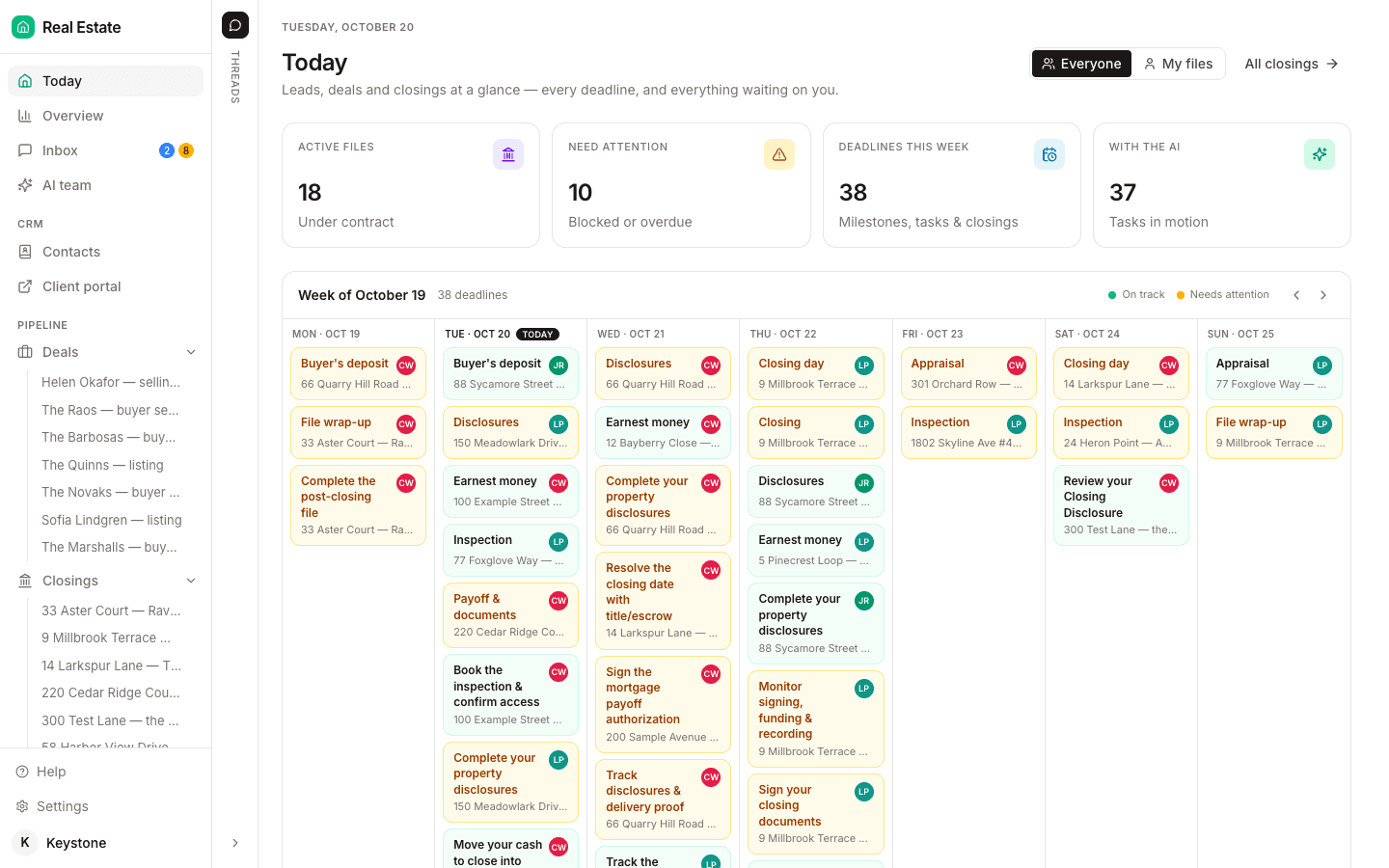
| Day view | Today: Active files, Need attention, Deadlines this week, a week calendar and a Needs you list. | Dashboard: Overdue, Upcoming deadlines, Active transactions. | Task Pipeline board across every file, plus a health bar on each property. | Tasks page across all transactions. | Tasks & Reminders page. |
| Bands it sorts into | This week, with blocked and overdue items pulled out on top. | Overdue, then upcoming. | Past Due, Today, Tomorrow, In 2 to 7 Days, Unscheduled. Red, orange, blue for the next three days. | Red overdue, yellow due soon, gray later. | Due today. |
| Reminders outside the app | An hourly check on every file. Anything that needs a person lands in your Inbox. | Check the dashboard each morning, the help page says. | Due and failed task triggers, Premium add-on only. | Daily email: overdue, due today, due tomorrow. | Opt-in daily email of Tasks due that day. Reminders arrive by email. |
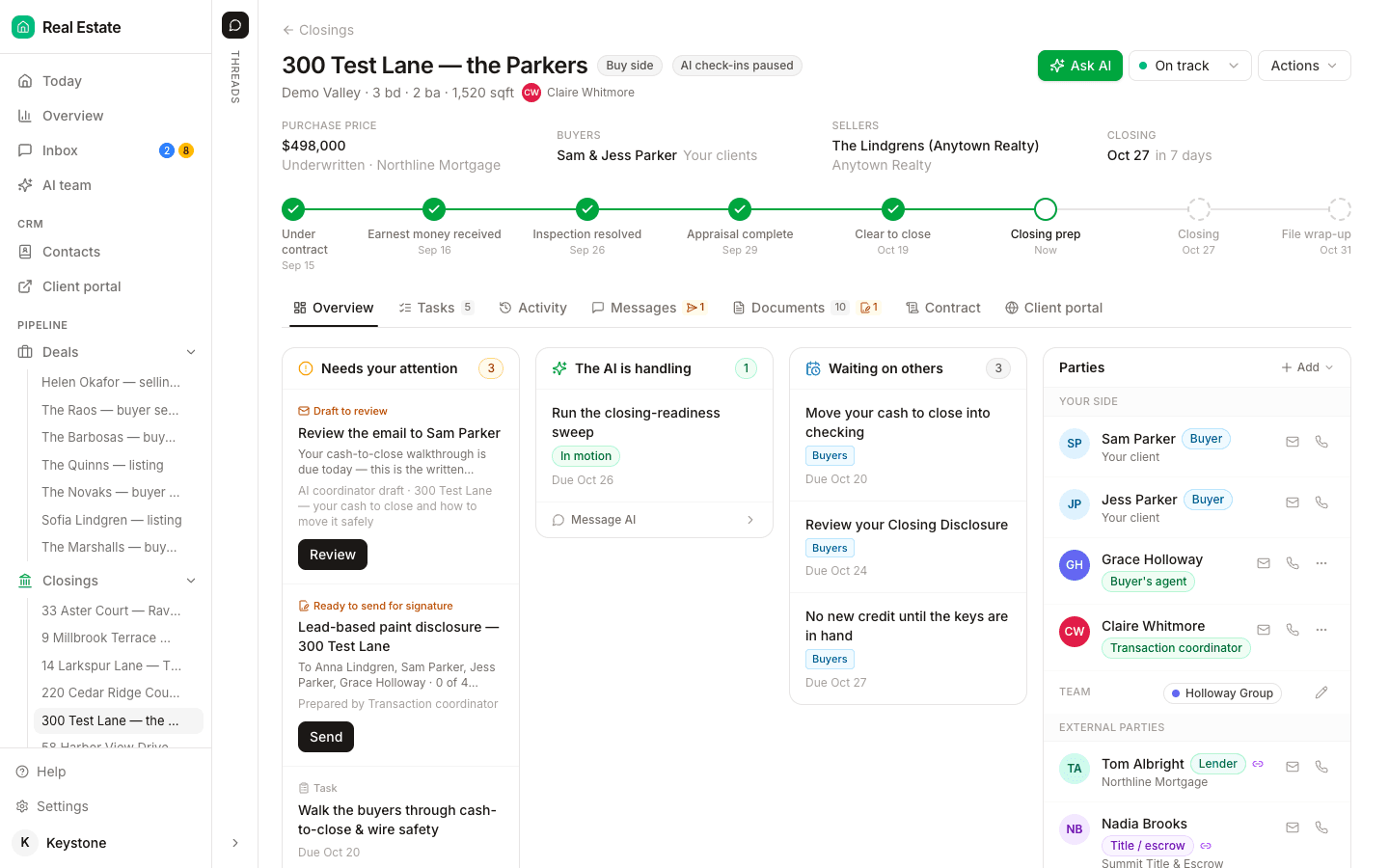
None of those views knows who you are waiting on. A red task reads the same whether you have not done it, the lender has not replied, or the agent has not decided, and the right move is different in each case. That layer is the queue, and until now you have kept it by hand as a sent-and-awaiting log on every file. DeedSpring keeps it for you. Each closing’s Overview splits open items into Needs your attention and Waiting on others, and the Today page pulls every blocked, overdue or waiting item across your files into one Needs you list.
What gets chased today?
Everything you sent this morning and have not heard back on. The circle-back is the step the two published routines share. Freedom Real Estate Services logs what was sent and when at 9:00 AM, then checks the log at 3:00 PM, where an unanswered HOA request is marked for escalation. Kurak sends her outgoing requests in the morning so the answers trickle in through the day. The afternoon check only works if the morning’s list was written down with the time each request went out.
How long to wait before you chase is your call, and the only published numbers are TC companies’ promises to their own agents. Quill TC promises replies within one business hour and same-business-day acknowledgement of a new contract. ROCKSTAR TC Services observes a 24-hour response window on operating days, runs a 4:00 PM cutoff for new files, and charges $25 a file for rush service. Pick a window between those two, write it into your agent agreement, and hold the other side to the same clock. A request that has had a full business day gets attempt two this afternoon.
When does an item leave your hands?
After the third attempt. ROCKSTAR’s terms put it in writing: “After a third attempt, or firm decline of signature,” responsibility passes to the agent or managing broker, and the evidence of attempts goes with it. That is the only published escalation rule we found, and it is the right one, because it turns a feeling that someone is slow into a count.
The ladder for a brokerage that has not written one. A deadline at risk: the agent, in writing, the same day. Still unresolved 24 hours before the date: the agent and the managing broker together, with the attempt log. Three attempts on any counterparty or client item: it goes to the agent or broker with the evidence. An agent decision that outlives its date: the managing broker. Where your brokerage’s policy says otherwise, it wins.
What does the daily checklist look like?
Ten items, in the order Kurak and Freedom Real Estate Services run them. The times are theirs and yours will differ. The order is the part to keep.
The transaction coordinator’s daily checklist
- Open the deadline view and work everything due today or in the next 48 hours, in date order.
- Clear every red item before you open the inbox.
- Spend 30 minutes on the inbox and sort each message: a new contract, a counterparty reply, or a question for the agent.
- Send the day’s outgoing requests in one batch and log the time you sent each one.
- Set up new files, then work the compliance block.
- Fix returned reviews: what is yours now, what is the agent’s by email today.
- Second inbox pass, 30 minutes. Move items between queues and start no new admin work.
- Circle back on the morning’s outgoing list. Anything unanswered gets attempt two. After attempt three it goes to the agent with the log.
- Update every file status and review the next 48 hours of deadlines. Flag anything at risk.
- Clear the inbox once more, read tomorrow’s list, and leave any file received after your cutoff for the morning.
What runs the queue for you?
DeedSpring. Upload the executed contract and the AI coordinator reads the price, deposits, contingencies and dates into deadlines on the file. From then on it checks every active file every hour. A milestone past target or a task nobody has moved is flagged on Today and on the closing’s Overview, and in your Inbox when a person needs to act. On the tasks assigned to it, it sends the chase, notes who said what, and keeps going until the item is confirmed in writing, so the counterparty queue chases itself. Anything sensitive or negotiable, money, contract terms, a date that moves, waits as a draft for you to send. Every task on a playbook names who does it, you, the client, an external party or the AI, which is the owner column this article has you keep by hand.
Starter is $15 a month for one closing a month. Standard is $25 a closing, down to $19 at volume, with unlimited agents and teammates and unused closings rolling over. Both are month to month.