Explainer · Transaction coordinator operations
What belongs in a real estate transaction audit trail
Four records make up a transaction's audit trail: the action log, the document history, the message history and the signing or approval evidence. Here is where dotloop, SkySlope, Paperless Pipeline, Docusign and DeedSpring keep each one, and the three places every trail breaks.
What counts as an audit trail?
Four records, kept together. The action log says what happened on the file and who did it. The document history says what each document looked like before and after a change. The message history holds what was said to the parties. The approval or signing evidence shows that a reviewer accepted a document or a signer signed it. A file with the first and the fourth but not the third is the normal state of a brokerage system.
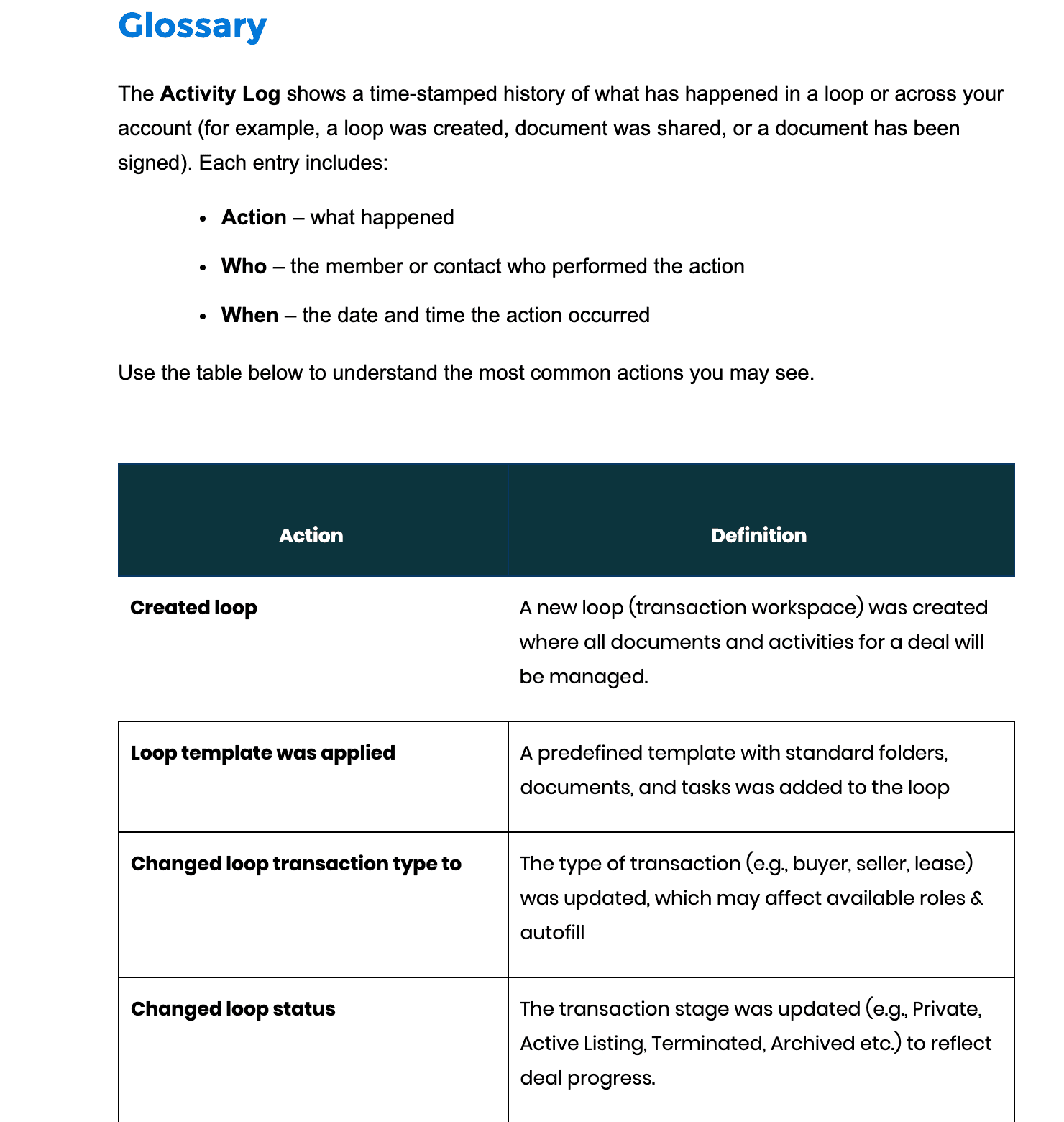
dotloop's own definition is the cleanest. Every entry in its Activity Log has three parts: the action, who performed it, whether a member or a contact, and the date and time. The log runs from the whole account down to a single field on a document, and it records a client viewing a document whether or not that client has an account.
The record-keeping rules list what has to be kept, and for how long. Texas lists the categories a broker keeps for at least four years from closing, contract termination or the end of the transaction, and substantive communications with parties to the transaction is one of them, next to disclosures, commission agreements, and offers, contracts and addenda. California's Business and Professions Code gives three years from closing, or from the listing date if the transaction is not consummated, for listings, deposit receipts, canceled checks, trust records and other transaction documents, and says the subdivision is not to be construed as requiring a broker to retain electronic messages of an ephemeral nature. The communications line is the one no system fills by itself.
Where does each tool keep each piece?
The four records of an audit trail, and where five tools keep them
| What the trail holds | DeedSpring | Docusign | dotloop | Paperless Pipeline | SkySlope |
|---|---|---|---|---|---|
| Action log | Activity tab: every chase, date move and note, with who and when. | Envelope History: Opened, Viewed, Signed, Declined, corrections, ownership transfers. | Activity Log: action, who, when. Account, loop, document or single field. | Transaction History: time-and-date log of everything, reviews included. | Log tab per file: emails in and out, close-out note. |
| Message history | Messages tab: email, texts, portal chat on the closing. Connected Gmail files itself. | Envelope notifications only: Sent Invitations, Resent, copy attached to email. | Shares and review notes are logged. | Emails on the transaction, exported as plain text in the monthly backup. | EML OUT entries with contents and attachments. Forwarded mail lands with its contents. |
| Signing or approval evidence | Coordinator notes who said what and chases until it is confirmed in writing. | Certificate of Completion: envelope ID, signer IP, signature image, timestamps. | Signature Verification: date and time, ID, IP address, security level. | Reviewed checkbox. Reviewer name and time on hover. | Accept, or Reject with a comment to the agent. DigiSign certificate shows who signed and when. |
| Getting the trail out | Recent activity: 14 days across every file, filtered by coordinator, team or clients. | Certificate PDF. In the combined PDF only when the admin setting is on. | Account log by date range, 7 or 30 days. Downloads and prints are logged as tamper-evident PDF exports. | Download Transaction: history plus every document. Monthly ZIP with history in plain text. | DigiSign envelope History can be printed and downloaded. |
SkySlope documents downloading a file's documents as a zip and says nothing about exporting the Log tab itself. Assume you screenshot it before an audit. In dotloop the account-wide log shows the last seven days by default, with 30-day and custom 30-day ranges. Check the time zone before a dispute too: a new dotloop user's zone is set to Eastern, and changing it re-renders every timestamp, old ones included.
What counts as evidence of a signature or an approval?
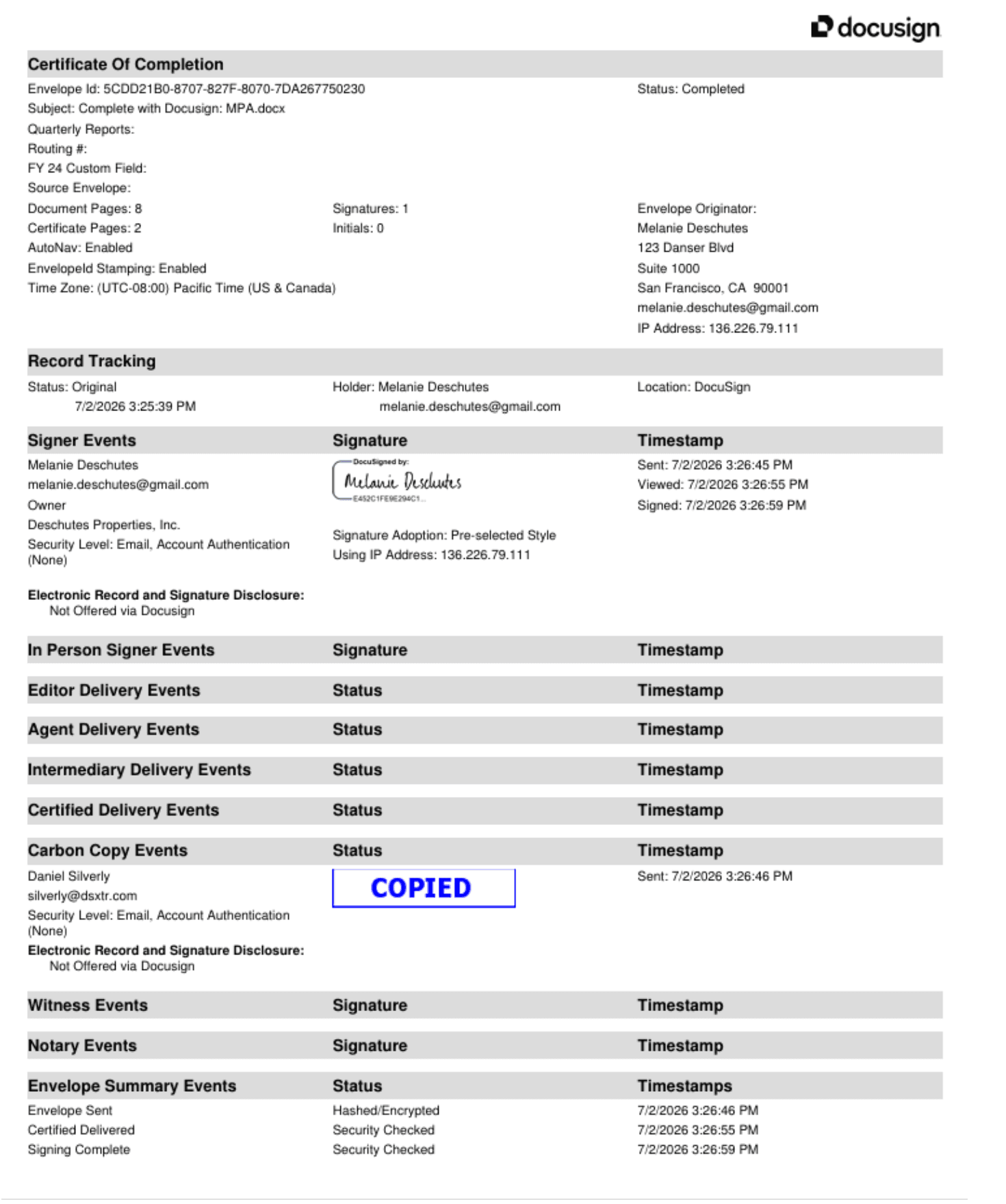
For a signature, the certificate. Every Docusign envelope has a Certificate of Completion with the envelope ID, the originator, the page, signature and initial counts, and for each signer an IP address, the signature image and the Sent, Viewed and Signed timestamps. Docusign adds its own caveat about the IP address: it may belong to an ISP data center, a VPN or the nearest cell tower, and might not pinpoint the exact physical location. dotloop's Signature Verification certificate carries the date and time, an ID, the IP address and a security level, reached from a link on every signed document, downloaded PDFs included. DigiSign's certificate shows who signed and when, and is not available for an envelope in Canceled or Correcting status.
For a broker approval, the mark plus the reason. In SkySlope's Quick Audit a reviewer accepts or rejects each checklist item, a Reject carries a comment to the agent, and undoing either keeps the comments. Paperless Pipeline's mark is the Reviewed checkbox, usually ticked by the principal broker or an admin, and hovering the document shows the reviewer's name and the date and time. Its document comments can be edited or deleted by any admin or staff user, so the comment is a note and the Reviewed tick is the evidence.
Where does the trail break?
In the same three places on every system we read: mail sent from the agent's own inbox, phone calls, and changes made to a document after it was signed.
Email outside the system
Every tool logs the mail it sends. SkySlope's Log tab records an email sent from the file as an EML OUT line with its contents and attachments, and mail forwarded to the file's own address lands with its contents. Paperless Pipeline exports the emails on a transaction as plain text in its monthly backup. None of that reaches a reply the agent sent from Gmail to the lender at 9 pm. SkySlope's help page says as much: agents are often required to submit copies of all client conversations when a file closes, usually as a Communication Log or screenshots, and its Attaching Emails to the Checklist page walks you through printing an inbox email to PDF to attach it.
Phone calls
Nothing logs them. A lender saying the appraisal is ordered does not exist on the file until someone types it in. The California rule quoted earlier does not mention calls at all. A call is only ever as good as the note. Write the note on the file, with the name and the time, and then get it in writing from the other side. DeedSpring's coordinator works the other way around: it notes who said what, keeps chasing until the item is confirmed in writing, and will not mark a milestone done on a lender's “should be fine” over the phone.
Edits after signature
In dotloop any change to a previously signed document wipes out the signatures, by design, and a change made by anyone other than the person who shared the document shows as Updated. Document History keeps every version with the activity in it, each one viewable and downloadable. In Docusign you cannot add a signer or a field to a completed document: you create a new envelope by copying with field data, forwarding or cloning. Corrections are for envelopes still in progress, and each one adds an Envelope Updated event to the certificate. DigiSign will not let you cancel or void a completed envelope. The break is the paper copy. A DigiSign PDF downloaded while one of two signers is still outstanding carries only the first signer's signatures, and a change initialed on paper and scanned back in has no certificate behind it at all.
What should you do with this on Monday?
Pick one place for the message history and make the other systems feed it. If that is the brokerage system, send from inside the file so the log catches it, and forward anything that arrived elsewhere. Write phone calls up as notes on the file the same day, with who called and when. Download the certificate with the signed document, not later, since Docusign only bundles it into the combined PDF when an admin setting is on. And before you close a file, pull the trail once: a capture of dotloop's log by date range, Paperless Pipeline's Download Transaction, and a capture of SkySlope's Log tab. How to track the signatures themselves is in how to track missing signatures and initials. What each vendor lets you take with you when you cancel is in our export terms comparison, and the broker review itself is in the brokerage review workflow.
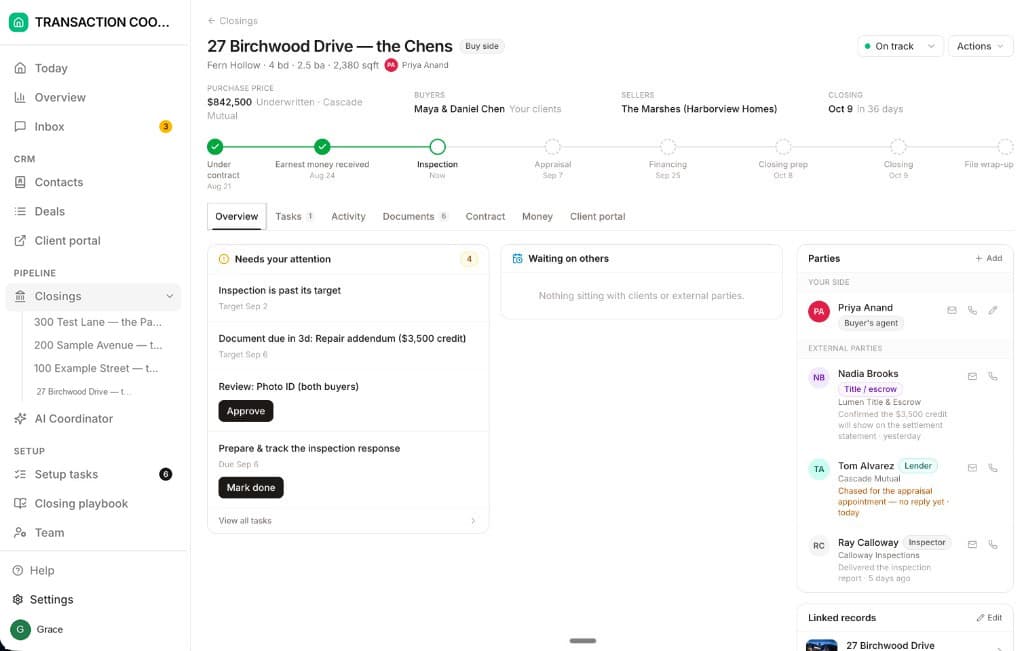
What does DeedSpring keep on the file?
DeedSpring is built so the third record fills itself. Connect your Gmail and the mail you send and receive lands on the right closing automatically, with each teammate connecting their own mailbox. Inbound email and texts land on the closing too, and the Messages tab holds the email, texts and portal chat filed there. The Activity tab is the file's log: every chase the coordinator sent, every date that moved, every note, with who did it and when. The coordinator notes who said what and keeps chasing until the item is confirmed in writing. On Today, Recent activity shows the last 14 days across every file, filtered to the AI coordinator, the team or clients.