
Migration guide · Product guides, pricing and migration
Exporting dotloop files: documents, folders and history to check
dotloop has no export button for an account or a loop. Documents leave one PDF at a time or as one merged PDF per loop, a paid API Nation backup copies every loop to Google Drive or Dropbox, and messages and brokerage templates never leave. Here is what to pull, in what order, and how to prove nothing is missing.
Who can pull the files, and from which account?
Anyone a document has been shared with can download it. Even the lowest share permission, View Only, lets the recipient print or download the document, so a buyer, a co-op agent or a coordinator on the loop can save what reached them. The agent who created the loop sees everything in it, and a Teams or Business+ admin sees it from the admin profile.
The account is the catch. The loops you built while attached to a brokerage or team sit on that profile. When a team admin removes an agent, the removal screen offers a checkbox, “Allow the agent to keep access to their existing loops.” Left unticked, the loops are gone from your view, and getting them back means an admin emailing [email protected] with your name, email address, member id and team. Either way the team's template folders stay behind.
“Save any templates from your old brokerage you might want, they disappear when your old broker severs your account.”
If you pay your own way, cancelling Premium drops the account to Freemium and the loops stay. A free account can only add people to a loop in the 90 days after it was created, so an old loop cannot take a new participant. Teams and Business+ run on yearly terms through a success manager. The terms dotloop links to say the account can be deactivated “at any time for any reason, with or without notice” and contain no clause about getting your data back.
What leaves dotloop, and how?
The export inventory: every part of a loop and the only way it leaves
| In the loop | Route out | What you get | Watch for |
|---|---|---|---|
| Signed documents | Per document, the three-dot menu, then Download. Or tick several and Download. | One PDF per document, or one merged PDF named Multiple Documents. | The merged file is one PDF, not separate files. Drag the order first. |
| Earlier versions | Document History, then Download beside each version. | A PDF of that version. The history window lists the activity in each one. | Replacing a document archives the original. Its history is where the old copy lives. |
| Signature certificate | Signature Verification in the document menu, or the link at the top left of a signed document. | A page with date and time, ID, IP address and security level. | The link on a downloaded PDF points back to dotloop. Save that page too. |
| Archived documents | Show Archived inside the loop, then download as above. | The same PDFs, listed in grey at the bottom of the folder. | Both API Nation backups skip them. Unarchive first or pull them by hand. |
| Folder structure | API Nation backup to Google Drive or Dropbox. | A folder per profile and a folder per loop. Dropbox keeps the loop's subfolders too. | Hand downloads carry no folders. You rebuild them yourself. |
| Loop details | API Nation Google Sheets or Google Drive backup. | A Loops sheet with a row per loop. The Sheets sync reads 91 fields. | No in-app export of View Details. Without the backup you retype it. |
| People and contacts | API Nation Google Drive backup. | A Contacts sheet and a Participants sheet. | Participants are per loop. Contacts is your address book. |
| Activity log | In the app, 7 days, 30 days or a custom 30-day range. Full history via the backup's Activity Logs sheet. | Who did what and when, per loop and per document. | Timestamps show in the viewer's time zone, EST by default. |
| Tasks | None in the app. The public API reads task lists. | Completed task lines in the activity log. | Assume the checklist itself stays in dotloop. |
| Messages and notes | None on any help page. | A Name Wrote line in the activity log for each compliance note. | Screenshot anything you may need to show later. |
| Templates | Your own template folders: the folder menu, then Download. | A zip of that folder's documents. | Team and association folders cannot be moved and go when you leave. |
How do you download a loop by hand?
For a handful of closed loops, do it yourself. Budget a few minutes a loop and expect your admin to see it, because dotloop writes every download to the activity log as “Exported [Document] to a digitally verified, tamper-evident PDF.”
Step 1: Show every loop
On My Loops open Filters, set Archived settings to All and write down the count, because the default view hides archived loops.
Step 2: Open the loop and click Show Archived
Archived documents and folders appear in grey at the bottom of each folder, and a replaced document is one of them.
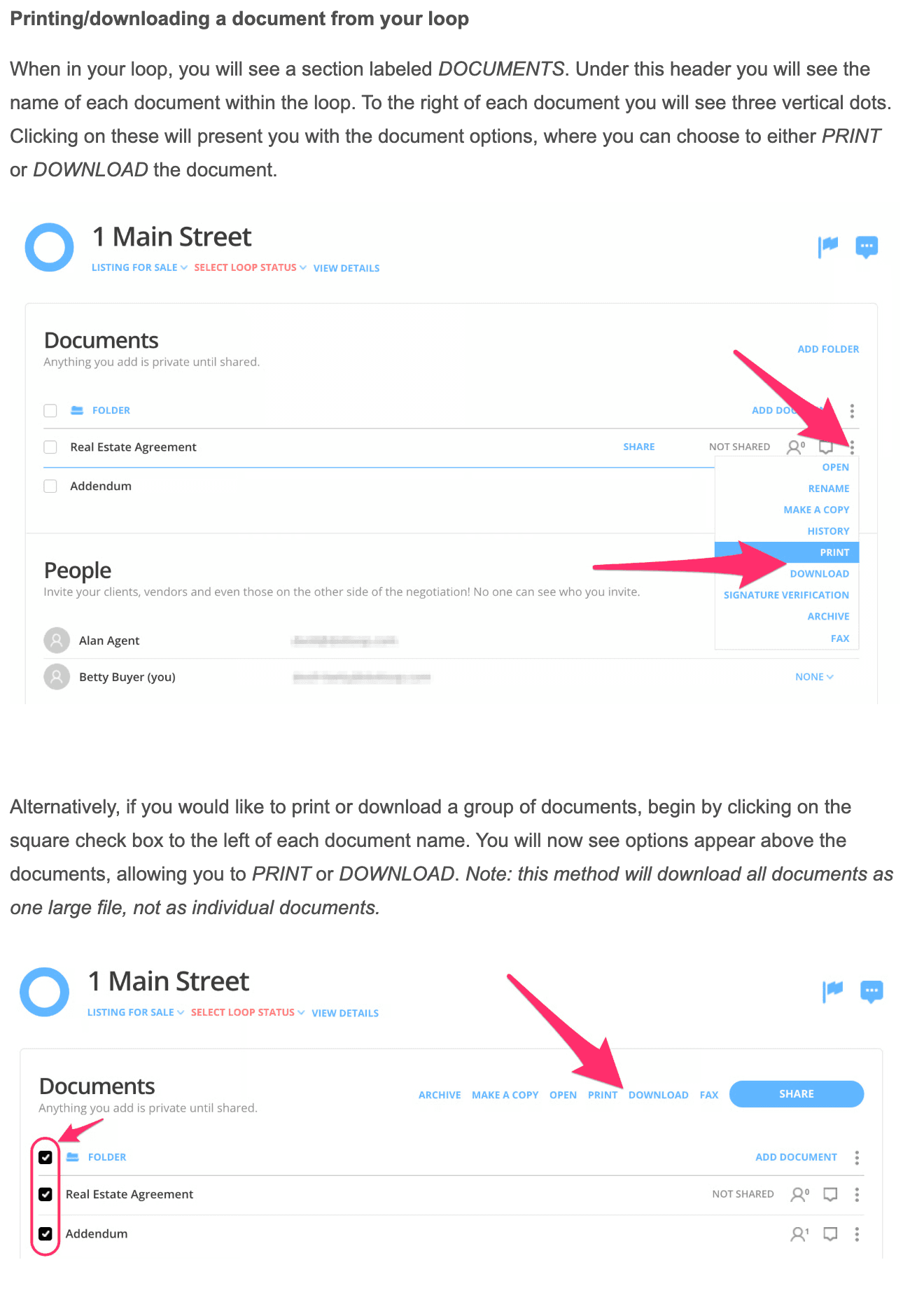
Step 3: Download each document on its own
The three-dot menu beside a document gives you Print or Download, and ticking several documents gives you one merged PDF, which reads well and files badly.
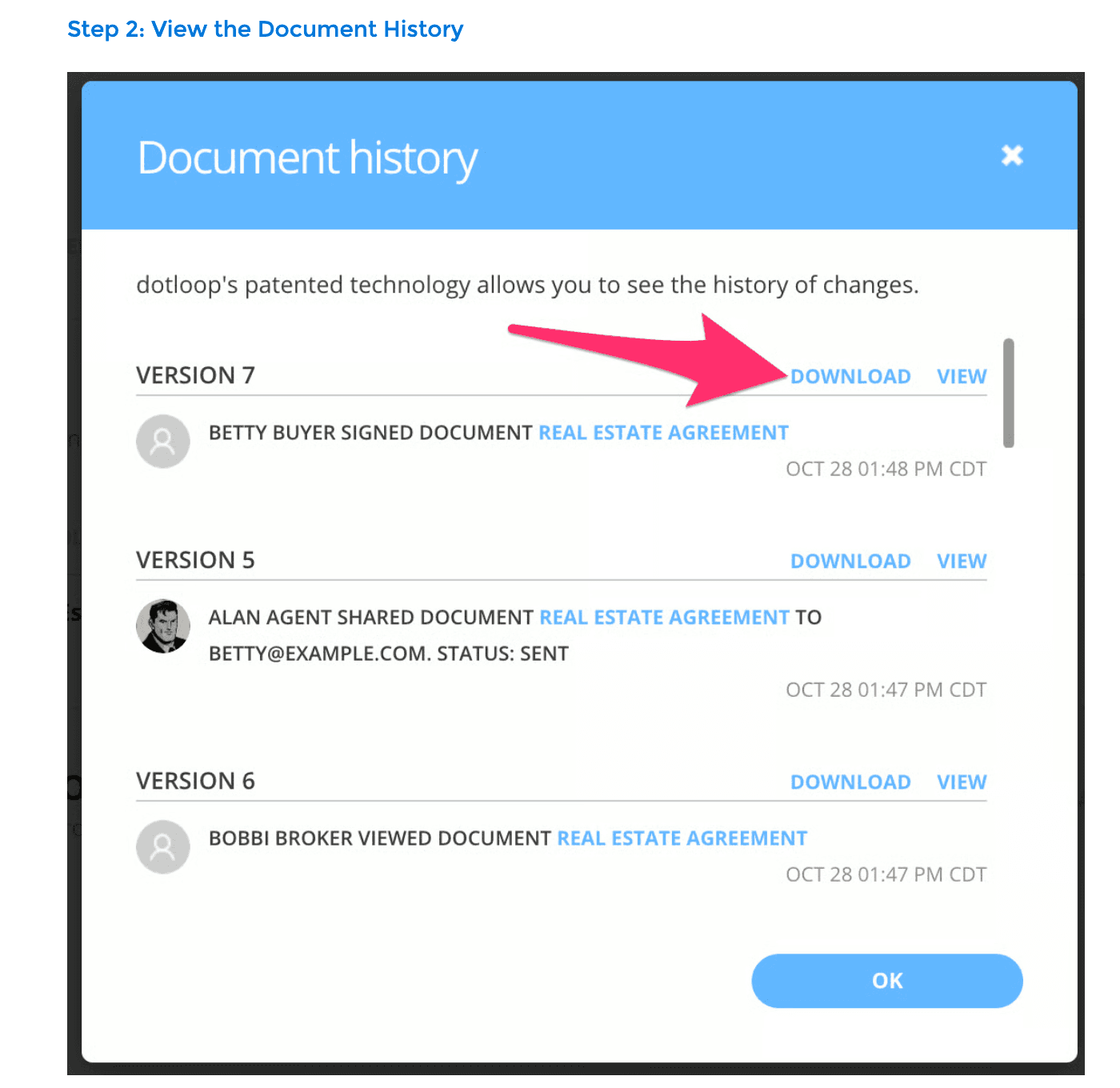
Step 4: Pull the earlier versions that matter
Document History lists every version with a Download link, so the counteroffer before the final one is one click away.
Step 5: Save the Signature Verification page for each signed contract
Open it from the document menu and save it as a PDF, because the link on the downloaded contract points back to dotloop.
Step 6: Record the loop details
Open View Details and type the price, dates and parties into your own sheet, since nothing in the app exports them.
Step 7: Zip your own templates
In Templates, the menu beside each folder you created has Download, which zips the folder.
One check on the PDFs you get. dotloop warns that documents scanned at anything other than 8.5 by 11 inches can misalign signatures and initials when downloaded or printed, so open the scans you uploaded yourself and look at the signature blocks before you file them.
Is the API Nation backup worth paying for?
For more than a dozen loops, yes, and take the Google Drive version. The Google Drive backup copies every document into a folder per profile and per loop, and writes four Google Sheets: Contacts, Participants, Loops and Activity Logs. Short of writing code, those sheets are the only route out for loop details, your address book and the complete history. The companion Google Sheets sync reads 91 fields per loop, from the roles and their contact information to the property address and the commission rates and totals. The Dropbox version copies documents only, in a folder per loop with the subfolders as they are arranged in dotloop. API Nation sells both on record-count plans with no price on its plans page, so check the figure at checkout.
It runs in batches, oldest loops first, at roughly 50 documents every fifteen minutes, and a typical run takes three to four days. Whatever lands in your Drive stays there if you cancel API Nation. The profiles you sync and the folder and sheet names are set once and cannot be changed after you activate, and pick every loop status, which is what the page recommends.
One sentence on that page decides whether the backup is complete: “Archived documents do not sync. Archived loops do sync.” The backup is a mirror, so archiving a document that has already been copied removes it from Drive as well. Replacing a document in a loop archives the original, which means every superseded counteroffer and every re-uploaded disclosure falls out of the backup. Unarchive those documents before you start, or pull them from Document History by hand.
Brokerages with a developer have a third route. dotloop's public API lists a loop's folders and documents, with archived ones included since July 2025, plus participants, task lists and the full activity feed, at up to 100 requests a minute per user. Most offices will find the backup cheaper than the scripting.
What about the loops still under contract?
Export the closed and terminated loops first and leave the live ones in dotloop until the last signature lands, because a document's history and its verification page are only complete there. Set each loop's status before you archive it, because dotloop keeps the previous status for reporting and search, and the backup filters on status. Do not remove clients from a live loop to tidy up. Removing a person strips their assigned fields from anything unsigned, and the share emails they received expire after 30 days, after which they need a free account to see the paperwork.
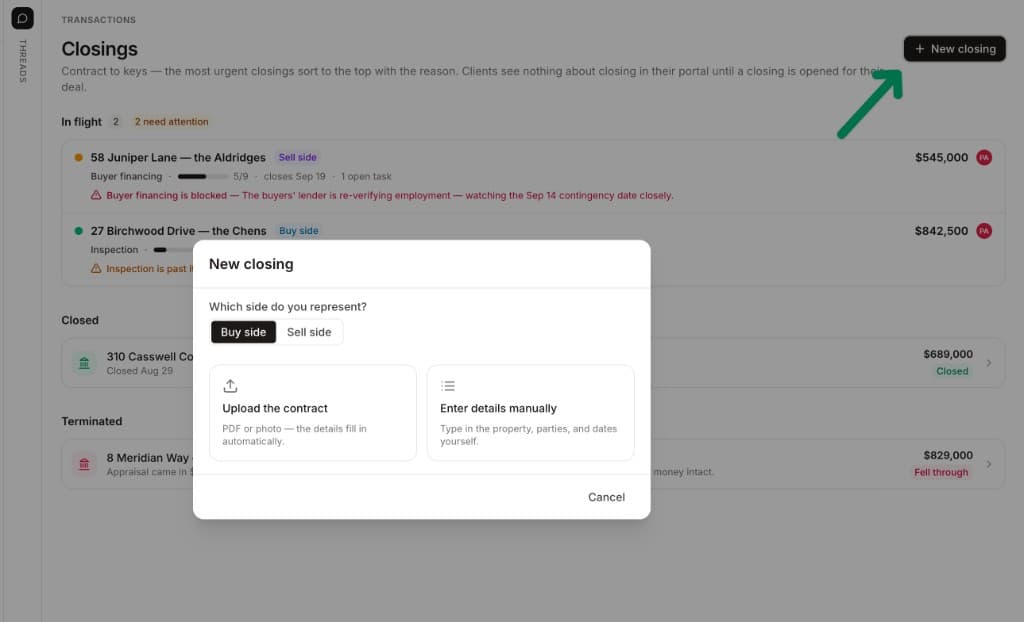
The export gives you the paper. It does not give you the deadlines, who is waiting on whom, or the lender's last email, because none of that ever lived in the loop. For each closing you carry across, upload the executed contract to DeedSpring and it reads the price, deposits, contingencies and dates into deadlines on the file, then checks every open closing hourly and drafts the chases for you to send. DeedSpring's help page lists live Dotloop deals as a supported import its team sets up with you, so say which system and roughly how many records rather than re-keying.
How do you prove the export is complete?
Count three things. Loops: the number on My Loops with Archived settings on All should match the rows in the Loops sheet, or the folders in your Drive. Documents: inside each loop, Show Archived and count every document against the files in that loop's folder, remembering that archived ones will be missing from the backup by design. History: the in-app activity log shows seven days, thirty days or a custom thirty-day range, so anything older is only checkable in the Activity Logs sheet, and its timestamps follow the viewer's time zone, EST unless someone changed it.
Then open a sample. The downloaded contract should be the version marked Signed in the loop, the top entry in Document History, and its verification link should resolve. Where it does not match, download the right version and note the loop. Rollback is the easy part, because nothing in dotloop is deleted by any of this. Loops, and the documents and folders inside them, cannot be deleted, archived loops restore at any time, and a cancelled Premium account keeps its loops on Freemium. The one way to lose the originals is to let a brokerage admin remove you before you have pulled them, so get that checkbox ticked before your last day.
What stays behind?
Messenger texts and compliance notes have no export on any dotloop help page. A compliance note shows in the activity log only as a Name Wrote line, so screenshot the conversations you may need. Task lists, compliance review stages and the notes admins wrote on documents survive the same way, as log lines. Your brokerage's and association's template folders stay with them. Assume all of it is gone the day your access is, and capture what you need now.
Where DeedSpring fits after the export
dotloop was where the forms got filled, signed and, on a team or brokerage plan, reviewed. Your Drive folder is now the archive. DeedSpring is the coordinator for the closings still open and the ones you take on next. Open a closing by uploading the executed contract and it reads the price, deposits, contingencies and dates into deadlines on the file. It checks in on every active file every hour, flags what is slipping, and drafts the chases and client updates for you to send, with anything sensitive or negotiable always waiting for a person. Your buyers and sellers get a portal, and e-signing is built in.
You pay per closing. Starter is $15 a month for one closing a month. Standard is $25 a closing, $22 from five a month, $20 from ten and $19 from twenty, with unlimited agents and teammates and unused closings rolling over. Both are month to month, so there is no yearly term to time your exit around.