
Workflow · Transaction coordinator operations
How to track missing signatures and initials in a transaction file
Track four things for every document: whether it is in the file, who has to sign it, which signatures and initials are actually on it, and whether the executed copy is filed with its certificate. An e-sign status answers only the third, and only for the fields someone placed.
What are you actually tracking?
A checklist line that says “Purchase contract: received” tells you the PDF is in the file. It says nothing about the initials line at the foot of every page. The Texas One to Four Family contract runs to twelve pages, and every one of them carries a Buyer and a Seller initials line in its footer. The signature blocks sit on page ten, two for the buyer and two for the seller, under an Effective Date box the broker fills in. Page eleven is the broker contact page and says “Print name(s) only. Do not sign”. A contract can be received, uploaded and e-signed and still be short three initials on page six.
So the tracker holds four states per document, and they move independently. Present means the right form is on the line. Required means you know who signs and initials it, and how many sets of marks that is. Complete means every one of those marks is on the page. Executed means the final copy and its certificate are filed and the date is in. The tracker shows the gap the day it appears and the date it was cured.
Who has to sign each document?
Start with the parties on the contract, because every check downstream counts against that list. SkySlope's Smart Assist is explicit about this. It takes the expected number of signatures from the contacts on the property file, so a file with one Seller and two Buyer contacts is scanned for one set of Seller marks and two sets of Buyer marks. Record a second buyer late and every earlier scan was checking for the wrong count. The same holds for a tracker you keep by hand.
Write the signer list once at intake, from the signature page of the executed contract, and copy it onto every later document. Then adjust per document. A disclosure may need one side's signature and the other side's acknowledgment of receipt. An amendment needs both sides again. A lender form may need the buyer alone. The grid is one row per document, one column per signer, and each cell holds one of four words: sent, viewed, signed, checked. The fourth word is yours, and no tool fills it in.
What does the e-sign status actually tell you?
Less than it looks. The four tools below each report on the fields the sender placed. In dotloop a document counts as Signed when every field directly assigned to every recipient is filled and signed, and a document shared with no fields for the recipient shows no status at all. In Docusign an envelope is Completed once all recipients have completed their actions. Neither sentence mentions the form's own initial lines. If nobody dragged a field onto page six, page six is never Waiting, never Part Signed and never flagged.
What each e-sign status means to the coordinator reading it
| What you want to know | Docusign | DigiSign (SkySlope) | Authentisign (Lone Wolf) | dotloop |
|---|---|---|---|---|
| Not sent yet | Draft. Purged after 30 days by default. | Draft. | Draft. | Not Shared. |
| Out for signature | Sent, then Delivered, then Waiting for Others. | Sent/In Progress. | Sent. | Waiting On Others. |
| Some signers done | Still Waiting for Others. The Details view names who still Needs to Sign. | Still Sent/In Progress. A download now carries only the signatures so far. | Still Sent. Signing details shows the status of each participant. | Part Signed. |
| Every placed field signed | Completed. | Completed. | Completed. A signing certificate is created. | Signed. |
| Can it read Completed with a signer outstanding? | No. Every recipient must have acted. | No. Signed by all signers. | Yes. Force signing completion, once one party has signed. | No. But a line with no field on it is never checked. |
| Stopped or changed | Correcting, Voided, Declined, Expired, Delivery Failure. | Correcting, Canceled. A Completed envelope cannot be voided. | Rejected, Expired. Reset returns it to Draft. | Updated. Any edit to a signed document wipes its signatures. |
| Proof of who signed when | Certificate of completion with the audit trail. | Certificate of Completion. None for Canceled or Correcting. | Signing certificate, made at completion. | Signature Verification: date and time, ID, IP address, security level. |
| Checks the form's own initial lines? | No. Statuses follow each recipient's action. | No. Statuses follow the signers. | No. Required fields only. | No. Assigned fields only. No fields, no status. |
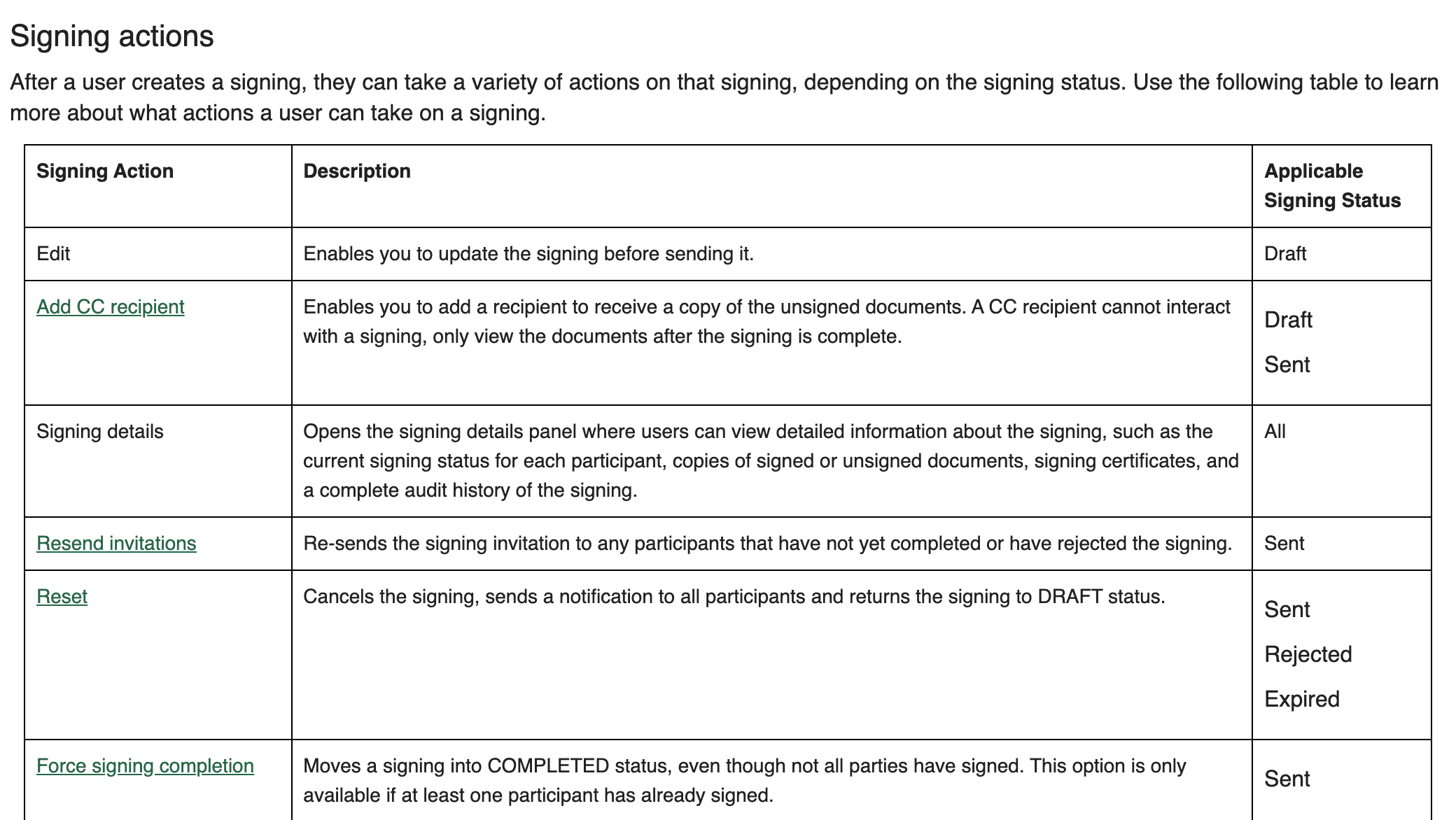
Two rows deserve a second look. Authentisign documents a Force signing completion action that moves a signing into Completed even though not all parties have signed, available as soon as one participant has. A Completed signing from a TransactionDesk user is therefore a prompt to open the PDF and count, never a tick on its own. And Docusign purges Draft envelopes after 30 days by default, so a packet that was prepared and never sent disappears rather than stalling.
The middle states matter too. DigiSign warns that a document downloaded while one of two signers is still out carries only the first signer's marks, so a PDF forwarded mid-flight can look signed and be half done. dotloop's Part Signed means a recipient returned the document with only some of their assigned fields complete. In the grid that is signed in one column and sent in another, which is why the grid has a column per signer.
How do you run the tracker each day?
Step 1: Build the signer list from the executed contract
Copy every name from the signature page and note how many sets of initials that is. Record the capacity when someone signs for an entity or under a power of attorney.
Step 2: Open a row for every required document and mark presence
A row with no PDF is a missing document, chased as one. A row with a PDF starts the signature check, and the checklist line stays open until that check is done.
Step 3: Read the e-sign status into the grid, column by column
Waiting for Others, Sent and Waiting On Others mean the request is still open. Part Signed, or a Docusign Details view that still names someone under Needs to Sign, means one column moves and the others stay. Completed and Signed move every column the tool knows about.
- If it fails
- Correcting blocks every outstanding signer until the sender saves or cancels. Declined, Rejected, Expired and Voided end the request, and Expired envelopes show as voided, so the row goes back to not sent and the reason is logged.
Step 4: Open the completed PDF and check every page yourself
Count the initial lines in the footer, every signature block for every party on your list, and the date beside each signature. Mark the column checked only when the count matches. A mark missing where no field was placed is one the status will never report.
- Evidence
- Page numbers of any gap, written on the row the day you find them.
Step 5: Chase by name, with the page number
Send the reminder or the fresh request the day the gap is found. In Docusign and DigiSign that is a reminder on the same envelope. In Authentisign, Resend invitations goes only to participants who have not completed or who rejected. In dotloop, share the document again.
- Owner
- The agent for their own client. You, to the other side's agent.
- If it fails
- A signer who declines or rejects is the agent's conversation, not another reminder. Log the decline with its timestamp and leave the column open.
Step 6: Re-check after any correction
A corrected envelope has to be sent again before anyone outstanding can sign, and in dotloop any change to a signed document wipes its signatures by design. Treat the corrected version as a new row and keep the old one in the history.
Step 7: File the executed copy with its certificate
The row closes when the final PDF and the certificate sit on the line and the Effective Date is filled in. On the Texas form that date is the broker's to write. Until then the row reads complete rather than executed.
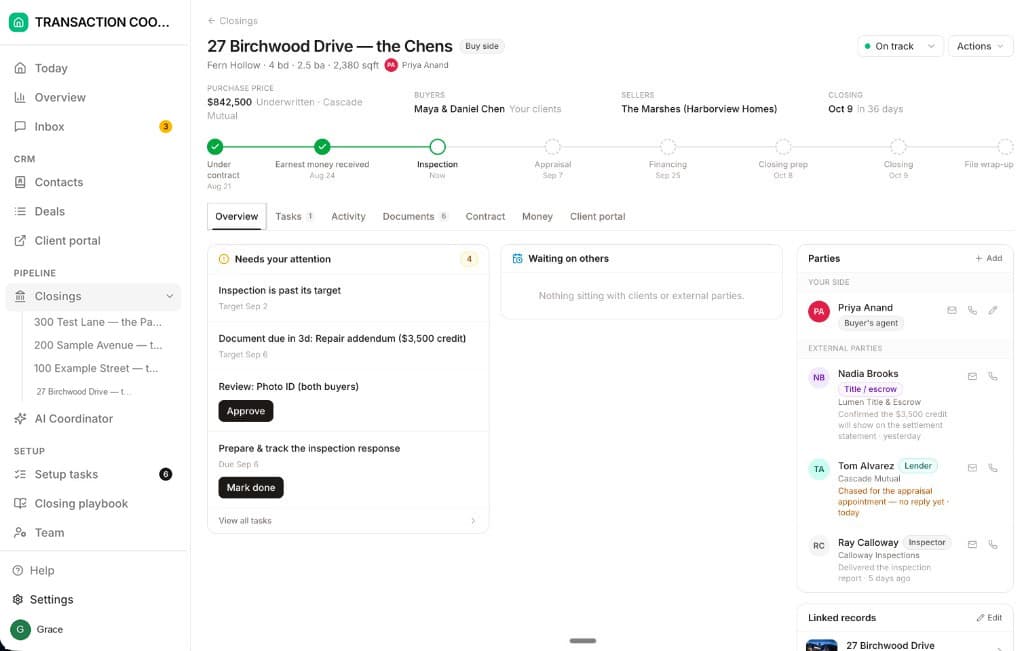
Step five is the one that slips, because on a five-party deal the “did you sign yet” message sits between the agent and the coordinator and belongs to neither. DeedSpring puts it on the closing. Send a form from the closing and the request shows each signer's status, and the nudge to whoever is outstanding goes from the same request. The signed copy comes back onto the closing under Documents, the coordinator checks the signatures, the dates and the details, and if something is missing it nudges you to send the document to the right party. It is told when everyone has signed.
Who checks the form itself?
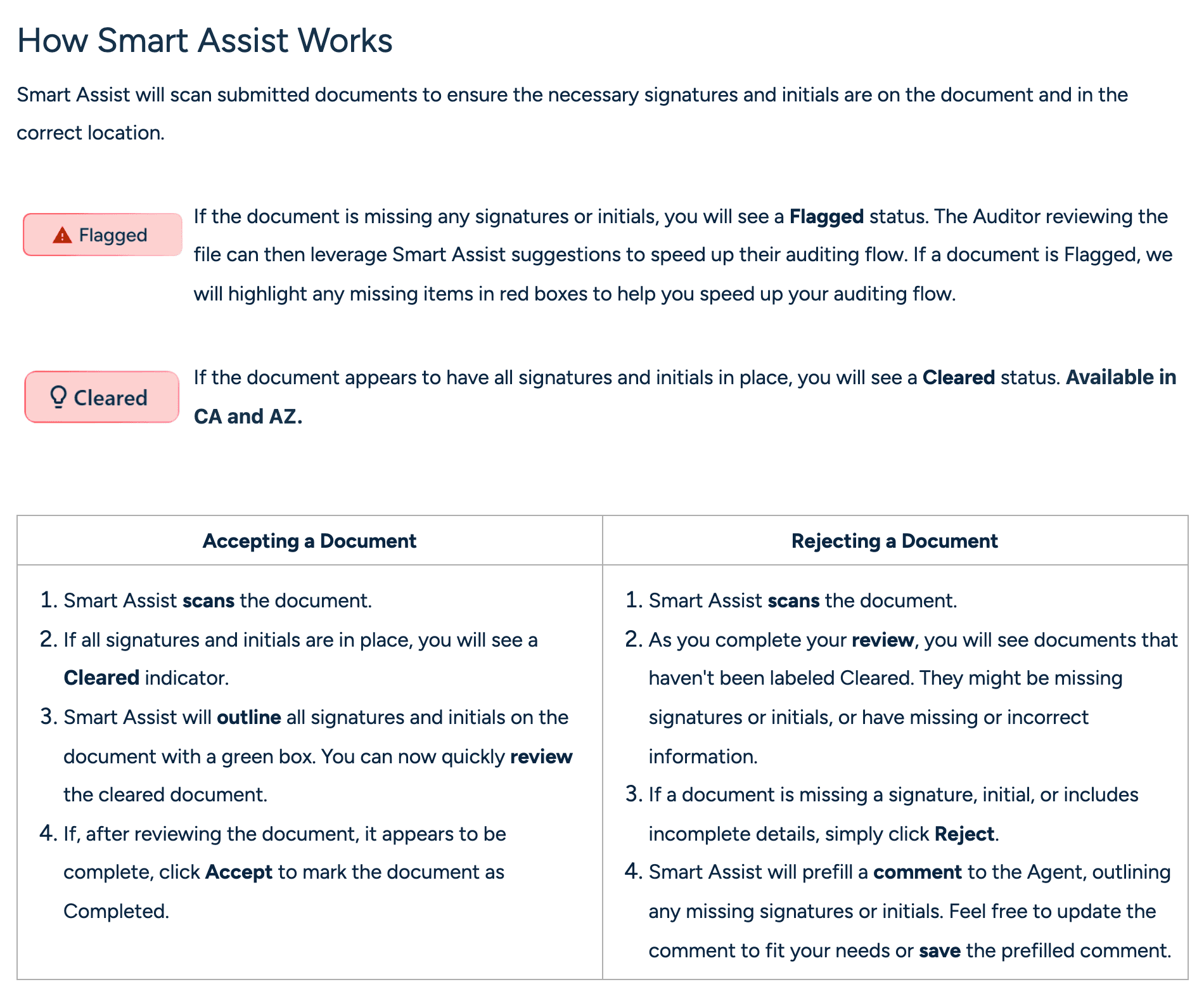
The broker's reviewer, and in one tool a scan runs ahead of them. SkySlope's Quick Audit shows a Flagged status when Smart Assist finds a signature or initial missing, with the gaps boxed in red, and Cleared when they all appear to be in place, with each mark boxed in green. A Reject carries a prefilled comment to the agent listing what is missing. In California the Smart Assist Panel goes further: it lists issues across every document in the file and compares the names on the file with the names on the contract. Both run in SkySlope's review queue, after the agent has submitted, and only in the states SkySlope lists.
Everywhere else the page-by-page check is a person with the PDF open. dotloop's Activity Log will tell you when a document was signed and when a single field was modified, and an admin can mark a document required before review, but the log records the fields that exist. The contract's footer lines exist on paper whether or not anyone placed a field over them, so the page check is still done by hand.
What counts as the executed copy?
The final PDF plus the tool's own record of who signed it and when. Docusign attaches a certificate of completion with the audit trail to every signed document. DigiSign's Certificate of Completion is available for Sent and Completed envelopes and never for a Canceled or Correcting one. Authentisign creates its signing certificate the moment the signing completes. dotloop puts a Signature Verification link at the top left of every signed document, live on the downloaded PDF as well, carrying the date and time, an ID, the IP address and the security level. File the certificate beside the PDF, because a forwarded copy with no certificate is a document, and the certificate is the proof. On the Texas form one line still has to be filled before the row reads executed: the Effective Date box the broker completes with the date of final acceptance, the date the earnest money and option fee clocks count from.