
Workflow · Transaction coordinator operations
How to turn an executed purchase agreement into a transaction file
Pull eight fields off the executed contract, write down the page each came from, have the agent check the dates against the PDF, then open the file. Where each field sits on the TREC and C.A.R. forms, how SkySlope, dotloop and Open To Close take them in, and how DeedSpring reads them for you.
What do you pull off the contract?
The fields that drive deadlines and money, from the final controlling document. If a counteroffer changed the price or the closing date, the counteroffer is the source. The C.A.R. form says so in its own definitions: the Agreement is the contract plus any counter offers and incorporated addenda. The table shows where each field sits on the two public forms we could read, the Texas TREC 20-19 contract and the California RPA sample.
Where each file-header field sits on the contract
| Field | TREC 20-19 (Texas) | C.A.R. RPA-CA (California) |
|---|---|---|
| Effective date / acceptance | Execution block on page 10. The broker fills it in. | ¶30A. Accepted in writing and delivered to the other party or their agent. |
| Buyer and seller | ¶1 and the signature blocks. | ¶1A and the signature blocks. |
| Property | ¶2A: lot, block, addition, county and address. | ¶1B: address and parcel number. |
| Sales price | ¶3C total, made of the ¶3A cash portion and ¶3B financed portion. | ¶1C price offered and ¶3G total. |
| Financing | ¶3B, plus Third Party Financing Addendum 40-11 ¶1 for type and amount. | ¶3D to ¶3E loan terms. |
| Earnest money / deposit | ¶5A: due within 3 days after the effective date. | ¶3A: due within 3 business days after acceptance. |
| Option or inspection period | ¶5B: the option days the parties fill in, ending 5:00 p.m. local time. | ¶14B(1): investigation contingency, 17 days after acceptance unless changed. |
| Title and survey | ¶6B commitment within 20 days of title receiving the contract. ¶6C survey, ¶6D objections. | ¶13A preliminary report and ¶14B review period. |
| Seller's disclosure | ¶7B, with blank days if not yet delivered. | ¶10A Transfer Disclosure Statement, due under ¶14A 7 days after acceptance. |
| Closing date | ¶9A: the date entered, or 7 days after title objections are cured, whichever is later. | ¶1D: a date, or a number of days after acceptance. |
| Title company / escrow holder | ¶6A title company and ¶5A escrow agent. | ¶7C(1)(b) escrow holder, with its acknowledgment on the last page. |
| Brokerage compensation | ¶12B. Fully negotiable, and restructured in 20-19. | ¶18A, per a separate written agreement. Brokers section on the last page. |
| Addenda attached | ¶22 checkbox list. Every checked box needs a document. | ¶5A addenda checklist. |
Record a source beside every value: a paragraph number, a page, or the counteroffer number. A field with no source is a field nobody has checked.
Where does the effective date come from?
Every other date counts from this one, and the forms define it three different ways. On the Texas contract the broker writes it in. The execution block reads “BROKER: FILL IN THE DATE OF FINAL ACCEPTANCE.” If the block is blank, the agent settles the date with the other broker in writing before you count a single day.
On the California RPA, Acceptance has two parts: the offer or final counter is accepted in writing and “delivered to and personally received by” the other party or their agent. The file needs the signature date and the delivery evidence, usually the e-sign completion time or the email. Florida's FAR/BAR AS IS form prints the effective date on page 1, as one Florida Realtor explained on r/RealEstate. Three forms, three places to look, so write the source next to the date.
The revision number goes on the file too. TREC's form page lists 20-19 as effective July 1, 2026, replacing 20-18. The two share paragraph numbers, but ¶12 on brokerage compensation was restructured, so a stray 20-18 page inside a 20-19 packet carries different compensation terms under the same paragraph number. Copy the form's own day-counting rule into the notes too: ¶5A(2) on TREC covers a deadline that lands on a weekend or holiday, and ¶30F to ¶30H on the C.A.R. form define Days and Days After.
What are the steps, in order?
The coordinator does every step except the sixth. A solo agent does all eight and still gets a second pair of eyes on the sixth.
Step 1: Count the pages and the addenda
The TREC footer tells you which page of 12 you are holding, and every box checked in ¶22 needs a document behind it. List each counteroffer and amendment by number and date. Missing pages or an unreadable scan go back to the agent before you read a single term.
Step 2: Check signatures and initials, page by page
Every TREC page carries a Buyer and Seller initials line in its footer, and every C.A.R. page has initials boxes, so you can spot a gap without reading a clause. Log any gap by page number and have the agent chase it. Publish no dates until it is cured.
Step 3: Fix the effective date and write down where it came from
On TREC it is the broker-filled block on page 10. On the C.A.R. form it is the signature date plus the delivery evidence. If the block is blank or the packet shows two dates, the agent settles it with the other side in writing first.
Step 4: Record the form and revision, and copy its counting rule
Write the form and revision date from the footer on the file, then paste the form's own day-counting language into the notes: ¶5A(2) and ¶5B on TREC 20-19, ¶30F to ¶30H on the C.A.R. form. A packet that mixes two revisions, or an attorney-drafted contract, waits for the agent to confirm which text governs.
Step 5: Pull the fields in the table from the final controlling document
Where a counteroffer or amendment changed the price, the closing date or a contingency period, the counter wins and the base value is marked superseded. A negotiable blank, such as option days, is recorded as blank and flagged to the agent, never filled from another deal.
Step 6: Have a second person confirm the six date-driving fields against the PDF
Effective date, earnest money and option fee amounts and due dates, option or inspection days, financing approval days, closing date, and HOA and disclosure delivery days. Any disagreement means re-reading the contract together, and the agent decides what a clause means.
- Owner
- The agent, or a second coordinator
Step 7: Open the file in the brokerage's system and submit the documents
Type from the verified list, not from the PDF. Upload the base contract, each addendum, counteroffer and amendment, and the receipts on the last page of the TREC form into the checklist slots, then submit for review. If the representation type or checklist is wrong, fix it before the first document goes in, because the required slots follow it.
Step 8: Send the timeline, and run every amendment back through steps 1 to 6
Derive every dated obligation from the verified fields and the counting rule, send it to the client, the co-op agent, the lender and title, and keep the send log on the file.
Where does the file live?
In SkySlope you type the fields in. Create a Transaction walks through the property, then the Transaction, Contacts and Commission tabs, and the file stays Incomplete until all three are done and Submit is clicked. Creating the file from the contract itself is offered in select regions only. In dotloop the loop is typed too. GenStone Realty tells its agents a loop needs the address, price, closing date, commission split and agent roles before it will sync for commission disbursement, and a coordinator added to a loop as “On my team” cannot submit it for review. The agent does that.
Open To Close has the agent fill a four-page Intake Form, Details, Documents, Contacts and Review, and the transaction appears once the coordinator approves it. ListedKit's Ava and DocJacket read the PDF and ask you to confirm. Ava pulls the execution date first and lets you click it to see where it came from. DocJacket's wizard pulls parties, addresses, key dates and financials for you to review and confirm.
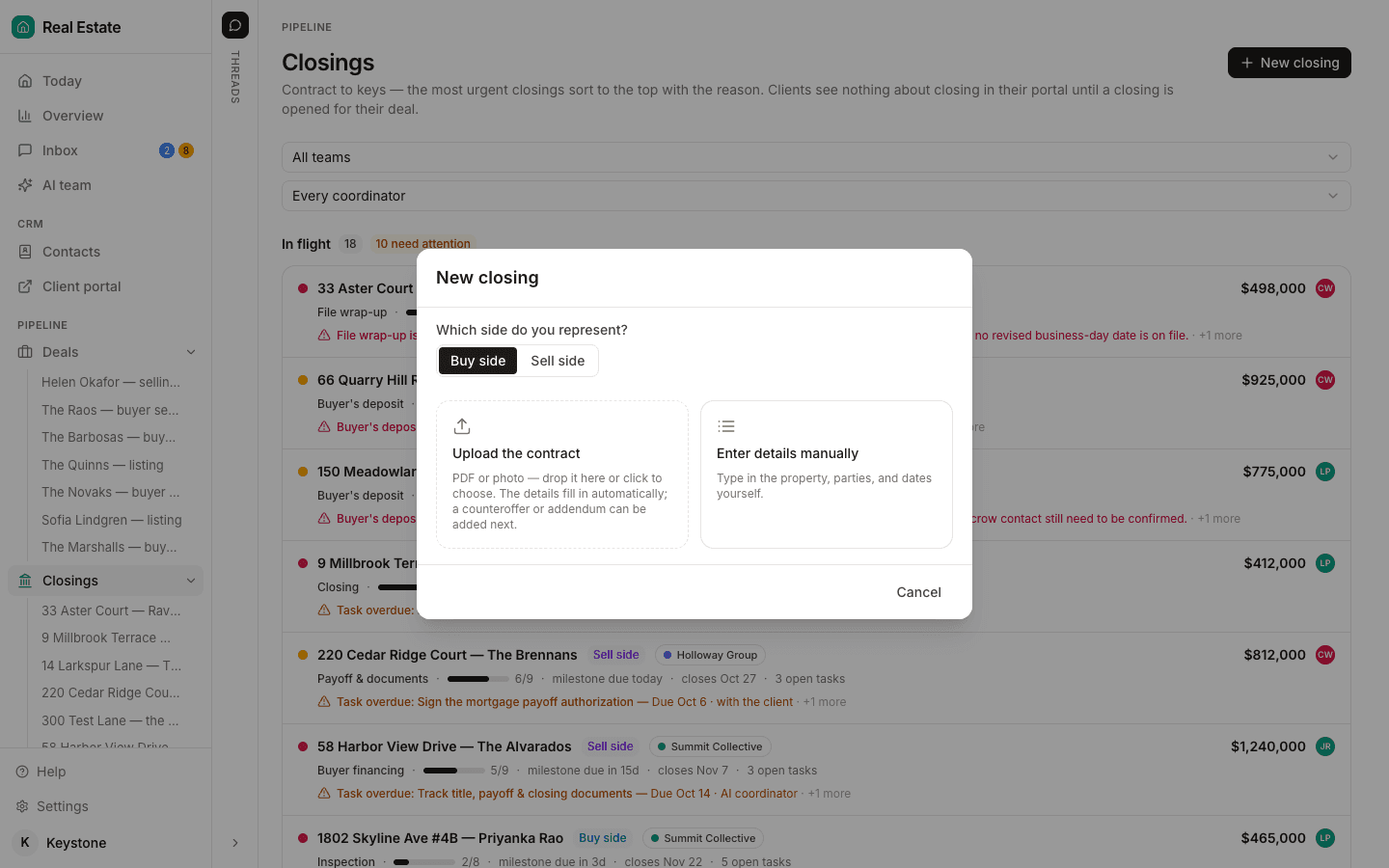
DeedSpring reads the executed contract when you open the closing. Upload it, pick the side, and it shows you the price, deposits, contingencies and dates it found, has you confirm the side and the playbook, and builds the file on your confirmation. From then on it checks every active file every hour and flags anything past its target.
How do you check it before the first deadline?
Before the timeline goes to the client, the lender or title, a second person confirms the six date-driving fields in step 6 against the PDF itself, with the amendments open beside it. In Texas an unlicensed assistant can enter contract data when a license holder directs it but cannot review a contract, so the agent signs off on what a clause means.
Two mistakes come up more than any other. The first is counting the inspection period from the day the listing flipped to pending instead of the day the last party signed. The second is a negotiable blank, option days or approval days, filled from memory or from the last deal. Practitioners on r/realtors disagree over whether a missing initial means the contract is not fully executed, and the intake step does not need to settle that. Log it by page, have the agent chase it, and publish no dates until it is in.
What happens when an amendment arrives?
Treat it as a new packet. Count it, check its signatures, find the fields it changed, then recompute every date that hangs off those fields and send the timeline again.
“Everyone updates the file. Almost nobody goes back and recomputes what that addendum did to the rest of the timeline”
One example from the Texas financing addendum. Say the closing date moves from November 6 to November 13. The buyer's right to terminate over lender property disapproval ends on the third day before closing, so that cut-off moves from November 3 to November 10. eXp Realty tells its agents to change a moved closing date in SkySlope immediately because it decides when the disbursement authorization is released. Mark the old value superseded by the amendment number and resend the timeline the same day.
What does DeedSpring do with the contract?
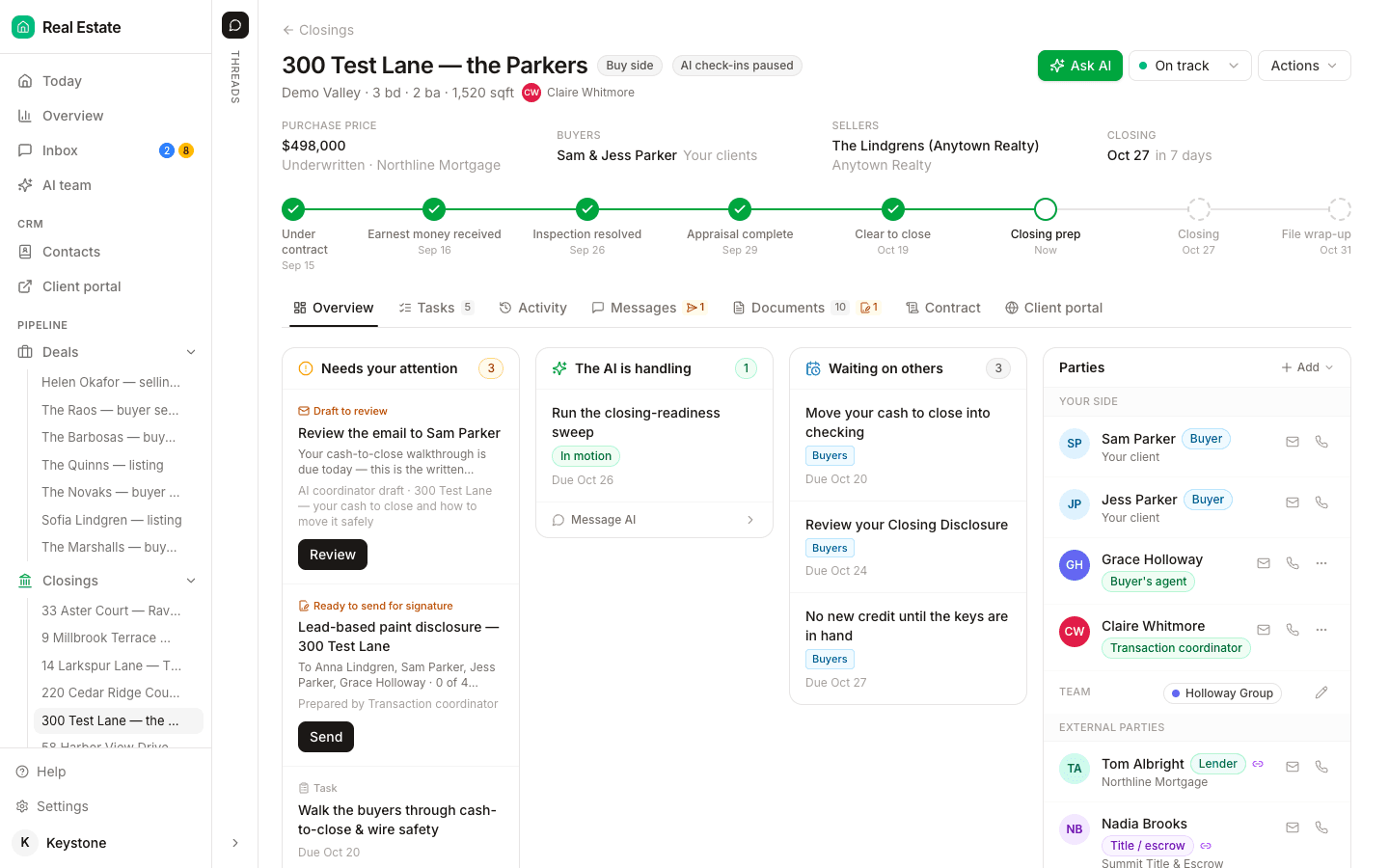
Open a closing, pick the side and upload the executed contract. The AI coordinator reads the price, deposits, contingencies and dates, shows you what it found, and builds the record on your confirmation. The extracted terms sit on the closing's Contract tab, the playbook's timings count from the contract or closing date, and the coordinator checks every active file every hour, flags anything past target on Today and drafts the chase for you to send. Move a date and the countdown, the client's timeline and the attention list follow it.
Starter is $15 a month for one closing a month. Standard is $25 a closing, down to $19 at volume, with unlimited agents and teammates and unused closings rolling over. Both are month to month.