
Workflow · Team and brokerage operations
The brokerage transaction review workflow from submission to approval
The agent submits, a reviewer accepts or rejects each document with a comment, the agent fixes what came back, and the broker signs off before the commission goes out. Here is who can do each step in SkySlope and dotloop, what happens on a rejection, when the agent gets paid, and how long the file is kept.
How does a file get from the agent to the broker?
Six steps, and the same six whether your brokerage runs SkySlope, dotloop, Paperless Pipeline or KW Command. The names change. SkySlope says Accept and Reject, dotloop Approve and Return, Paperless Pipeline has a Reviewed checkbox, and KW Command says Approved and Returned.
Step 1: Submit
The agent, or a TC who is allowed to, uploads the required documents and submits the checklist in SkySlope or the folder in dotloop.
Step 2: Review each document
The reviewer accepts or rejects one document at a time and writes what to fix on every reject.
Step 3: Tell the agent
One message carries every status and comment, and it is logged against the file.
Step 4: Fix and resubmit
The agent re-signs or replaces the document, and only what came back is reviewed again.
Step 5: Broker sign-off
The broker's final check sets the stage your policy names, and the commission disbursement authorization goes out after it.
Step 6: Close and archive
The settlement statement and commission check copy are accepted, the file is archived, and the retention clock starts.
Who can submit a file, and who can approve it?
Who does what in SkySlope and dotloop
| SkySlope Suite | dotloop | |
|---|---|---|
| Who submits | The agent, or a Limited TC with TC Access. | The agent. A TC added with Add to My Team cannot. |
| Who approves | Admin/Auditor or Broker. An Office Manager cannot. | The admin profile on Teams or Business+. |
| The decision | Accept or Reject each checklist item. Reject needs a comment. | Approve or Return each document. Return needs a note. |
| Skipping a document | Switch a Required item to Not Required. | Mark it No Review Needed. |
| Undoing a decision | Unaccept or Unreject. Comments stay. | Revert to Needs Review. |
| How the agent hears | One Update Agent email: statuses, comments, a DigiSign re-sign link. | Changing the review stage emails the agent. |
| Resubmitting | The agent re-signs or re-uploads the item. | Whole folder again. Approved documents are left out. |
| The broker's stage | Stages the Broker account creates. Filters, never gates. | Workflow stages, such as Contract Documents Need Review and Approved. |
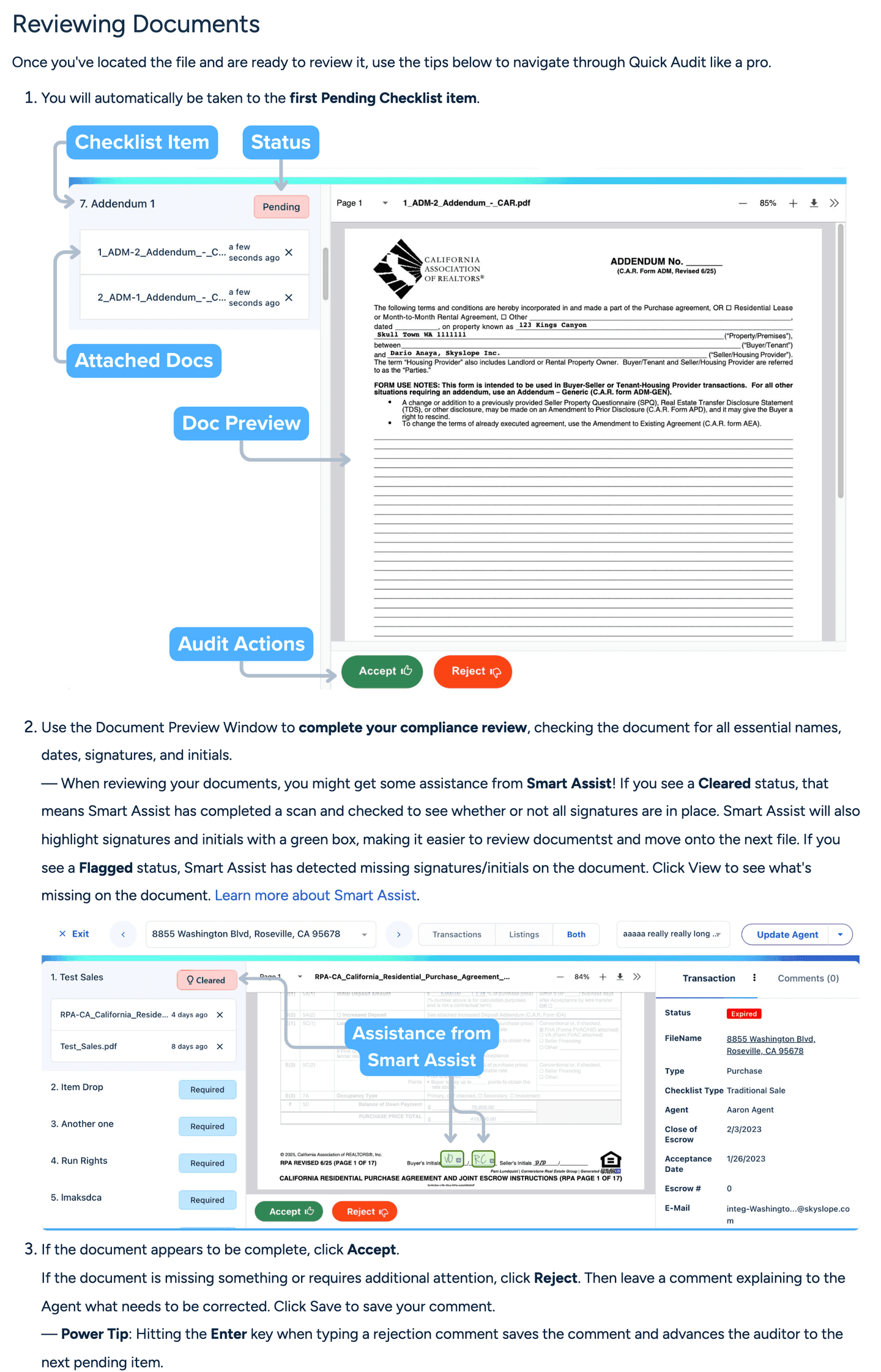
SkySlope's roles are strict. Only an Admin/Auditor or a Broker can accept or reject. An Office Manager sees every file in the office and has no compliance features. A Limited TC can create files for agents who switch on TC Access and submit documents to the checklist, and cannot rule on them. Review itself happens in Quick Audit: the reviewer lands on the first Pending item, clicks Accept or Reject, and a Reject has to carry a comment telling the agent what to correct. Smart Assist counts the signatures and initials the file calls for and suggests Cleared when they are all there. The reviewer still clicks.
dotloop is looser on who approves and stricter on who submits. Review exists once the account is attached to a team or brokerage, and the admin profile on Teams or Business+ does the approving: open the loop, approve or return each document, add a note on a return, or mark a document No Review Needed. The agent submits whole folders, and anything already approved is left out. A transaction coordinator added to the loop with Add to My Team cannot submit it for review. The agent has to. If TCs run your agents' files, settle that before the policy says the TC submits.
In Paperless Pipeline a document sits on the Unreviewed page until someone ticks Reviewed, usually the principal broker or another admin. The log records who and when, and the whole history downloads with the documents when an auditor asks. In KW Command the agent submits the checklist to the Market Center and the MCA or Compliance Coordinator approves or rejects each document.
What happens when a document is rejected?
SkySlope collects the rejections into one Update Agent email: a link to the checklist, each item's status with the reviewer's comment, and a DigiSign shortcut so the agent can re-sign a document marked Incomplete without leaving the email. A wrong click is reversible. Unaccept and Unreject put the item back to Pending with the comments intact.
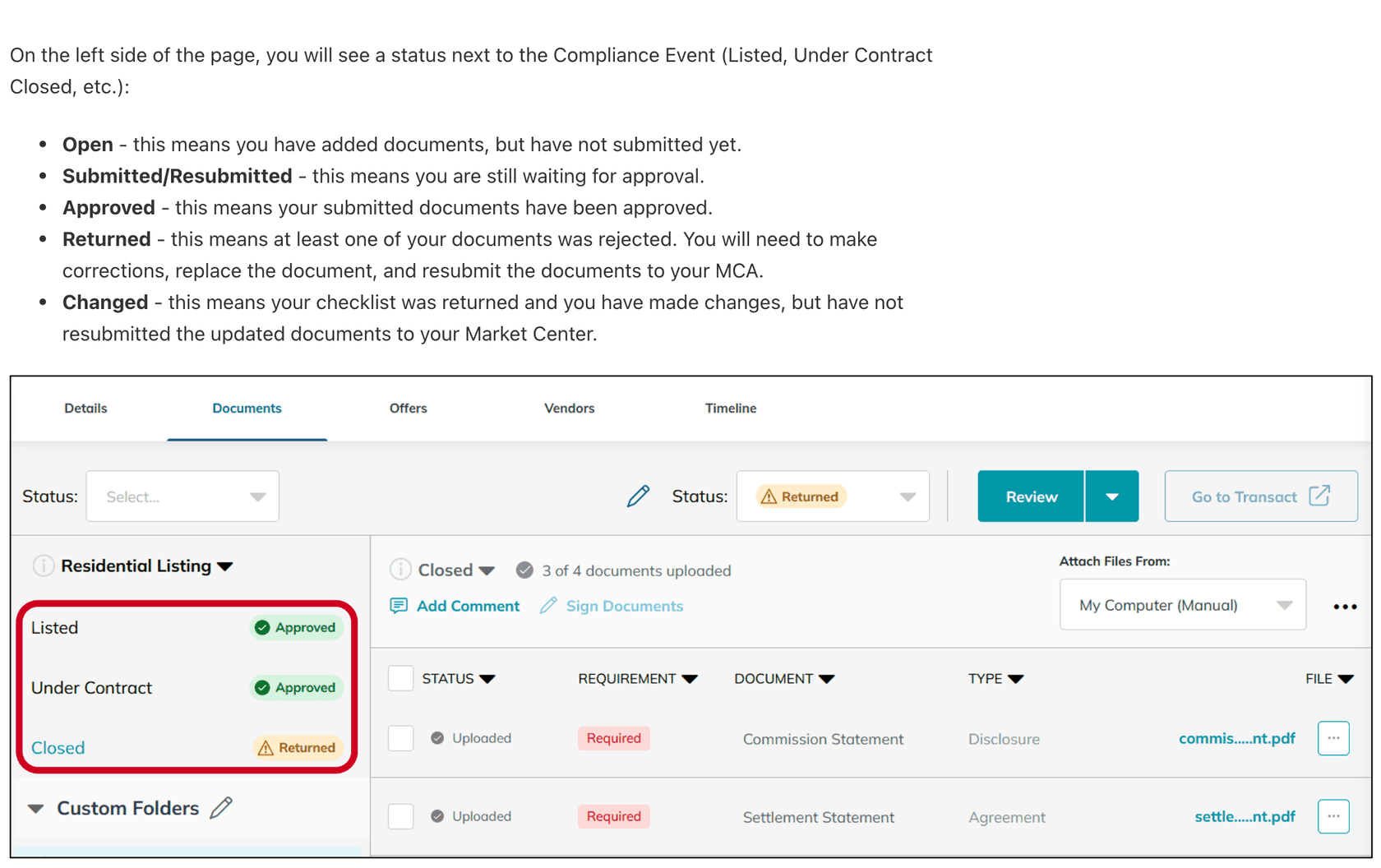
In dotloop the Return prompts the reviewer for a note, and changing the folder's review stage sends the agent the email. When the agent submits again, the resubmit logic moves the folder from Returned to Agent back to Needs Review and skips the documents already approved. KW Command is the one tool with a name for the in-between state: a returned checklist the agent has edited but not yet resubmitted shows as Changed, and replacing a document asks for a reason comment.
Write the rejection so it can be fixed without a phone call. Name the document, the page, the defect and the fix: Amendment 1, page 1, buyer initials missing at paragraph 3. Re-sign and resubmit. Two returns on the same item usually means the checklist item is wrong rather than the document. Call the agent before you reject it a third time.
Can the broker's review be a second stage?
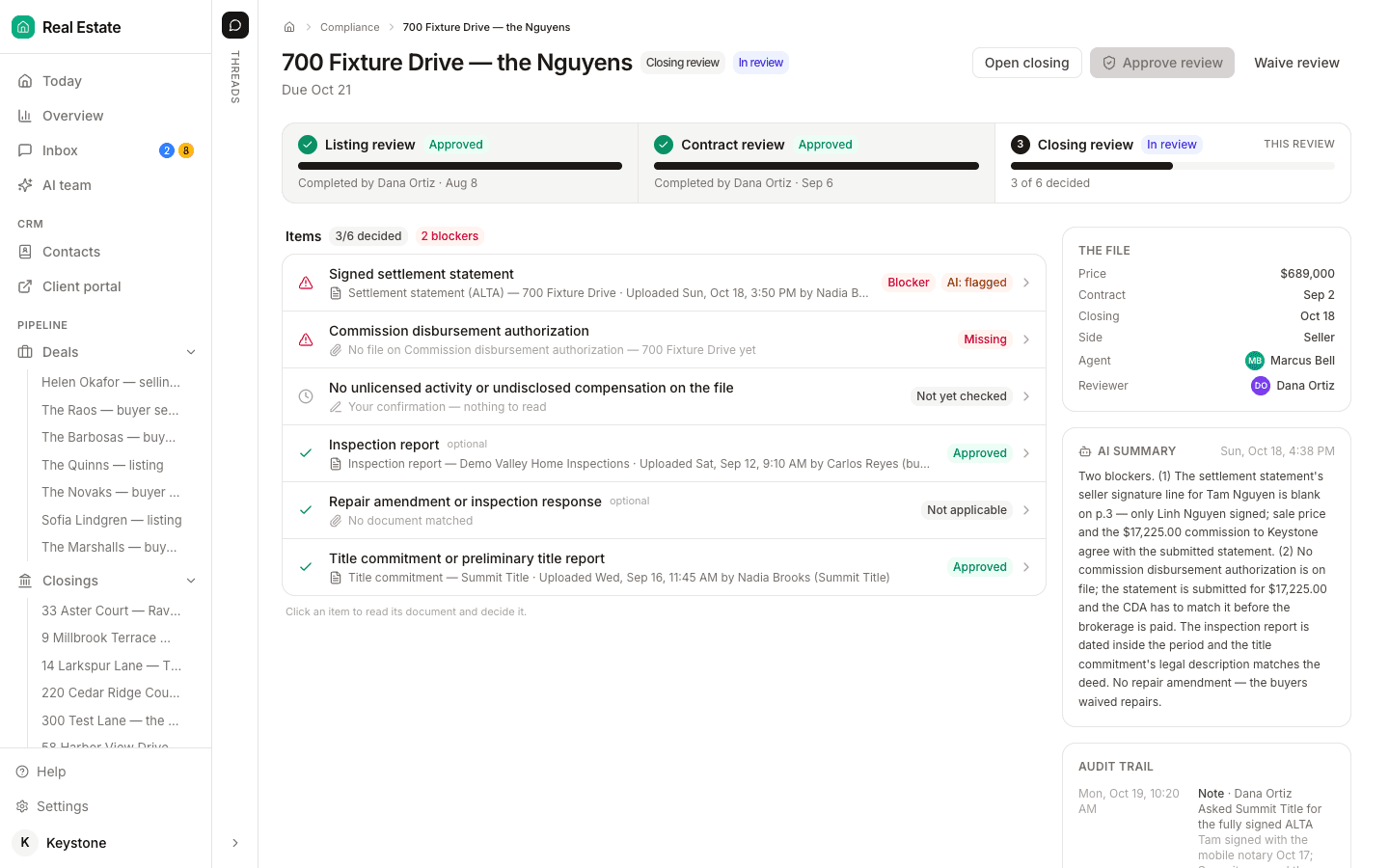
Only by policy. SkySlope ships two stages, Checked and UnChecked, and the Broker account can add more. SkySlope's own examples run Initial Coordinator Review, Compliance Broker Review and Broker Approved - Ready to Pay. Stages are filters on the review queue. A team admin asked on SkySlope's community forum for a first stage that accepts a document and hands it to the broker for a final check, because once an admin accepts a document it is accepted for everyone. dotloop's workflow stages work the same way: labels that drive the notifications, with defaults such as Contract Documents Need Review, Contract Documents Approved and Returned to Agent.
So the two-stage review most brokerages want, a coordinator's check for anything missing and then the broker's check, is enforced by who holds compliance rights. Give the coordinator a role that cannot accept, and the broker the one that can. GenStone Realty's agent guide shows the policy version: the managing broker is on every loop, and before close the broker is sent a statement of acknowledgement certifying that the file was reviewed and approved.
If the broker delegates the check, put the delegation in writing. Texas lets a broker delegate compliance administration to another license holder but “may not relinquish overall responsibility”, and Colorado's Rule 6.3.F requires any delegation of supervision to be in writing and signed by the supervising broker.
Who chases the documents that are still missing?
Nobody in the review tool. SkySlope and dotloop check what is already in the file and tell the agent what is not. Getting the repair addendum signed by the other side, the appraisal ordered before the financing date and the settlement statement in from title is coordination work, and it is where review queues stall. That is the job DeedSpring does. It reads the executed contract into the key terms and dates on the closing, watches the contingency dates and sends reminders before anything is late, and when the signed addendum comes back by email it files it on the right document line. Anything sensitive or negotiable waits as a draft for a person to send.
When does the agent get paid?
After approval, in every policy we found. eXp Commercial asks agents to upload all documentation within two business days of execution, sends the CDA to the closing entity 7 to 10 days before closing, and settles within 48 hours after close of escrow only if the closing documents are in and the file is Broker Approved. GenStone's compliance team issues every commission authorization before the scheduled closing and tells agents that submitting often avoids processing delays. The back-office tools gate the same way. Approving a deal in SkySlope Books locks its values and removes Draft from the CDA, and in KW the Market Center approves, returns or terminates the agent's commission request before it is imported with a DA ID.
Agents on r/realtors describe the gate from the other side: no commission check until the file is complete and approved by compliance, and the brokerage generates the CDA once everything is submitted for review. One former commission processor:
“if you got me the check the day of closing, and your file was clear, you could get paid the same day.”
One brokerage on the same thread takes paid-at-closing privileges away from agents who do not turn in their paperwork. The failure most agents complain about is the queue rather than the rule. A newer agent waited several days for an admin to acknowledge paperwork submitted for review, then another week or two for a mailed check. Work the queue soonest-closing first. Paperless Pipeline's Unreviewed page filters by closing date for exactly this, and in SkySlope a Ready to Pay stage is the filter.
How long do you have to keep the file?
It depends on your state, and the clock starts at different events. Texas: at least four years from closing, contract termination or the end of the transaction, in a format readily available to TREC. California: three years from closing, or from the listing date if the deal never closed. Florida: at least five years from the receipt of any money entrusted to the broker, or from execution of the listing or offer if none was, and two years after any litigation ends. Colorado: four years from consummation or the expiry of a listing that did not consummate, and electronic records must stay retrievable and legibly printable.
Three of those states also say something about the review itself. Colorado's supervision rule requires employing brokers to ensure executed contracts and transaction files are reviewed. California's DRE evaluates brokers on their systems to review documents that affect a party's rights. Texas requires sponsoring brokers to keep written policies that ensure records are properly maintained, and TREC's own course manual notes that brokers are moving to cloud recordkeeping systems with deadlines for when agents must upload.
The archive is the brokerage's, whatever the agent does next. SkySlope Suite files cannot be transferred from one brokerage to another, and only an Admin or Broker closes and archives. Paperless Pipeline lets you download a transaction's history with every document when the auditor asks.
What does DeedSpring do for a brokerage running review?
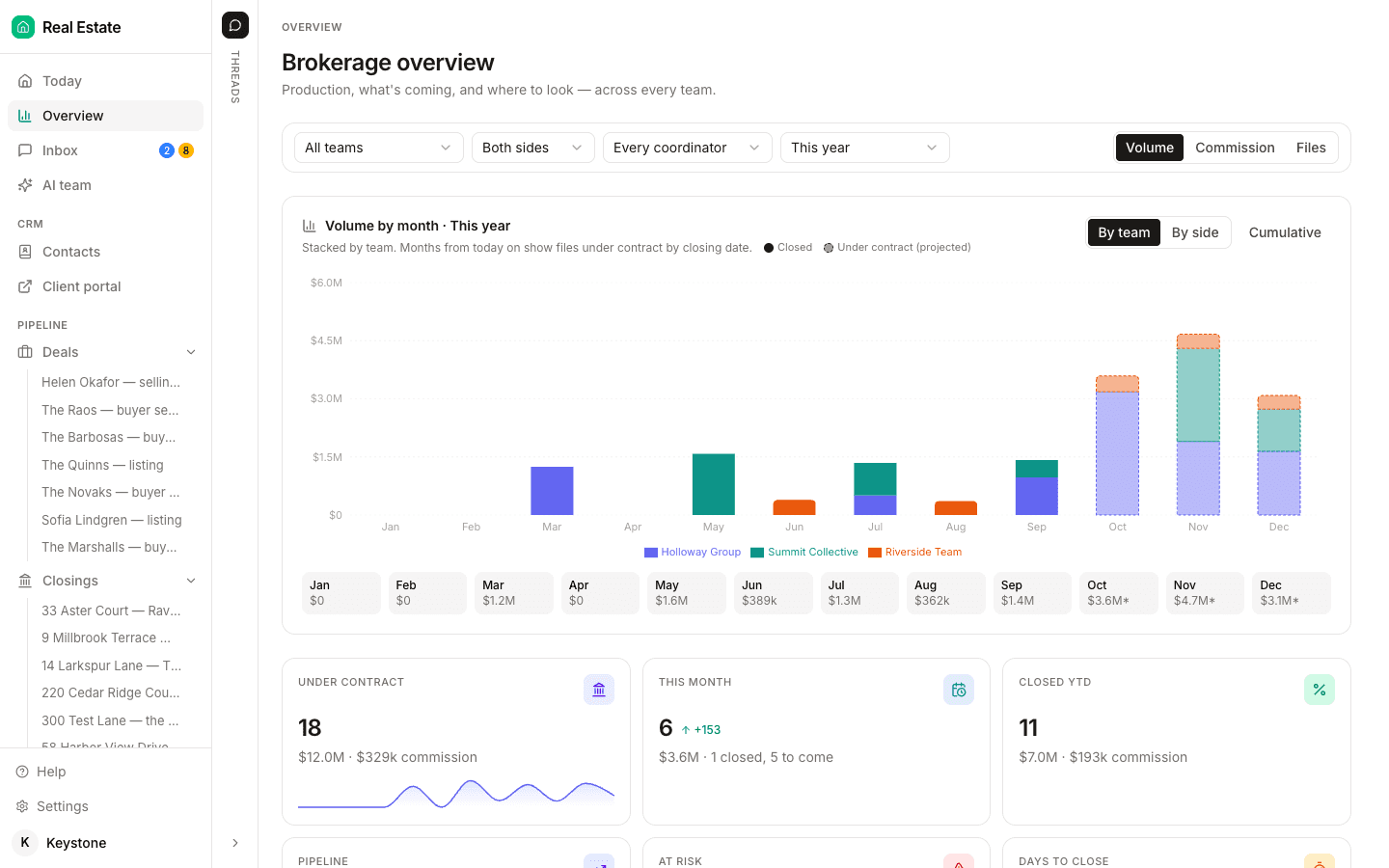
It gets the file to your reviewer complete and on time, and gives the broker the view across teams. Switch on Teams and every person on the roster belongs to one, with a role of Broker/admin, Team lead, Transaction coordinator, Agent or Assistant that sets what they see: everyone's closings, their team's, or only their own. Each closing names its Agent and its Coordinator. The Overview page filters by team, side, coordinator and date range, and shows what is under contract, what is at risk and what closes next. The AI coordinator reads the contract, watches the dates, files the documents that come back by email, and drafts the chases for you to send.
Starter is $15 a month for one closing a month. Standard is $25 a closing, less at volume, with unlimited agents and teammates and unused closings rolling over. Both are month to month. The Brokerage plan adds office compliance dashboards and audit exports, priced on application.