
Teams & permissions
A larger brokerage groups its roster into teams, each with a lead, and decides who sees which files by role. Brokers and team leads get an Overview of pipeline, production, and what is about to close. A transaction-coordination firm uses the same setup, with teams called coordination clients.
Turn teams on
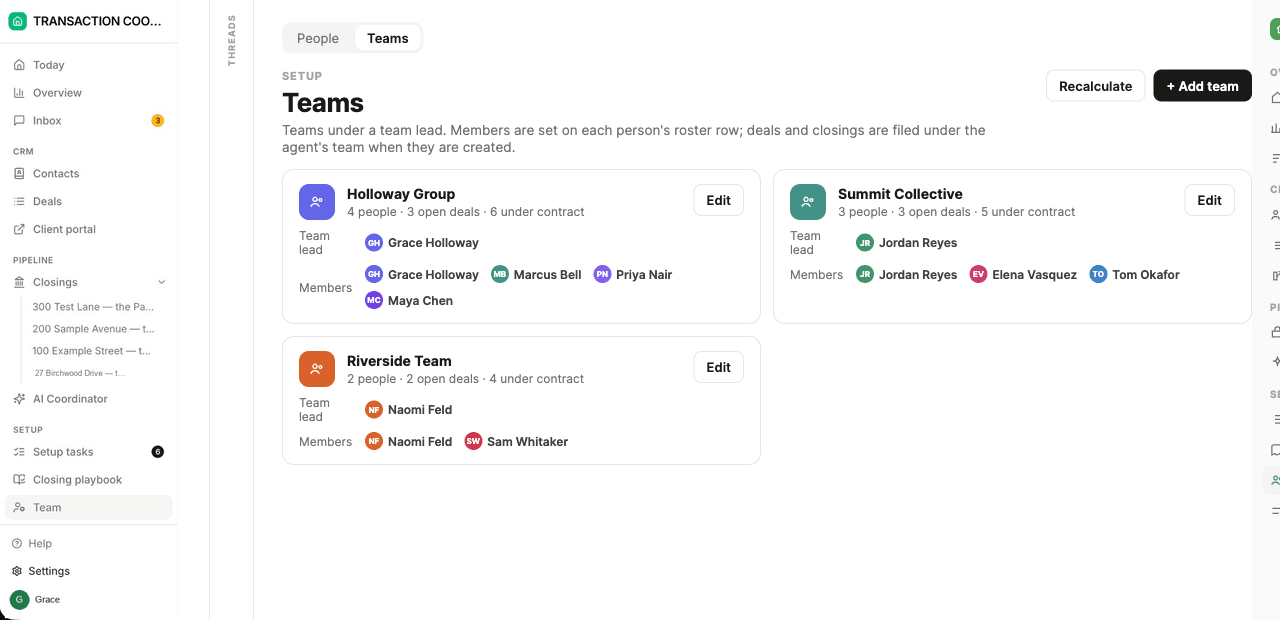
Open Config → Business and, under Larger organisations, switch on Teams. The roster page becomes People and Teams. Each team has a name, a colour, and a team lead. Every person on the roster belongs to a team.
New deals and closings are filed under the agent's team when they are created. If someone later moves teams, closed files stay where they were counted, so the numbers stay honest. Recalculate on the Teams page re-files open deals and closings under each agent's current team.
Leaving Teams off changes nothing: the roster stays a list of people, Overview stays out of the menu, and on the Sharing grid "their team's" is the same as "only theirs" because nobody is on a team.
Roles
Role on a roster row is what that person can see. A free-text job title — buyer agent, listing agent — lives in Title and is what colleagues and clients see. App access is separate: Signs in means they can be invited; Roster only keeps them on the roster for assignments and attribution, and they are never invited.
How far each role sees is set on Config → Sharing: a row per role, and for each Everyone's, Their team's, or Only theirs, with a checklist of the record types it applies to. Some roles always see more than that, whatever column they're on:
Broker / admin
Runs the brokerage and manages the roster; the only roster role that can also delete records. Usually on Everyone's. Workspace owners and builders still see everything, whatever role is on their roster row.
Team lead
Always every client, deal, and closing on the team they lead, and the records that hang off those files — so they can't be limited to only theirs. Their Overview is that team.
Transaction coordinator
Always the closings they are added to as coordinator or collaborator, the deals behind those closings, and the clients on those deals. On Everyone's (the default) they see every deal and client too; on Only theirs they are limited to the files they are working.
Agent
The default role — a roster row with no role set is treated as an agent. Sees what the grid allows: everyone's, their team's, or only the ones they are assigned to.
Assistant
Always the files of the agents listed on Supports — the people they work for. They can also be named on a closing as someone else working it.
Roles apply automatically — there is nothing separate to switch on. Each teammate needs a roster row whose email matches the address they sign in with, and a Member role in the workspace.
Who is on a closing
A closing names its Agent — copied from the deal when the closing opens — and its Coordinator, the person running the paperwork. On a larger team that is a transaction coordinator; on a small one it is often the agent. Also working this closing lists assistants or a second coordinator. The AI coordinator is a different actor and is not one of these fields.
Assign a coordinator to one agent's files, or across a whole team, by putting them on the closings those people own. The Closings and Deals pages filter by team and by coordinator, so a lead can narrow the desk to one team or one coordinator.
An assistant's standing assignment is the Supports field on their roster row: the agents they work for. Those agents' deals and closings are visible to the assistant without being added to every file.
Overview
With teams on, brokers and team leads get Overview in the menu. A broker sees the brokerage. A team lead sees their team — the page only counts records that person is allowed to read. One filter bar drives the whole page: team, buy side or sell side, coordinator, date range, and whether the numbers are volume, commission, or file count. The view lives in the link, so it can be sent to someone else.
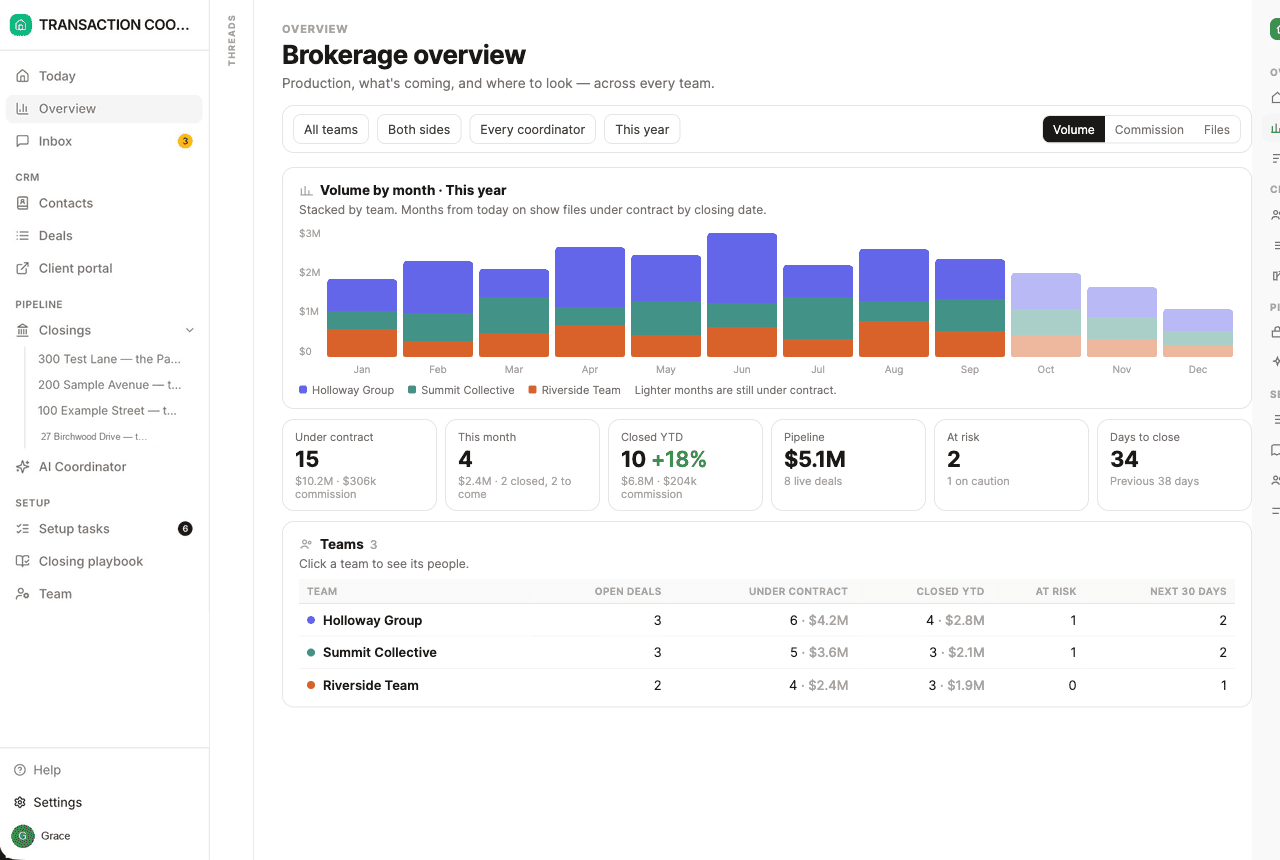
- Production — volume, commission, or files by month, stacked by team or by side. Months from today on are lighter: files still under contract, plotted on their closing date.
- Pipeline and pace — under contract, this month, live deal pipeline, files at risk, and average days from contract to keys.
- Teams and the leaderboard — members, active deals, files under contract, closed in the range, and what closes in the next 30 days. Open a team for the same numbers per person. Top producers ranks people or teams by what they closed.
- What's coming — coordinator workload, closings week by week, and Needs a look: files at risk, closings this week that are not clear to close, files with nobody running them, overdue milestones, and quiet deals.
Coordination clients
A transaction-coordination firm uses the same switch. Under What to call them, choose Coordination clients. Each client brokerage or team is a team. Its agents sit on the roster as Roster only — named on files, never invited, never a user. The firm's own coordinators sign in and are assigned to the closings.
Labels follow the choice. The Teams tab becomes Coordination clients, Overview talks about clients, and the shared-visibility switch reads People on the same client see each other's files. A client can record the brokerage name shown on its files.