
Starting a closing
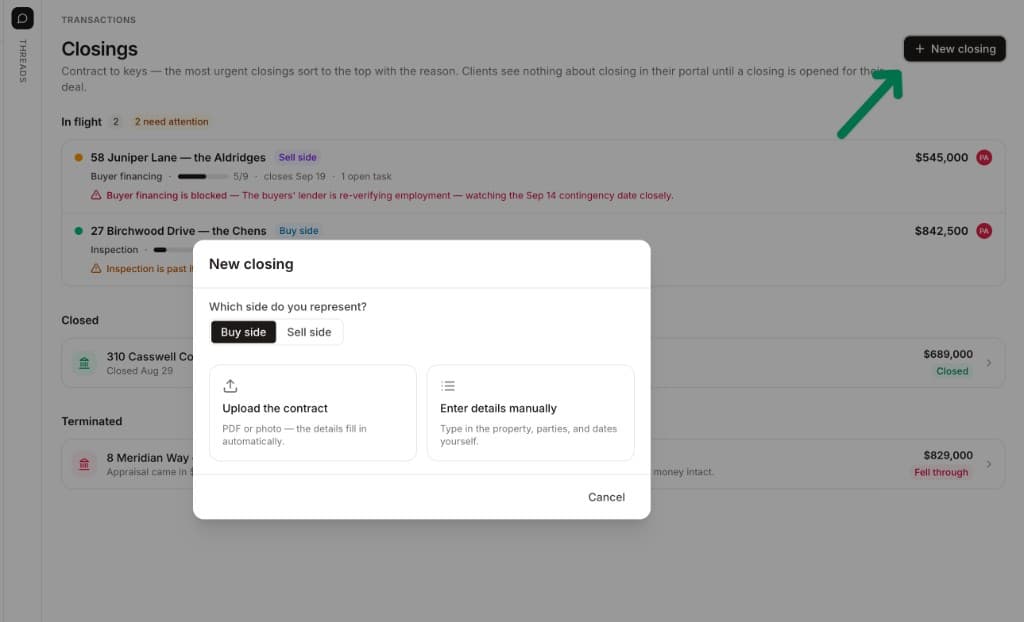
An offer is accepted and the clock starts. Click Closings under Pipeline — the label, not one of the files listed under it — then say which side you're on, and upload the contract or type the details in yourself.
Opening one
Click + New closing
Answer which side you represent
Choose how the details get in
The closing opens, ready to work
Your side picks the playbook
The Buy side / Sell side toggle does more than label the deal. It selects the playbook for that closing type — so a buy-side closing arrives with financing and inspection already on the chain, while a listing arrives with disclosures and payoff. Edit the process once in Setting up your closing playbook; every closing opened afterwards follows it.
Or start from a thread
You can skip the dialog entirely: open a thread with the assistant, attach the executed contract, and say "open the closing for this." It reads the contract, shows you what it found, lets you confirm the side and which playbook to apply, and builds the record on your confirmation — same closing, no form.