
Workflow · Transaction coordinator operations
A transaction coordinator's software workflow from intake to archive
A transaction file goes through eight stages, from the agent's hand-off of the executed contract to the broker's archive of the closed file. Here is who does what at each stage, what to do when a stage fails, and how DeedSpring reads the contract and watches the deadlines for you.
What happens at intake?
The agent forwards the executed purchase agreement with its addenda and the parties' contact details. Quill calls that hand-off the starting gun. AgentPro's training module labels it Day 0 and gives it to the agent. Nothing downstream starts before it.
The coordinator's first job is to read the whole contract before sending anything. AgentPro's Step 1 is to read it front to back, and its rule for a gap is to “stop and notify the agent before proceeding”. Quill's Day 1 is the same work: verify every signature and date, confirm the right form for the deal type, build the deadline calendar, open the broker file, and only then tell the lender and the title company.
Jamie Hallman, who runs a Florida TC firm, has a dedicated setup person whose job is to “review it first for execution”. Her estimate for her own intake is that 70% of contracts arrive unsigned somewhere. A missing initial, an unchecked addendum box or an unclear term goes back to the agent the same day, and no date is calendared until it is cured. The agent settles the gap with the other side. In Open To Close the hand-off is a form the agent submits from the Agent Portal, and the file sits as a pending submission until the coordinator approves it.
How do you set up the file?
Setup turns a verified contract into a file the brokerage and the parties can see. Every other date counts from the effective date, so confirm that one first. On the Texas contract it is the execution block on page 10, and the form itself tells the broker to fill in the date of final acceptance.
Step 1: Enter the deadlines
Count every contract date from the verified effective date and write each one down with the paragraph it came from.
Step 2: Apply the brokerage checklist
In SkySlope a new file sits at Incomplete and moves to Pending when you click Submit on the Commission tab. In Paperless Pipeline an admin's rules attach the checklist template for you.
Step 3: Send the introductions
Email the lender, title or escrow and the co-op agent with the contacts and the dates.
Step 4: Open title or escrow
Get the contract to the title company so its own clocks can start.
Step 5: Send the calendar back to the agent
Do it the same day, so the agent can catch a wrong date before anyone else sees it.
Brokerage policy adds its own clock on top. eXp Realty's commercial division requires every transaction document uploaded within two business days of execution, whatever the contract says. Put policy dates on the same calendar as contract dates and label which is which.
How do you track the deadlines?
Dates on the calendar come from three places, and a different person moves each one. Contract dates belong to the parties and move only by amendment. On TREC 20-19 the earnest money and option fee are due within 3 days after the effective date, time is of the essence for that paragraph, and the closing date is the stated date or 7 days after title objections are cured, whichever is later. Brokerage-policy dates belong to the brokerage: eXp's commercial division wants the compensation disbursement authorization with the closing entity 7 to 10 days before closing. Practice dates are yours. Quill sends a 48-hour and a 24-hour reminder before each deadline, and you can change a cadence like that without asking anyone.
Before each date passes, confirm it was satisfied, waived or amended, and attach the proof: the escrow receipt, the delivered notice, the signed amendment. If a date is about to be missed, the coordinator tells the agent. The decision to terminate, extend or waive is never the coordinator's. When a date moves, file the amendment first and rebuild the calendar from it.
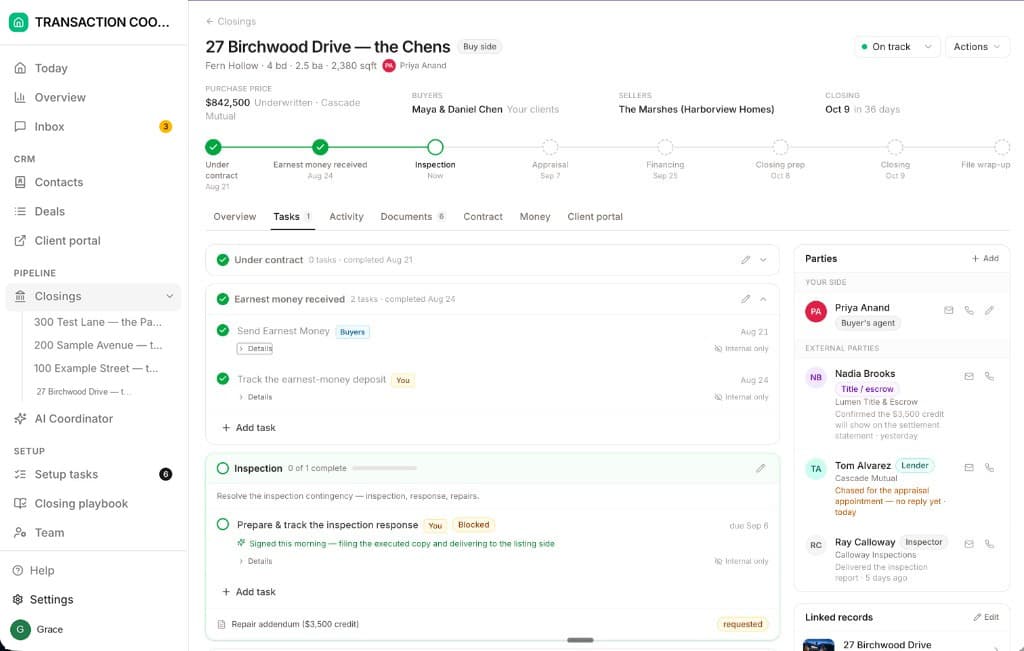
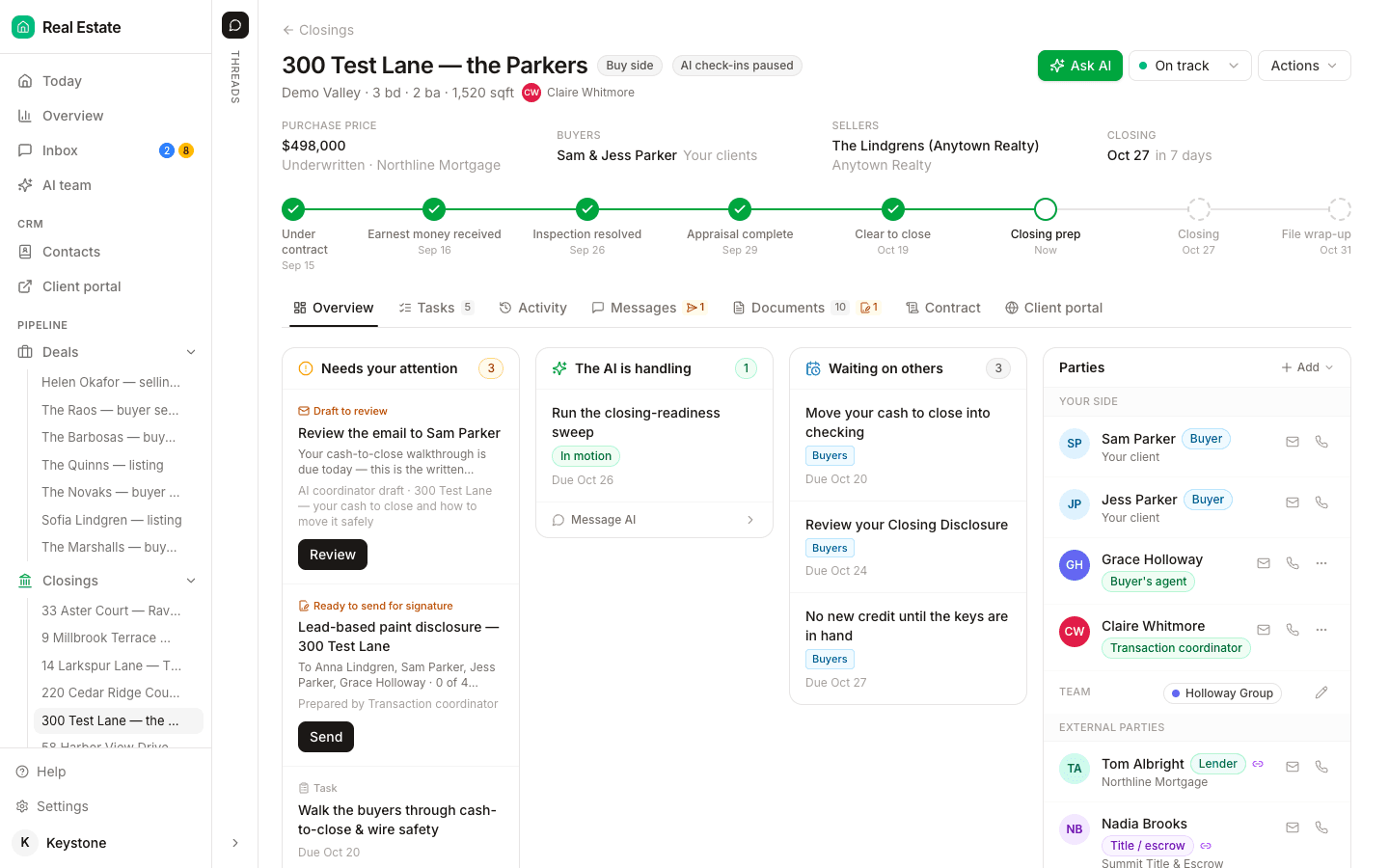
DeedSpring does this stage for you. Upload the executed contract when you open the closing and it reads the price, deposits, contingencies and dates into the file. The playbook times each task from the contract or closing date and names who does it. The AI coordinator checks every active file every hour and flags anything past its target on Today and on the closing. A task waiting on someone else is flagged Blocked with a note, and it will not mark a milestone done without evidence in writing.
How do documents and signatures get into the file?
Each checklist slot is filled from whichever channel the brokerage uses: an upload, an email-in address, a portal. In Open To Close, anything that arrives from an intake form, a portal, an integration or the property's email address lands in an unapproved queue until the coordinator approves it. Rejection there is permanent. Once a document has been rejected, “there is no way for us to retrieve it”, so download anything you might need before you reject it. A late item is chased until it arrives, and the chase is logged on the file.
Amendments, disclosures and notices are drafted on the state form, sent for signature, and the signed copy is routed back to the file. Whether it comes back on its own depends on the e-signature tool in use. If it does not, upload it by hand and re-check the slot. Either way the file needs the completed envelope's certificate or audit trail beside the signed document, because that is what proves who signed and when.
Who submits for review, and who approves?
The coordinator submits. Someone else approves. The software draws that line before any job description does. In SkySlope the Limited TC role can create and modify its own listings and transactions, submit documents and manage the life of a file, on its own account or on behalf of an agent. Accepting or rejecting a checklist item belongs to the Admin/Auditor and Broker roles, and even the Office Manager cannot do it. Paperless Pipeline puts the same line inside the checklist: agents mark a task done or not applicable, and only an admin marks it fully complete. Open To Close gates the front door instead. The agent's intake form goes to the coordinator for approval before it becomes a property.
A rejected item goes back to the agent with the reviewer's reason, where the product records one, and re-enters document collection. Use the product's own word for what happened. In SkySlope a reject is a review decision by an Admin/Auditor or Broker on a submitted checklist item. In Open To Close a rejected document is gone. Paperless Pipeline has no reject state at all, only fully complete or not yet.
What happens at closing?
Title or escrow closes. The coordinator confirms. Review the settlement statement against the contract, confirm signing, then confirm funding and recording. Quill's rule is that the coordinator “shouldn't mark the file closed until that confirmation is in hand”, and the confirmation is recording, not signing.
The closing date is the date most likely to move. When it does, update the brokerage's system the same day. eXp tells its agents a changed closing date is changed immediately in the SkySlope file, because it decides when the disbursement authorization is released. If the deal dies, the coordinator asks for the cancellation and the broker grants it. In SkySlope an agent's cancellation sits in Canceled/Pending until an Admin or Broker approves it.
How does the file get archived?
The closed file moves to the archive and, where the brokerage requires it, is exported to its own storage. In SkySlope only an Admin or Broker can mark a file Closed/Archived. The coordinator's part is to leave the checklist complete so that step is a formality: every slot holds the final signed version, the settlement statement matches the contract, and the closing note records the recording date. Policy can add one more clock. eXp settles the transaction within 48 hours after close of escrow, provided every document is in and the file is Broker Approved. If something must change after archive, the role allowed to reactivate the file does so, edits it and closes it again.
What does DeedSpring do across the file?
DeedSpring is the coordinator's own system for the middle of this workflow. Open a closing from the executed contract and it reads the price, deposits, contingencies and dates. The playbook for your side builds the milestones and tasks, timed from the contract or closing date, each one naming who does it. The AI coordinator checks every active file every hour, chases the parties on the tasks you give it until the item is confirmed in writing, and drafts anything sensitive or negotiable for you to send. A closing names its Agent and its Coordinator, and the Actions menu carries Mark as fell through, Mark as closed and Archive closing. It sits beside the brokerage's compliance system: you still submit there for review, and everything else happens here.
Starter is $15 a month for one closing a month. Standard is $25 a closing, down to $19 at volume, with unlimited agents and teammates and unused closings rolling over. Both are month to month.