
Buyer guide · Software comparisons and alternatives
Best AI transaction coordinator software: an evidence-based buying guide
What an AI transaction coordinator actually does, which of DeedSpring, ListedKit, Open To Close AI, SkySlope and Trackxi read the contract and act on it, which only summarize, and what each one costs.
What does an AI transaction coordinator actually do?
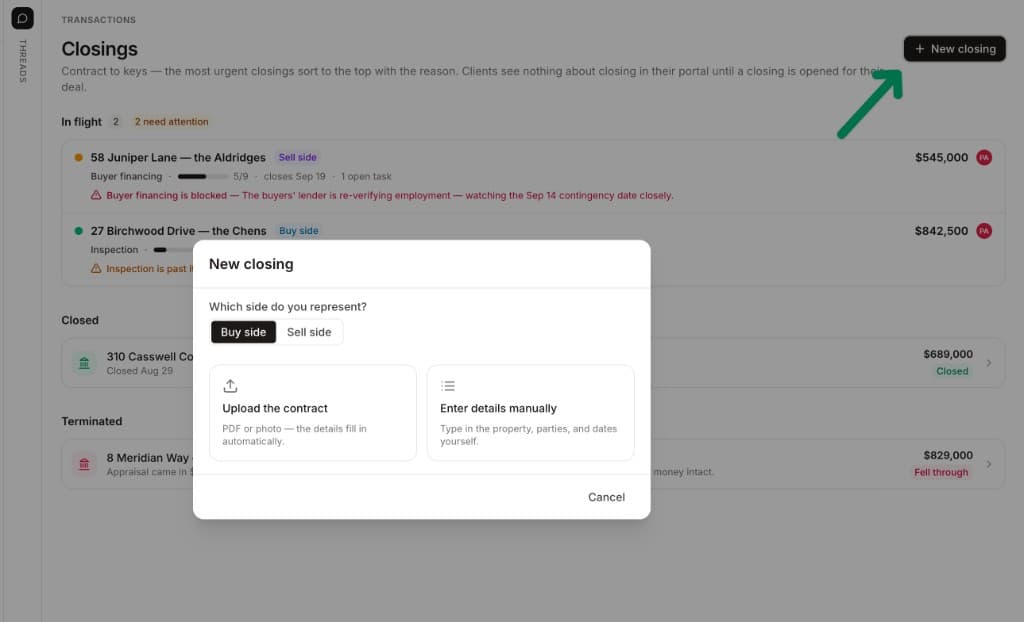
Strip the marketing away and there are four jobs. The first is reading the contract. A human coordinator opens the executed purchase agreement and pulls out the price, the deposits, the contingency periods and the dates, then works out what each one means on the calendar. The AI versions start the same way. ListedKit's help page says Ava extracts the execution date first because every other deadline is counted from it, and you can click the date to see where in the contract it was pulled from. Open To Close AI's Ollie extracts property information, purchase prices, contract dates and contacts from an uploaded agreement. SkySlope's version fills in the property address and the contact names.
The second job is turning what it read into work. That means the deadline list, with relative dates resolved into real days, and the tasks that hang off each one. ListedKit handles wording like “7 business days before closing” and re-reads an uploaded amendment to move everything the new date touches. DeedSpring's playbooks make this the coordinator's first task on every closing: read the contract, extract the terms, and set or correct the deadlines before anything else happens.
The third job is drafting the communication, which is most of a coordinator's day. The intro email to the parties, the earnest money confirmation, the inspection scheduling, the appraisal chase, the reminder to the lender about the commitment date. The fourth job is actually doing it, with a human deciding what goes out. This is where the products separate. A tool that reads a PDF and answers questions about it is a reading assistant. A tool that reads it, drafts the chase, waits for your approval and comes back tomorrow if nobody answered is a coordinator. Trackxi's AI Assistant sits in the first camp, answering questions such as what is the status of the earnest money deposit in a given file.
Which products read the contract, and which only summarize it?
The five tools on the four jobs, who approves, and the published price
| Job | DeedSpring | ListedKit | Open To Close AI | SkySlope | Trackxi |
|---|---|---|---|---|---|
| Reads the executed contract | Yes. Upload it and the price, deposits, contingencies and dates are read off it. | Yes. Execution date first, then parties, financing and contingencies. | Yes. Ollie extracts property, price, contract dates and contacts. | Key details such as the address and contact names. California and Arizona. | Yes, from a PDF sale agreement. Fields editable before you finalize. |
| Builds the deadlines from it | Yes. Deadlines set or corrected on the closing by the coordinator's first task. | Yes, including relative dates such as days before closing. | Dates are extracted for review. No deadline math described. | No. The file lands on the Checklist tab. | Creates the transaction record. No deadline math described. |
| Re-reads a signed amendment | The feature page says it reads the amendment and recomputes downstream dates. | Yes. Upload it and affected deadlines and tasks recalculate. | — | No equivalent on the help pages. | — |
| Drafts emails and texts | Yes. Drafts land in the Inbox with Send, Edit, Discard or Ask AI to revise. | Yes. Drafts, replies and scheduled reminders from your Gmail or Outlook. | — | No. | An AI Email Assistant is listed on Pro and up. No detail published. |
| Chases until the item is confirmed | Yes. Checks every active file hourly and keeps chasing until confirmed in writing. | Scheduled reminders go out at the times you set. Unattended work is on a waitlist. | No. | No. | No. |
| Who approves what goes out | Approve first by default. Anything about money or terms is always a draft. | You review and send replies. Reminders you put on the calendar send themselves. | You review extracted data before it is added. | Smart Assist suggests Cleared or Flagged. The auditor decides. | You edit the pre-filled fields before finalizing. |
| Published price | Starter $15 a month for one closing. Standard $25 a closing, $19 at twenty or more. | $14.99 a credit, $11 each in a 50-pack. One credit per contract setup. | $39 a user a month billed annually, $49 monthly. 1,000 Ollie credits included. | Suite starting at $340 a month. | AI rows start at Pro, $69 a month. |
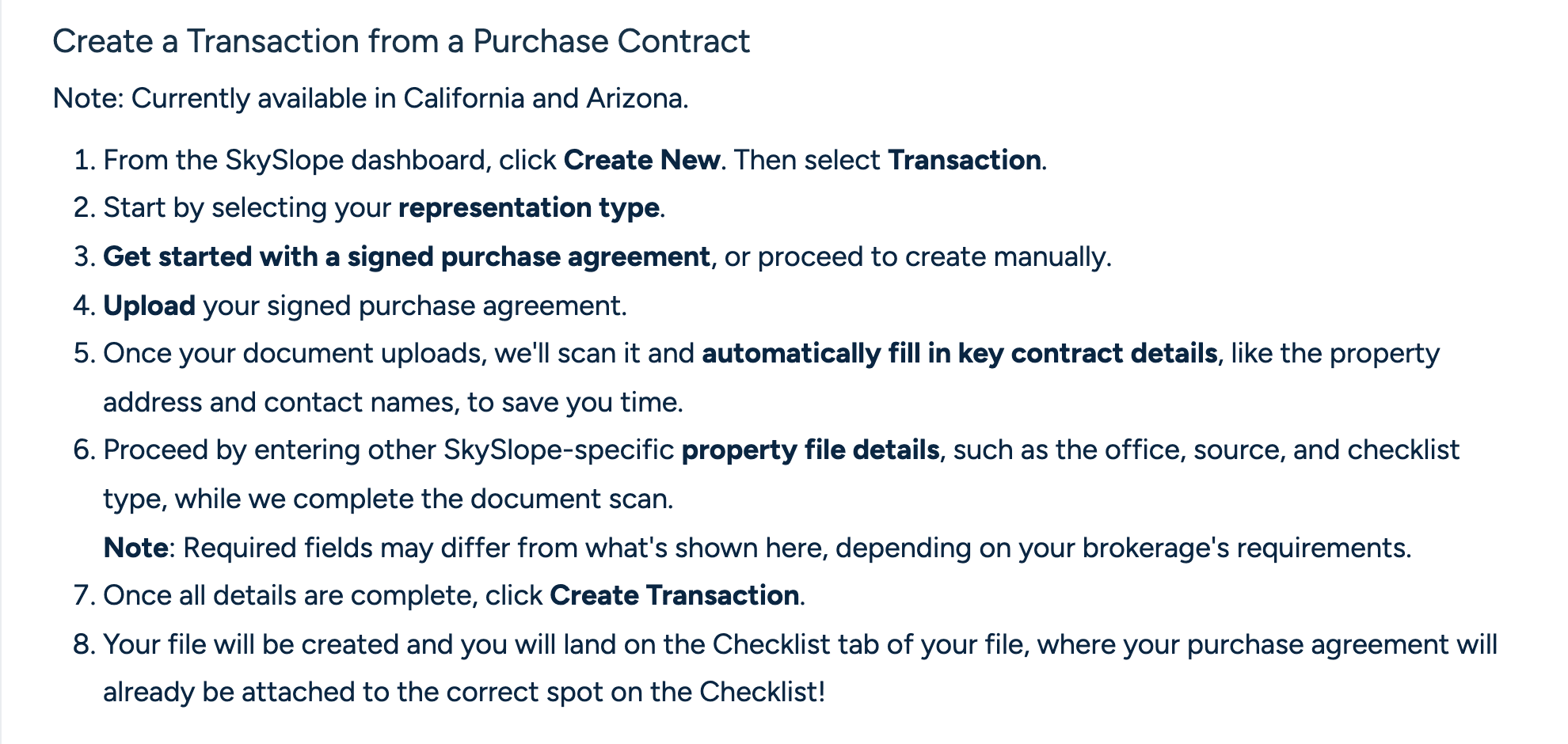
All five will take an uploaded contract and pull fields from it. The differences are in what they pull and where it goes. SkySlope's Create a Transaction from a Contract is a shortcut into the brokerage file: you upload the signed purchase agreement, it fills the property address and contact names, you add the office and checklist type, and the file lands on the Checklist tab with the agreement already attached. It is currently available in California and Arizona. SkySlope's other AI, Smart Assist, works on the auditor's side of the brokerage, scanning documents for required signatures and initials and suggesting Cleared or Flagged. Neither reads a contingency period or sets a deadline.
Trackxi reads a PDF sale agreement into a new transaction, and the pre-filled fields are editable before you finalize. Its pages describe the extraction and the question-answering assistant and stop there. Ollie, the AI inside Open To Close AI, goes further on the reading side: it extracts the property, the price, the contract dates and the contacts, and the page is explicit that you review the results before they're added. Ollie also scans a connected inbox for dates, tasks and document requests and leaves it to you to decide what belongs in the transaction. Keep the two Open To Close products apart when you shop. The classic Open To Close at opentoclose.com sells Grow, Pro and Scale plans with rule-based task triggers and no Ollie. Open To Close AI at opentoclose.ai is the one with the contract and inbox scanning.
ListedKit and DeedSpring are the two that treat the contract as the start of the timeline rather than the end of data entry. Ava reads the execution date, the parties, the financing and the contingencies, calculates every deadline including the relative ones, and tags the tasks that will become emails. DeedSpring reads the price, deposits, contingencies and dates off the executed contract when you upload it and sets the deadlines on the closing from them. Two names that come up in searches are not in the table. dotloop is where a great many contracts get signed, and its plans page sells forms and signing rather than anything that reads the contract afterwards. Upload a contract to Lofty's Cowork and it reads it and populates your transaction record inside the CRM, but Lofty publishes no price for it, so there is nothing to compare.
Which one keeps working after the contract is read?
Reading the contract once is the easy part. The coordinator's real work is what happens on day nine, when the inspection period is ending and nobody has sent the repair request, and on day twenty, when the lender has gone quiet about the appraisal. Three things decide whether a product helps here: whether it re-reads an amendment, whether it drafts the message, and whether it follows up on its own.
On amendments, ListedKit is clear. Upload the amendment or counteroffer and Ava re-reads the contract and recalculates all affected deadlines and the tasks tied to those dates move with them. You can also just tell it the closing slipped two days and it moves the closing date and every related deadline. DeedSpring's deadlines feature page says that when a signed amendment changes a date, DeedSpring reads it, recomputes everything downstream and reschedules every reminder. The other three publish nothing on amendments.
On drafting, ListedKit's email automation runs three ways. Auto-reply drafts an answer to an incoming email and nothing leaves without you. On-demand drafts when you ask. Scheduled reminders are the exception to the approval rule: Ava sends those at the time you set, on the logic that you put them on the calendar yourself. Everything goes from your own Gmail or Outlook. DeedSpring's coordinator writes the chase and the update and puts it in the Inbox as a draft to review, with Send, Edit, Discard or Ask AI to revise. The default is approve first on every channel, and you can switch a channel to send on its own, but anything about money, contract terms, a moving deadline or bad news stays a draft whatever the setting says.
On following up, DeedSpring is on its own. Its coordinator checks in on every active file every hour, sends the chase, notes who said what, and keeps going until the item is confirmed in writing. ListedKit's version of that is Agentic Ava, described as coming soon, with a waitlist: Ava today reads the inbox and contracts and drafts the emails, and the unattended background work that brings you only what is urgent is the thing being promised. Ollie surfaces what it finds in the inbox and stops. SkySlope and Trackxi do not chase anyone.
What does each one cost?
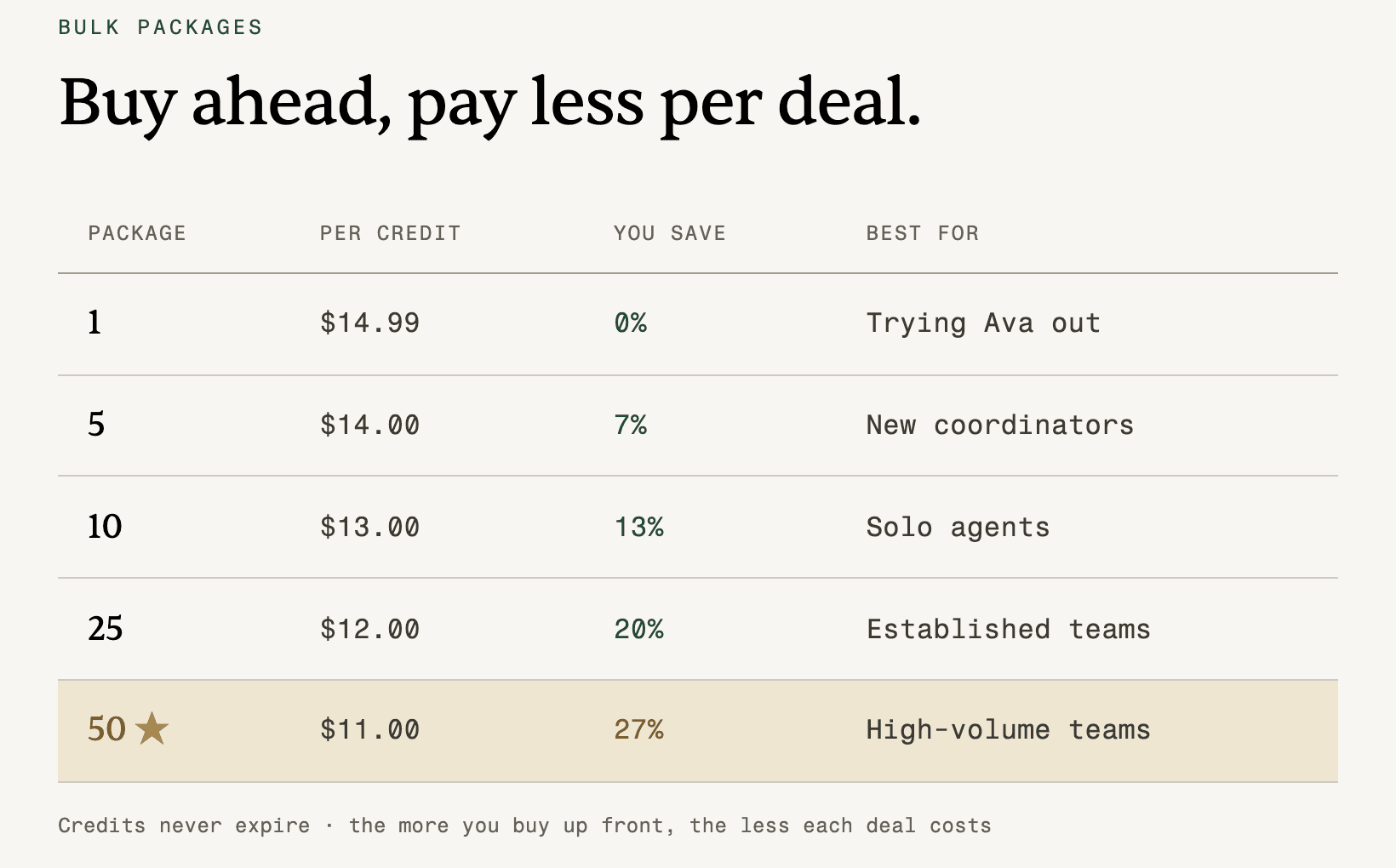
Nobody prices on the same unit. ListedKit sells credits with no subscription: $14.99 for one, the first one free, down to $11.00 each in a pack of fifty, and one credit is one contract setup, so a listing you take to close costs two and a quiet month costs nothing. Team members are unlimited. Ava Sign, its e-signature add-on, is $29.99 per user a month. Open To Close AI has one plan at $39 per user a month billed annually or $49 billed monthly, with a 30-day trial, and every paid user includes 1,000 Ollie AI credits each month. The credits page prices them at $0.02 each, one credit per scanned page and one per scanned email, with more available to buy, and the calculator page calls 80 credits a transaction an illustrative estimate rather than a quote. Ollie is optional.
SkySlope Suite is a brokerage purchase, starting at $340 per month with no long-term contract required, and the contract scan comes with it in the two states. Trackxi's AI rows, AI Powered Transaction Automation, AI Assistant and AI Email Assistant, are ticked on Pro at $69 a month, Pro Plus at $99 and Enterprise at $199, and not on Essential at $39. Pro covers five active team members and a hundred open transactions. DeedSpring's Starter is $15 a month for one closing. Standard is $25 a closing for the first four in a month, $22 from five, $20 from ten and $19 from twenty, with unlimited agents and teammates, unused closings rolling over, and no contract. Brokerage pricing is on application.
Put ten buy-side files through each in a month and the arithmetic is simple. ListedKit is ten credits at the ten-pack rate, $130. Trackxi Pro is $69 whatever you close. Open To Close AI is $39 or $49 per user, and ten twenty-page contracts use 200 of the 1,000 included credits. SkySlope is $340 before anything else the brokerage pays for. DeedSpring is ten closings at $20, so $200, and for that the contract is read and every party is chased every hour until they answer. The cheaper figures buy the reading. The DeedSpring figure buys the coordinator.
How should you choose?
Start from the job you are short of hands for. If it is data entry, every product here removes most of it and the cheapest one you already own wins. A SkySlope brokerage in California or Arizona should switch the contract scan on and stop reading further. A Trackxi Pro team already has the extraction. If the job is the timeline, you need a product that resolves relative dates and re-reads amendments, which narrows it to ListedKit and DeedSpring. If the job is the chasing, the daily grind of getting the lender and the title company to confirm things in writing, DeedSpring is the only product on this page built to do it, and ListedKit has told you plainly that its version is on a waitlist.
Three things to get in writing from whichever vendor you pick. Ask which states the contract reading has been checked against, because SkySlope's page says two, ListedKit's says any state, and the others say nothing. Ask what happens when a signed amendment arrives, and whether the deadlines it touches move on their own or wait for you. And ask exactly what can leave the system without a human pressing send, because the answer ranges from nothing to scheduled reminders to a per-channel setting, and the right answer for a message about earnest money is not the right answer for a Friday status update.
Where DeedSpring fits
DeedSpring is built for the agent, team or transaction coordinator whose gap is the whole chain from contract to deadlines to chasing. You start a closing by uploading the executed contract, and the coordinator reads the price, deposits, contingencies and dates off it and sets the deadlines on the closing. Every closing runs on a playbook whose first task is the coordinator's own, and DeedSpring says it ships playbooks for every US state and DC. From then on it checks every active file every hour, drafts the chase or the update into the Inbox for you to send or edit, and keeps going until the item is confirmed in writing. Sensitive messages are always drafts. E-signing is built in, and roles for broker, team lead, coordinator, agent and assistant decide who sees which files.
Starter is $15 a month for one closing. Standard is $25 a closing, falling to $19 at twenty or more a month, with unlimited agents and teammates, unused closings rolling over and no contract. Brokerage pricing is on application. The full table is on the pricing page.
How we compared
We compared DeedSpring, ListedKit, Open To Close AI, SkySlope and Trackxi on what their help pages and feature pages say the AI reads, drafts and sends, and on their published prices. Prices were checked in October 2026.