
Buyer guide · Software comparisons and alternatives
Best transaction management software for small real estate brokerages
DeedSpring if you want the file worked and the broker's review on it, from $25 a closing with no per-agent fee. Paperless Pipeline for the cheapest review record at low volume, SkySlope Suite when the forms must live in the same system. The queue, the correction cycle, the bill at five, ten and twenty files a month, and what you get back when you leave.
What does a small brokerage need from this software?
Five things decide this purchase, and none of them is on a features page. Where the broker sees what is waiting. What an agent has to do before a file is in that queue at all, because a system agents work around is a filing cabinet with a login. How a bad document gets back to the agent and how the fixed one gets back to the reviewer. What the bill looks like at five or ten files a month. And what you can take with you when you leave.
The pricing pages say almost none of it. dotloop puts its review workflows on two plans it will only quote. Paperless Pipeline deletes an account's data the day you cancel unless you have the backup. SkySlope has no way to download every archived file at once. Each of those is on a help page, and each one changes the decision.
Which one does what?
Six systems on what you pay, the review, the agent's part, corrections and the exit
| Question | DeedSpring | BoldTrail BackOffice | dotloop | Lone Wolf Transact | Paperless Pipeline | SkySlope |
|---|---|---|---|---|---|---|
| What you pay per | A closing opened. Agents and teammates are free. | Quoted after a demo. | An agent on Premium, $34.99 a month. Teams and Business+ quoted, yearly. | Quoted. No published price. | New files a month. Users unlimited. | The brokerage, from $340 a month. |
| Ten new files a month | $200 | A quote | $34.99 per agent on Premium, or a Business+ quote | A quote | $140 | $340 at least |
| The review queue | One Compliance page, in lanes by whose turn it is, overdue first. | Approve docs page. A transaction's documents in a batch. | Admin opens the loop and clicks Review. Stages set per workflow. | Reviews page. Status flips to Submission Required on its own. | One Unreviewed page across every file. | Docs to Review and Quick Audit. |
| What the agent has to do | Nothing to submit. The review opens when the file goes under contract. | Upload the documents. One email listing what was approved and rejected. | Click Submit for Review themselves. A TC on the loop cannot. | Submit when the phase changes. Blank paperwork does not block it. | Upload, or email documents to their own maildrop address. | Upload to the checklist. Flagged items email them daily until done. |
| A returned document | Note, task on the agent's Today, re-checked when the fix lands. | Reject with a reason. An approval can be revoked later. | Return with a note. Resubmit logic sets the stage. | Needs Corrections with a comment. | Comment emailed to the agent. Reviewer ticks Reviewed. | Reject with a comment. Update Agent email with a DigiSign resend. |
| Leaving with your files | ZIP or merged PDF per closing. Audit exports on the Brokerage plan. | ZIP emailed at each close, link lasts 7 days. Dropbox or Drive sync. | A Google Drive backup through API Nation. Archived documents do not sync. | Lists, files or bulk data. Download before you cancel. | Monthly backup ZIP, 30 days to download. Data deleted on cancel. | One ZIP per archived file. No bulk download. |
| Term | Month to month. | Set by the agreement. 30 days after it ends to request data. | Premium monthly or yearly. Teams and Business+ yearly. | On the sales order. | Month to month. Cancel by email. | No long-term contract. Ends at the end of the term. |
Two of the six will not print a price. BoldTrail's pricing page is a demo request form and Lone Wolf sends brokers to a demo for Transact, so both columns carry what the help pages and terms say and leave the number to your quote.
What does it cost at your volume?
Take three offices. Three agents closing five files a month. Six agents closing ten. Twelve agents closing twenty.
Paperless Pipeline charges on new files a month with unlimited users: $69 for up to five, $140 for ten, $190 for 25, $240 for 40. Go past your tier and new files are blocked until a master admin upgrades, unless Transaction Overages is on, which lets them through at a flat $15 each and waives the fees if you upgrade before the cycle ends. You can only drop to a smaller plan in a month where you created fewer files than it allows. Everything is month to month, cancelled by email seven days before the billing date, with no refund for the rest of the month.
SkySlope Suite starts at $340 a month for the brokerage, forms included, DigiSign and Books as add-ons, no long-term contract. That is the price at five files and the price at twenty. One poster on r/RealEstateTechnology, shopping for a brokerage of two, put the problem plainly.
“I like SkySlope, other than their massive monthly cost. I’ve only got one agent, other than myself.”

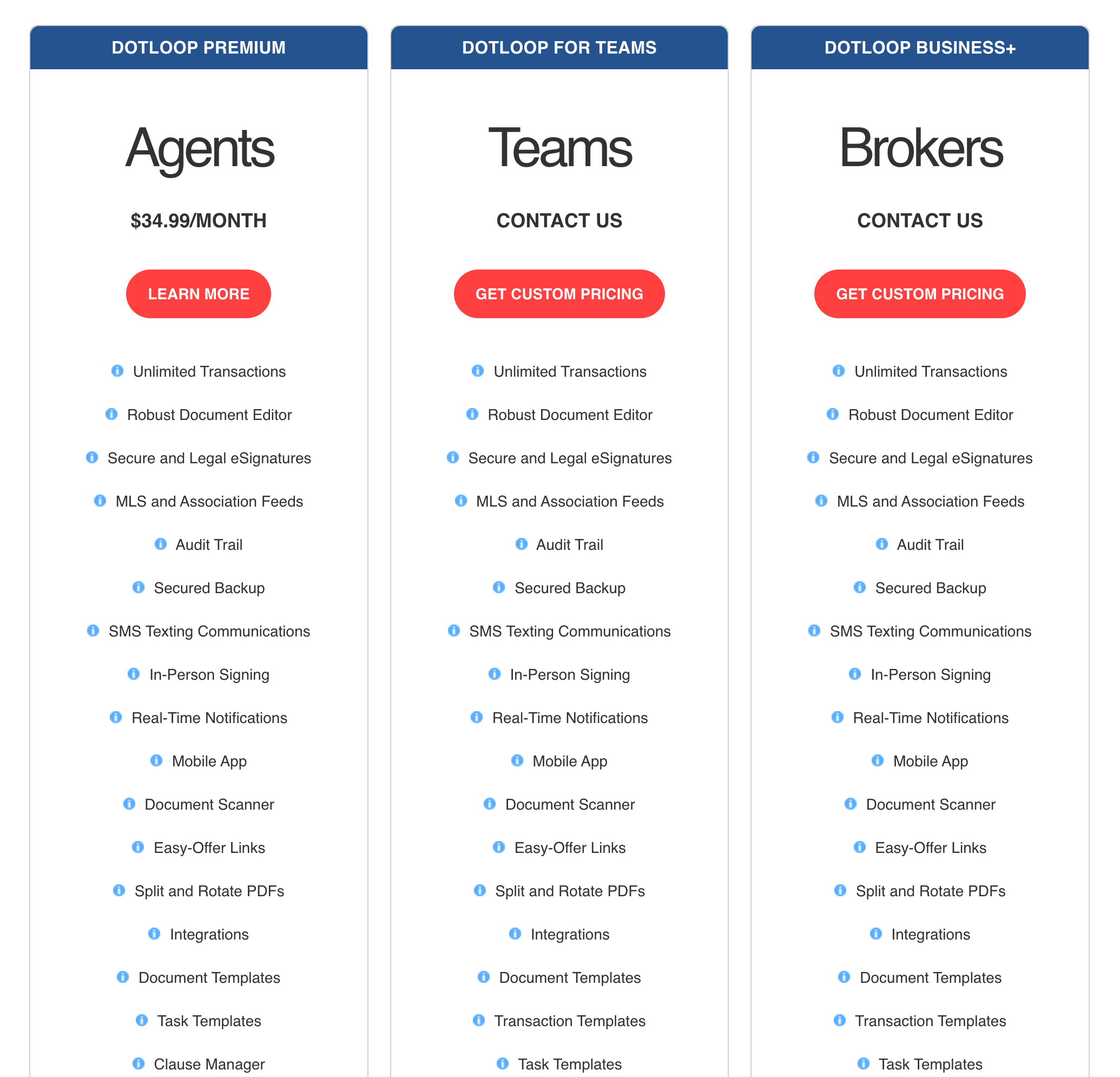
dotloop publishes one price too. Premium is $34.99 a month per agent, or $344 a year, and it is the agent's plan. The review workflows a brokerage needs sit on Teams and Business+, quoted after a discovery call and sold on yearly terms. Three agents on Premium cost $104.97 a month, six $209.94, twelve $419.88, and none of that gives the broker a review queue.
DeedSpring charges per closing opened and nothing per agent: $25 each for up to four a month, $22 from five, $20 from ten and $19 from twenty, with unused closings rolling over. Five files cost $110, ten $200, twenty $380. Starter is $15 a month for a solo agent with one closing. Above thirty a month the Brokerage plan is priced on application and adds office compliance dashboards, audit exports and SSO.
At five files the order is Paperless Pipeline $69, dotloop Premium $105, DeedSpring $110, SkySlope $340. At twenty it is Paperless Pipeline $190, SkySlope $340, DeedSpring $380, dotloop Premium $420 before the brokerage quote. The first two figures buy a checklist and a review desk. The DeedSpring figure buys those plus a coordinator that reads the contract and chases the documents into the file.
How does a file reach the broker?
In dotloop the agent starts it. They open the loop, tick the folders, pick the workflow and click Submit for Review, and only an account attached to the brokerage or team can do that. A transaction coordinator added to the loop as On my team cannot submit on behalf of the agent. The admin then opens the loop, clicks Review, approves or returns each document and sets the folder's review stage, which emails the agent. The stages are yours to define, but only in a Teams or Business+ profile. That is why the Premium price on the plans page does not buy a brokerage a review.
Lone Wolf Transact takes the submit decision away from the agent. A checklist is tied to a phase, so when an agent clicks Offer Accepted the file moves to Under Contract, the review status flips to Submission Required and the agent is walked through the submission. An agent can still send it with mandatory paperwork blank. Missing transaction details do block it.
SkySlope works from the checklist attached to the file type. An item the broker has flagged emails the agent daily until the document is uploaded, on a cadence set company-wide. Reviewers work Docs to Review or Quick Audit, which opens the first pending item of the first pending file and moves on with Accept or Reject. An Office Manager can open every file in the office but cannot accept or reject. An Admin can. There is one Broker account per brokerage.
Every unreviewed document in a Paperless Pipeline company sits on one Unreviewed page, filtered by location or status, and agents get documents in by uploading or by emailing them to their own maildrop address. Only the Review docs permission marks a document reviewed, and the help page says to give it to admins only. BoldTrail BackOffice collects submissions on an Approve docs page, where an admin works a transaction's documents as a batch.
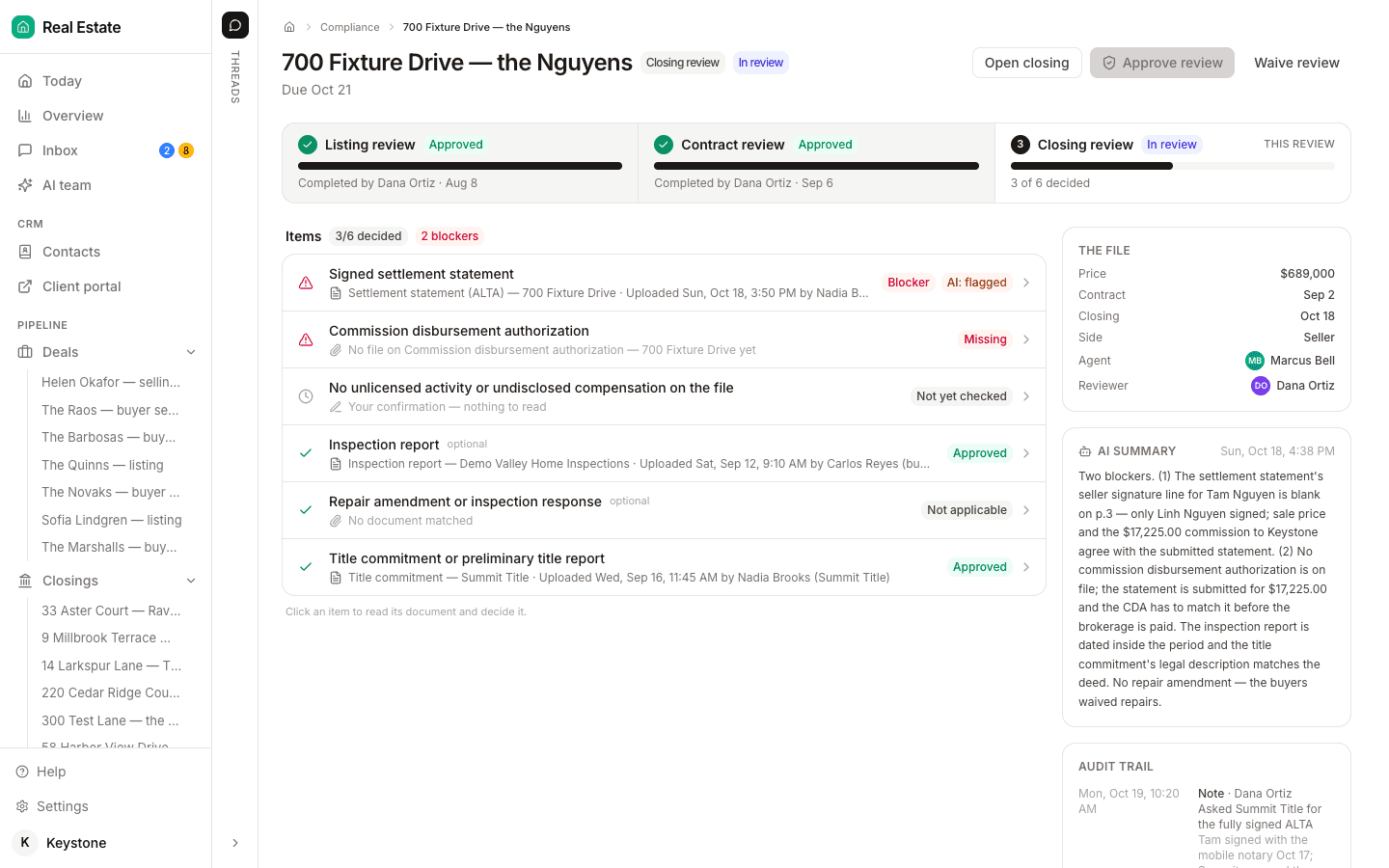
DeedSpring opens the review itself. A contract review opens when a closing goes under contract and a closing review when it closes, built from the brokerage's template, and by then the AI coordinator has been chasing the lender, title and the inspector for what the file is missing and updating the file from what comes back. The reviewer's desk is one Compliance page with every review in lanes by whose turn it is, overdue first against the office's SLA in business days. All of it is switched on under Config and needs Brokerage mode. Agents sit on the roster at no charge, and the sharing grid decides whether an agent sees everyone's files, their team's or only their own.
What happens when a document is wrong?
dotloop's admin clicks Return and is prompted for a note. When the agent resubmits, resubmit logic decides where the folder lands, so a Returned to agent folder goes back to Needs Review without anyone moving it. SkySlope's Reject takes a comment, and the Update Agent button emails the agent a snapshot of the checklist with each item's status, the correction comments and a DigiSign shortcut that pulls the rejected document into a new envelope on the same file. BoldTrail BackOffice makes the reviewer write a reason for every rejection, emails the agent the approved and rejected list, and lets a reviewer revoke an approval later, which puts the document back to submitted for approval and writes an activity-log entry.
Lone Wolf Transact's reviewer sets the transaction to Needs Corrections with a comment, the agent resubmits, and the cycle runs until the broker admin marks it Approved. Paperless Pipeline has a Reviewed checkbox per document and a comment field. A comment is emailed to the agent on the transaction when that setting is on, and who reviewed what sits in the Transaction History.
What none of those pages describe is the fixed document finding its own way back to the reviewer. DeedSpring does that part. Return to agent writes the correction note, drops a task on the agent's Today and emails them. When the corrected upload lands, the item goes back to Not yet checked, the task completes and the review returns to the queue once every returned item is back. Replace a document the review already approved and the item becomes Changed after approval and is re-checked. The Compliance Reviewer reads each document first and writes a finding with a severity and the page to look at, and it grades and never approves. Broker sign-off on the closing review is a button only a broker can press, and with Compliance before approval on it is what unblocks the commission statement.
What do you get back when you leave?
Ask this before you sign, because every vendor answers it differently and two of the answers cost money. SkySlope keeps closed files in Access Archives, where a drop-down downloads one file's documents as a ZIP. There is no bulk option. When a brokerage asked the SkySlope forum for a download by month or year, the product team answered that it has no faster way to get all the files downloaded. Cancellation takes effect at the end of the current term, and a Suite file cannot be transferred to another brokerage.
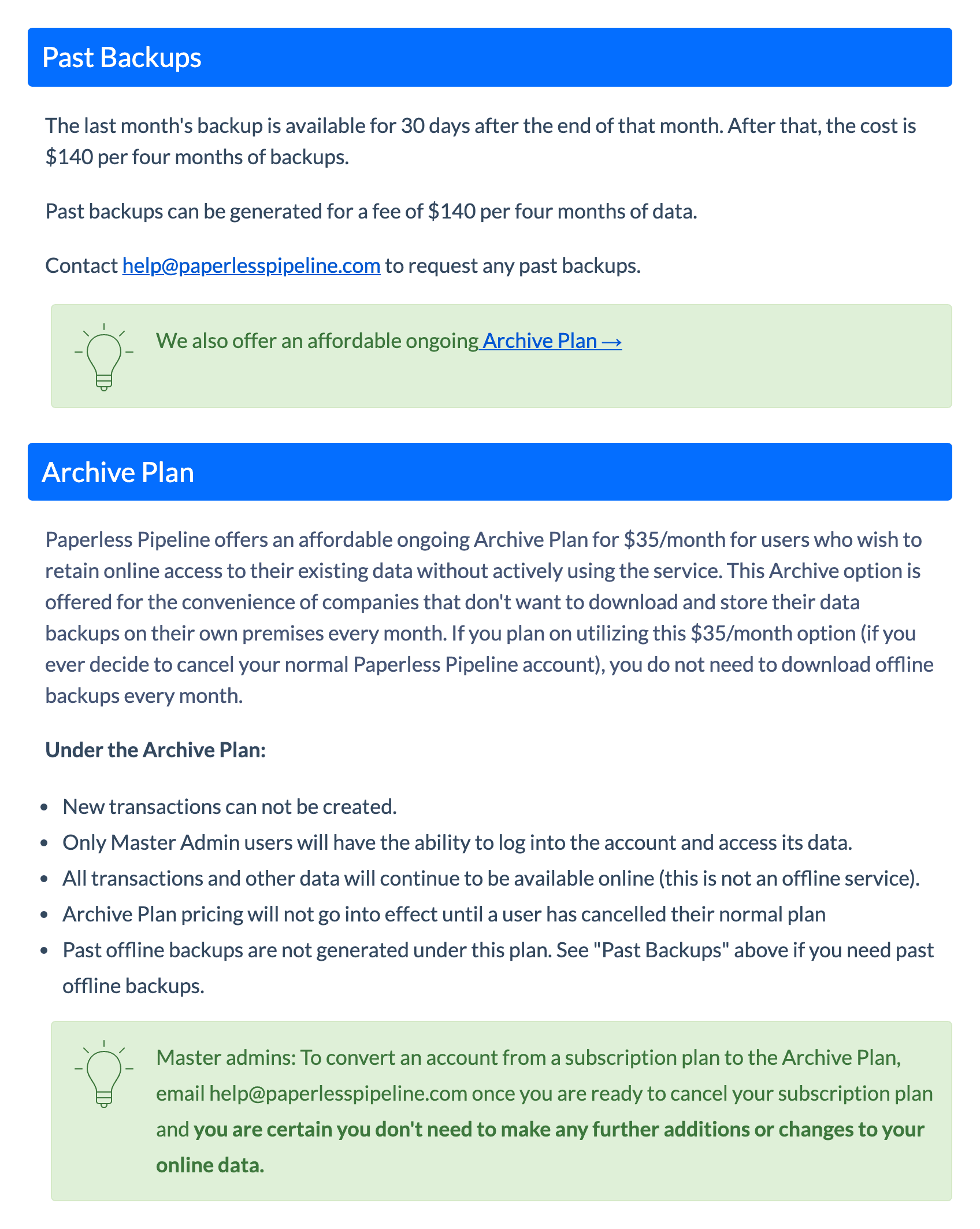
Paperless Pipeline generates a monthly backup ZIP organized by property address, with documents in their original format and notes, checklists, emails and history as text. It covers the files created or made inactive in the previous month and sits there for 30 days. Miss the window and a past backup costs $140 per four months of data. On cancellation all your transactions and other data are deleted immediately. The alternative is the Archive Plan at $35 a month, read-only and master admins only, once you cancel the normal plan.
BoldTrail BackOffice emails the account owner a ZIP of each transaction when it closes, with a link that expires in seven days, and syncs files to Dropbox or Google Drive for anything bulk. Inside Real Estate's terms give you thirty days after the subscription ends to request your data in writing, say costs may apply, and allow deletion after that. Lone Wolf's terms tell you to export what you want before termination and say Lone Wolf may charge for help afterwards. Transact's own page says it exports lists, individual files or bulk data. For dotloop, the API Nation Google Drive backup copies every loop's documents except archived ones and writes spreadsheets of loops, people and activity, over three to four days.
DeedSpring downloads any closing's documents as a ZIP of the originals or a single merged PDF with a cover sheet from the Documents tab. Every plan keeps a full audit trail on each file, and the Brokerage plan adds org-wide audit exports.
Which one should you buy?
If you want the file worked and reviewed in one place, buy DeedSpring. The coordinator reads the contract, chases the documents in and updates the file, the review opens by itself, a returned item comes back on its own, and the broker's sign-off clears the file to disburse and releases the commission statement.
If your agents already run their deals in dotloop and you have ten or more of them, get the Business+ quote and put the review workflows on top of what they know. If your state association forms live in SkySlope and you can carry $340 a month, buy SkySlope Suite: the review desk is the most complete here and the file never leaves the forms system. If commissions and agent billing already run through BoldTrail BackOffice, use its approvals and buy nothing else. Demo Lone Wolf Transact when you want submission to start itself the moment an agent clicks Offer Accepted.
If $340 is a problem and you want a review record with unlimited users, buy Paperless Pipeline at $69 or $140, turn overages on, and put the monthly backup download in someone's calendar. Before you sign with anyone, get three things in writing: what an agent has to do to put a file in front of the broker, what the agent receives when a document is returned, and how you download every closed file with its review history the month you leave.
What does DeedSpring give a small brokerage?
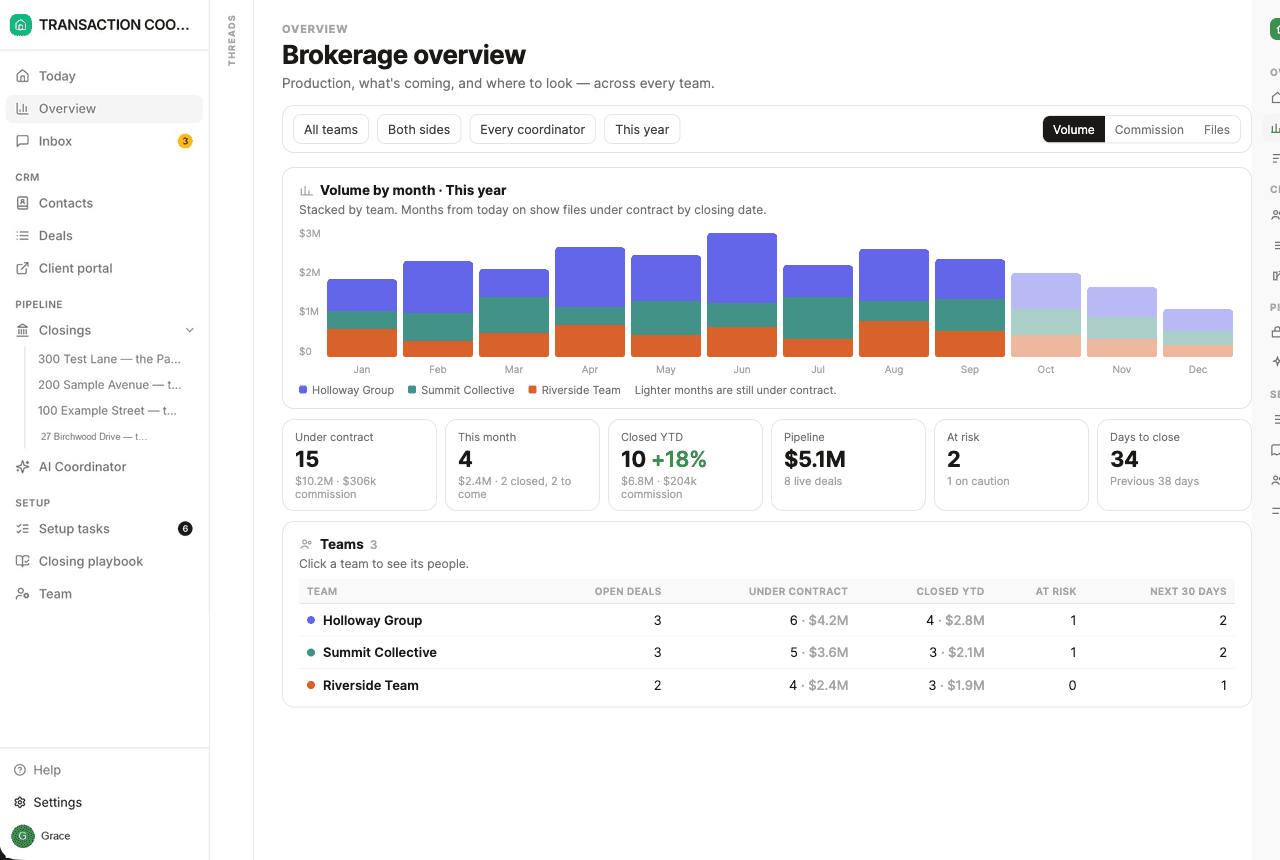
DeedSpring is transaction coordination for agents, teams and brokerages, with the brokerage's review on the same file. A closing starts from the executed contract, the AI coordinator reads the price, deposits, contingencies and dates into the deadlines, and it chases lenders, title and inspectors until each item is confirmed in writing. Roles for broker, team lead, coordinator, agent and assistant decide who sees what, and with Teams on the broker gets an Overview of production, pipeline and what is about to close, per team.
How we compared
We read each vendor's pricing page, its help pages on submission, review, corrections, billing and downloads, and the terms that govern your data after you leave, for BoldTrail BackOffice, dotloop, Lone Wolf Transact, Paperless Pipeline and SkySlope, plus DeedSpring's own help and pricing pages. Prices were checked in October 2026.