
Alternatives · Software comparisons and alternatives
dotloop alternatives for solo agents, teams and brokerages
A solo agent paying $34.99 a month for forms and signing can move to SkySlope Forms at $15.99 with DigiSign included. A team or brokerage that wants broker review at a published price should buy Paperless Pipeline, from $69 a month with unlimited users. If dotloop's forms are fine and the chasing is the problem, add DeedSpring beside it from $15 a month.
Why do agents and brokers leave dotloop?
Price first. dotloop Premium is $34.99 a month or $344 a year. It was $31.99 a month and $314 a year in mid-February 2026 and $34.99 by mid-March, a rise of $3 a month. Teams and Business+ have no published price at all. Both cards say Contact Us, and dotloop's own support page says every Business and Team partnership runs on a yearly term. The dotloop pricing guide has every plan in detail.
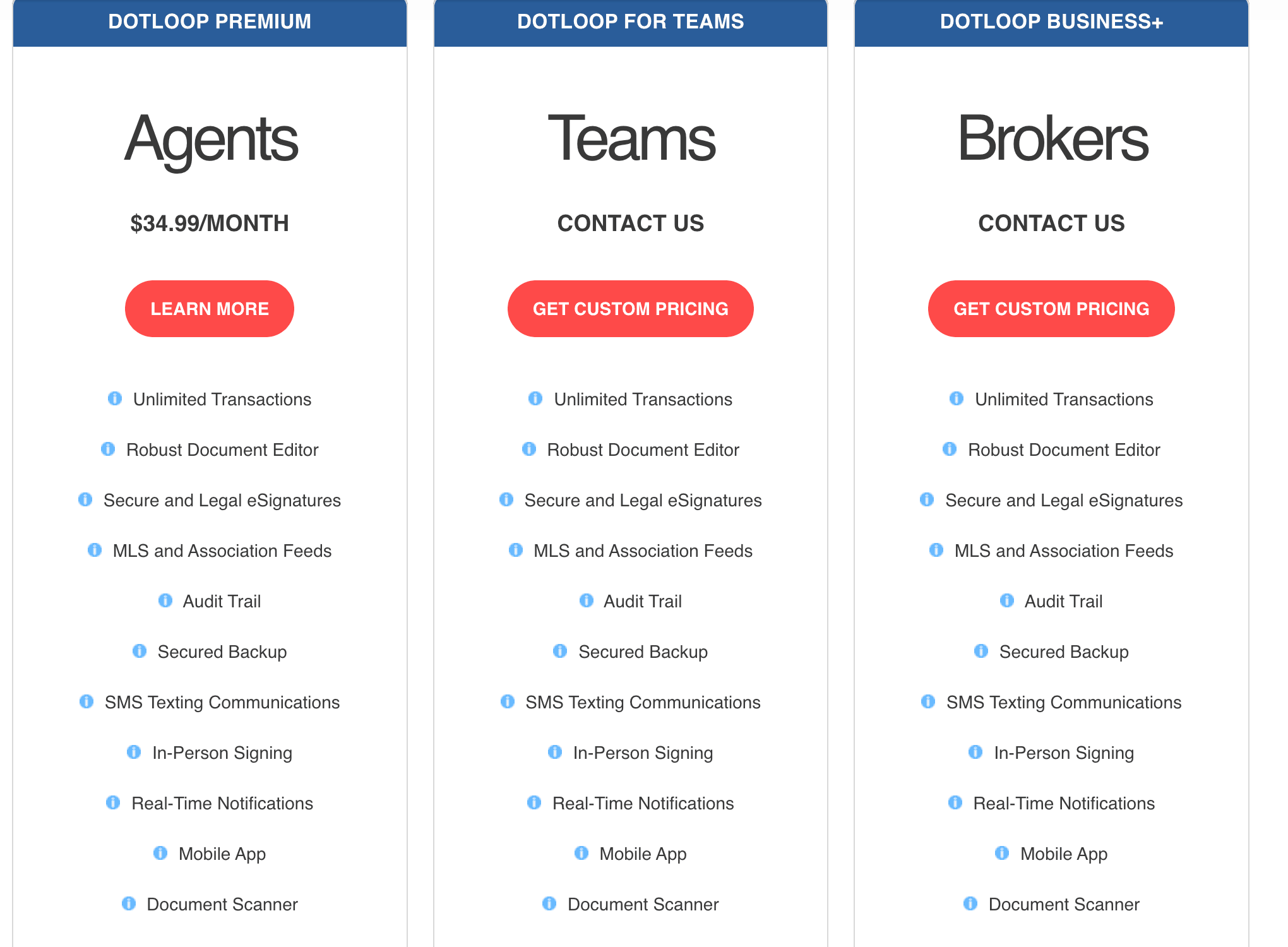
Then the forms. dotloop supplies interactive forms for more than 150 local and state associations, and if it has no agreement with yours, interactive forms are unavailable. Then the review step, which is where teams feel it. You can only submit a loop for review when your account is attached to a brokerage or team, and a transaction coordinator added to a loop as On my team cannot submit on behalf of the agent. Unlimited workflows and custom branding are No on both the Free and Premium accounts. The review queue lives in Teams and Business+, behind the quote.
Which alternatives do what?
Six products cover dotloop's jobs between them: association forms, signing, broker review and the day-to-day chasing dotloop never tried to do. Docusign and SkySlope Forms replace forms and signing for one agent. SkySlope Suite, Paperless Pipeline and Lone Wolf Transact replace the brokerage review. Open To Close and DeedSpring sit beside dotloop and run the deal. The table has what each costs and which job it takes.
dotloop alternatives by who they suit, what they cost and which of dotloop's jobs they take
| Product | Who it suits | Price | Forms, signing and review |
|---|---|---|---|
| dotloop (what you have) | Agents whose association feeds dotloop forms. Broker review needs Teams or Business+. | Premium $34.99 a month or $344 a year. Teams and Business+ quote only, yearly terms. | Forms for 150+ associations, signing built in. Submit for Review on Teams and Business+. |
| DeedSpring | The chasing dotloop leaves to you. Runs beside the forms platform you keep. | Starter $15 a month for one closing. Standard $25 a closing, $19 at twenty or more. | Reads the contract into deadlines, chases the parties, e-signing built in. Texas forms published. |
| Docusign Real Estate | A solo agent who only needs signing and association forms. | Starter $10 a month for 5 envelopes. REALTORS® $20 per user. Both billed annually. | Real Estate Association Forms on every plan. No broker review. |
| Lone Wolf Transact | Agents whose association supplies it. Brokers who want review stages. | Quote only. Authentisign signing is an extra fee. | Licensed form libraries. Review moves Pending Review, Needs Corrections, Approved. |
| Open To Close | A TC-run team that keeps dotloop for forms. | $99, $199 or $399 a month with one user. $69 per extra user. | No forms library. Imports loops and copies documents back to dotloop. |
| Paperless Pipeline | A team or brokerage that wants review at a published price. | $69 a month for 5 new files, $140 for 10, $190 for 25. Unlimited users. | No forms library. Review is a reviewed checkbox plus emailed comments. |
| SkySlope | Solo: Forms with DigiSign included. Brokerage: Suite with Accept or Reject review. | Forms $15.99 a month or $149 a year. Suite from $340 a month. | Forms included. Suite reviewers Accept or Reject each document with a comment. |
What should a solo agent use instead of Premium?
SkySlope Forms, if you pay for dotloop yourself. It is $15.99 a month or $149 a year, and access to DigiSign, the e-signature, is included in the subscription. Against Premium's $344 a year that saves $195. You give up dotloop's task templates and the loop, which is the shared workspace your co-op agent and clients sign inside.
If signing is the only thing you use, Docusign's Real Estate Starter is $10 a month, billed annually as $120, for five envelope sends a month, with association forms on the plan where Docusign carries them, which it says varies by state. The REALTORS® plan, for NAR members, is $20 per user a month, billed annually, with unlimited envelopes subject to reasonable use. Five envelopes a month is tight for an active agent. Price the REALTORS® plan at $240 a year instead and the saving over Premium is $104.
Before you pay anyone, open My Account in dotloop. If your brokerage or association provides Premium, that page greets you with You are currently a premium member, and the $34.99 is not your bill. The free account still gives you ten transactions, the forms and e-signing.
What should a team use instead of dotloop for Teams?
Paperless Pipeline, if what the team wants is a file everyone can see and a review step at a price you can read. It charges by new files a month, with unlimited users and no contract: $69 for five, $140 for ten, $190 for 25. Five agents each paying Premium is $1,720 a year. The ten-file tier is $1,680, and adding people never changes the bill. The first 30 days after you upgrade are unlimited, so you can load every open deal and old file in one go.

Two things change. There is no forms library, so your agents keep writing contracts in dotloop or your association's forms tool and upload the signed PDF. And review is gentler than dotloop's: the broker or admin ticks a reviewed checkbox and any comment on the document is emailed to the agent. The dotloop vs Paperless Pipeline comparison has that side by side.
A team run by a transaction coordinator should look at Open To Close instead. It is $99, $199 or $399 a month with one user, plus $69 for each extra user, so a Pro plan with two added seats is $337. It imports loops from dotloop on every plan and its help page explains how to copy documents back over to dotloop so you can stay in compliance. The forms and signing stay in dotloop. The task templates, email templates and agent portal move.
What should a brokerage use instead of Business+?
SkySlope Suite, if your compliance desk wants a reject button. Suite starts at $340 a month with Forms included. DigiSign is an add-on at $6.25 a month per account, billed annually, and every account has to subscribe, so ten agents add $750 a year. The reviewer opens Quick Audit, clicks Accept to mark a document Completed or Reject and leaves a comment explaining what needs to be corrected. In 21 states Smart Assist scans for missing signatures and initials first. At ten agents the floor is $34 an agent, about what one agent pays dotloop for Premium. The SkySlope vs dotloop comparison follows one file through both.
Lone Wolf Transact, if your association already supplies it. Lone Wolf calls compliance reviews the fundamental core of Transact Broker Edition. A transaction moves through Pending Review, Needs Corrections, Submission Required and Approved, with multi-tier reviews for offices that need an admin to check before the broker. The brokers' page lists compliance checklists and broker file review, and Authentisign, the e-signature, as an extra fee. There is no published price for either, so the route in is your association or [email protected].
Paperless Pipeline is the cheapest brokerage route, and the one with the mildest review. Forty new files a month is $240 with unlimited users. Read the billing page before you commit, though. On cancellation your transactions and other data are immediately and permanently deleted, so the monthly backups have to be part of the routine from day one.
What if the forms are fine and the deal still runs late?
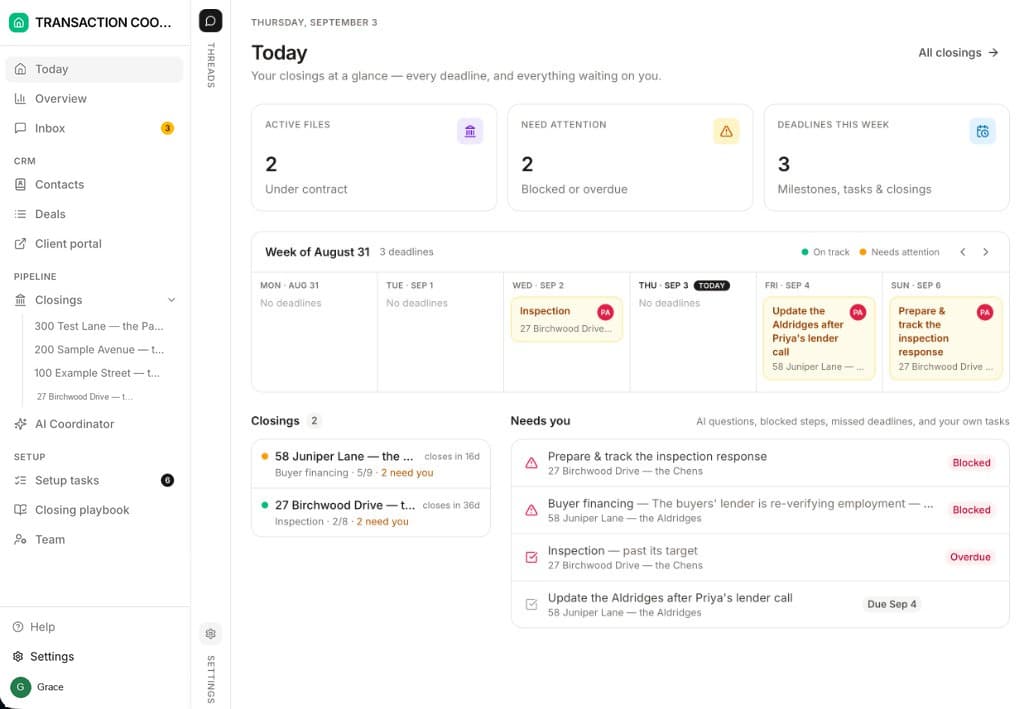
Then dotloop is not the problem. It holds the forms, the signatures and the task list, and somebody still has to read the executed contract into dates, watch them and chase the lender and the title company. DeedSpring does that part. Upload the contract and its AI coordinator extracts the price, deposits, contingencies and dates into deadlines on the file, checks every open closing every hour, flags what is slipping on Today, and drafts the chase for you to send. Anything sensitive or negotiable always waits for a person. It is built to sit beside the forms platform your brokerage mandates, and its own form pack is published for Texas, so keep dotloop for the association forms.
Who should stay on dotloop?
Three kinds of user. The agent whose brokerage or association provides Premium, because the alternatives all cost money and dotloop costs nothing. The agent still inside the free account's ten transactions, because it carries the forms, signing and task lists. And any team or brokerage mid-term on Teams or Business+. Unless the order says otherwise, the Dotloop Dashboard terms run for one year and renew in one-year periods unless either side gives written notice at least sixty days before the current term ends. The order also carries a one-time initiation fee and a subscription fee for the number of users in it.
If you do go, do two things first. Back the loops up. The route dotloop's help pages document is the Google Drive Backup via API Nation, a third-party sync that copies each loop's documents into a Drive folder, skips archived documents, and writes the loop, people and participant data to Google Sheets. Its help page names changing brokerages as a reason to run it. The dotloop export guide lists what to check in the download. Then cancel Premium from My Account. The account drops to Freemium and loses unlimited loop creation, task templates and Add to team.
How we compared
We compared SkySlope Forms and Suite, Docusign Real Estate, Paperless Pipeline, Lone Wolf Transact, Open To Close and DeedSpring with dotloop Premium, Teams and Business+ on their pricing pages and help articles on forms access, signing, broker review, contract terms and export. Prices were checked in October 2026.