
Comparison · Software comparisons and alternatives
dotloop vs Open To Close: can one replace the other?
No. Keep dotloop for forms, e-signatures and broker review, because Open To Close has none of the three. Add Open To Close on top only if a coordinator will run its templates, triggers and portals on every file, and budget time for the link, which copies details, contacts and documents one property at a time.
What does each one actually do?
dotloop is where the paperwork lives. It sells itself as handling “the entire deal from offer to close”: MLS and association form feeds, e-signatures, a document editor, task templates and, on Teams and Business+, compliance workflows. An agent buys Premium for $34.99 a month or $344 a year. Teams and Business+ are quoted on a call.
Open To Close is the coordinator's layer that sits on top of a system like that. Its plan comparison is custom fields, task templates with triggers, email and text templates with merge fields, agent intake forms, and free agent and client portals. Grow is $99 a month, Pro $199 and Scale $399, one user included and $69 a month for each extra user. Its own integrations page files dotloop, SkySlope and Brokermint as the document systems it connects to, which is most of the answer.
This is classic Open To Close, the product sold on opentoclose.com. Open To Close AI is a separate product with its own per-user price.
Side by side
dotloop and Open To Close, job by job, and what to do when you run both
| Job | dotloop | Open To Close | If you run both |
|---|---|---|---|
| Contract forms | MLS and association form feeds on every plan. | None. Its Forms are agent intake questionnaires. | Keep dotloop. |
| E-signature | On every plan. The editor turns a flat PDF into a signable form. | None of its own. DocuSign on Pro and Scale, with two settings to get right. | Keep dotloop. |
| Broker review | Compliance workflows on Teams and Business+. A TC added as On my team cannot submit. | No review stages. The TC approves or rejects incoming documents. | Keep dotloop. Upload copies from Open To Close. |
| Task checklists | Task Templates on every plan. A due date can follow another task. No triggers. | Templates with triggers: 3 on Grow, unlimited on Pro and Scale. | Open To Close, for the TC. dotloop's list stays for the broker. |
| Automatic email and text | None. | Core feature. Unattended sending on Pro and Scale. 250 texts a user a month. | Open To Close. |
| Agent intake | Create a loop. Transaction Templates on Teams and Business+. | Intake forms, 4 on Grow and unlimited above, or import a loop. | Import the loop, then apply a property template. |
| Client portal | None on the plans page. | Free on every plan. | Open To Close. |
| Price, dates, contacts, documents | The loop holds them. Outside apps read them and upload PDFs by API. | Imported per property. Ticked fields overwrite. A File Role renames the document. | Decide which side owns each field before the first import. |
| Signature and task status | Stays in dotloop. Webhooks carry no document or task events. | Fully executed and signed are toggles a person sets. | Neither one learns the other's status. |
Can Open To Close replace dotloop's forms and signatures?
No. Open To Close's Forms are intake questionnaires an agent fills in so the TC stops chasing details. There is no state or association contract library on its pricing page or in its help pages. The contract gets written wherever the forms are, and for most readers that is dotloop.
Signing is the same story. Open To Close has no e-signature of its own. You build a DocuSign envelope from a property's documents and sign in DocuSign, with your own DocuSign account connected. The signed copy comes back only if the property's email address was CC'd on the envelope and DocuSign's delivery setting is PDF. Miss either and the executed document never reaches the file. DocuSign is on Pro and Scale only.
What does arrive lands in the same unapproved queue as uploads from intake forms, portals and the property email, and a document rejected from that queue is gone for good. On a property's documents, fully executed and signed are toggles a person sets.
dotloop puts form feeds and e-signatures on every plan, Premium included. Its Document Editor turns a flat PDF into a signable form with signature, initial, text and date fields. Autofill only works on interactive forms from your brokerage or association, so a scanned addendum still gets typed.
Can dotloop do what Open To Close does?
Not the automation. dotloop's task template is, in its own words, “simply a reusable Task List” loaded into a loop. Each task can be assigned to a person, who is added to the loop and notified, and given a due date, including one that follows another task's completion. No email, no text, no trigger, no condition. Task Templates are on every plan. Transaction Templates and Automated Compliance Workflows start at Teams.
Open To Close's unit is the task trigger. A task completed, or not completed by a date, sends an email or text or adds and removes templates and fields. The message waits in a queue for a person unless you flip a per-trigger switch, on Pro and Scale, that sends it unreviewed. Grow gets three triggers and no unattended sending. Trigger conditions are Scale only. Intake is an agent form, four on Grow and unlimited above, or a loop imported from dotloop. Agent and client portals are free on every plan.
Broker review stays dotloop's. Open To Close has no review stages. Its approve or reject queue is the TC's gate on incoming documents, and a TC added to a loop as On my team still cannot submit it for review in dotloop.
What does the dotloop link actually move?
Details, contacts and documents, one property at a time, each time a person asks. Open To Close describes the connection as letting you “import/export details, contacts, and documents” between a property and a loop, with multiple dotloop profiles supported. The help articles behind that sentence describe a per-property link where every transfer is a button someone presses.
A loop becomes a property through Import Dotloop: pick a dotloop profile and a field-map template, name the team and the user, strip the special characters from the title, choose the contacts, and wait a few minutes. A property can be linked to only one of dotloop, SkySlope or Brokermint at a time.
Three habits travel with every import. A property template of tasks, triggers and dates can be applied as part of it, and applying one can rewrite dates the property already holds. Field values you tick are copied, and “if a value exists it will be overwritten”. Documents land in a folder with a File Role, and the role renames the file.
The other direction is a copy too. Export a Property creates a new loop, and a field-map template keeps property fields in step afterwards. Property fields, nothing else. Upload a File puts one document into one dotloop folder, which Open To Close itself frames as a way to “copy documents over to Dotloop so you can stay in compliance”. Open To Close itself treats dotloop as the record.
Nothing in those articles moves a task, a completion, a trigger, a signature status, a review stage or an activity-log entry in either direction, and apart from the field map nothing moves without someone pressing a button. The link moves paper and fields. It does not move the deal. Neither tool reads the executed contract into deadlines, watches them, or emails the lender when the appraisal is late. That is where DeedSpring sits, from $25 a closing: it reads the contract, sets the dates and runs the chase, and if your brokerage mandates dotloop it keys the closing in there for you on request.
Why doesn't anything sync?
Because dotloop does not let outside apps touch much. Its public API lets an authorized app read loop details, manage participants and contacts, and list, download and upload PDF documents. Task lists are read-only. Webhooks are still an initial release whose events cover loops, participants, contacts and profiles, with nothing for documents, tasks or signatures, and a user is capped at 100 requests a minute. Open To Close does not say it uses this API, but the limits match.
dotloop's own integrations directory lists 66 apps, and Open To Close is not one of them, so a dotloop admin will not find the link on dotloop.com. The generic route is thinner still. Zapier's dotloop app has one trigger, New Loop, polled every 15 minutes on Zapier's free plan, and one action, Create Loop. Zapier staff confirmed the trigger “does not return buyer or seller information”, so a new-loop alert arrives without the parties.
What does running both cost?
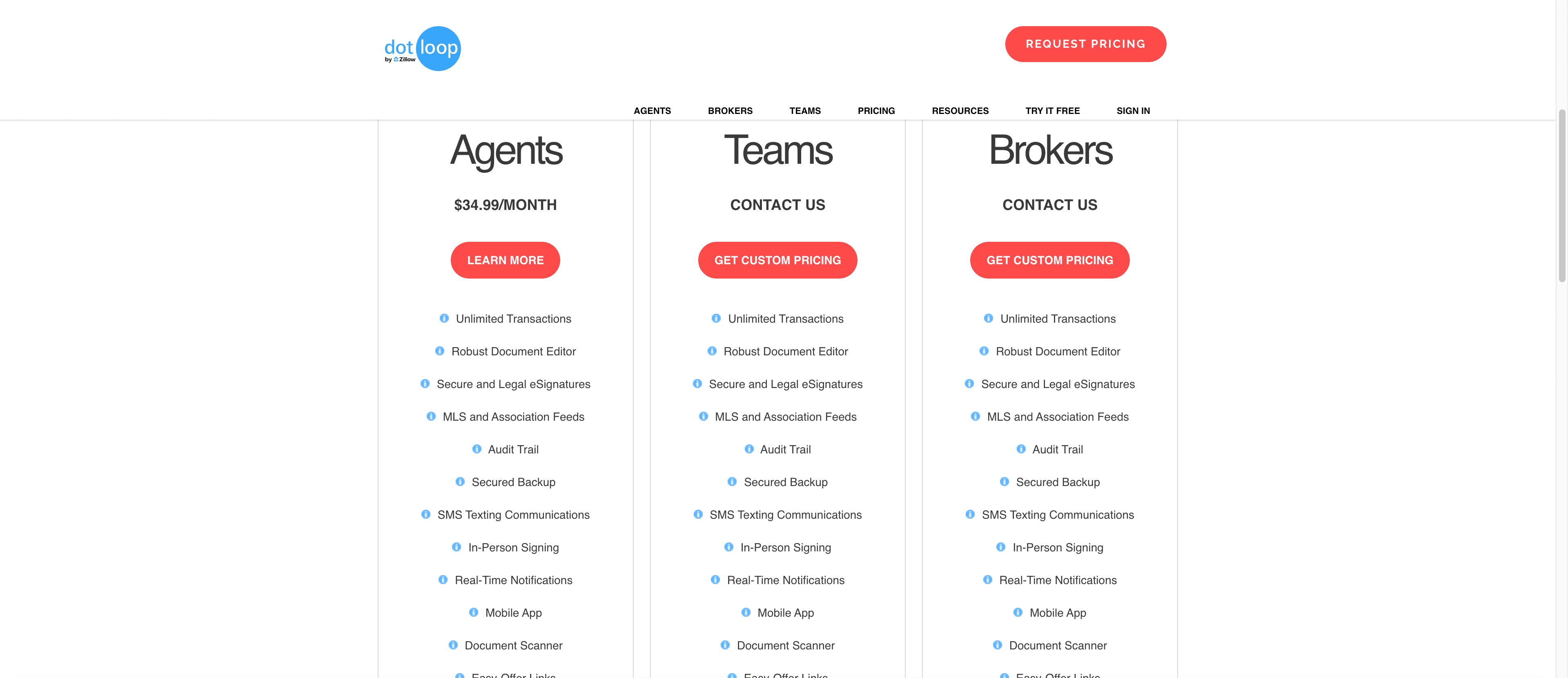
$133.99 a month for one person with one seat in each: dotloop Premium at $34.99 plus Open To Close Grow at $99. Pay Premium annually and the year comes to $1,532. A second Open To Close user adds $69, so a TC and an assistant pay $202.99 a month, or $2,360 a year with Premium paid annually. Those figures leave out DocuSign, which Open To Close signing needs and which only unlocks on the $199 Pro plan, and texts beyond 250 a user a month at $5 for each extra 250. dotloop Teams and Business+ have no published price, so a team adds a quote to the Open To Close line.
Who should pick dotloop alone?
A solo agent whose brokerage mandates dotloop and who has no TC. Premium at $34.99 gives you the forms, the signing, an audit trail and task templates that cover a checklist. A brokerage choosing its compliance system: dotloop, or whichever forms-and-review system your association provides. Open To Close is not a candidate for that job. And anyone hoping to retire dotloop's signatures. Do not. DocuSign through Open To Close is a third login with two settings to get right.
Who should add Open To Close?
A TC business running files across several brokerages' dotloop accounts. Multiple dotloop profiles are supported and every import is per property, so the brokerage's loop stays the brokerage's. Take Grow if nothing sends unattended, and Pro from the first DocuSign envelope. A team that wants clients in a portal and agents on intake forms: Open To Close for the front, dotloop for the paper, and time per file budgeted for the link. Either way, decide before the first import which system owns the price, the dates and the contacts, because an import overwrites whatever Open To Close already holds for a ticked field.
The job neither one does
dotloop is where the paperwork is filed. Open To Close is where the TC's list is kept. DeedSpring is the coordinator that makes sure the deal shows up on time. Upload the executed contract and it reads the price, deposits, contingencies and dates into deadlines on the file. It checks every open closing every hour, flags what is slipping, and drafts the chases and client updates for you to send, with anything about money or a moving date always waiting for a person. Your buyers and sellers get a portal, e-signing is built in, and if your brokerage mandates dotloop it keys the closing in there for you on request.
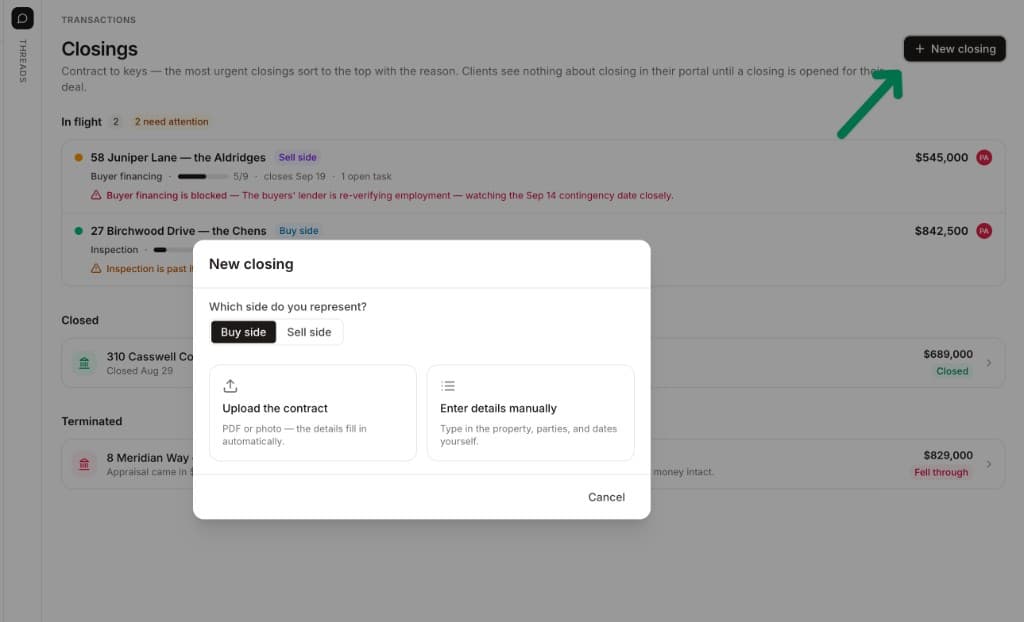
Starter is $15 a month for one closing a month. Standard is $25 a closing, less at volume, with unlimited agents and teammates and unused closings rolling over. Both are month to month.
How we compared
We compared dotloop Premium, Teams and Business+ with Open To Close Grow, Pro and Scale, using both vendors' pricing pages, dotloop's public API guide and Open To Close's help articles on the dotloop link, triggers and DocuSign signing. Prices and pages were checked in October 2026.