
Comparison · Software comparisons and alternatives
Open To Close vs ListedKit: which one to buy, and what each one automates
Buy Open To Close if your agents start the file or you close more than about seven buyer-side deals a month. Buy ListedKit if you start from the executed contract and close fewer. Here is who presses send in each, who types the dates, and what each costs at your volume.
Side by side
DeedSpring, ListedKit and Open To Close on who does the work
| Workflow step | DeedSpring | ListedKit | Open To Close |
|---|---|---|---|
| Price | Starter $15 a month for one closing. Standard $25 a closing, $19 at 20 or more. | $14.99 a credit, down to $11 in a 50-pack. Unlimited seats. | Grow $99, Pro $199, Scale $399 a month. $69 per extra team member. |
| How a file starts | Upload the executed contract or type the details in. | Upload the executed contract. Ava reads it, you confirm. | An agent fills in your intake form, or you import from Dotloop, SkySlope or Brokermint. |
| Who sets the deadlines | The coordinator, from the contract, as the first task on every closing. | Ava, from the contract. Click any date to see its source. | You type the anchor dates. Date templates do the arithmetic. |
| When a date moves | Move the date on the closing. The countdown and the client’s timeline follow. | Tell Ava in chat, or upload the amendment and she recalculates. | A person edits the date field. Dependent tasks update. |
| Who chases | The coordinator, on the tasks you assign it, until the answer is in writing. | You. Ava drafts, you send. | Email and text triggers you set on each task. |
| Review before send | Approve first by default. Anything sensitive is always a draft. | Every draft waits for you. Scheduled reminders go out unattended. | Queued for Inspect, Edit or Send. Per-trigger auto-send on Pro and Scale. |
| Client portal | Included on every plan. | No client login. A team workspace for coordinators and agents. | Agent and client portals free on every plan. |
| E-signature | Built in. | Ava Sign add-on, $29.99 per sending user a month. | DocuSign integration on Pro and Scale. |
| A deal falls through | Opening the closing used one. Unused closings roll over on Standard. | ListedKit won’t say. Assume the credit is spent. | Nothing. Transactions are unlimited. |
| Trial | Free to try. | First intake free, no card. | 30 days free. |
Who presses send?
In Open To Close a trigger fires when a task is completed, or is not completed by its date, and sends an email or text. The message lands on the Trigger Pipeline first. Inspect shows the rendered message and any missing merge fields. Edit freezes the wording. Snooze holds it for up to four days. One toggle on the trigger, “Trigger will be queued”, switches all of that off. Set it to red and the email goes out “without you being able to review it”.
That toggle is a plan feature. Grow does not include automatic sending for emails or texts, so a Grow account cannot bypass review even by mistake. Pro and Scale can, trigger by trigger. On Scale you can put a condition on a trigger, and when the condition is not met the message goes to the Failed Trigger tab instead of to the client. On Pro, the only thing between a bad merge field and your client is you opening Inspect.
ListedKit’s drafts wait for you. When a client email arrives, Ava drafts a reply from the deal context. Ask her for an email and she drafts it. Tasks tagged Email Task draft themselves on the due date, and the help page tells you to check the dashboard each morning, review, edit and send. The exception is scheduled reminders, which Ava sends at the time you set. An Ava that runs in the background and surfaces only what needs you is what the Agentic Ava waitlist is for.
One early Ava user explained why the draft step stays:
“i still copy-paste its draft emails and tweak them because the tone can feel robotic and i’m not risking it talking straight to clients”
The same comment put intake at about five minutes instead of half an hour. So the audit is different in each tool. On Open To Close you read every trigger on every template to see which ones are red. On ListedKit you read the reminders you scheduled.
How does a file start?
Open To Close starts with a form. An agent fills in an intake form with conditional logic, four of them on Grow and unlimited on Pro and Scale, and the submitted or approved form can fire a trigger. Or you import the transaction from Dotloop, SkySlope or Brokermint, on any plan. Either way the data lands in fields you built first. The Getting Started Guide runs Fields, then Contacts, Documents, Tasks, Emails and Intake Forms, calls Fields the foundation of the account, and offers free group training twice a week. Budget the setup.
Nothing in Grow, Pro or Scale reads the contract. Open To Close’s AI, Ollie, is sold as a separate product, Open To Close AI: one plan at $39 per user a month billed annually or $49 billed monthly, with 1,000 Ollie credits per user each month and a 60-credit example scan. A migration tool moves an existing account’s templates, fields and roles across, and nothing says a classic account can use Ollie without migrating.
ListedKit starts with the contract. Upload the purchase or listing agreement as-is, addenda included. Ava extracts the execution date first and lets you click it to see where it came from. You check the parties, financing and contingencies, confirm the timeline and apply a task template. The first three transactions are framed as training Ava.
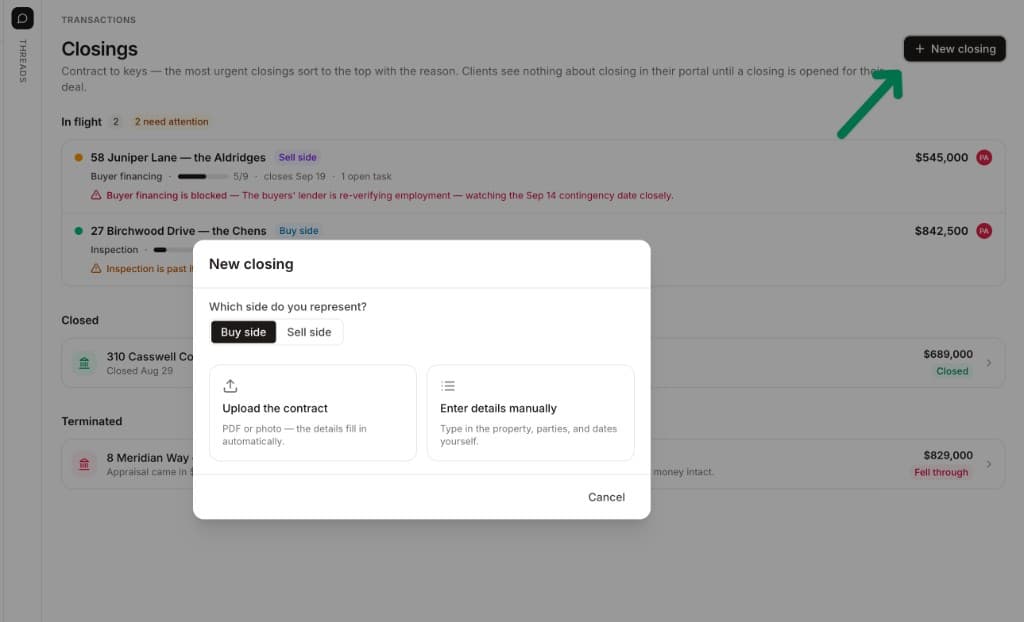
DeedSpring works the ListedKit way. Upload the executed contract, confirm the price, deposits, contingencies and dates it found, and the deadlines are set as the first task on the closing. If you are on Open To Close and want the contract read, that is a second product at $39 a user. Here it is in the plan you already pay for.
What happens when a deadline moves?
In Open To Close a changed date is a field edit. Tasks whose due date is calculated from that field update with it, and date templates cascade. Edits to a task template do not reach files already open. The date math handles business or calendar days and rolls a date off a weekend or federal holiday. A person still finds the new date in the amendment and types it.
In ListedKit the same change is a sentence. Type “The closing date got delayed by 2 days” in chat and the closing date and every related deadline and task move with it. Upload the amendment instead and Ava re-reads the contract and recalculates the affected deadlines.
What does each one cost at your volume?
Open To Close charges per account. Grow is $99 a month, Pro $199 and Scale $399, each with one user included and $69 a month for every extra team member. Agent and client portal logins are free, transactions are unlimited, and ten or more team members means Enterprise pricing. Grow caps Task Triggers at three and leaves out automatic sending, webhooks, trigger conditions and task locking, so the automation this article is about really starts at $199, and conditional automation at $399.
ListedKit charges per credit. A buyer-side deal uses one credit. A listing uses one, plus a second when it goes under contract. One credit is $14.99, and packs of 5, 10, 25 and 50 bring that to $14, $13, $12 and $11. Credits never expire, seats are unlimited and the first intake is free. ListedKit won’t say what happens to a credit when a deal dies. Assume it’s gone. E-signature is Ava Sign, $29.99 per sending user a month.
For one user doing buyer-side deals, ListedKit costs more than Grow from about seven deals a month. Listings use two credits, so the line is about four listings. Each extra Open To Close seat adds $69, which moves it by roughly five credits. At volume it is not close. A TC on r/realtors who closes about 200 a year, around 17 a month, calls Open To Close worth every penny, and 17 to 34 credits a month would run $187 to $374 even at the 50-pack rate.
Who should buy Open To Close?
A team whose agents start the file, because an intake form with conditional logic and a trigger on approval is exactly that. Anyone whose brokerage lives in Dotloop or SkySlope, since the import is on every plan and ListedKit has nothing like it. Anyone who wants some messages to go out unattended. And anyone over about seven buyer-side files a month on one seat. Clients get a free portal, though one r/RealEstateTechnology user who tried several all-in-one tools found none of them clean enough on the portal side. Buy Pro. Grow’s three triggers and no automatic sending make it date math with a form on the front.
Who should buy ListedKit?
A solo TC or small team that starts from the executed contract and wants the dates read and the emails drafted, with a person pressing send. Anyone under about seven buyer-side files a month, because a quiet month costs nothing. Anyone who does not need a client portal, a CSV export or a Dotloop connection: ListedKit connects to Gmail, Outlook, the two calendars and Follow Up Boss and nothing else, and its export is a PDF summary. Before you buy a pack, get three things in writing: when the second credit on a listing is charged, what happens to a credit when a deal falls through, and what you can export if you leave.
Who chases the lender when nobody has pressed send?
Open To Close sends whatever you built a trigger for. ListedKit drafts and waits. DeedSpring’s AI Transaction Coordinator reads the executed contract into deadlines, checks every active file every hour, and on the tasks you assign it sends the chase, notes who said what and keeps going until the item is confirmed in writing. Every message it writes is a draft you send, unless you switch routine confirmations and reminders to send themselves, address by address. Money, contract terms, a moving deadline and bad news are always drafts.
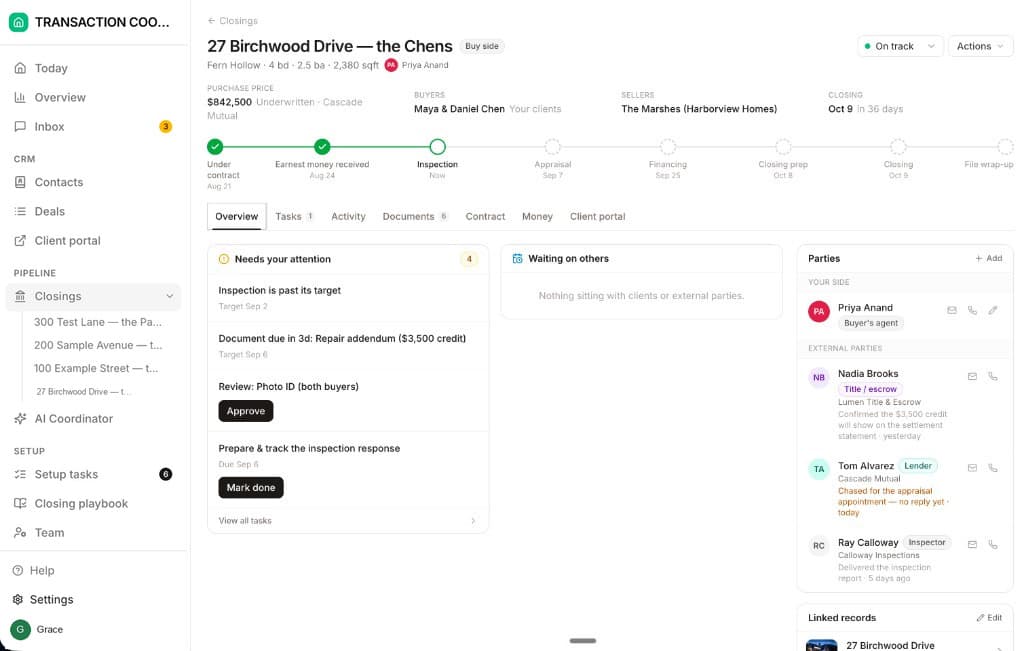
Starter is $15 a month for one closing. Standard is $25 a closing, down to $19 at twenty or more, with unlimited teammates and unused closings rolling over. A client portal and e-signing come with every plan, and both plans are month to month.
How we compared
We compared classic Open To Close (Grow, Pro and Scale) with ListedKit and DeedSpring using each vendor's pricing page and help articles on intake, triggers, changed deadlines and email drafting, plus dated user reviews. Prices and pages were checked in October 2026.