
Comparison · Software comparisons and alternatives
Open To Close vs Trackxi: which one your TC desk should buy
Buy Open To Close if your coordinators must own tasks by role and your clients only need to watch. Buy Trackxi if lenders and inspectors should close their own tasks and three users for $69 a month matters more. Neither reads the contract or chases anyone. DeedSpring does, from $15 a month.
What does each one cost?
Open To Close charges for the people who manage files. Grow is $99 a month, Pro $199 and Scale $399, each with one user included and $69 a month for every extra team member. Transactions are unlimited, and the agents and clients you invite to a portal are free. Texts beyond 250 a user cost $5 per further 250, and ten or more team members puts you on Enterprise pricing.
Trackxi charges by tier and caps what fits inside it. Essential is $39 a month for one team member and ten active files. Pro is $69 for five members and 100 active files. Enterprise is $199 for ten members and 1,000 active files. Crossing a cap gets you a prompt to upgrade rather than a bill. Follow Up Boss, automation and AI all start at Pro, so the real entry price for a coordinator on Follow Up Boss is $69.
For a three-person desk the gap is wide. One coordinator and two assistants pay $337 a month on Open To Close Pro and $69 on Trackxi Pro. Six users pay $544 on Open To Close Pro and $199 on Trackxi Enterprise.
Side by side
Open To Close and Trackxi on the things that decide the purchase
| Open To Close | Trackxi | |
|---|---|---|
| What you pay | $99, $199 or $399 a month, plus $69 for each extra team member. | $39, $69, $99 or $199 a month by tier. Annual from $399 to $1,999. |
| Team members | One included. Agent and client portal users are free and unlimited. | 1 on Essential, 5 on Pro and Pro Plus, 10 on Enterprise. |
| Active files | Unlimited on every plan. | 10, 100, 100 or 1,000. Closed files do not count. |
| Who owns a task | A role you define, mapped to a team member. Adding the role adds the person. | A person, with a due date. The role list is not published. |
| Who can complete a task | Team members, or Follow Up Boss users on pushed tasks. Clients cannot. | Team members and outside partners through the Partner Portal. |
| Client portal | Read-only. Per role: timeline, details, contacts, documents, tasks, notes. | Progress, documents and messages. View-only or Full Access. |
| Agent or partner login | Agent Portal: free, sees own files, submits intake forms. | Partner Portal: lenders and inspectors see their tasks, upload and mark them done. |
| Follow Up Boss | All plans. Contacts, emails, texts and notes pushed out. Tasks round-trip. | Pro and above. App embedded in Follow Up Boss, key fields mapped. Direction unstated. |
| Calendar | Transaction dates to Google or Outlook, with invitations to chosen contacts. | Your tasks mirrored to Google, Outlook or Apple for 60 days, one way. |
| E-signature | DocuSign on Pro and Scale. | None listed. SkySlope two-way sync on Pro Plus and Enterprise. |
| Onboarding | Free group training Tuesdays and Wednesdays. Live chat and email on all plans. | Two hours of 1:1 onboarding on every paid plan. Phone support from Pro. |
| Trial and leaving | 30-day trial. Data kept and restored if you come back. | 14-day trial after you pick a plan. Download your data before the cycle ends. |
Who owns a task in each?
Open To Close separates the role from the person. Roles are labels you define, such as Transaction Coordinator or Listing Coordinator, and tasks in a template carry a role rather than a name. Open To Close’s own instruction is that tasks “have to be assigned a role so you know who is responsible for it”. Give a team member that role and any task carrying it adds them automatically, with a per-user filter inside each transaction.
Access follows the team. Put a file on a Listing Team and only that team’s members can open it. An admin can also impersonate a team member, see their files and fire triggers on their behalf, which matters when you audit who sent what. The pipeline-wide filters that let two coordinators each see only their own tasks across every file start on Pro. On Grow you filter inside each transaction.
Trackxi documents assignment and keeps the role model to itself. Inman’s reviewer describes each task carrying notes, the parties attached to it and the ability to assign people to it and create due dates. The FAQ promises admins and team members role-based permissions and says VAs, agents and TCs can be given specific access levels, but no page lists the roles or the levels.
What Trackxi does publish is completion by outsiders. The Partner Portal assigns photography uploads, appraisals, loan approvals and inspection reports to the vendor doing them, and “Partners mark them as Completed once done”. That is the sharpest difference between the two. In Open To Close a task is closed by a paid team member or a Follow Up Boss user. In Trackxi an unpaid lender can close it.
What can clients, agents and partners see and do?
Open To Close’s client portal is read-only. A portal role switches on Timeline, Details, Contacts, Documents with separate upload and download rights, Tasks and Notes, and whatever you switch on, a client cannot change the timeline, edit details, complete tasks or add notes. Agents get a different free login. An Agent Portal user sees the files they are on and submits intake forms, which route to the team and team member you choose. Delete the agent and their files pass to the coordinator on each transaction.
Trackxi describes its client portal in marketing terms. Clients get a one-click or automatic invite, a progress view, documents and messages, and internal notes stay private. Its coordinator page offers View-only or Full Access levels for clients and partners without listing what either contains. Assume a client on Full Access can do more than watch, and ask exactly what before you invite one.
Portal polish is where Open To Close takes its one public knock. A commenter on r/RealEstateTechnology who tried several all-in-one tools found it “solid for transaction management” but said “none felt clean enough on the client portal side”.
What moves to Follow Up Boss, and which way?
Open To Close pushes. Follow Up Boss is on all three plans, and contact fields, synced emails, texts and notes go from Open To Close into Follow Up Boss. Tasks are the only round trip. A task assigned to a Follow Up Boss user goes out through a single account-wide webhook, and when it is completed in Follow Up Boss the change comes back and marks the task. A coordinator serving several Follow Up Boss clients connects each client’s API key and gets one webhook per account.
Trackxi’s integration starts at Pro and runs as an app embedded inside Follow Up Boss. Contacts come in with key fields mapped automatically and the two systems stay synchronized, in Trackxi’s words. It does not say which fields, in which direction, or whether tasks move at all. If you bill on Follow Up Boss deal stages, get that in writing before you sign.
Calendars differ in kind. Open To Close pushes a transaction date to Google or Outlook and sends invitations to the contacts you pick, on every plan. Trackxi mirrors your own task list into Google, Outlook or Apple Calendar for 60 days ahead, one way, with no invitations to the parties. Open To Close adds DocuSign on Pro and Scale and imports from dotloop, SkySlope and Brokermint on every plan. Trackxi has no e-signature and syncs with SkySlope both ways on Pro Plus and Enterprise.
Both tools hold the dates you typed and a list you tick. Neither reads the executed contract to set those dates, watches them, or emails the lender when the appraisal is late. That is where DeedSpring sits, beside either one, from $15 a month.
How long until you are live?
Open To Close expects you to build before you run. Its Getting Started Guide orders the work Fields, then Contacts and Documents, then task and email templates, then intake forms, and it suggests going live with one or two transactions at a time. The trial is 30 days on the pricing page and 15 free transactions in the account FAQ. Ask which applies.
Trackxi front-loads human help. Every paid plan includes two hours of one-to-one onboarding, and Trackxi will migrate your transactions, checklists, templates, contacts and automations from the tool you are leaving. Buyer, seller, listing and custom templates come pre-built with sub-task checklists. The 14-day trial starts after you pick a plan.
Automation is a paid-tier feature on both. Trackxi’s starts at Pro: an email fires when a task is marked complete or on a date, once you have set the rule. Open To Close caps Grow at three task triggers with no automatic sending. On Pro and Scale a trigger’s emails can wait in a queue for you or go out on their own.
Who should pick Open To Close?
A desk where two or more coordinators must each own their own queue, enforced by role and team, which is what Pro’s pipeline filters and the impersonation log are for. A desk whose clients should see everything and touch nothing. A desk that lives in Follow Up Boss and needs to know what goes where. And any desk past 1,000 active files, where Trackxi publishes no tier and quotes a custom plan. Budget $69 for every seat and buy Pro, because Grow has no DocuSign and only three triggers.
Who should pick Trackxi?
Three to five internal users under 100 active files, where $69 against $337 buys a lot of tolerance for unpublished permission detail. A desk that wants lenders, inspectors and photographers to close their own tasks, which only the Partner Portal does. And anyone who wants a human to set it up and move the old data over. Skip Essential unless you work alone without Follow Up Boss. Before you sign, get two things in writing: whether invited partners count toward Active Team Members, and which Follow Up Boss fields move in which direction.
The job neither one does
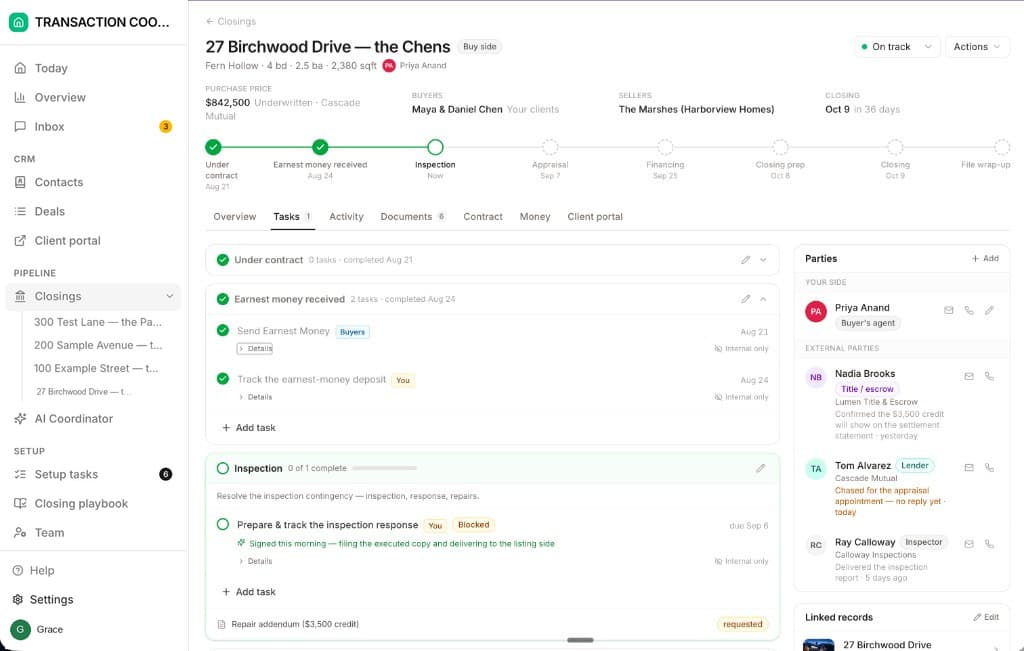
Open To Close and Trackxi are where the task list lives. DeedSpring is the coordinator who works it. Upload the executed contract and it reads the price, deposits, contingencies and dates into deadlines on the file. Every task names who does it, Deal owner, Client, External party or AI, and the AI coordinator chases the ones that are its own, drafts the replies for you to send, and checks every open closing every hour. Your buyers and sellers get one portal, signed in by magic link, with each milestone marked Everyone, Buyer side, Seller side or Internal only, at no per-client fee. Roles cover broker, team lead, coordinator, agent and assistant, and a TC firm runs each client brokerage as a team. E-signing is built in, and Follow Up Boss connects.
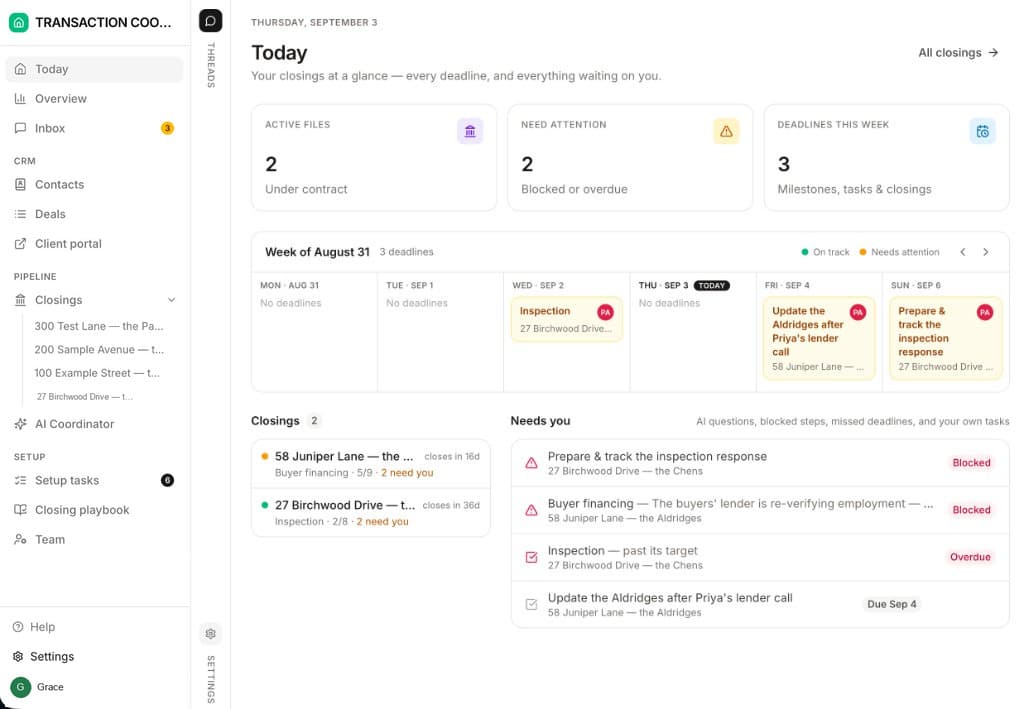
Starter is $15 a month for one closing. Standard is $25 a closing, $19 at twenty or more, with unlimited agents and teammates and unused closings rolling over. Both are month to month.
How we compared
We compared Open To Close’s Grow, Pro and Scale plans with Trackxi’s four tiers, using both pricing pages, Open To Close’s help articles on teams, roles, portals and Follow Up Boss, and Trackxi’s portal, integration and FAQ pages. Prices and plan limits were checked in October 2026.