
Comparison · Software comparisons and alternatives
Lofty vs BoldTrail: real estate team workflows and transaction handoffs
Lofty, formerly Chime, keeps the transaction, the checklist and the commission split inside the CRM. BoldTrail, the renamed kvCORE, shows deals kept in Dotloop, SkySlope or its separate BackOffice. Buy Lofty for a team that runs its own deals and BoldTrail for a brokerage with offices.
Which name is which?
Lofty was Chime until November 2023, when Chime Technologies announced the rebrand. BoldTrail is the renamed kvCORE. Inside Real Estate launched the brand in June 2024, moved every kvCORE account over, and no longer sells kvCORE on its own. Two more names matter here. BoldTrail BackOffice is the former Brokermint, the company's transaction, commission and accounting product, sold apart from the CRM. Lofty is also moving every account from Lofty Classic to Lofty AOS in stages, with no fixed timeline. You can switch back during the rollout, and when it ends Classic is retired.
BoldTrail, DeedSpring and Lofty on the points a team lead decides
| Decision | BoldTrail | DeedSpring | Lofty |
|---|---|---|---|
| Published price | None. Quoted by account size, products and add-ons | Starter $15 a month for one closing. Standard $25 a closing, less at volume | None. All four plans say Request Pricing |
| How a new lead is routed | Rules per company, office or team. Round robin by weight, or Blast | None. A closing opens from the signed contract | Round Robin, Next Up or Blast Alert, skipping agents outside working hours |
| Who owns the lead | The entity whose page or ad captured it. Agents export only their own | The roster and a sharing grid decide who sees each record | Company, office, team or personal. Company leads stay when an agent leaves |
| Team structure | Company, Office, Team, Agent. Team Admins cannot add agents | Broker/admin, Team lead, Transaction coordinator, Agent, Assistant | Company, office or team, and personal scopes. Permissions set who edits routing |
| The transaction record | Pulled from Dotloop, SkySlope or Folio. Agent, lender and client editable | Opened from the executed contract. Dates, deadlines and parties on the file | Inside the lead profile: stages, checklists, documents, splits and a CDA |
| Who chases the parties | Nobody in the CRM. The connected system holds the dates | The AI coordinator, until the item is confirmed in writing. Drafts approved first | Checklist tasks remind the assignee. Applied by hand, ten templates |
| Your data when you leave | Written request within 30 days of termination. Costs may apply | Month to month. Cancel from settings | Written request within 90 days. Lofty may delete after 90 days |
How does each one route a new lead?
A Lofty routing rule matches on source, ZIP code, tags and other lead attributes, then hands the lead out one of three ways. Round Robin cycles through the agents. Next Up goes to the next available agent in a queue, with an optional weighting. Blast Alert pings everyone on the list and the first to claim it wins. Rules run top to bottom and a Default Rule sits at the bottom. Agents outside their working hours, or with Vacation Mode on, are skipped. If every agent on the rule is out, the lead moves to the next rule. The Routing Logs show which rule fired and why the lead matched.
BoldTrail starts from the entity. A lead arrives at the company, office or team whose ad or page captured it, and that scope's rules pick the agent. The default rule cannot be deleted and round-robins by text and email to every active agent. Your own rules weight recipients by percentage, where “the system rolls the dice,” or Blast the lead to a list where the first to accept gets it. With lead acceptance on, a lead that arrives outside office hours goes to the timeout agent. A seller who typed an address and no contact details into an office or team site is not routed at all and waits with an admin.
Lofty's rules know whether an agent is at work today. BoldTrail's rules know which office the lead belongs to. If a Lofty admin makes every lead Company Owned, the personal and office rules never run.
Who owns the lead once it lands?
In Lofty a lead's owner and its assignee are two different fields, and only the owner can delete, merge or export it. Leads captured by a company, office or team channel are owned there, and the Lead Ownership page is blunt about why: by default a user who leaves cannot export them. Personal leads, from an agent's own open house or ad spend, belong to the agent. An owner or admin sets the company's ownership policy in Permission Profiles. The default, Global Company Lead, makes every lead company-owned and hides the owner fields. Turn it off to get the company, office, team and personal split above.
BoldTrail works the same way with fewer settings. You may only export the contacts you own, and contacts from team or office pages and ads are owned by those entities. Agents export agent-owned leads and admins export company or team leads. Change your login email and exports pause for 48 hours. A Team Admin can mark the team's leads private so office and company admins cannot see the contact details. One commenter on r/RealEstateTechnology put the rule in a sentence.
“Just remember, every lead that comes into brokerage CRM is owned by the broker. Not agent.”
How do offices and teams fit?
BoldTrail's roles are Company Admin, Office Admin, Team Admin, Agent and Lender, nested in that order, and every office and team must have its own admin. A Team Admin can edit the team website and remove agents from the team, but cannot add one. That takes a company or office admin. Routing, campaigns and search alerts are all set per scope, and the hierarchy is Company, Office, Team, Agent. A team that wants its own routing, its own lead ownership, its own landing pages and a subdomain website gets them when the brokerage buys the Multi-Teams add-on.
Lofty's scopes are company, office or team, and personal, with routing at each level. On the Enterprise edition two permissions decide who edits it: one for the entire company, one for the user's own office and its sub-offices.
What happens to the deal after the contract is signed?
This is where the two part company. Lofty keeps a transaction record inside the CRM. Every transaction lives in a lead's profile, with a pipeline per transaction type and default purchase stages of Pre-Contract, Under Contract, Pending, Closed and Canceled. You can add up to 15 stages per type, 100 custom fields and 100 custom roles. Lofty's own description of the feature is modest: it is “intended primarily for reporting purposes” and for tasks that remind you what happens at each stage.
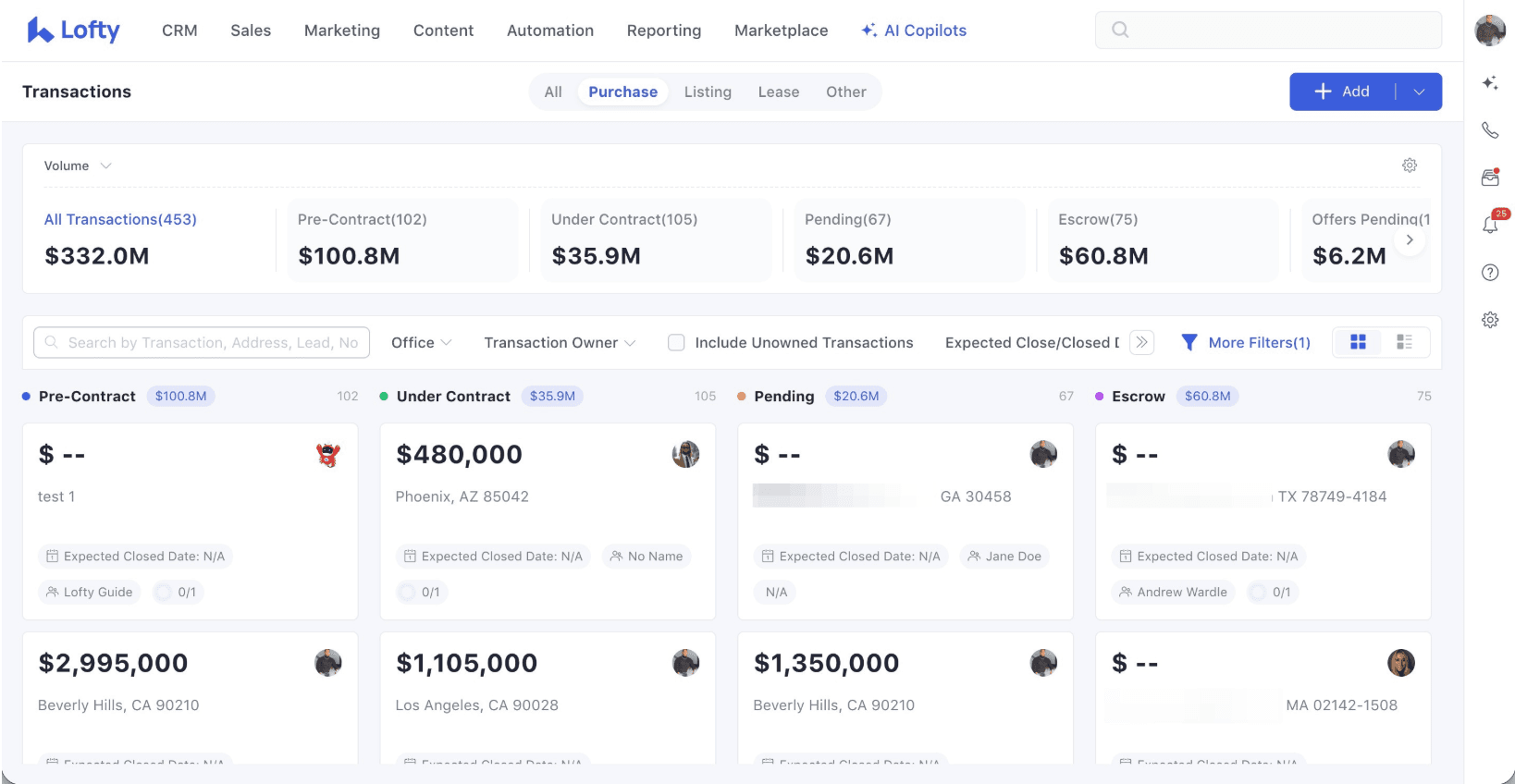
The reminders are checklists. A checklist template adds tasks at each stage, each with an assignee and a due date counted from a date on the transaction. You get ten templates in total, and they do not auto-apply. Someone opens the transaction and applies the checklist by hand. Clients follow the stages you mark visible in the Closely app, with shared documents and e-signing. When the deal closes you enter the sold price, GCI and three stages of splits, including outside parties, and generate a CDA that saves to the transaction and emails as a PDF. Documents have to be downloaded and uploaded again to use elsewhere. The Dotloop connection syncs five fields both ways and brings documents back. SkySlope gets transaction details only. On Lofty AOS the same record is described as tracking a deal “from contract to close,” with key dates flowing to your calendar and tasks.
BoldTrail's CRM does not hold the transaction. Deals shows transactions pulled from a system you connect in the Marketplace, “All transaction details are pulled from their source,” and the only fields you can change are the agent, the lender and the client. The Dotloop connection is one way into BoldTrail. The help page says there is no way to add a transaction in BoldTrail and have it sync to Dotloop, though it brings the contract, inspection and closing dates in. SkySlope also connects through the Marketplace, and a transaction created in BoldTrail can sync to SkySlope. Since June 2025 SkySlope charges an API usage fee for the connection. A newer Deals page lets an agent add a deal by hand with a title, type, stage and contact, and pulls incoming transactions from the MLS and systems such as Folio and SkySlope.
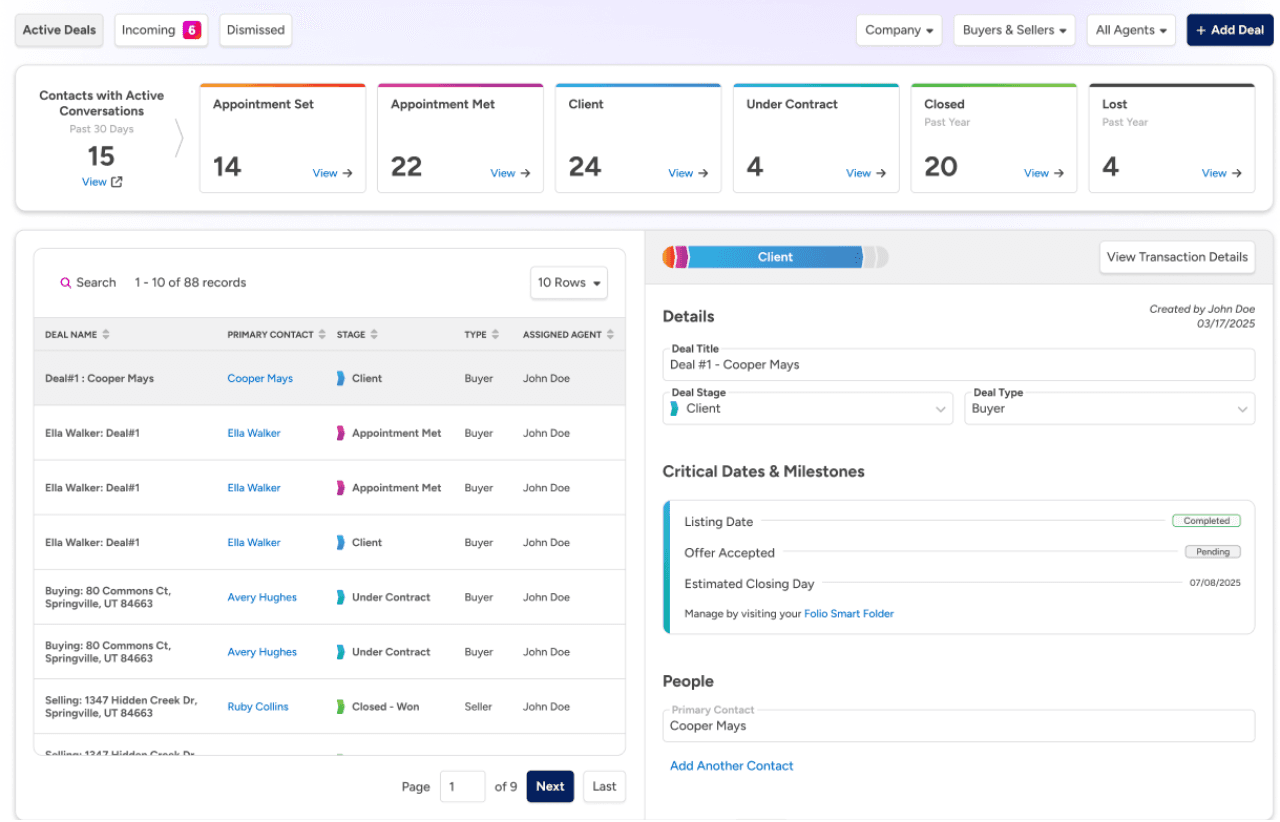
For the brokerage, the transaction and the commission live in BoldTrail BackOffice, a separate product with its own sign-in that you connect through the Marketplace. Agents are invited into it with a commission plan and an onboarding checklist, and a transaction can be created from Deals and finished in BackOffice. BoldTrail's own comparison with Lofty, from April 2026, says Lofty's back office is “Not natively included.” Lofty's site now sells a Lofty Back Office with transactions, commissions and one-click CDA generation, and its help pages document the splits and the CDA on a closed transaction. Neither Lofty page documents a general ledger or trust accounting.
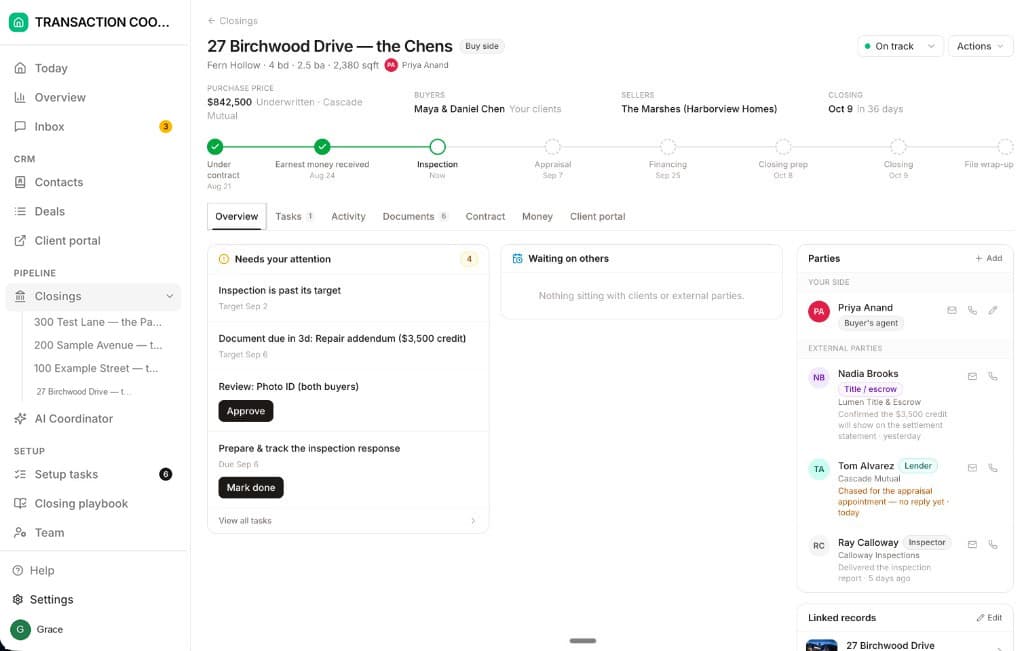
What neither one does is run the file. Lofty's tasks remind the person assigned. BoldTrail shows dates held in Dotloop, SkySlope or Folio. Nobody in either CRM reads the executed contract into the inspection and financing deadlines or chases the lender until the appraisal is booked. That is a coordinator's job, and it is what DeedSpring does beside either CRM. Both are on its connector list.
What do they cost, and what happens when you leave?
Neither publishes a platform price. Lofty's pricing page lists Agent, Team, Broker and Enterprise plans, every column says Request Pricing, and the quote depends on package, seat count, upgrades and lead-gen programs. Our Lofty pricing guide works through the add-ons. BoldTrail's FAQ says pricing depends on account size, products and add-ons like Streams, BackOffice or Recruit, “so there's no single list price.” Budget the Multi-Teams add-on and SkySlope's API fee on the BoldTrail side.
Read the exit terms before you sign either. Lofty's Terms of Use give you 90 days after termination, on a written request and with fees paid, to download your exportable CRM Data, and Lofty may delete it after those 90 days. A committed-term agreement renews for a year unless you give written notice at least 90 days before the end date. Inside Real Estate's Terms give you 30 days after termination to make the written request, say costs may apply, and allow IRE to delete the data after the 30 days. Our comparison of export terms across CRM and transaction tools goes further.
Which should your team pick?
Buy Lofty when the team runs its own deals and wants the transaction, the checklist, the client portal and the commission split in the same place as the lead. It suits a team lead who will build the ten checklists, keep ownership personal where agents bring their own leads, and accept that the record is a reporting record until someone works it. Expect screens to change during the AOS rollout.
Buy BoldTrail when you are a brokerage with offices, your compliance system is Dotloop or SkySlope and will stay that way, and you want BackOffice and Recruit from the same vendor. The entity model matches an org chart, the default rule means no lead sits unassigned, and team-level control is a paid add-on.
Whichever you pick, get three things in writing from the rep: which modules the number covers, what the Multi-Teams or Back Office line costs, and how you export when you leave.
Where does DeedSpring fit?
DeedSpring starts where both CRMs stop. Upload the executed contract and it reads the price, deposits, contingencies and dates into deadlines on the file. It checks every active file every hour and drafts the chases and client updates for a person to send, with anything sensitive or negotiable always waiting for approval. Your buyers and sellers get a portal, and e-signing is built in. For a brokerage, the roster carries Broker/admin, Team lead, Transaction coordinator, Agent and Assistant roles, with a sharing grid that sets how far each one sees. Lofty and kvCORE (BoldTrail) are both on the Data connections list.
How we compared
We read both vendors' pricing pages, terms and help articles on lead routing, ownership, roles, transactions and connectors, plus one Reddit thread. We compared what each does from a new lead to a closed deal, what each publishes about price, and what happens to your data when you leave.