
Buyer guide · Software comparisons and alternatives
Best real estate client portal software for active transactions
DeedSpring if your buyer or seller should see the timeline, upload what you ask for and message you on every plan. Open To Close for per-role portals that include lenders and inspectors. Trackxi on a $39 budget. What each portal lets a client see and do, and what it costs.
What should a client see and do in a transaction portal?
Two different things get called a client portal. One is the home-search kind: saved listings, showings, offers. The other starts the day the contract is signed and answers the question every buyer asks twice a week: where are we, and what do you need from me? This guide is about the second kind. DeedSpring's portal happens to carry both, with the search pages behind switches you can turn off, so the line is easy to see there.
Judge a transaction portal on six things. How the client gets in. Whether it shows the deal's milestones and the countdown to closing. Whether it tells them what they owe you, with a date. Whether they can see documents and hand you one back. What they can never see, and whether you can check that before you invite them. And whether it works on a phone. The table below runs four tools through that list. dotloop, SkySlope and Paperless Pipeline come after it, because none of the three gives a client a portal in this sense.
The four portals on that checklist
What a buyer or seller can see and do in each portal, and what it costs
| Question | DeedSpring | ListedKit | Open To Close | Trackxi |
|---|---|---|---|---|
| How the client gets in | One link for every client. Email, then a magic link or code. No password, no app. | No login. A web link to the live timeline, plus events on their own calendar. | Invite per contact, by hand or automatically. Lenders and inspectors can have one too. | One-click or automatic invite. Free sign-in. |
| Where the deal stands | Closing timeline with a countdown. Each step marked Everyone, Buyer side, Seller side or Internal only. | The timeline link updates when an amendment moves a date. | Timeline of transaction dates, if the role is given Timeline. | A tracker of what is done, what is next and how close to closing. |
| What they are asked to do | Their own to-dos and documents that need them, each with a due date. | No login, so nothing to do there. Parties get an emailed timeline and calendar events. | Sees Completed, Scheduled and Unscheduled tasks. Cannot complete one. | Clients watch progress. Partners get tasks to complete in a separate portal. |
| Documents | Views what is shared and uploads from the portal straight onto the closing. | A PDF summary by email. Nothing on its pages about files. | Download and upload, each a separate permission on the role. | Documents and utility or HOA details the agent posts. Uploads are described for partners. |
| What they never see | Internal notes, risk flags, other clients, your pipeline, internal-only steps. Preview as any client. | Dates for other roles. Buyers see buyer deadlines, lenders see financing. | Anything not on the role, notes when EX is on, any field with its star off. | Internal notes. View-only or Full Access permission levels. |
| On a phone | The same link in a browser. | The link, and reminders from their own calendar app. | Read-only in the iOS and Android app. | Nothing on its pages. Assume a browser. |
| What the portal costs | Included on every plan, no per-client fee. Starter $15 a month, Standard from $25 a closing. | $14.99 a credit per contract setup. No seat fees. | Portal users free. Plans $99 to $399 a month plus $69 a seat. | On every plan, from $39 a month for one seat. |
Which portal shows the client where the deal stands?
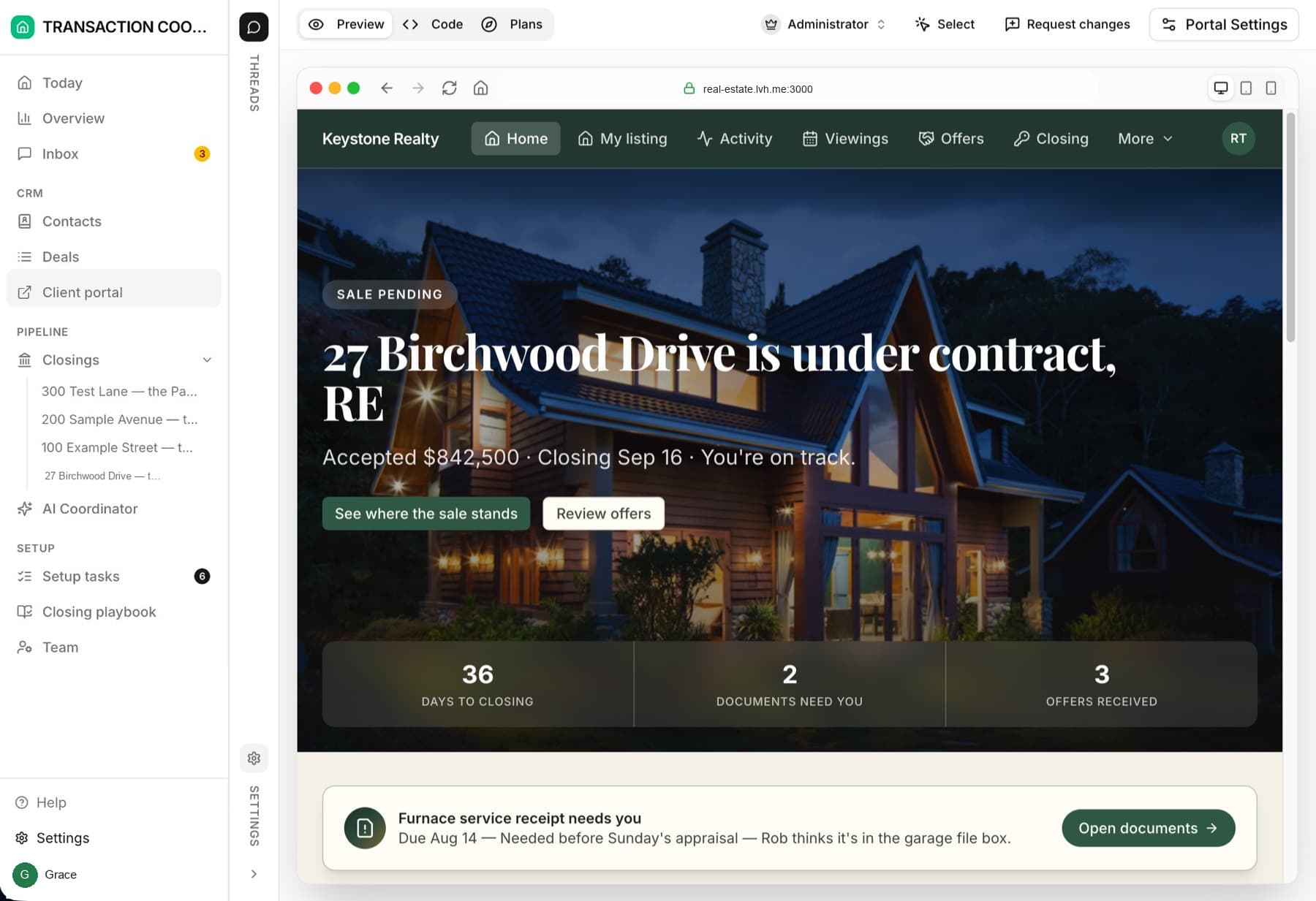
All four do, in different shapes. In DeedSpring the closing has one timeline, and every step on it is marked Everyone, Buyer side, Seller side or Internal only. A buyer and a seller on the same deal each read a timeline written for them, and when you move the closing date the countdown on their home page moves with it. The seller's version leads with days to closing and offers received.
Open To Close shows the transaction dates, closing, earnest money due, inspection and so on, to any portal role you give the Timeline permission. Trackxi's tracker shows what is done, what is next and how close the deal is to closing. ListedKit does the job without a login at all. Ava, its assistant, sends every party a web link to a live timeline and puts the deadlines on their own Google or Outlook calendar, and when an amendment moves a date the link and the events update. That is a strong answer for a buyer who will never create another account. It is also the whole portal.
Can the client act, or only watch?
This is where the four split. Open To Close is explicit that its client portal is read-only: a client cannot change the timeline or details, complete a task or add a note. The one action a role can be granted is uploading documents, and download is a separate permission beside it. Clients can also message you from the portal, which we come back to under cost. Trackxi puts the doing on its Partner Portal, where lenders and inspectors complete assigned tasks and upload files. Its client portal pages describe watching: progress, documents, resources and messages. ListedKit's parties get a link, an emailed timeline and a PDF summary, and its pages describe no way for them to hand anything back.
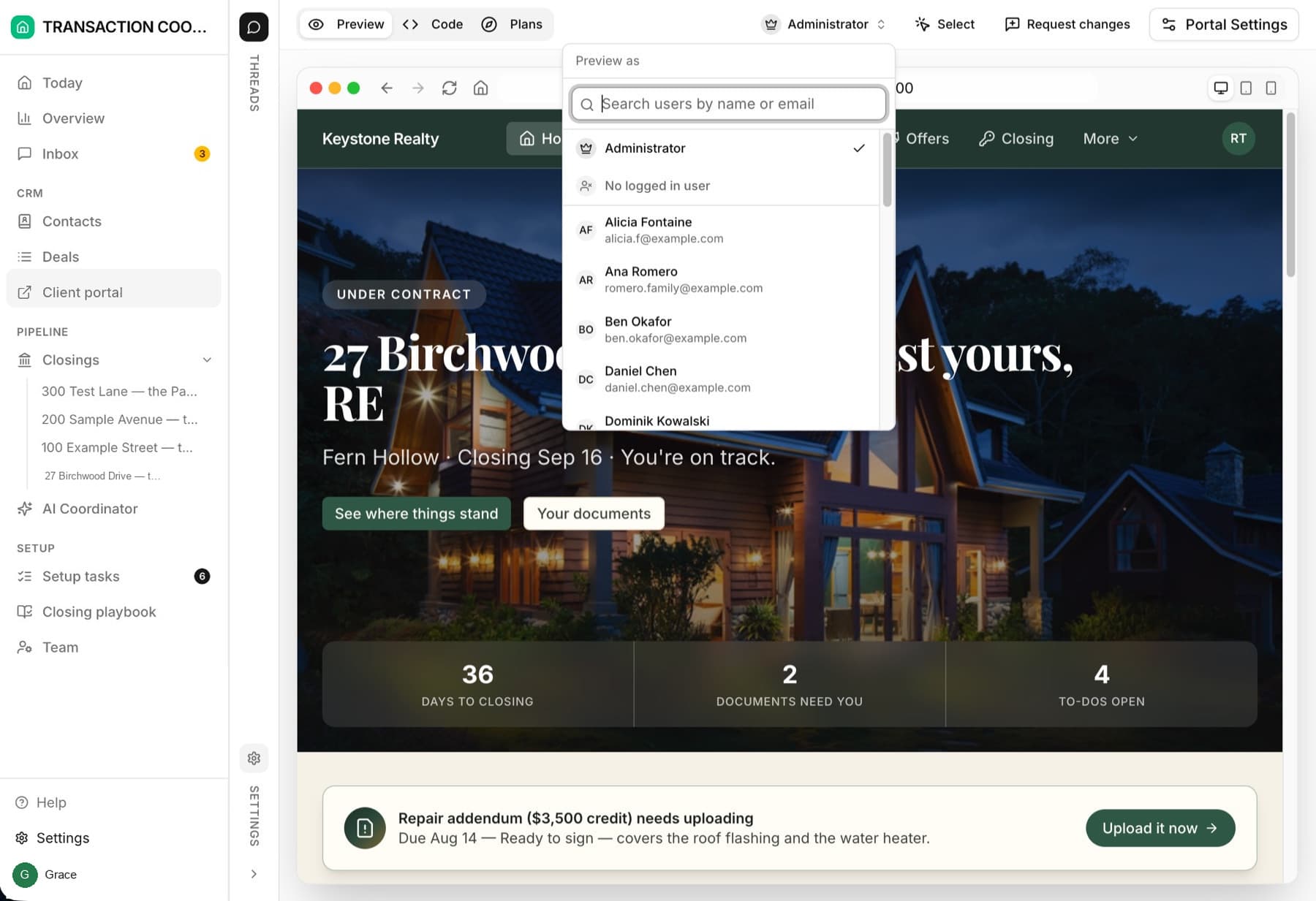
DeedSpring's portal is built around what the client owes you. The home page counts the documents that need them and their open to-dos, each with a due date, and a document they upload from the portal is on the closing record before they close the tab. Switch Messages on and they get a chat thread to your team that lands in the same Inbox as your email and texts. The buyer in the screenshot below has a repair addendum waiting to be uploaded and a button to do it.
What does the client never see?
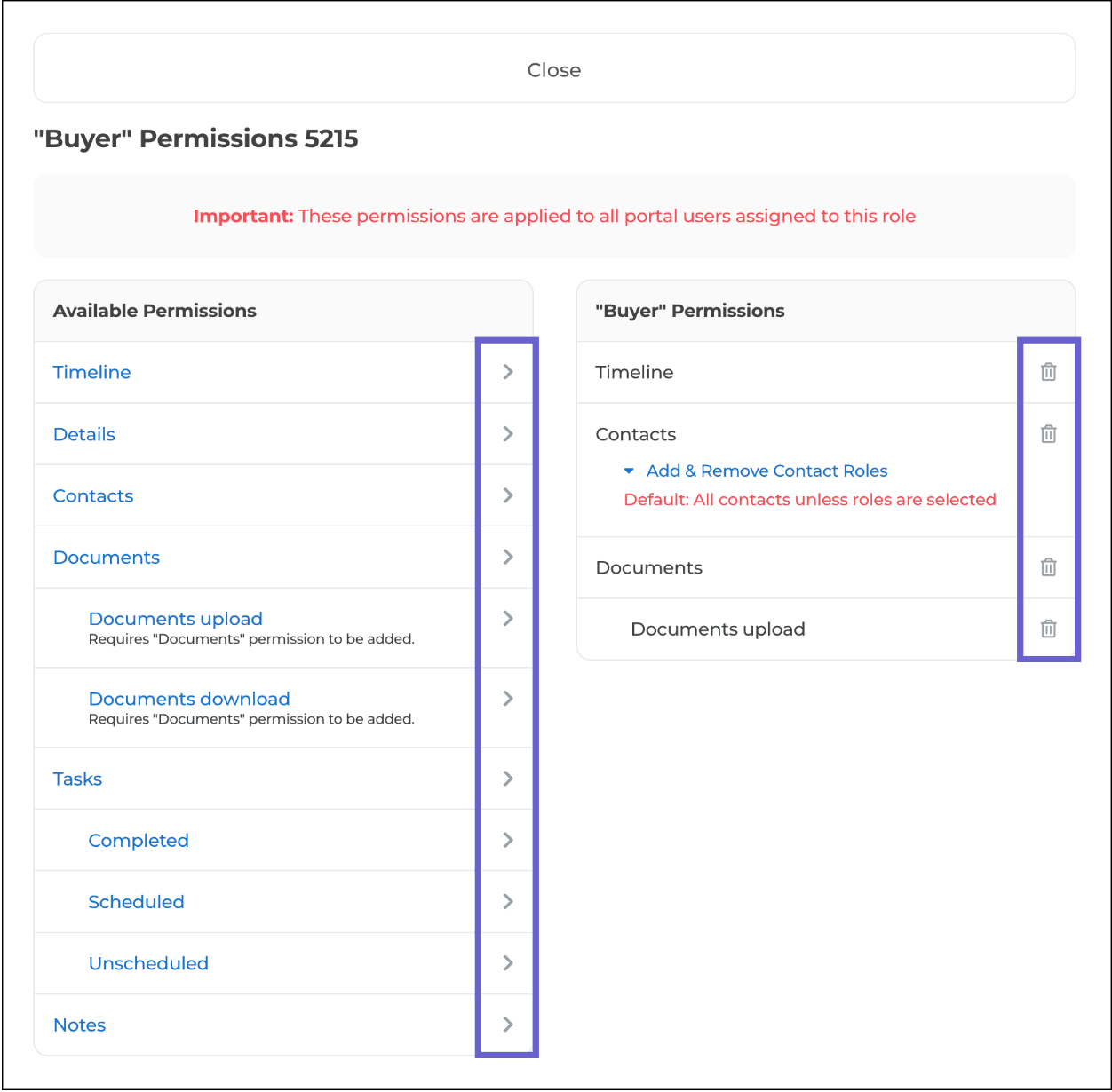
Open To Close has the most knobs. You create a portal role for each kind of person, Buyer, Seller, Inspector, and give the role some of six permissions: Timeline, Details, Contacts, Documents, Tasks and Note. Switch the EX button on and transaction notes stay out of every portal. Each field carries a star: purple shows it to agents and clients, clear hides it, which is how you show the client who referred them and not the referral fee. Set the role's permissions before you send the invite. The invite is the moment a client sees whatever the role allows.
DeedSpring works from the record rather than a permission list. A client sees a deal only if they are in its Members field, their Buyer or Seller role picks the side, and the portal never carries internal notes, deal health or risk flags, other clients' records or your pipeline. Any task or milestone you mark Internal only stays off it. Before you invite anyone you can preview the portal as any eligible client, in the live portal, and flip between a few of them to confirm each sees only their own deal. Trackxi says you share only what matters while keeping internal notes private, with View-only or Full Access permission levels. ListedKit's control is by role on the shared timeline: buyers see buyer deadlines, lenders see financing milestones.
What does it cost to give every client a login?
Nobody charges per client, so the bill is the plan behind the portal. Open To Close lists agent and client portals as free on Grow, Pro and Scale. The plans are $99, $199 and $399 a month, each with one seat and $69 for every extra team member. One catch sits in the same pricing table: Messaging, including Send Messages to Clients, is ticked on Scale only, while the portal help pages describe clients sending you direct messages. Ask which plan unlocks portal messages before you promise clients a chat.
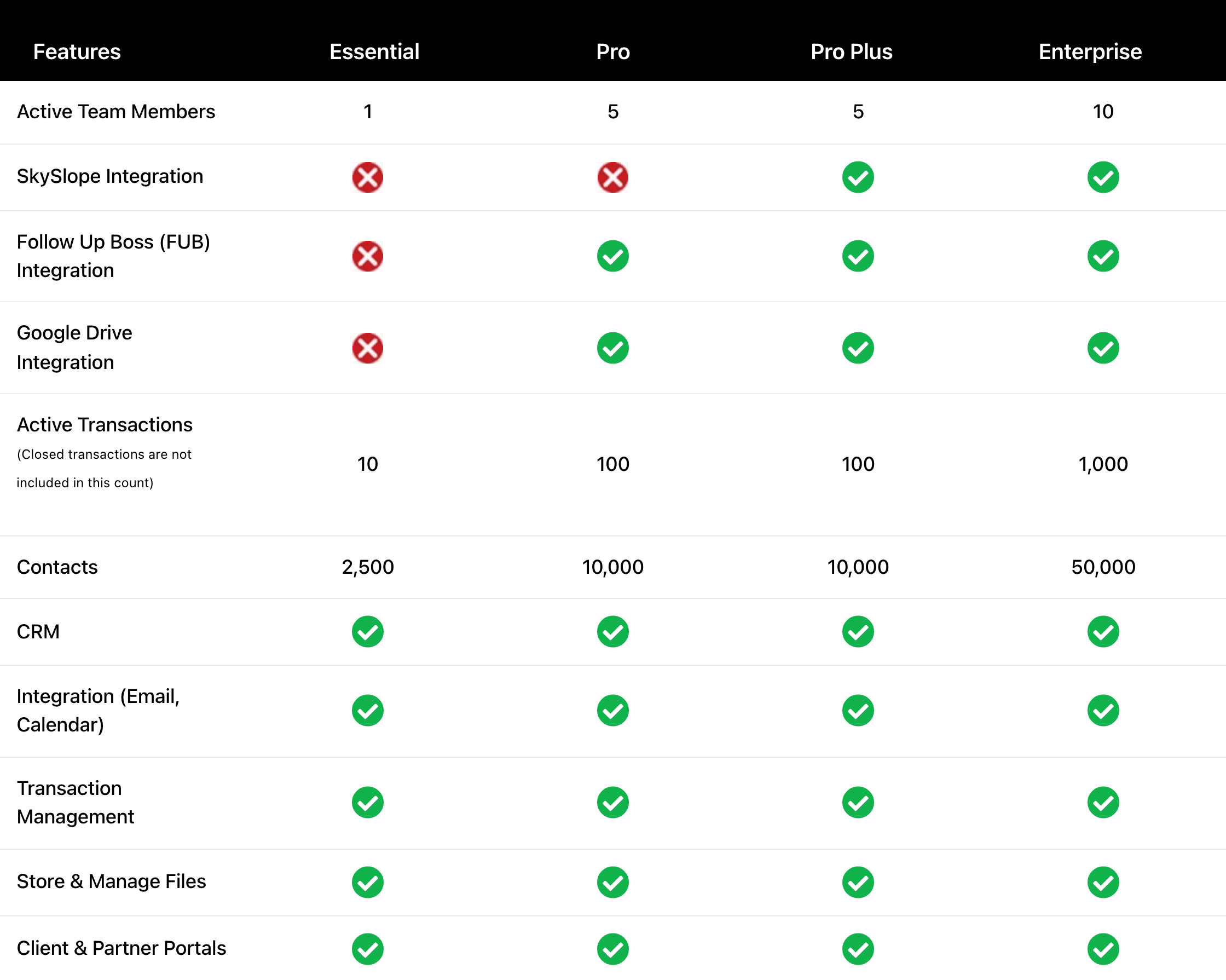
Trackxi includes Client & Partner Portals on all four plans. Essential is $39 a month for one team member and ten active files, Pro $69, Pro Plus $99, Enterprise $199, and closed files drop out of the count. ListedKit sells credits at $14.99 each, $11 in a 50-pack, with no seat fees, and the shared timeline costs nothing on top. Add Ava Sign at $29.99 per sending user if you want signatures inside it. DeedSpring includes the portal on every plan with no per-client fee. Starter is $15 a month for one closing. Standard is $25 a closing, falling to $19 at twenty or more, with unlimited agents and teammates. The portal can sit on your own domain.
Doesn't dotloop, SkySlope or Paperless Pipeline already do this?
No. dotloop gives your client documents, not a deal. A document is private until you share it, and you share it as View Only, Can Sign or Can Fill & Sign. The client gets an email whose subject starts ACTION NEEDED, opens the document, signs and shares it back, with no account needed. dotloop's own definition of a client is a buyer or seller invited to review or sign documents, and its client pages describe nothing beyond that: no timeline, no to-do list, no countdown. If you want to know how the agent side works, read how dotloop works.
SkySlope's pricing page describes DigiSign envelopes that buyers and sellers sign, and its help pages return nothing for “client portal”. Assume your SkySlope clients get signing emails and nothing to log in to. Paperless Pipeline's plans start at $69 a month with unlimited users, and every one of those users is an agent or an admin. Its permission model has no client role, and a help search for “client portal” finds only the Enterprise Portal for administering several accounts. All three are the brokerage's system. The client portal is a second layer you buy for your own clients, which is the same shape as the TC software decision.
Which one should you buy?
Buy DeedSpring if the portal's job is to run the under-contract file with the client: a timeline written for their side, the documents and to-dos they owe you with dates, an upload that lands on the file, and a chat into your Inbox, included on every plan from $15 a month. Buy Open To Close if you need many kinds of portal user, buyers, sellers, lenders, inspectors and agents, each with its own read-only view set from a permission list, and an agent portal where agents submit intake forms. Budget Scale if clients must message you inside it. Buy Trackxi if the price decides it: $39 a month gets a solo agent a tracker, documents and messages for every client, and a Partner Portal where lenders complete their tasks. Choose ListedKit when your clients will not create one more login and a live timeline link plus calendar invites is all the portal they want. Open To Close and Trackxi against each other is its own article: Open To Close vs Trackxi.
How we compared
We compared DeedSpring, ListedKit, Open To Close and Trackxi on what their help and pricing pages say a buyer or seller can see and do in the portal, and read dotloop, SkySlope and Paperless Pipeline pages on the client side. Prices and pages were checked in October 2026.