
Comparison · Software comparisons and alternatives
Follow Up Boss vs BoldTrail: lead routing, team structure and pricing
Follow Up Boss publishes its prices and routes leads with rules you can read in one screen. BoldTrail, the renamed kvCORE, nests offices and teams and quotes privately. Pick Follow Up Boss for a team with its own lead sources, BoldTrail for a brokerage that wants one vendor. Neither runs the file once the contract is signed.
What separates them in one table?
First, the names. BoldTrail is the front-office CRM from Inside Real Estate, the product that was kvCORE until the company put kvCORE, BoomTown and Brokermint under one brand in mid-2024. The FAQ says kvCORE is no longer sold on its own and every kvCORE account was moved over. BoldTrail BackOffice is the Brokermint successor, a separate back-office product for transaction management, commissions and accounting that BoldTrail connects to through its Marketplace. This article is about the CRM. Follow Up Boss joined Zillow Group in December 2023 and still sells as a standalone CRM.
Follow Up Boss, BoldTrail and DeedSpring on the things that decide the purchase
| BoldTrail | DeedSpring | Follow Up Boss | |
|---|---|---|---|
| Published price | None. Quoted by account size, products and add-ons | Starter $15 a month for one closing. Standard $25 a closing, less at volume | Grow $69 per user, Pro $499 for 10 users, Platform $1,000 for 30, monthly |
| Routing rules match on | Source, hashtag, lead type, then property type, area, MLS and price for buyers | None. DeedSpring starts at the signed contract | Lead source first, then tags, price, city, state, ZIP, MLS number, phone number |
| Ways to distribute | Round robin with percentage weights, or Blast to everyone on the list | None | Round Robin groups or First to Claim groups |
| Lead nobody takes | Timeout agent after the minutes you set, or a pond | None | Fallback after at most 30 minutes unclaimed, or a pond |
| Hierarchy | Company, Office, Team, Agent. Each office and team has its own admin | Teams, each with a lead. A sharing grid sets what each role sees | One account. Teams with team leaders on the Platform plan only |
| What a team lead can do | Team Admins cannot add agents. The Multi-Teams add-on gives teams their own routing | Sees every file on their team, and everyone's if the grid allows | Sees every lead on the team. Cannot assign leads to groups |
| Website and lead generation | IDX websites and a lead engine are part of the platform | None. Connects to Follow Up Boss and kvCORE (BoldTrail) | None. Connect any lead source and website |
| Deals after contract | Pulled from a connected transaction system. Agent, lender and client are the editable fields | Opens the closing from the executed contract. Dates, playbook deadlines, drafted updates | Buyers and Sellers pipelines, typed in or created from Open to Close or Dotloop |
How does each one route a new lead?
Follow Up Boss routes by source. Every lead source on the Lead Flow page gets an agent or a group, an optional lender, and an action plan, and you can hold distribution for up to five minutes on a source so a lead lands with its data filled in. Advanced rules add a second layer underneath: match on tags, price, city, state, ZIP code, MLS number or phone number, processed top to bottom, with a default rule catching whatever falls through. A group hands leads out Round Robin or First to Claim, and only the owner and admins can edit any of it.
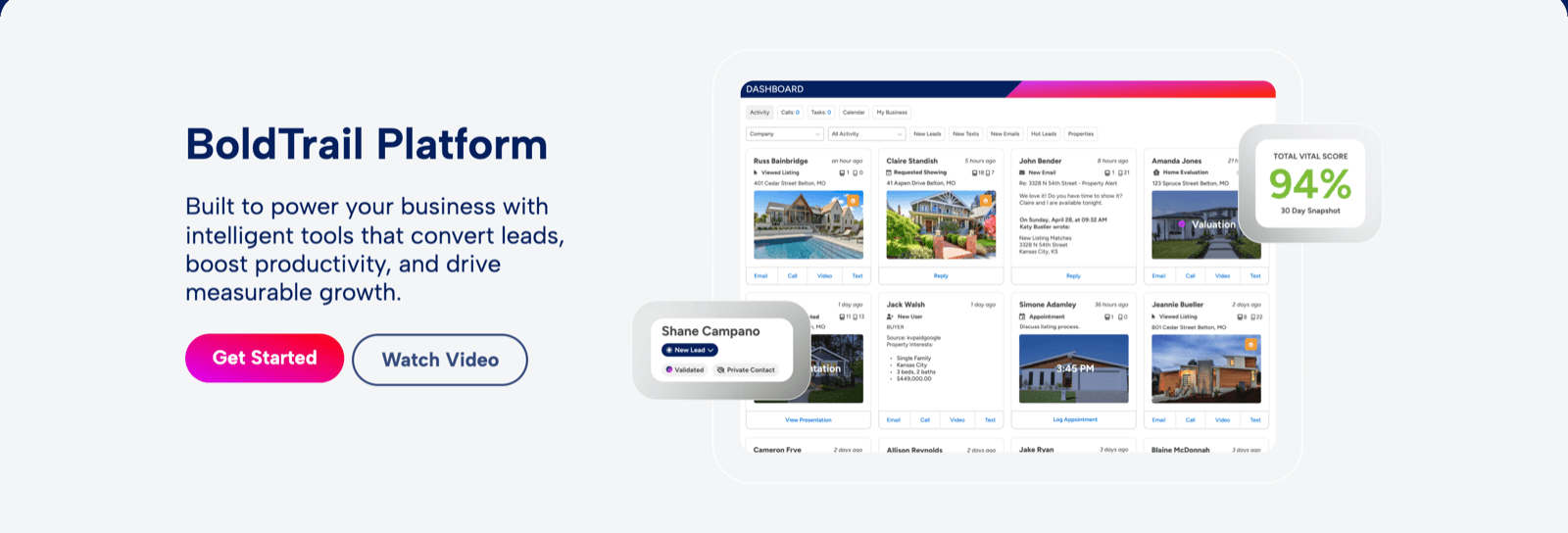
BoldTrail routes by scope. Rules live at Company, Office or Team level, and the default rule, which cannot be deleted, will “distribute leads round-robin via text message and email through all active Agents.” Your own rules match on source, hashtag and lead type (buyer, seller, renter or agent), and for buyers also on property type, area, MLS and price. Each rule can weight its recipients by percentage, which must total 100, after which “the system rolls the dice.” Or you pick Blast, where everyone on the list is offered the lead and “The first person to accept the lead gets it.”
The practical difference: Follow Up Boss criteria describe the lead (its ZIP, its price band), while BoldTrail criteria describe where the lead came from and which office or team it belongs to. A ten-person team will be fine with either. A brokerage with three offices that each want their own rules will find BoldTrail already shaped that way.
What happens to a lead nobody takes?
In Follow Up Boss a First to Claim group sends a push notification to every member's phone, and only to the phone, so an agent on email will miss it. A lead can sit unclaimed for at most 30 minutes before it goes to the group's fallback. Lender groups are always round robin. Ponds are the longer-term holding tank: a pond behaves like an agent that leads can be assigned to, team members pick from it, and lead flow can point a source straight at it. Ponds need an account with more than one user, and there is no pond reporting.
BoldTrail has the same two ideas with more knobs. When lead acceptance is on, a timeout agent is required, and the help page tells you to multiply your acceptance minutes by the number of people on the list so everyone gets a turn before the timeout fires. Leads that arrive outside office hours go to the timeout agent directly. Pond accounts are created by admins only, each belongs to one office or team, and an agent takes a contact with a Claim Contact button. Reclaim rules can pull a neglected contact back into the pond, and automated emails from campaigns do not count as working the lead.
How do they handle offices, teams and permissions?
Every Follow Up Boss account has four roles: Account Owner, Admin, Agent and Lender. Only the owner can change billing, custom stages and fields, and the export permission. Teams arrive with the Platform plan, which adds ISA and team-lead roles. A team leader sees every lead assigned to anyone on the team, plus leads a teammate collaborates on, and cannot assign leads to groups. An Account Team Lead sees all leads without admin rights. The plan breakdown puts Grow at solo users and teams of five or fewer, Pro at 5 to 20 users and Platform at 20 or more.
BoldTrail is built as a tree. The scope hierarchy is Company, then Office, then Team, then Agent, and each Office and Team must have its own admin. Roles are Company Admin, Office Admin, Team Admin, Agent and Lender. A Team Admin “cannot add Agents to their team entity,” so a company or office admin does that. Companies that buy the Multi-Teams add-on let a team run its own lead routing, own every new contact it adds, and run a website on a subdomain of its office.
If you run offices, BoldTrail's model matches your org chart and Follow Up Boss gives you one layer of teams at the top price. If you run one team, the Follow Up Boss roles are enough and the tree is overhead you will not use.
What do they cost?
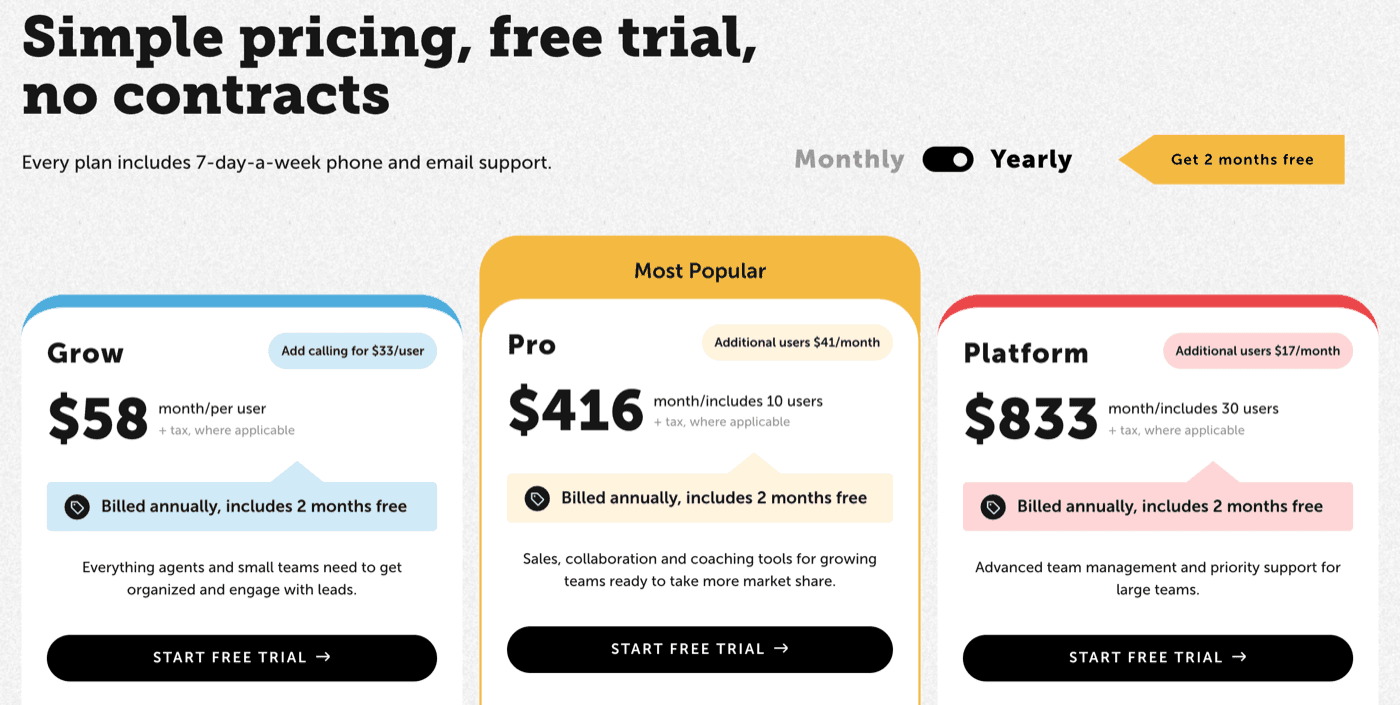
Follow Up Boss prints three plans. Grow is $69 per user a month, or $58 billed annually, with calling an extra $39 per user ($33 annual). Pro is $499 a month including ten users, $49 for each extra user ($416 and $41 annual). Platform is $1,000 a month including 30 users, $20 for each extra ($833 and $17 annual). All plus tax, with a 14-day free trial and no contracts. Lead distribution is on every plan. Team inboxes and call reporting start at Pro. Teams within teams is a Platform feature.
BoldTrail prints nothing. Its platform page ends in a form that asks your team size and job title. The FAQ says pricing depends on account size, the products included and add-ons like Streams, BackOffice or Recruit, “so there’s no single list price.” The company's own kvCORE-to-BoldTrail post adds that add-ons such as BackOffice or the recruiting product may cost extra. Two more costs sit in the help pages: Multi-Teams is an add-on the company buys, and since June 2025 SkySlope charges an API usage fee to connect to BoldTrail.
Some agents never see a BoldTrail invoice because the brokerage pays for it, and that shapes how the two get compared in the wild.
“I have KvCore through my brokerage, and I pay for FUB personally. I personally like FUB more; it's more user-friendly and has more seamless integrations with other systems.”
What do they connect to?
Follow Up Boss sells itself as the open hub, with a 250-plus integrations directory and an API, and it has a help article on taking leads from BoldTrail itself by email parsing, Zapier or the tracking pixel. On the transaction side, the Dotloop connection is one way, from Dotloop into Follow Up Boss through Realsynch and Zapier every five minutes, carrying price, close date, commission and the loop link. Lone Wolf Transact runs as an embedded app that pushes contacts one way and starts a transaction from the Follow Up Boss record, and Open to Close can create a deal from its side.
BoldTrail connects through its Marketplace. The Dotloop connector maps loop fields including Closing Date and Contract Agreement Date, and disconnecting it goes through Support. The SkySlope connector works the same way and carries the usage fee above. Websites and IDX need no connector because they are part of the platform.
Which one carries the file after the contract is signed?
Neither, really. A Follow Up Boss Deal is a card in a Buyers or Sellers pipeline with a name, a price, a projected closing date, the contacts, the commission and splits, and the team members on it. Only the account owner can change the pipelines and stages, and non-admins see only their own deals. The option period, the appraisal deadline and the lender's clear-to-close live somewhere else, which is why the Dotloop, Lone Wolf and Open to Close connections exist.
BoldTrail Deals are stricter about it. You connect a transaction account in the Marketplace first, then “All transaction details are pulled from their source,” and the only fields you can change in BoldTrail are the agent, the lender and the client. A newer Deals feature pulls incoming transactions from the MLS and from systems such as Folio and SkySlope. BoldTrail BackOffice, the separate Brokermint product, covers the brokerage's transaction management, commission automation and accounting.
That hand-off is where DeedSpring sits. It opens the closing from the executed contract, fills in the dates, lays out the deadlines from a playbook and drafts the client updates for a person to approve before they go out. Follow Up Boss and kvCORE (BoldTrail) are both on its list of data connectors.
Which should your team pick?
Buy Follow Up Boss if you already have a website and lead sources, you want a price you can put in a budget today, and your structure is one team or a handful of teams under one owner. Grow covers a small team, and Teams only matter once you are paying for Platform.
Buy BoldTrail if you are a brokerage that wants IDX sites, lead generation, routing by office and a commission back office from one vendor, and you can sit through a quote. Expect the Multi-Teams add-on if team leads want their own routing, and ask the sales rep in writing which modules the number covers.
Where does DeedSpring fit?
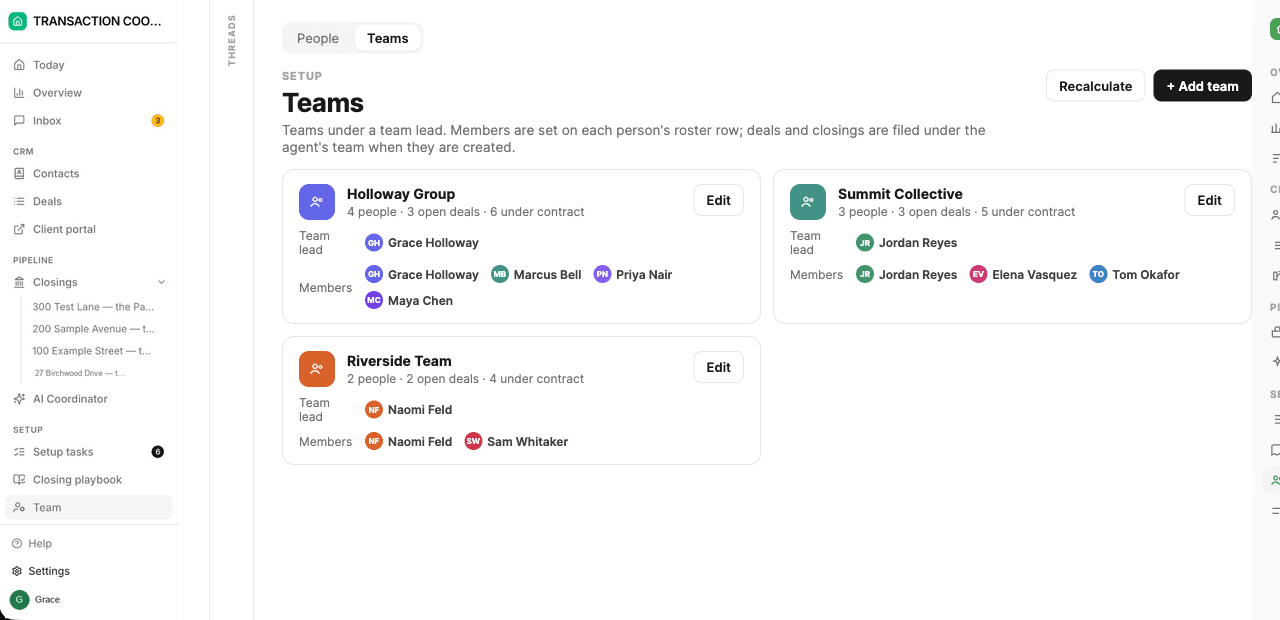
Both CRMs stop at the signed contract, and DeedSpring starts there. It is transaction-coordination software for agents, teams and brokerages. Open a closing from the executed contract and the dates fill themselves in, the playbook lays out the deadlines, and the emails it drafts wait for a person to approve them. For a brokerage, Teams gives each team a lead and a color, and a sharing grid decides, role by role, whether a person sees everyone's files, their team's or only theirs. The roles are Broker / admin, Team lead, Transaction coordinator, Agent and Assistant.
Starter is $15 a month for one closing a month. Standard is $25 a closing, less at volume, with unlimited agents and teammates and unused closings rolling over. Both are month to month, and you can see the current price at deedspring.com/pricing.
How we compared
We compared Follow Up Boss with the BoldTrail front-office CRM on lead routing, ponds, team hierarchy, permissions, price and integrations, using both vendors' help pages, pricing pages and public FAQ. Prices and pages were checked in October 2026.