Workflow · Product guides, pricing and migration
Using Follow Up Boss after a signed agreement: Deals and transaction handoffs
Follow Up Boss keeps the people, the conversation and a pipeline card with the price and close date. The contract, its deadlines and the documents move to a transaction tool. Here is the handoff step by step, which integrations send what back, and where DeedSpring runs it.
What does a Follow Up Boss Deal actually hold?
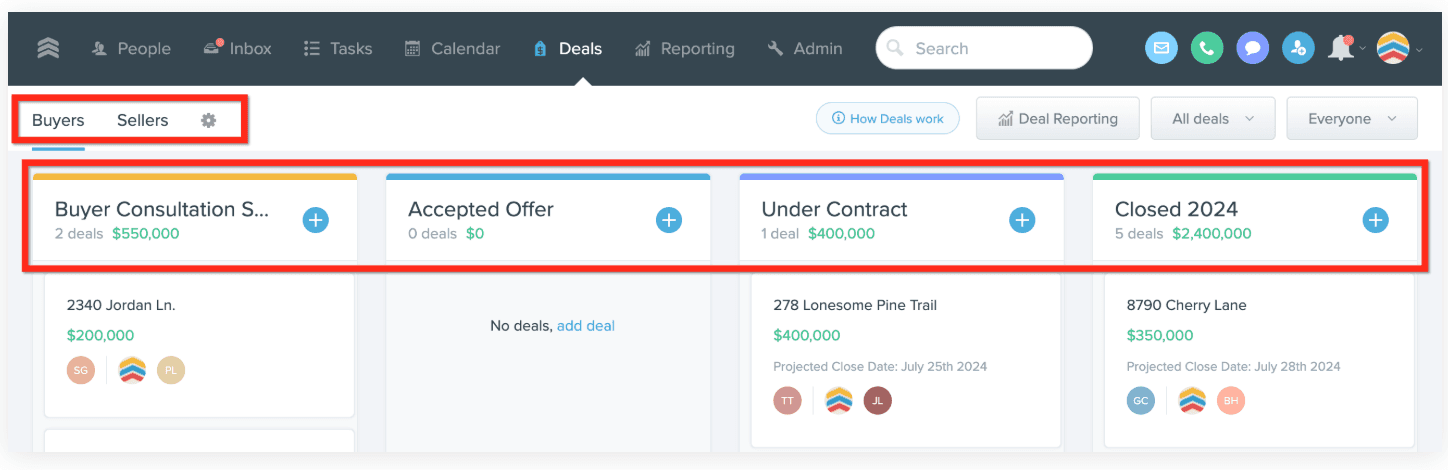
A Deal is a card in a pipeline. Follow Up Boss ships two pipelines, Buyers and Sellers, and each is a row of stages read left to right: Buyer Contract, Offer, Pending and Closed on the buyer side, Listed, Offer, Pending and Closed on the seller side. Only the account owner can add, rename or reorder pipelines and stages, and the whole feature exists to connect lead sources to closed transactions for reporting.
The card itself holds more than the help text lets on. The Creating Deals page lists a name, price, projected closing date, contacts, commission and splits, and team members. The dialog it shows, and the API behind it, also take five contract dates: earnest money due, mutual acceptance, due diligence, final walk-through and possession. Add a property address, a description, and any custom fields the owner has built, which come in four types: date, text, number and dropdown. A custom date shows on the Follow Up Boss calendar and can trigger an automation, but it does not sync to your connected calendar.
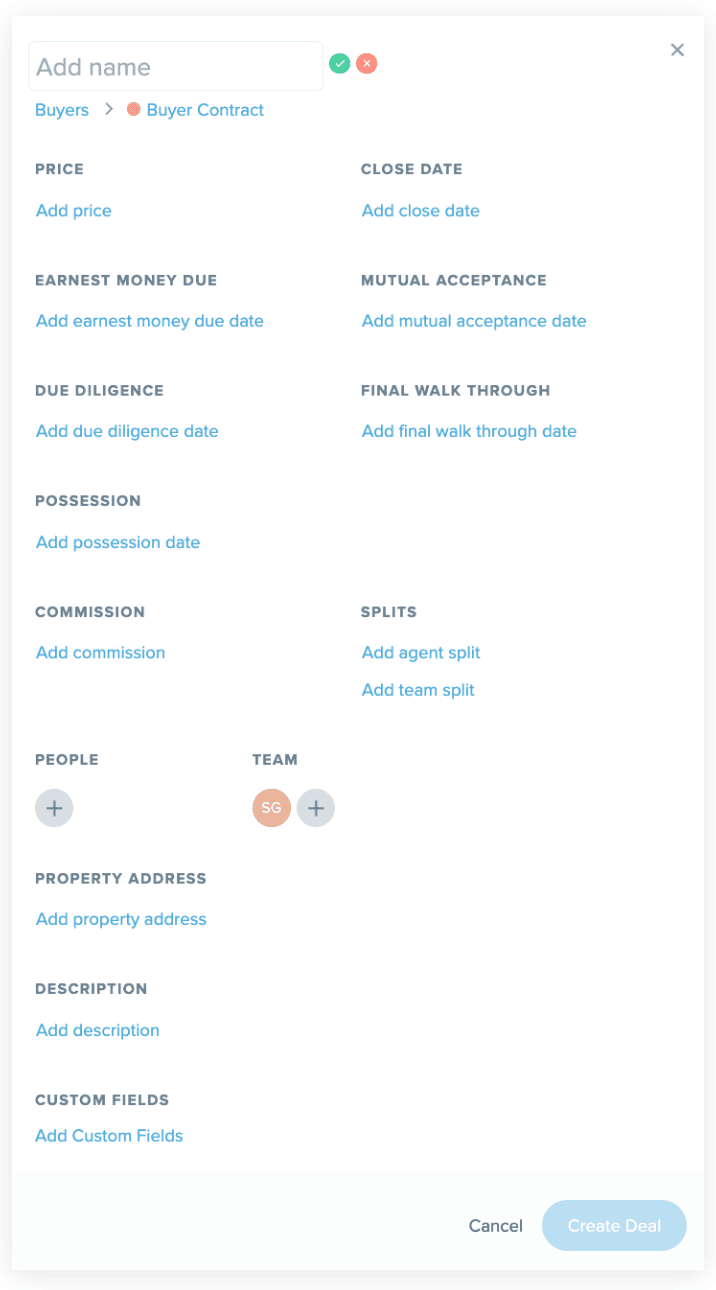
The card can carry the file, but that is all it does with it. Documents attach to the contact's profile or to an existing deal, up to 100 MB each. Tasks and action plans run on the contact, and the contact has a stage of its own, Under Contract or Closed, that is separate from the deal's stage. Nothing in Follow Up Boss reads the contract. Every date on that card was typed by someone, and nothing watches it afterward.
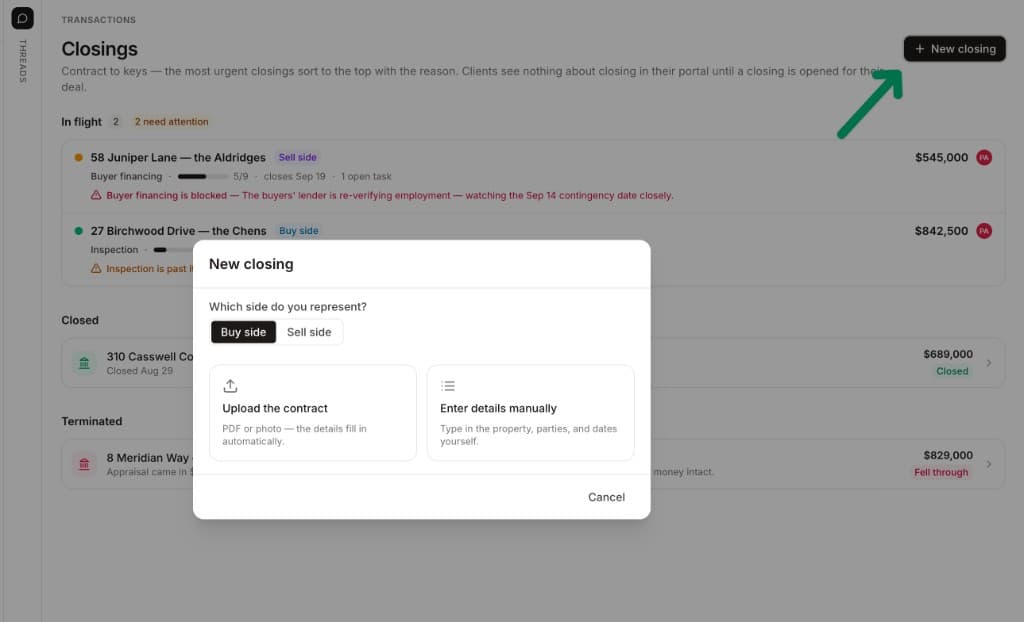
That typing is the step DeedSpring takes over. Upload the executed contract and it reads the price, deposits, contingencies and dates into deadlines on a closing, then checks every active file every hour and drafts the chases for you to send. DeedSpring lists a Follow Up Boss connector among its data connections, and its help pages offer to set up an import of your live Follow Up Boss deals with you.
What stays in the CRM and what moves?
Contacts, conversation and the stage card stay in Follow Up Boss. The contract, the checklist and the documents go to the transaction tool, and a narrow set of fields comes back.
Who owns which record once a Follow Up Boss contact is under contract
| Record | Follow Up Boss keeps | The transaction tool owns | What comes back to the Deal |
|---|---|---|---|
| Contacts | The record: names, phones, emails, relationships, stage, tags, source. | A copy as parties. Trackxi and Lone Wolf pull them from Follow Up Boss. | Nekst sends new contacts both ways. New Trackxi contacts stay in Trackxi. |
| Emails, texts, notes | Logged on the contact. Emails and call recordings never export. | What the coordinator sends from the file. | Open To Close writes a reference of each one. Nekst posts them as notes. |
| Tasks | Action plans on the contact, started by a deal stage change. | The contract-to-close checklist and its deadlines. | Trackxi sends task data. Dotloop sends none. |
| Stage | Pipeline columns: Buyer Contract, Offer, Pending, Closed by default. | The file status or loop status. | Dotloop, Nekst and Brokermint map their status onto a stage. |
| Price and dates | Price, close date, and earnest money, acceptance, due diligence, walk-through and possession dates. | Read from the contract. DeedSpring and Nekst extract them from the PDF. | Dotloop maps price and closing date. Nekst maps pricing and close dates. |
| Commission | Commission, agent split and team split, for the goal report. | Brokermint's back office. | Dotloop sends the sale commission total. Brokermint syncs the deal both ways. |
| Documents | Attachments on the contact profile or the deal, up to 100 MB each. | The file: contract, addenda, disclosures. | Dotloop sends the loop URL. Open To Close shows documents in its widget. |
Which transaction tools connect, and which way does the data flow?
Take six transaction tools from Follow Up Boss's integration help. They do not all point the same way. Dotloop is one way into Follow Up Boss. Realsynch receives the loop's webhooks and, about every five minutes, creates or updates a deal matched on the client's email, mapping purchase or sale price to Price, closing date to Close Date, the sale commission total to Commission, and the loop URL to a custom field. The loop must carry the client's name and email, a buyer or seller assignment, an agent marked as listing or buying agent, the property address and the transaction type, or the deal may not be created correctly. Realsynch's team does the setup, and nothing flows back into Dotloop.
Open To Close also pushes into Follow Up Boss: a new deal from its transaction, and a reference of each email, text, note and field change onto the contact. Its widget inside Follow Up Boss shows the transaction's contacts, documents, dates, tasks and timeline, and from inside a transaction you can import any Follow Up Boss contact. The connection is set up by the account owner with an API key.
Lone Wolf Transact runs the other way. Contacts sync one way from Follow Up Boss into Lone Wolf, you start a transaction from a contact's profile and the Parties step is pre-filled, and transactions for those contacts then list in a panel on the profile. Lone Wolf's own page says leads, contacts and transaction data flow from Follow Up Boss into Transact. Neither page says a Transact file updates the Follow Up Boss deal, so assume the stage is yours to move.
Three tools go both ways. Brokermint turns a Follow Up Boss deal into an incoming back-office transaction and a Brokermint transaction into a Follow Up Boss deal, within two to five minutes, with custom field mapping between them. Nekst syncs contacts in both directions, reads an uploaded purchase contract for dates, parties and terms, creates its transaction and a matching deal, and updates the deal as its status moves through Listed, Pending and Closed. Trackxi pulls contact details and tags from Follow Up Boss and sends back transaction updates, task data and status changes, but a contact created in Trackxi does not come back.
Zillow is a special case. A deal in Follow Up Boss can be synced to Zillow Premier Agent as a transaction once it has a price, closing date, commission, assigned agent and property address, and edits made in Zillow update the deal. Edits made in Follow Up Boss need a Refresh Sync, and a transaction added in Zillow does not become a deal.
The handoff, step by step
The trigger is a fully executed agreement. The work is done when the contract's dates live in a tool that watches them, the deal card shows the right stage, price and close date, and the coordinator can see the deal. Here is the sequence for a team whose agents live in Follow Up Boss and whose coordinator lives in the transaction tool.
Step 1: Change the contact's stage and open the Deal from their profile
Set the contact's Stage to Under Contract, which Follow Up Boss defines as offer accepted, then press the plus in the Deals box on the profile and pick the Buyers or Sellers pipeline and its first stage. Team members assigned to the contact join the deal automatically.
- Owner
- The agent
Step 2: Fill the card from the executed contract
Name the deal with the property address, then add the price, the close date, commission and splits, and the five contract dates the card offers. Fill the separate property address field too, because the Zillow sync requires it. If a date is still being negotiated, leave it blank rather than guessing.
Step 3: Open the transaction file from the contract
Upload the executed contract to the transaction tool and let it build the file. Nekst reads the PDF for dates, parties and terms and pushes a matching deal into Follow Up Boss, Open To Close pushes a new deal from its transaction, and a deal created in Follow Up Boss reaches Brokermint as an incoming transaction within two to five minutes. If nothing appears, check that the transaction type is mapped to a pipeline and that the API key was created by the account owner.
- Owner
- The coordinator
Step 4: Decide where the messages live
A coordinator working from the transaction tool sends from there. Open To Close can write a reference of each email, text and note onto the Follow Up Boss contact, Nekst posts its messages as notes, and Trackxi's list back is transaction updates, task data and status changes. Anything the file must keep belongs in the transaction tool or the agent's connected mailbox, because emails stored only in Follow Up Boss cannot be exported.
Step 5: Wire the stage change to the follow-up
Build an automation on the Deal Stage Changed trigger to assign the lender, add a note or start an action plan. It applies to every contact on the deal, runs once per person unless you switch that, and does not fire when a deal is created, so create the deal in the first stage and then move it.
- Owner
- The account owner or an admin
Step 6: Give the coordinator a seat on the deal
Non-admin users only see deals they are part of, so add the coordinator as a team member on each deal or as a Collaborator on the contact. A collaborator can do everything the assigned agent can but is not notified when the client writes in, so the agent @mentions them in a note.
Step 7: Move the card as the file moves
Drag the deal to Pending and then to Closed when no integration does it for you, and make sure one stage has “Mark deals in this stage as closed for reporting” ticked. If a stage you need is missing, only the account owner can add it.
Step 8: Close out, and archive rather than delete
A lost deal is archived. Deleting a deal that was synced to Zillow cancels the transaction in Zillow. Let the Closed stage start the post-closing action plan, and export the Deals report to CSV if the brokerage wants a record outside the CRM.
What can you get back out of Follow Up Boss?
Two exports matter to a coordinator. The contact export is a CSV from People, and with All Columns ticked it carries each contact's Deal Stage, Deal Close Date and Deal Price, plus the most recent 50 calls, 50 texts and 50 notes. Emails and call recordings are not in it. The Deals report exports separately, with stage, date entered, time in stage, close date, price, commissions, people and lead source. Exporting is an owner permission by default, granted per user with the Can Export box, and the owner is emailed when an agent or admin exports.
Where does DeedSpring fit beside Follow Up Boss?
Follow Up Boss is where the relationship lives and where the deal card tells the team lead how big the pipeline is. DeedSpring is where the contract goes. Upload the executed agreement and it reads the price, deposits, contingencies and dates into deadlines on the closing, applies the buy-side or sell-side playbook, and then checks in on every active file every hour. A milestone past target gets flagged, and the chases and client updates arrive as drafts for a person to send, with anything sensitive or negotiable always waiting for you. Your buyers and sellers get a portal. DeedSpring names a Follow Up Boss connector among its data connections, and will set up an import of your live Follow Up Boss deals with you.