
Comparison · Software comparisons and alternatives
Authentisign vs Docusign for real estate: forms, signing and audit records
Authentisign is Lone Wolf's signing tool, bundled with TransactionDesk and zipForm and supplied through some MLSs and associations, while Docusign sells three real estate plans from $120 a year. Which to use, what each costs, how the client signs, and what each signing certificate records.
Which Authentisign and which Docusign?
Authentisign is Lone Wolf's e-signature product, and most agents meet it as a button inside something else. Lone Wolf's Authentisign page sells it bundled with Transactions in its TransactionDesk Edition or zipForm Edition, supplies it to MLS and association members at no extra cost, and sells it standalone to everyone else. In Transact, Lone Wolf's transaction management product, the licensed forms library is part of the package and Authentisign is an e-signature add-on at an extra fee.
Docusign sells real estate two ways. The real estate plans page lists three self-serve plans for agents and small groups, Real Estate Starter, Real Estate and REALTORS®, each with association forms included. Rooms for Real Estate is the broker product, built around a custom approval process and an audit trail for each deal, and it is quote only. Rooms lists Lone Wolf and zipForm Plus among its integrations.
Side by side
Authentisign, Docusign's real estate plans and DeedSpring on the points that decide the purchase
| Decision | DeedSpring | Authentisign | Docusign real estate plans |
|---|---|---|---|
| What you are buying | Transaction coordination from signed contract to keys, with e-signing built in | Lone Wolf's signing tool, bundled with its forms products or bought alone | Signing plans for agents. Rooms, the broker system, is quote only |
| Published price | $15 a month for one closing. $25 a closing on Standard, less at volume | $129 a year standalone. No extra cost through an MLS or association that supplies it | $10, $25 or $20 a user a month, billed annually |
| Send limits | Priced by closings opened. No envelope count | No limit on signatures | 5 a month, 100 a user a year, or unlimited under reasonable use |
| Forms | Texas contracts and disclosures. Upload MLS or brokerage packets elsewhere | Signs forms from TransactionDesk, zipForm or Transact, or any PDF you upload | Association forms on all three plans, by membership, US only, not every state |
| How the signer gets it | Sent from the closing. The signed copy comes back by email onto its Documents tab | Email invitation with START SIGNING. Signer creates a signature at the first field | Email from [email protected]. No Docusign account needed |
| The audit record | A full audit trail on each file, on every plan | Signing certificate on completion. Signing Details keeps the full history | Certificate of Completion per envelope, plus an event-by-event History |
| Reminders and expiry | The coordinator checks signatures and nudges you when one is missing | Reminders you schedule. Every signing expires, 30 days by default | Notifications and reminders on every plan |
What does each one cost?
Lone Wolf prints no price on the Authentisign page. Its TransactionDesk store sells one year of Authentisign for $129, with a free 30-day trial beside it. There is no envelope allowance to watch, because the product page says there is no limit on signatures. If your board supplies it, the price is zero and the decision is made. Transact buyers pay an additional fee that Lone Wolf does not publish, so get the number in writing before you sign.

Docusign prices by envelope, and an envelope is one send, however many documents and signers it holds. Billed annually, Real Estate Starter is $10 a month, $120 a year, for one user and five envelopes a month. Real Estate is $25 a user a month, $300 a year, for one to five users and 100 envelopes a user a year. REALTORS®, for NAR members, is $20 a user a month, $240 a year, with unlimited envelopes subject to the reasonable use policy. Billed monthly the same three plans are $15, $45 and $35, and the Real Estate plan's allowance becomes ten envelopes a user a month.
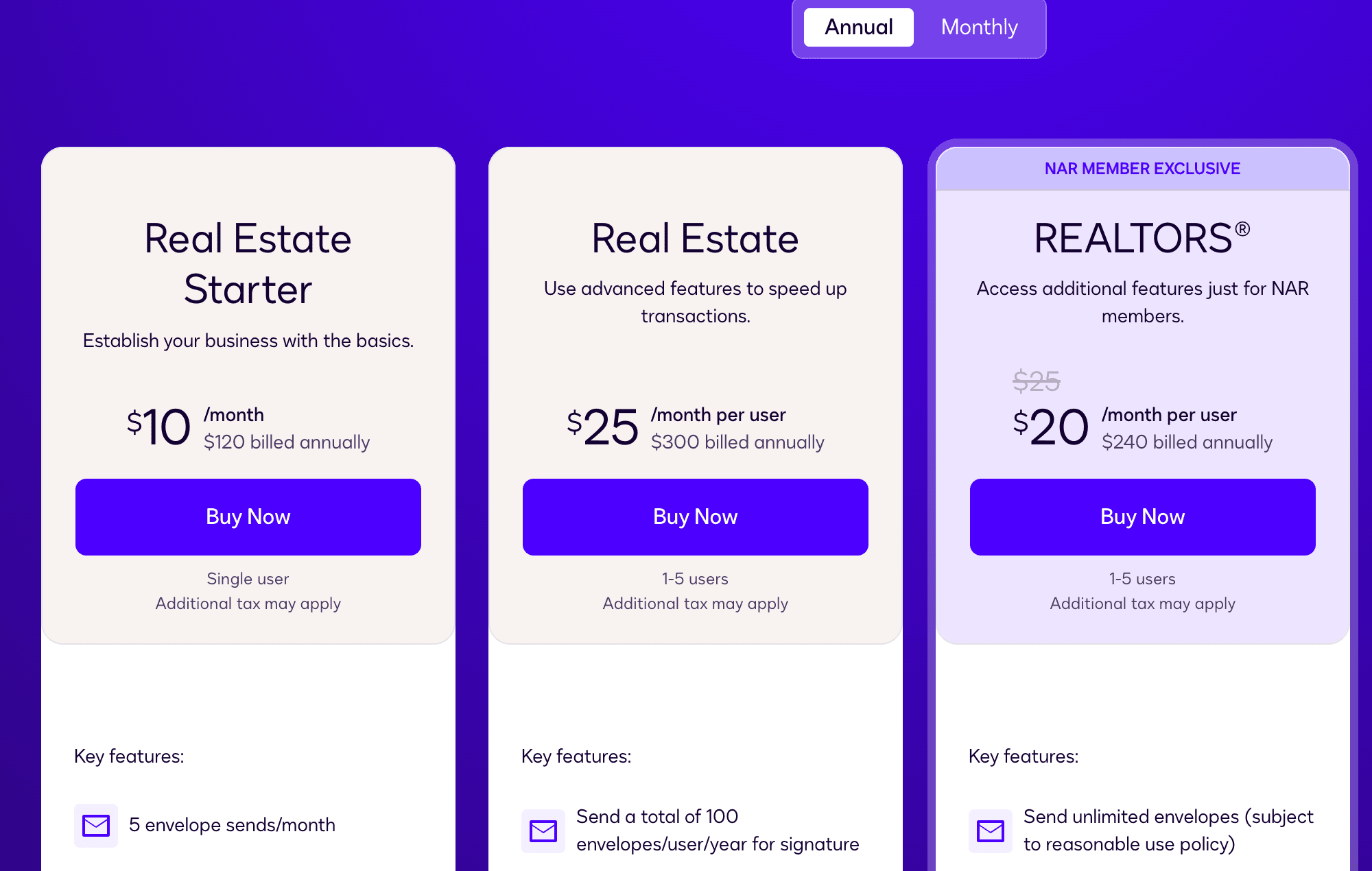
Three things on that page change the bill. A sent envelope counts whether or not anyone signs it. The REALTORS® plan has no hard cap, but Docusign may stop new sends when volume exceeds reasonable use, and its reasonable use policy lets it charge for envelopes beyond the allowance. And every plan renews automatically, monthly or yearly. An agent sending six envelopes a month on Starter has already outgrown it. At that point the next step is REALTORS® at $240 for NAR members, $111 a year more than a standalone Authentisign, or Real Estate at $300 for everyone else.
How does the signing go for your client?
An Authentisign invitation arrives by email with a START SIGNING button. Lone Wolf's help page for signers walks the client through a Participant Acknowledgement that links the Consumer Consent Disclosure and Lone Wolf's terms, then into the documents. The first signature field opens a Create your signature popup. A progress indicator counts the fields down. Complete Signing passes the packet to the next signer, or back to you from the last one, and emails the client links to the signed documents and the signing certificate. A client who spots a misspelled name can hit REJECT, pick a reason from a dropdown, and the signing comes back to you to fix and re-send.
You set the terms before sending. Every signing has an expiry date, 30 days out by default and always 11:59 PM, after which a client who opens it sees an expired notice. You can schedule automatic reminders at a frequency and time of day you choose. A unique Authentisign ID is stamped on every page of every document, top-left unless you move it.
A Docusign envelope arrives from [email protected], and the client needs no Docusign account to review, adopt a signature and finish. Declining, reassigning to someone else, uploading a signed paper copy, and passing or failing an access code or ID check are all events the envelope records. Notifications and reminders are on every real estate plan.
What ends up in the audit record?
Authentisign creates its signing certificate automatically when the last participant finishes. Lone Wolf's own description is short: the certificate lets you track when the document was signed, the name of the document, who signed it, and where. The richer record is the Signing Details panel, which holds each participant's status, copies of the signed and unsigned documents, the certificates, and a complete audit history of the signing. Signers see a slice of that too: a history log showing when the signing was created and when documents were added. Participants can still download their signed documents after you delete the signing from your list.
Docusign publishes the anatomy of its Certificate of Completion, and every envelope gets one. The top section carries the Envelope Id, subject and originator, the page count, and the number of signatures and initials. Signer Events lists each signer's IP address, signature image and key timestamps, plus the Electronic Record and Signature Disclosure they accepted and the date they accepted it. If your account settings did not require the disclosure, or the signer is on your own account, that line reads Not Offered via Docusign. Envelope Summary Events timestamps the send and the completion and adds an Envelope Updated line for every correction or markup. Docusign is candid about the IP address: it may be an internet provider's data center, a VPN, or the nearest cell tower, so it shows the connection, not the signer's chair.
Behind the certificate sits the envelope History: Opened, Viewed, Signed, Declined and Reassign for each recipient, access-code and identity-check passes and failures, and the sender's own corrections and resends. If the signer allowed location access there is a Signed in Location link. Completed documents are sealed with PKI, and timestamps come from a server clock synchronized with the NIST atomic clock. You download the certificate from the envelope's Details view, and if you combine all PDFs into one file and the certificate is missing, an account setting is the usual reason.
Both records tell you afterwards who signed and when. Neither tells you this morning that the seller's initials are missing on page four of the amendment and the appraisal is Thursday. Authentisign's reminders fire on the schedule you set, and Docusign's History logs the Opened that never became a Signed. Watching that against the deadline is a coordinator's job, and it is what DeedSpring does: the signed copy lands on the closing, the coordinator checks the signatures and the dates, and if something is missing it nudges you to send the document to the right party.
What do the vendors say about legal validity?
Lone Wolf's Authentisign page says its signatures are legally binding and comply with all North American and international laws and statutes, and the same answer tells you to check your local laws and regulations for specifics. The page also cites ESIGN and UETA compliance and approval from Fannie Mae and FHA. Docusign's US legality guide, updated January 20, 2026, lists Real Estate among transaction types where caution should be exercised before using electronic signatures, alongside documents to be notarized or recorded.
The federal law both vendors point to is the ESIGN Act. Its general rule of validity, section 7001(a)(1), reads: “a signature, contract, or other record relating to such transaction may not be denied legal effect, validity, or enforceability solely because it is in electronic form”.
Who should pick Authentisign?
Anyone whose MLS, association or brokerage already provides it. The forms you fill in TransactionDesk or zipForm sign in the same place, the certificate and history are kept with the signing, and the marginal cost is zero. An agent outside those arrangements who wants an unmetered signing tool for $129 a year is the other buyer. A Transact brokerage should ask Lone Wolf for the add-on fee and, if agents move between offices, what happens to their signings when they do.
Who should pick Docusign?
An agent who pays for their own tools and sends to counterparties who will not log into anything, because the recipient needs no account and every envelope ships with a Certificate of Completion that names who signed, from where, and when. NAR members should buy REALTORS® at $240 a year and skip the envelope count. Starter at $120 fits an agent closing a handful of deals a year who can live with five sends a month. A brokerage that wants a custom approval process is buying Rooms, which is a sales call. If a brokerage provides the account, the account's fate follows the brokerage's contract. When Keller Williams' corporate contract with Docusign ended on July 14, 2026, the corporate eSignature account went read-only, the Rooms account was deactivated, and documents nobody had downloaded may no longer be reachable. Read what the KW Docusign Rooms shutdown did to agents' files before you let a brokerage own your signing history.
What does DeedSpring do that neither signing tool does?
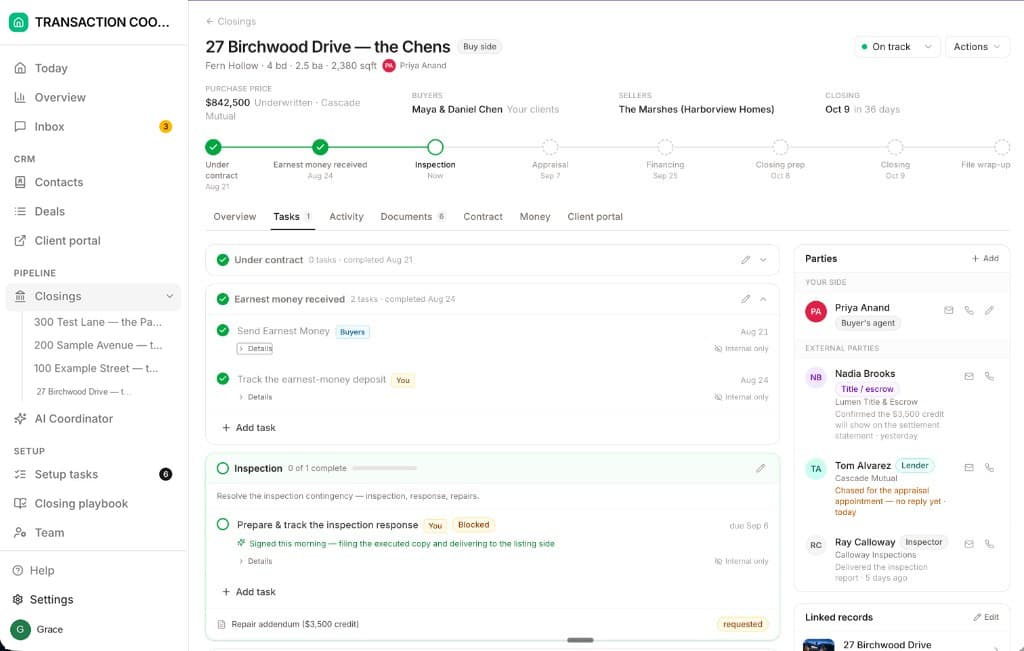
Authentisign and Docusign put a signature on a form and give you a certificate that says so. DeedSpring runs the file the form belongs to. Upload the executed contract and the coordinator reads the price, deposits, contingencies and dates into deadlines, checks every active file every hour, and drafts the chases for you to send, with anything sensitive or negotiable always waiting for a person. E-signing is built in: send a form to the buyer, seller, agent or title company, and the signed copy comes back onto the closing under Documents, where the coordinator checks the signatures and dates. The form can be a Texas contract or disclosure from the library or any PDF you upload, and DeedSpring finds the blanks on it for you.
How we compared
We read Lone Wolf's Authentisign product and help pages, its TransactionDesk store, and Docusign's real estate plans page, support articles on the Certificate of Completion and envelope History, and legality guide. Prices were read on both billing toggles in October 2026.