
Comparison · Software comparisons and alternatives
dotloop vs TransactionDesk: signing, templates and collaboration
Pick dotloop at $34.99 a month if your deal lives in one loop and you collaborate with co-op agents inside it. Pick TransactionDesk if your association already gives it to you with Authentisign at no extra cost. Here is how each one hands a document to someone who does not use it, where brokerage templates live, and what two people on one file can see.
How do the three line up?
The decision between dotloop and TransactionDesk is rarely about the editor. It is about who is already paying for it, what happens when the other side of the deal does not use the same software, and whether the templates your brokerage hands you behave the way you expect. The table puts those side by side, with DeedSpring in the first column because it is the product we sell.
DeedSpring, dotloop and TransactionDesk on the things that decide the purchase
| Question | DeedSpring | dotloop | TransactionDesk |
|---|---|---|---|
| What an agent pays | Starter $15 a month for one closing. Standard $25 a closing. | Free for 10 transactions. Premium $34.99 a month or $344 a year. | Usually an association or MLS member benefit. |
| Signing | Built in. Send to a buyer, seller, agent or title company. | Built in on free and Premium. | Authentisign. $129 a year from the TransactionDesk store if not a member benefit. |
| A signer who does not use it | The signed copy comes back through your connected email into the closing. | Can sign and share back without creating an account. | Email invitation into a secure portal. Signed copies and certificate emailed back. |
| Templates from the brokerage | Two default closing playbooks per workspace, written for your state, DeedSpring says. | Locked folders appear under your personal folders. Copy to edit. | Office transaction templates need Super User access. Share with a team via Sharing. |
| Two people on one file | Roles for broker, team lead, TC, agent and assistant. | Add to my team gives a shared view of the loop. Cannot be undone. | Share the transaction with other agents in your office. |
What happens when the other side does not use your software?
In dotloop, documents stay private until you share them, and the share permission decides what the recipient can do. There are four: View Only, Can Sign, Can Fill & Sign, and Can Edit in Private. The last one is “the Share Permission that should be used when collaborating with other real estate professionals”, and any change to a signed document under it wipes the signatures. You can also tick a box to attach PDF copies to the email that goes out.
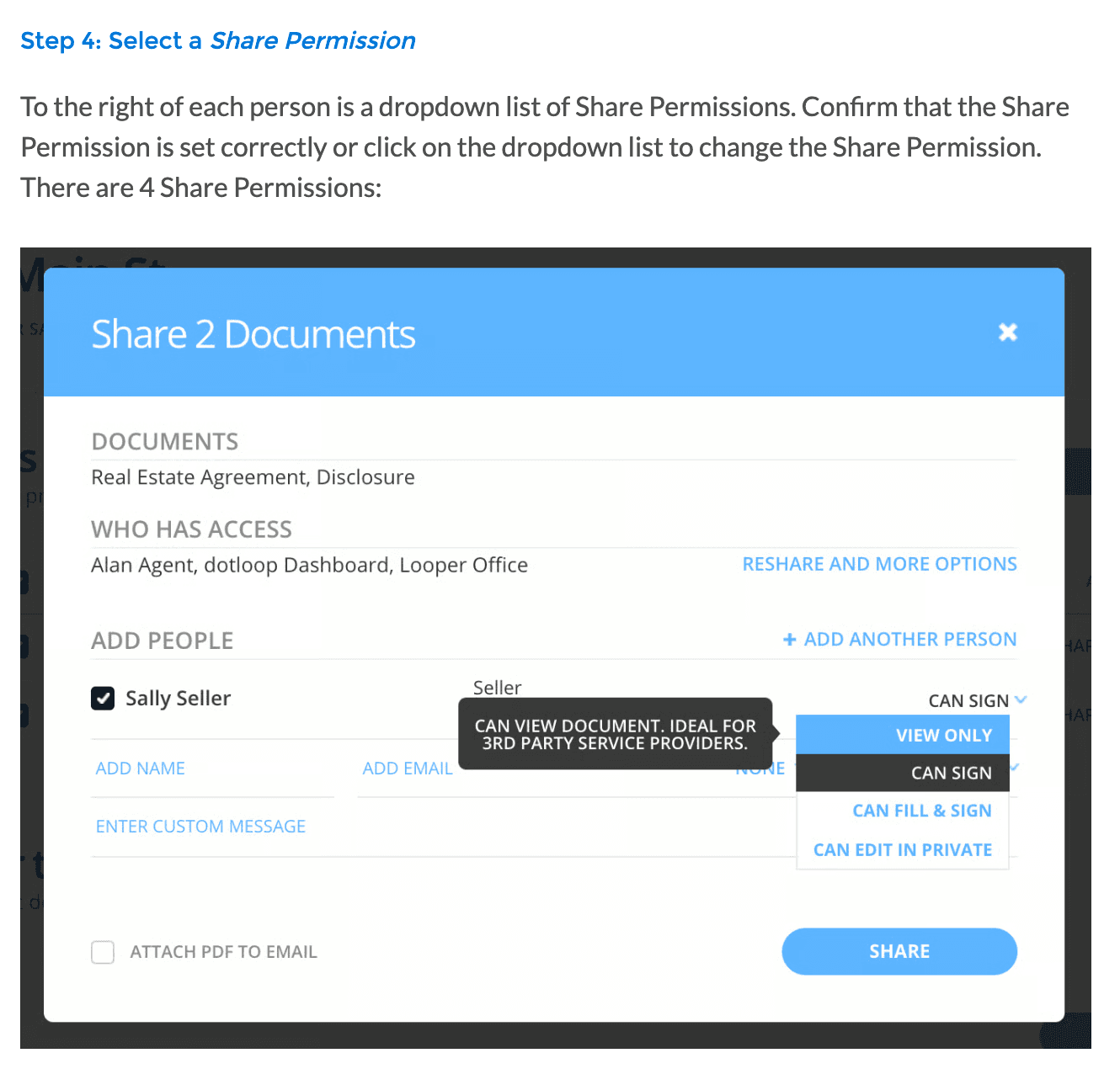
A client or counterparty who gets a Can Sign share does not need an account. dotloop's own guidance for invited non-users says they “have the option to sign and share the document back without creating an account”, with one condition: each signer needs their own unique email address. The signer opens an email whose subject begins ACTION NEEDED, picks Adopt and Sign, then Share back with the agent. Afterwards any signed document carries a Signature Verification link listing the date and time, an ID, the IP address, and a security level.
TransactionDesk signs through Authentisign, which Lone Wolf describes as its “seamlessly-integrated in-house signing service”. A signing can carry remote signers alongside reviewers, who read and can reject but do not need to sign. Everyone gets an email invitation into a secure portal, and you can set a signing order or let people sign at the same time. Every signing must have an expiry date, 30 days from creation by default, and you can add automated reminders. When the last participant finishes, a signing certificate is created and each person gets a confirmation email with links to the signed documents and the certificate. If an invitation goes missing, Resend Invitations goes only to people who have not finished, and you must wait five minutes between resends.
“WA Realtor here - Authentisign used in my area, as a feature of NWMLS. It’s pretty easy to use. I believe the vendor or NWMLS creates templates for all of our forms. I think I could create my own templates for other forms, I just haven’t bothered. For changes to signed docs, you would have to download signed doc and upload into a new ‘signing’. All and all, I like it much better than Dot Loop for signings.”
Where do the templates your brokerage hands you live?
dotloop keeps templates in one section with two folders you cannot move or delete, Personal and Inbox. Anything in Personal “will not be deleted if you decide to leave a brokerage”. Folders shared by your brokerage or association sit underneath, cannot be reordered, and stay at the bottom of the list. Their documents are locked, so to fill one you add it to a loop or copy it into your own folder, either as a dotloop document that keeps its fields or as a flat PDF. Making a fully editable copy of a locked template takes a Business+, Teams or Premium account, and once you have it, later updates to the brokerage original do not flow into your copy.
Loop templates are a different thing. Your company or team sets them up and applies one when a loop is created, and dotloop's pricing page lists transaction templates under Teams and Business+ only. An admin can require every loop to use one. If you leave a team, you keep your personal folders but “cannot move team provided template folders from one profile to another”.
TransactionDesk separates forms from documents. Forms are the interactive contracts your board or association publishes, and they autofill from the transaction. They live in an Individual Forms folder that Lone Wolf sets up from your boards, and you cannot create your own form folders. A transaction template “defines a standard set of forms, documents, and checklist items”. To build one for an office you need the brokers edition and Super User access, though you can share a template you made with your team once the team is defined as a group. One more date matters here. Lone Wolf is moving TransactionDesk Edition customers to Transact, and anyone who started on Transact on or after March 5, 2026 had their TransactionDesk templates moved across automatically, all of them as Personal templates. You can only migrate templates you created.
How do two people work the same file?
dotloop's answer is Add to my team. Tick it when you add a partner agent, TC or managing broker to the loop and they see everything you see, including every document in it, without you sharing each one. dotloop warns in the same article that “once a person is added to your team, this action cannot be reversed”, and that the other side's agent and your clients should not be on it. Co-op agents get Can Edit in Private instead. Removing someone from a loop later does not take back the documents they already viewed or signed.
TransactionDesk works at the office level. From a transaction's more options menu you can share it with other agents within your office, and documents other users share with you land in a Shared Documents folder. Tasks can be assigned to a team member or to someone else in the office. When an agent leaves, a Super User can transfer their transactions, and the departing agent gets an email with a link per transaction that downloads it as a PDF with its attachments.
The work that starts once the contract is signed, chasing the earnest money receipt and the inspection response, is where DeedSpring sits. Its AI coordinator reads the executed contract to open the closing and works through a playbook of dated tasks, drafting the follow-ups for you to approve before anything is sent.
What does each one cost an agent?
dotloop is free for your first 10 transactions, with one catch: on a free account you can only add people to a loop for 90 days after it is created. Premium is $34.99 a month or $344 a year, and the yearly figure is an 18% saving. One subscription covers every personal profile on your account. If your company or association provides Premium, the upgrade screen simply tells you that you are already a premium member. Teams and Business+ are quote only.

TransactionDesk usually arrives as a member benefit. MLS Technology tells its subscribers Authentisign is “included with your membership fees”, and Arizona REALTORS® points members to the Authentisign benefit at no additional cost. If you are not covered, Lone Wolf's eSignature page sends TransactionDesk Edition users to a store where a free 30-day Authentisign trial sits next to 1 year of Authentisign at $129.00. The same page says there is no limit on signatures.
Who should choose which?
Choose dotloop if your co-op agents are often on dotloop too and you are happy to pay $34.99 a month or have a brokerage that pays it. The share permissions and Add to my team are the reason to be there.
Choose TransactionDesk if your MLS or association already includes it and your forms library lives in it. Authentisign does the signing and the certificate is automatic. The store price only matters if nobody is covering you. Ask your association whether you are on TransactionDesk Edition or being moved to Transact, because templates behave differently after the move.
Where does DeedSpring fit?
dotloop and TransactionDesk get a contract filled and signed. DeedSpring picks up the closing from there. Upload the executed contract and it reads the parties and dates to open the file, or type them in yourself. Each closing follows a playbook of milestones and tasks, and DeedSpring says there is a state-specific default pair for every US state and DC. The AI coordinator drafts the chase emails to the lender and the title company, and by default a person approves each one before it goes.
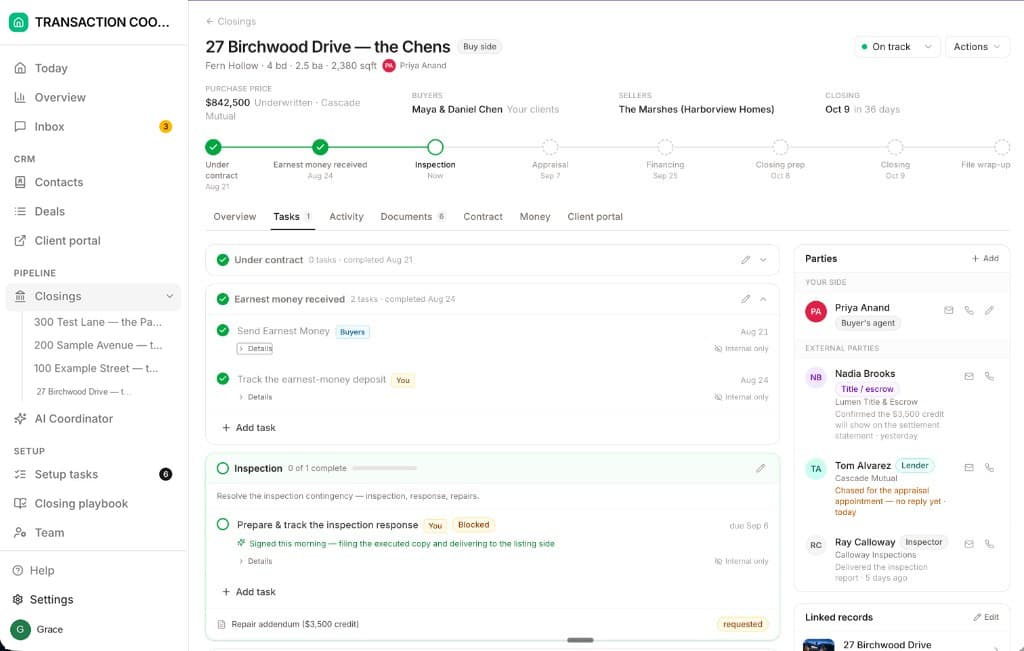
Signing is built in too. Send a form to a buyer, seller, agent or title company, and the signed copy comes back through your connected email and is filed under the closing's Documents. Broker, team lead, TC, agent and assistant each have a role in the workspace, so the coordinator on a file is a named person with their own access.
Starter is $15 a month for one closing a month. Standard is $25 a closing, down to $19 at volume, with unlimited agents and teammates and unused closings rolling over. Both are month to month, and Brokerage pricing is on application.
How we compared
We compared dotloop Premium with Lone Wolf Transactions (TransactionDesk Edition) using both vendors' pricing pages, support articles on sharing, signing, templates and transfers, the TransactionDesk store, and two association benefit pages. Prices and pages were checked in October 2026.