
Explainer · MLS, IDX and listing data
How days on market is calculated: DOM vs CDOM and when the clock resets
DOM counts one MLS listing and restarts with every new MLS number. CDOM adds up every listing of the property and resets only after an off-market gap each MLS sets: more than 30 days at CRMLS, 45 at ARMLS and Canopy, 60 at Stellar, 90 at SmartMLS, MRED and Unlock MLS.
What is the difference between DOM and CDOM?
DOM belongs to the listing. It starts when the listing goes live or on its contract date, depending on the MLS, pauses in some off-market statuses, and goes back to zero the moment a new MLS number is issued. CDOM belongs to the property. It carries the earlier listings' days into the new one until the property has been off the market long enough for the MLS to call it a fresh start. Flexmls, the MLS software vendor, tells its subscribers that the rules vary by MLS.
SmartMLS in Connecticut writes the listing clock as arithmetic. Its help page says: “Days on Market (DOM) is calculated for on-market listings by taking [Today’s Date] minus [ListingContractDate] minus [Off-Market Days].” It adds one every night after midnight, so a listing entered this morning shows 0. CDOM is that DOM plus whatever the property carried in, and only a Closed status stops it.
The names change at the state line. ARMLS in Arizona calls the listing clock ADOM, for Agent Days on Market, and it survives a relist by the same agent. The Unlock MLS glossary in Austin also says ADOM, but there it means Actual Days on Market and it is tied to the MLS number. CRMLS in California calls its pair DAM and CDAM, for Days Active in MLS. MRED in Chicago says Listing Market Time and Total Market Time. Same two clocks every time.
Even day one differs. ARMLS's example lists a property on October 1, cancels it on October 31 and shows 31. SmartMLS shows 0 on the day of entry. Canopy's values start at 0 too.
How long does a property have to sit before CDOM resets?
Each MLS sets its own off-market gap and counts it in its own statuses. Here is the figure in each MLS's own rule.
The two clocks and the reset gap at nine MLSs
| MLS (state) | Listing clock / property clock | Property clock resets after |
|---|---|---|
| SmartMLS (CT) | DOM / CDOM | A relist on the 91st day or later after Expired or Cancelled. |
| CRMLS (CA) | DAM / CDAM | More than 30 days Cancelled or Expired. |
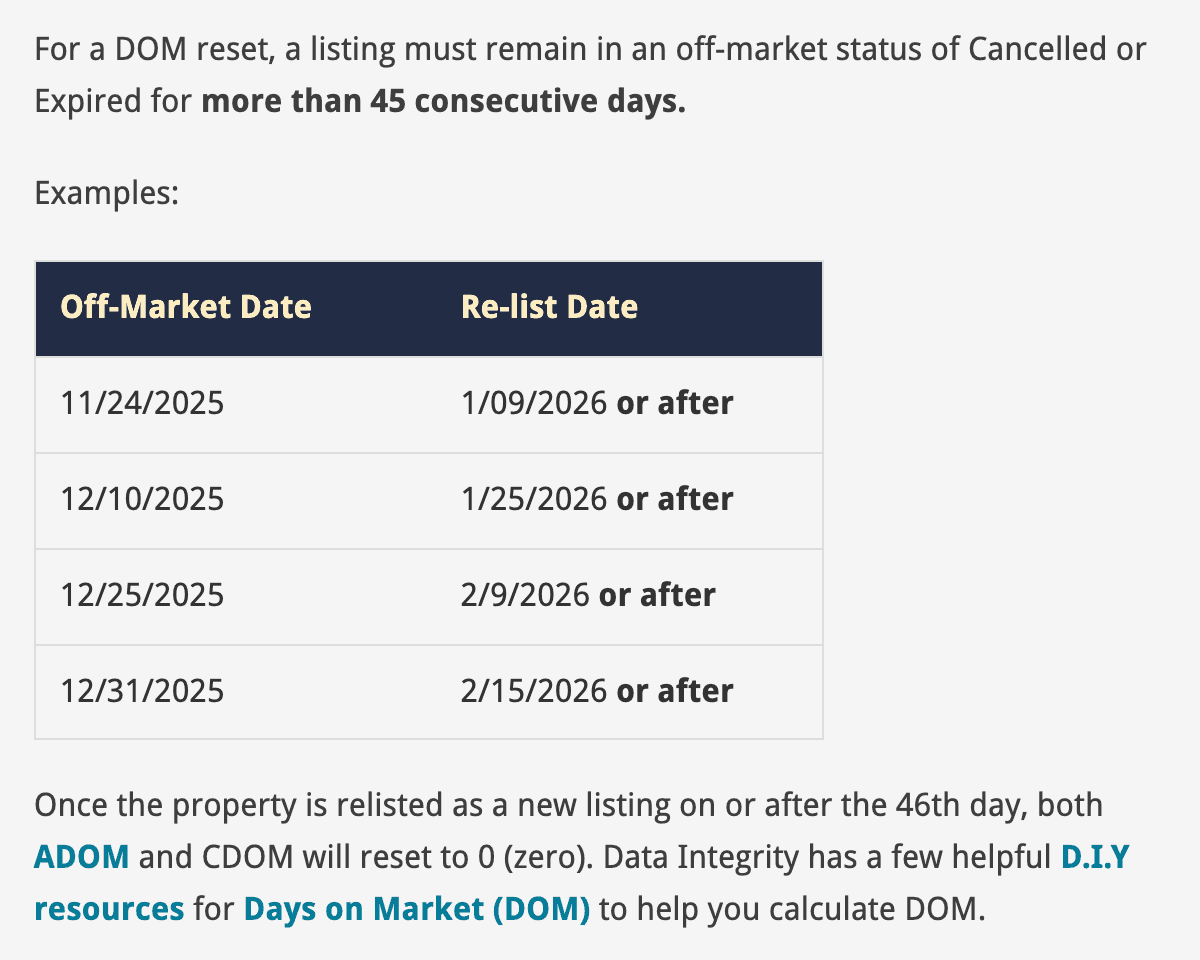
| ARMLS (AZ) | ADOM / CDOM | More than 45 consecutive days Cancelled or Expired, relisted on or after the 46th day. |
| Canopy MLS (NC/SC) | DOM / CDOM | Expired or Withdrawn with an Off Market Date more than 45 days past. |
| NTREIS (TX) | DOM / CDOM | 31 days or longer in Cancelled, Expired or Sold. |
| Stellar MLS (FL) | ADOM / CDOM | 60 days off the market. |
| MRED (IL) | Listing Market Time / Total Market Time | 90 consecutive days canceled or expired, relisted on the 91st day or later. |
| Unlock MLS (TX) | ADOM / CDOM | More than 90 days off market. |
| NorthstarMLS (MN/WI) | DOM / CDOM | No gap. CDOM covers every listing Active in the past 12 months with the current owner. |
The gap only runs in the statuses the rule names. SmartMLS's 90 days run from Expired or Cancelled, and Withdrawn and TEMP are not permanent off-market statuses there. ARMLS says Coming Soon and TOM days do not contribute toward its 45. Canopy counts the other way: a TEMP date more than 45 days old resets CDOM on the next listing even when the expiry was recent.
ARMLS used 90 days until June 4, 2020, when it moved to 45. Stellar's 60 days sits in Article 04.15 of its rules, and Article 04.20 adds that an Office Exclusive moving to full MLS entry clears the property history and resets both ADOM and CDOM. NorthstarMLS has no gap at all. Its CDOM is the total for the address with the current owner across every listing Active in the past 12 months, it can pass 365, and a Sold or Comp Sold in that window resets it.
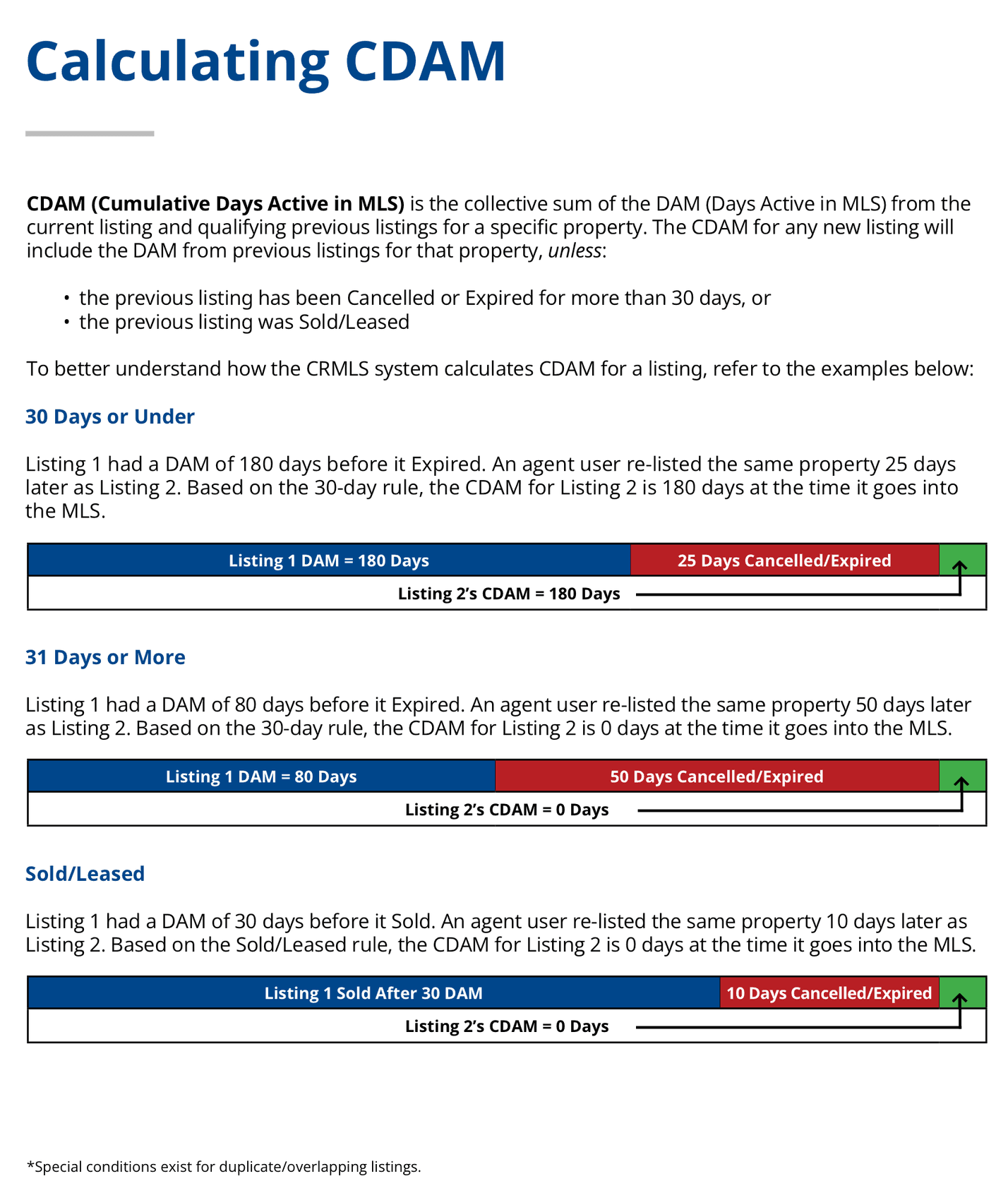
CRMLS prints its own examples. A listing that ran 180 days and sat cancelled for 25 relists with a CDAM of 180. One that ran 80 days and sat cancelled for 50 relists at zero. A property that sold after 30 days and relists 10 days later also starts at zero.
Does relisting reset days on market?
The listing clock, yes, every time. A new MLS number puts DOM back to zero at SmartMLS and Canopy, resets Unlock MLS's ADOM regardless of history, and takes MRED's Listing Market Time back to one day. ARMLS requires a new listing number to relist at all.
The property clock, only once the gap in the table has passed. Inside the gap the new listing opens carrying the old count. ARMLS adds a twist for its agent clock. Relist with the same agent inside 45 days and both ADOM and CDOM carry over. Relist with a different agent and ADOM resets while CDOM carries. SmartMLS also resets CDOM when the property comes back under a different property type, and Unlock MLS keeps a separate count for each property type.
A closed sale resets the property clock at SmartMLS, CRMLS, ARMLS, Canopy, Unlock MLS and NorthstarMLS. CRMLS and Unlock MLS treat a lease the same way. NTREIS counts Sold as one of the three statuses in which its 31-day break can run.
Which statuses pause the clock?
Under contract is the big one, and the MLSs split on it. SmartMLS pauses DOM in Under Contract, TEMP and WITH, and stops it for good at Closed, Expired or Cancelled. ARMLS keeps counting in Active, UCB and CCBS, and stops at Closed, Cancelled, Expired, Pending, Coming Soon and TOM. Canopy counts only Active days. CRMLS counts Active and Active Under Contract, leaves Coming Soon, Hold, Pending and Withdrawn out, and lets a Withdrawn listing that returns to Active pick up where it stopped. NTREIS treats HOLD as a suspension, and Pending, Sold, Expired, Withdrawn and Cancelled as off market.
MRED leaves Temp days out of Listing Market Time but counts them in Total Market Time. NorthstarMLS excludes TNAS, Pending and withheld time from CDOM. Unlock MLS counts in A or AC only.
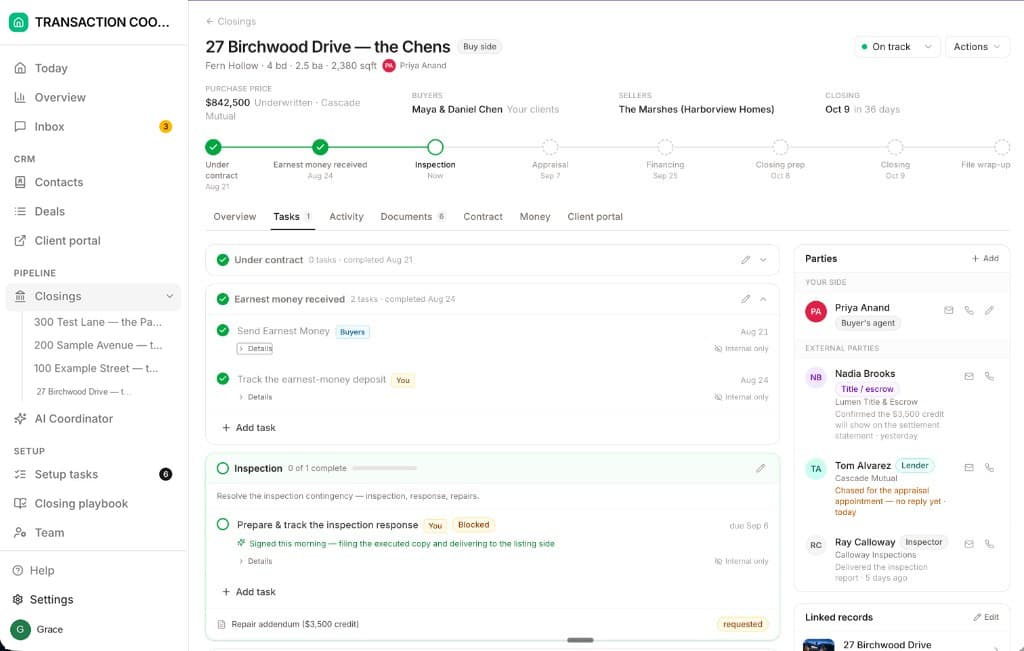
Once a listing goes under contract, DOM stops being the number anyone watches. The clock that costs money from that day is the one in the contract: the inspection, appraisal and financing deadlines and the closing date. DeedSpring reads those dates off the executed contract and chases every party until each item is confirmed in writing.
Does Coming Soon count toward days on market?
Mostly no, and the detail matters when you plan a relist. CRMLS's DAM does not accrue while a listing is Coming Soon, a status capped at 21 days. ARMLS stops both counts in Coming Soon. NTREIS gives Coming Soon no DOM, but a listing that goes live within 31 days of an earlier Coming Soon picks up its CDOM. SmartMLS runs its 90-day test from the Go Active Date, so a relist entered as Coming Soon inside the 90 days can still start CDOM fresh if it goes Active after them. Canopy starts the clock on a Limited Exposure or Firm Exclusive listing only when its Visibility becomes Public.
Why does Zillow show a different number from the MLS?
Because the portals keep a third clock. For a listing that arrives through an IDX feed, Time on Zillow is determined by the On Market Timestamp provided by the MLS, and nobody can change it by hand. Outside IDX feeds it resets only after 31 or more consecutive days off market, a change of listing type or certain ownership changes. Time on Redfin counts the days advertised as on market under this MLS number, which makes it a listing clock, and Redfin says so when it contrasts the figure with CDOM.
The feed adds slack of its own. NTREIS does not share its DOM or CDOM with third-party sites at all. Canopy tells its data vendors a record's values are current only to its ModificationTimestamp and to add a day themselves for each Active day. Canopy's May 2026 notice on Limited Exposure says the MLS can limit DOM tracking inside its own systems, but Limited Exposure remains an active status, so a portal can show the days once the listing goes public. Its example is one week hidden, seven days on market. When a buyer asks why the portal and the MLS disagree, read them the two definitions, then quote the MLS's CDOM.
What matters once the contract is signed
Days on market is a listing-side number. Your client sees it on the portal, the other agent sees it in the MLS, and the moment the contract is executed it stops moving. From then on the dates that matter are the ones in the contract. DeedSpring reads the executed contract into its price, deposits, contingencies and dates, sets the deadlines on the closing, checks every active file every hour and drafts the chases and client updates for you to send. Anything sensitive or negotiable always waits for a person. Your buyers and sellers get a portal that shows them where the file stands.
Starter is $15 a month for one closing a month. Standard is $25 a closing, less at volume, with unlimited agents and teammates and unused closings rolling over. Both are month to month.