
Template · Listing and closing workflows
Offer comparison worksheet for real estate agents
A one-page worksheet that lines up every offer's price, financing, exits, dates and seller-paid costs in the same row order, names the contract paragraph each number came from, and ends on a net-to-seller line and a blank decision field. With the register that keeps a stale counter from going out.
When do you need an offer comparison worksheet?
The moment a second offer arrives, or the moment you set an offer deadline. The seller may look at all of them at once. TREC's answer to a buyer who wanted offers taken one at a time is that a seller may receive, review and negotiate several offers simultaneously, and that the listing agent has a duty to present all of them in a timely manner. NAR's Standard of Practice 1-6 says the same in one sentence: submit offers and counter-offers objectively and as quickly as possible. And the decision is the seller's. NAR's multiple-offer guidance reminds agents that how offers are presented, whether counters are made and which offer is accepted are decisions made by the seller, not the listing broker.
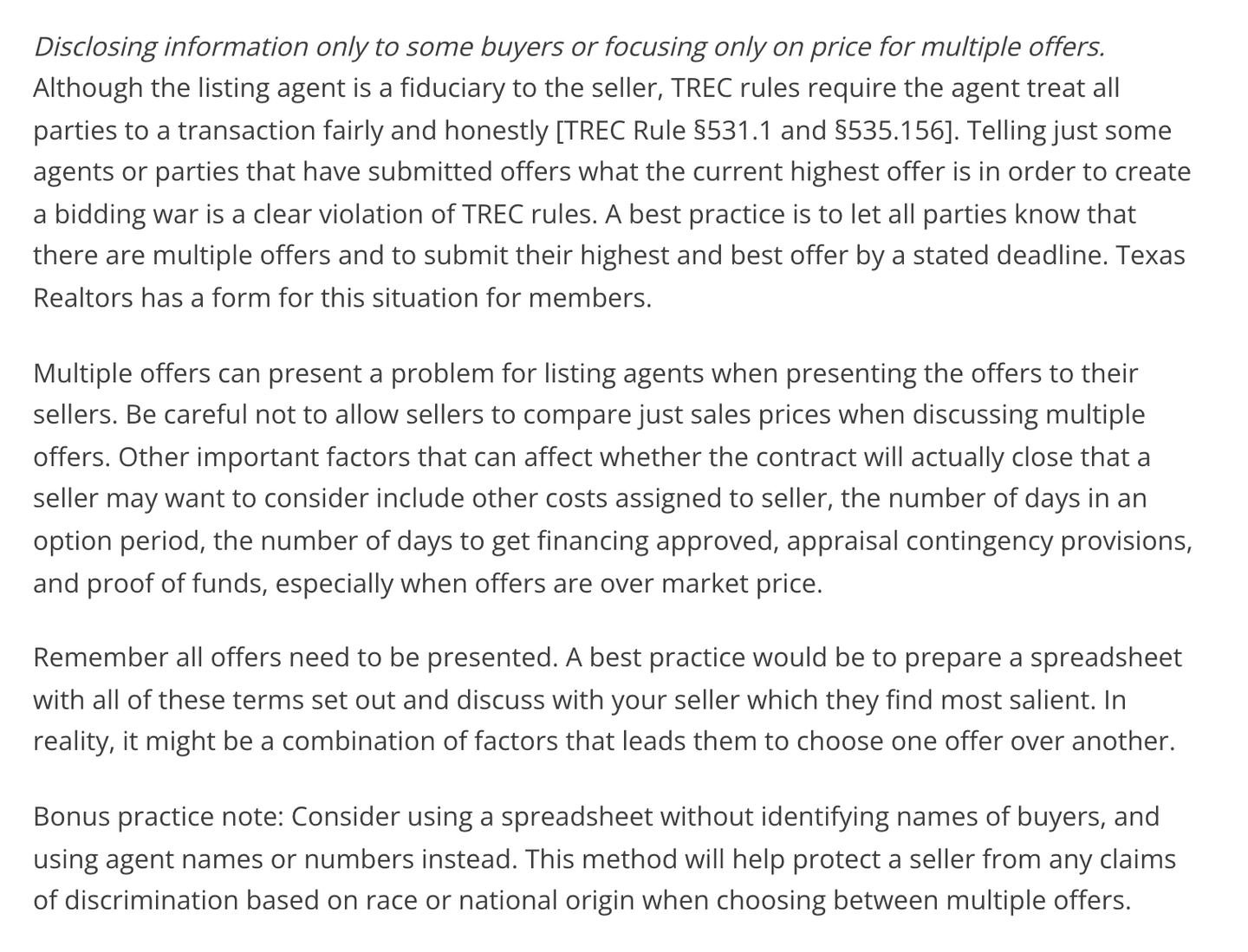
So the worksheet's job is to put every offer in front of the seller in the same shape, fast, with nothing left out and nothing added. The Texas Real Estate Research Center tells listing agents not to let sellers compare just sales prices, lists the other factors that can affect whether the contract will actually close (costs assigned to the seller, option days, financing days, appraisal provisions, proof of funds) and calls a spreadsheet of those terms a best practice. Its bonus note is the one to copy: leave the buyers' names off and use agent names or numbers, which helps protect the seller from a claim of discrimination based on race or national origin. Working agents on r/realtors run it the same way.
“Spreadsheet. Hide the names, include all relevant details, sort by net to seller with highest net at the top.”
What goes on the worksheet?
Sixteen rows, written to the Texas TREC 20-19 contract with its Third Party Financing Addendum and appraisal addendum, because Texas puts a paragraph number on every term a seller cares about. The first column says where on the form the number lives. The offer columns hold what the buyer wrote and nothing else. The last two rows are the only place for anyone's opinion. The three offers below are a demonstration on a $400,000 list price, and every figure in them is invented.
Offer comparison worksheet, with a labelled demonstration
| Term | Where to read it | Offer 1 | Offer 2 | Offer 3 |
|---|---|---|---|---|
| Buyer's agent, received | Cover email. Agent name or a number, never the buyer's name. | Agent A, Tue 9:40 a.m. | Agent B, Tue 11:15 a.m. | Agent C, Tue 4:58 p.m. |
| Sales price | ¶3C | $412,000 | $405,000 | $420,000 |
| Cash and financing | ¶3A and ¶3B, and which financing addendum box is ticked | 20% down, conventional, Third Party Financing Addendum | All cash, no financing addendum | 5% down, conventional, Third Party Financing Addendum |
| Loan-approval exit | 40-11 ¶2A: the days in the blank, or the not-subject box | 21 days after the Effective Date | None | 30 days after the Effective Date |
| Appraisal exit | 40-11 ¶2B, until the 3rd day before closing. 49-1 if attached. | ¶2B only. No 49-1. | None | ¶2B, plus 49-1 box 3: 10 days to exit if appraised under $420,000 |
| Earnest money | ¶5A, within 3 days after the Effective Date | $4,000 | $10,000 | $5,000 |
| Option fee and Option Period | ¶5A for the fee, ¶5B for the days | $300, 7 days | $500, 5 days | $200, 10 days |
| Seller pays toward buyer's costs | ¶12A(1)(b), the not-to-exceed blank | $6,000 | $0 | $8,000 |
| Seller pays toward buyer's broker | ¶12B(1), a dollar figure or a percentage of the Sales Price | 2.5% ($10,300) | 2% ($8,100) | 3% ($12,600) |
| Closing Date | ¶9A | 45 days out | 21 days out | 40 days out |
| Sale of the buyer's home | ¶22 box and Addendum 10-6 ¶A, with its date | None | None | Yes. Buyer's home under contract, contingency date 30 days out |
| Written-in terms | ¶11 Special Provisions, and any addendum not on the ¶22 list | None | None | None |
| Proof behind the offer | Attachments: pre-approval letter or proof of funds | Pre-approval letter attached | Bank statement attached | Pre-approval letter attached |
| Net before the seller's own costs | Price minus ¶12A(1)(b) minus ¶12B(1). Arithmetic, no judgement. | $395,700 | $396,900 | $399,400 |
| Risk you see | Your words. Keep them out of the rows above. | Low. Full appraisal exit stays open until 3 days before closing. | Lowest. No lender, no appraisal, closes in three weeks. | High. Two ways out on the appraisal and a home still to sell. |
| Seller's decision | The seller writes here, after the walk-through below. | [blank] | [blank] | [blank] |
One row gets missed. TREC 20-19 carries a second seller line at ¶12B(1), a dollar amount or a percentage of the Sales Price applied toward the compensation the buyer owes their own broker, separate from the ¶12A(1)(b) contribution toward the buyer's expenses. An offer asking for 3% there is $12,600 off the top of a $420,000 price. The net row subtracts both lines and stops. The seller's own expenses under ¶12A(1)(a), the deed, the lien releases and half the escrow fee, are the same whichever offer wins, so they belong on the title company's net sheet instead.
How do you read the demonstration?
Offer 3 has the highest price and the highest net, and the most ways to come back. It is subject to the sale of the buyer's home under Addendum 10-6, which ends the contract automatically if the contingency is not satisfied or waived by the date in the blank. If the seller accepts another written offer, the seller notifies the buyer, who must waive within the days in the blank or the contract ends. It also carries two appraisal exits: the Third Party Financing Addendum's ¶2B, which lets a buyer terminate on or before the 3rd day before the Closing Date when the lender decides the property does not satisfy its underwriting requirements, and a 49-1 box 3 right to walk within ten days if the appraisal comes in under $420,000. Offer 2 nets $1,200 more than Offer 1 on a price $7,000 lower, because it asks for no concession and 2% rather than 2.5% toward the buyer's broker, and with no lender there is no ¶2B at all. Offer 1 is the quiet middle.
Two things do not belong in the offer columns. The first is any sentence written into ¶11 Special Provisions or an attached addendum that changes what the contract does, an escalation clause above all. TREC's own article says a license holder who drafts one is engaged in the unauthorized practice of law under Rule 537.11(b)(5), and Texas REALTORS says a seller who receives one can seek legal advice or ask the buyer to resubmit without it on form TXR 1926. Copy the clause into the Written-in terms row as it stands, flag it, and let the seller's lawyer say what it means. The second is a number carried over from a counter unchecked. California's Seller Multiple Counter Offer spells out why: unless the counter says otherwise, when a buyer wrote an appraisal contingency below the offered price, the dollar gap stays the same and comes off the final price, so a counter to $1,200,000 on a $1,000,000 offer with a $950,000 appraisal floor produces a $1,150,000 floor. Re-read the row.
How do you keep the stale offer from going out?
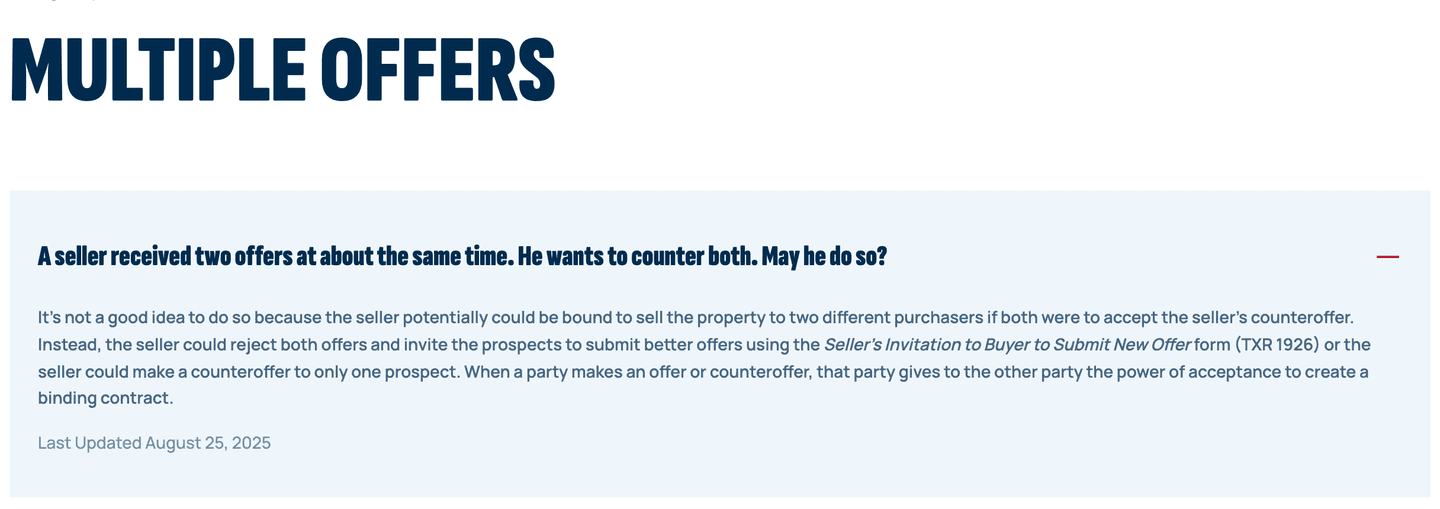
The worksheet compares terms. The register below tracks paper, because the expensive mistake in a multiple-offer week is sending the wrong document: countering two buyers at once, or re-sending a counter the seller has already replaced. Texas REALTORS puts the first risk plainly: a seller who counters two offers could be bound to sell to two purchasers if both accept. Its alternatives are a counter to one buyer only, or rejecting both and inviting new offers on TXR 1926. One live document per buyer is the rule the register enforces.
The offer register: one row per document
- Offer number and buyer's agentThe worksheet number. The agent's name, email and phone. No buyer names.
- Document and versionOffer, Seller Counter 1, Buyer Counter 1, with the date and time each went out.
- ReplacesThe document this one kills. In Texas, handwritten changes to the offer are initialed on the form itself, so note which blanks changed.
- Signature stateWho has signed, who has not, and the envelope or file it lives in.
- ExpiresThe date and time written on the document. Blank means it has none.
- StatusLive, expired, rejected, revoked or accepted. One live document per buyer, never two.
- Acceptance communicatedDate, time and channel the last acceptance was told to the other side. Blank until it has been.
Three rules fill the register in. In Texas a contract is accepted when four things have happened: it is in writing, both sides have signed it including initials on any handwritten change to the offer, the acceptance is unequivocal, and the last party to accept has told the other side or their agent. Those initialed changes are why the Replaces row names the blanks that changed. Texas REALTORS makes the fourth step the Effective Date, which is why the register's last row stays blank until the call or email has gone. In California the Seller Multiple Counter Offer is built for this week: the seller signs it once to send it, the buyer signs to accept, and the seller signs again to pick that buyer. Nothing binds anyone until all three signatures are on it and the buyer has a copy, and the form says the seller can accept any other offer until that selection is made. Making the counter also means any previous offer or counter offer can no longer be accepted, which is the Replaces row written into the form.
The third rule is for the signing software. A superseded counter still sitting unsigned in a buyer's inbox is a live document as far as that buyer can see. In Docusign you void any envelope you sent that is still in process and type a reason, which goes into the email to the recipients and the envelope's history. Everyone who has already signed, or whose turn it was, gets that email. People further down the signing order get nothing, so tell them yourself. Deleting an in-process envelope voids it too. Write the void time into the Status row and the stale version cannot come back signed a week later.
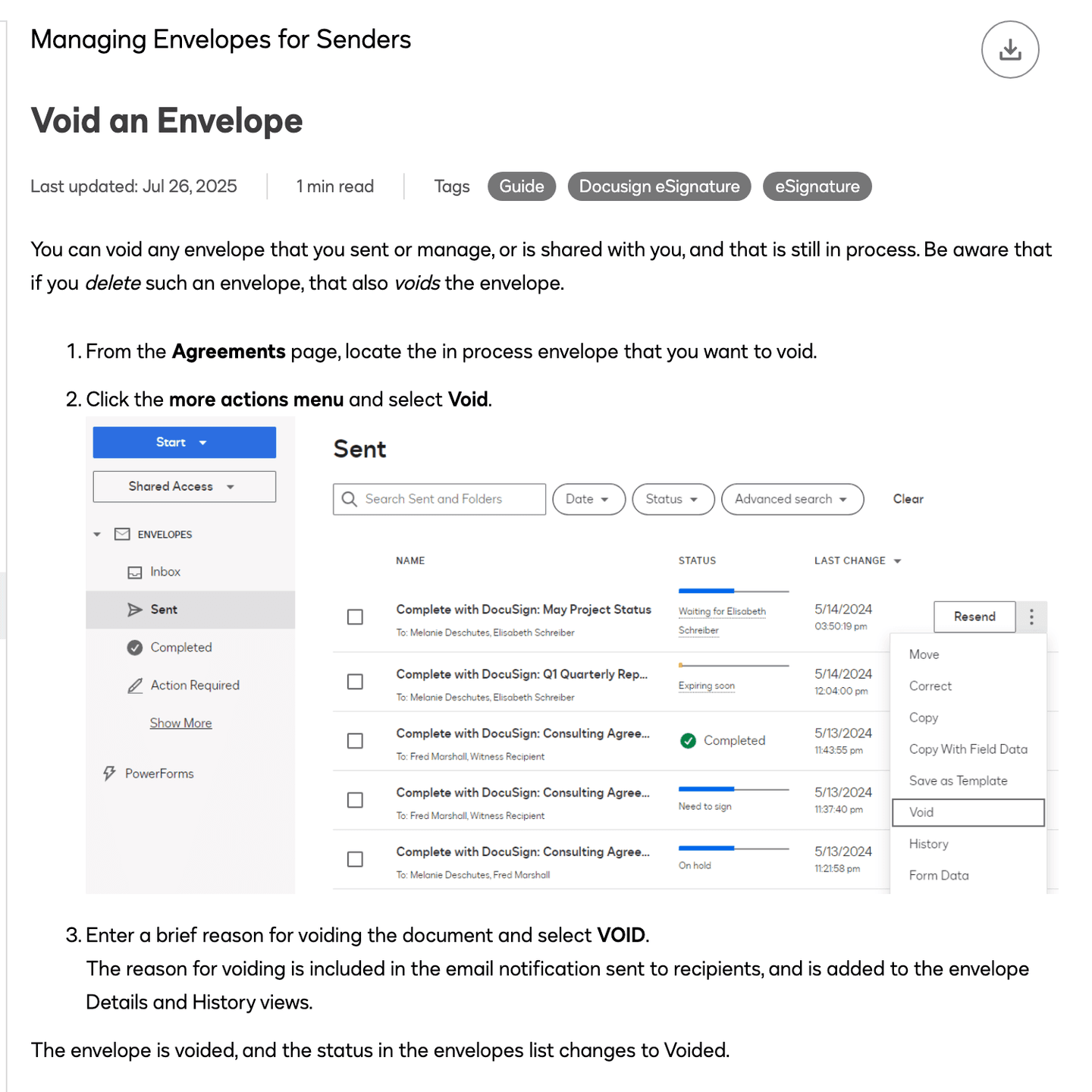
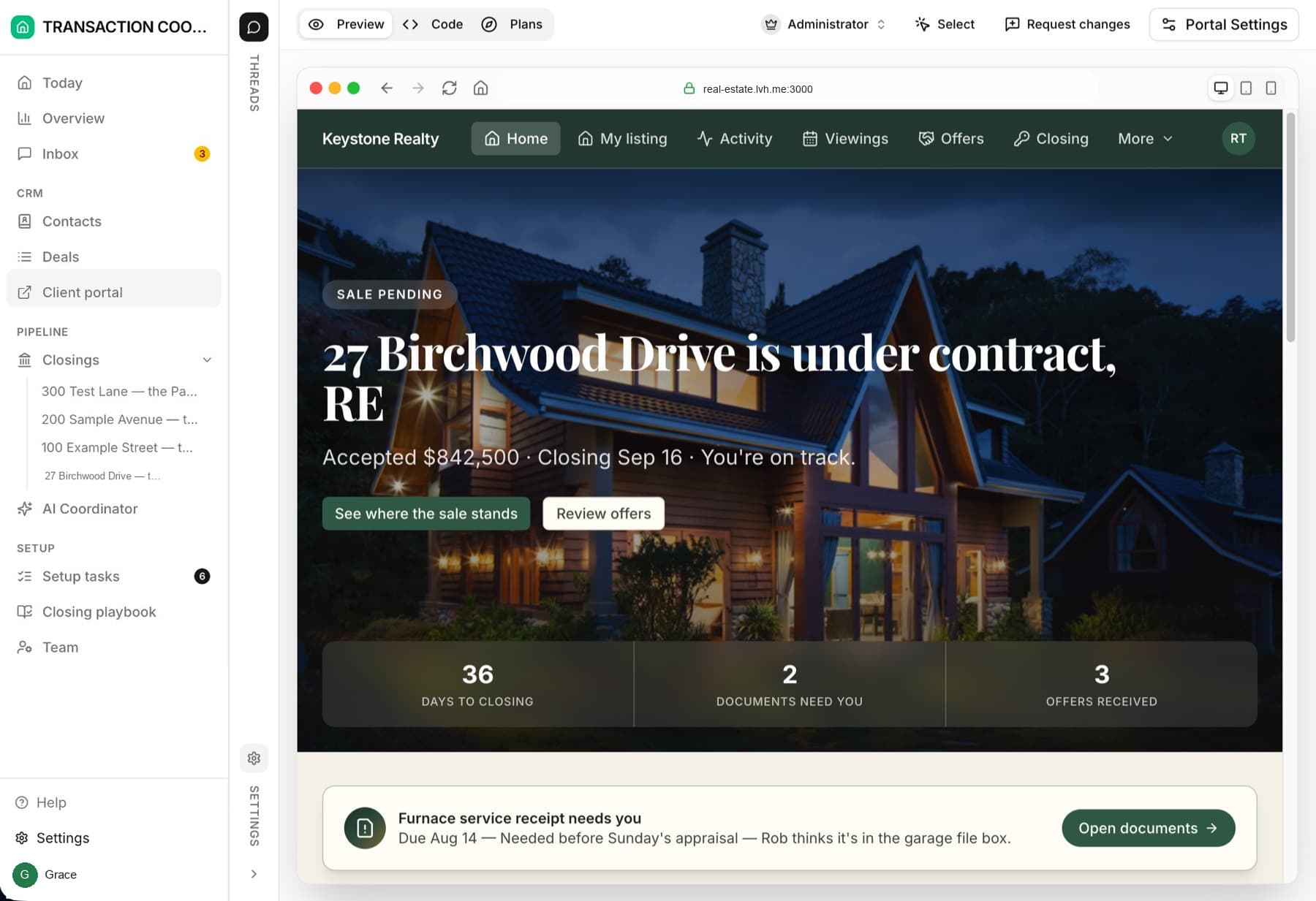
When the seller signs the last version, the worksheet and the register are done and the closing starts. In DeedSpring that is one step: open the closing on the Sell side, upload the executed contract, and it reads the price, the deposits, the contingencies and the dates into deadlines on the file, so the contingencies and dates you compared on the worksheet become the dates it watches. Forms go out for signature from the same file, with each signer's status on the request and the coordinator told when everyone has signed.
How do you adapt it outside Texas?
Keep the rows and change the first column. Your form carries the same terms under different paragraph numbers: price, financing, deposits, appraisal, closing date and seller-paid costs. Find each one and write its paragraph in where the TREC reference sits. NAR's guidance says your duties to the seller and to the other parties are set by state law and regulation as well as the Code, so find out before the first offer week whether your form has a multiple counter offer like California's. Drop the ¶12B(1) row if your form has no buyer-broker contribution line, and where an attorney reviews the contract, add a Replaces entry for the attorney's rider. Ask the seller what matters most before you sort the columns. A seller who needs to close in three weeks reads the sheet in a different order from one who needs the highest net.
What does DeedSpring do once the seller picks one?
DeedSpring has an Offers module behind a Config switch, and the seller's portal has a Showings and Offers page of its own, so the count of offers in is something the seller sees without calling you. The work it runs starts when one is accepted. Open the closing from the executed contract and the price, deposits, contingencies and dates are read into deadlines on the file. The AI Transaction Coordinator checks every active file every hour, flags a milestone past its target on Today and on the closing's Overview, and drafts the chase to the lender or the reminder to the buyer's agent for you to send. Anything that touches money, contract terms or a moving deadline is always a draft for you.
Starter is $15 a month for one closing a month. Standard is $25 a closing, less at volume, with unlimited agents and teammates and unused closings rolling over. Both are month to month, on the pricing page.