Migration guide · Product guides, pricing and migration
Import Follow Up Boss contacts into Trackxi: fields, sync direction and checks
Follow Up Boss's own integration page lists ten contact fields that go to Trackxi and three kinds of transaction data that come back for viewing. Here is the field map with its direction, who can switch it on and on which Trackxi plan, how to check the import against your export, and how to undo it.
What moves, and which way?
The headline says two-way. The field list says otherwise. Follow Up Boss's Trackxi page opens with “Two-way, real-time sync of contacts, transaction updates, and task data,” then lists what actually crosses. Contacts go down to Trackxi. What comes back up is transaction updates, task data and status changes tied to synced records. The transaction detail is viewed in a Trackxi panel inside Follow Up Boss. Neither page says what a status change is in Follow Up Boss terms or where it lands, so assume your contact records are untouched and check one after the first sync. The page says one thing plainly: Trackxi does not sync newly created Trackxi contacts back into Follow Up Boss.
The field map, with direction, from Follow Up Boss's own integration page
| On the contact | Follow Up Boss → Trackxi | Trackxi → Follow Up Boss | What to assume |
|---|---|---|---|
| Names | First, middle and last name. | Nothing. A contact created in Trackxi never returns. | Fix spellings in Follow Up Boss and let them flow down. |
| Email, phone, address, website | Yes, each listed as one item. | Nothing. | A profile can hold 25 numbers. Check a contact with three before you trust it. |
| Tags | Every tag, when the tag switch is on. | Nothing. | Clean Admin › Tags first. There is no filter. |
| Birthday, home anniversary | Listed, with no field name. | Nothing. | Follow Up Boss keeps these in custom date fields you named. Check one contact. |
| Notes, calls, texts, emails | Not on the list. | Nothing. | They stay in Follow Up Boss. The CSV carries the last 50 calls, texts and notes. Emails never export. |
| Stage, source, agent, lender | Not on the list. | Status changes tied to synced records. | Your contact stage stays yours to move. |
| Deals, price, close date | Not on the list. | Transaction updates and task data, viewed in the panel. | Trackxi holds the transaction. The Follow Up Boss Deal card is still yours. |
| Custom fields, files, relationships | Not on the list. | Nothing. | They stay behind. |
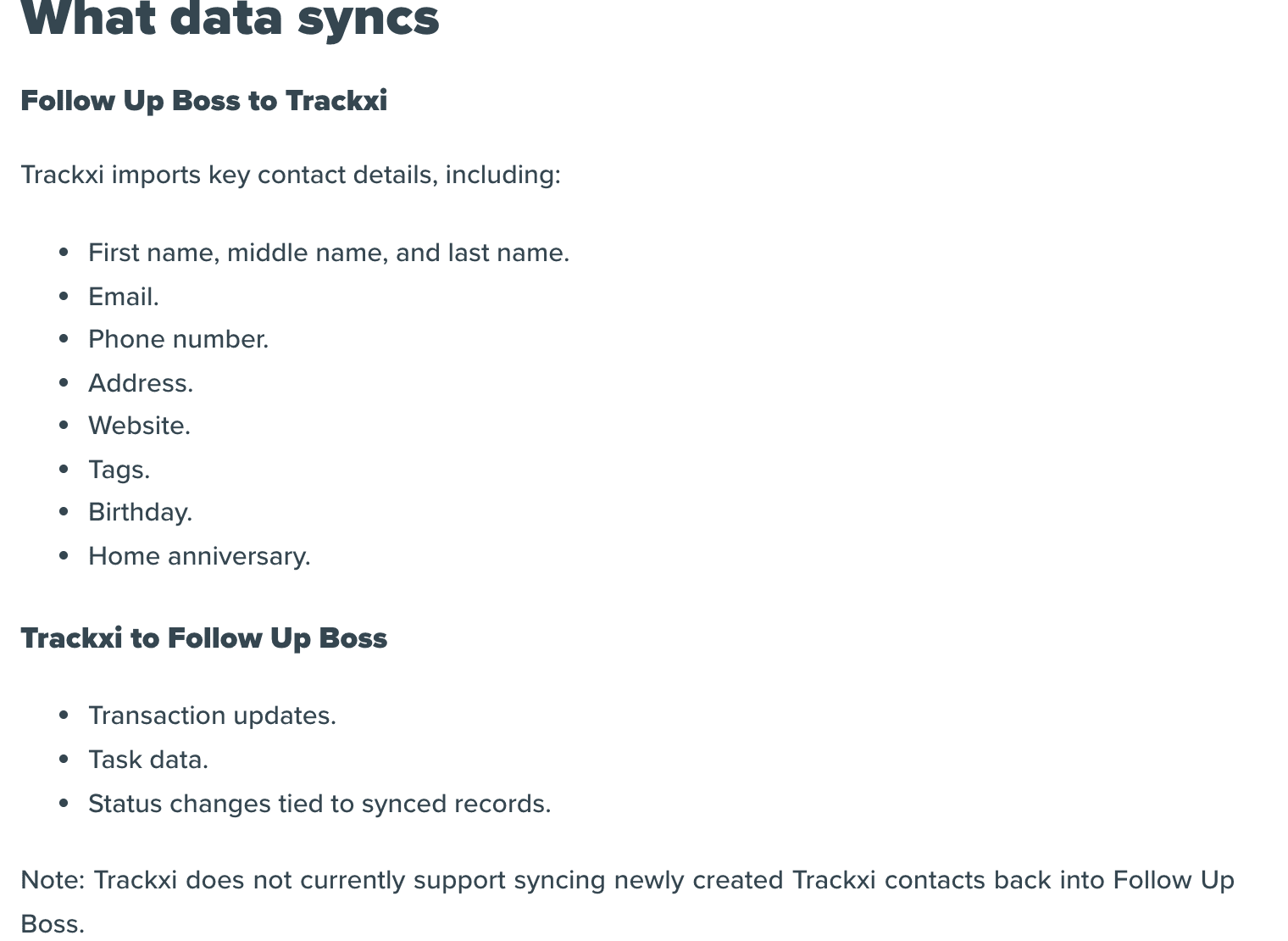
Set the ten fields against what a Follow Up Boss contact actually holds. The contact export runs to 47 columns when you tick Export All Columns: stage, lead source, assigned agent, timeframe, property details, background, deal stage, close date, deal price, campaign fields and every custom field. None of that is on the integration page. Trackxi's own blog says the integration syncs deals from Follow Up Boss. Its partner's help page names no deal field, so trust the help page and treat the Deals board as yours to keep moving by hand.
Who can switch it on, and on which plan?
The connection runs on a Follow Up Boss API key. Follow Up Boss's API key page says a key gives access to all information in the account, which means Trackxi reads the whole database, not one agent's sphere. By default anyone on the account can create a key. The Trackxi page asks for Admin access to generate the key and enable the embedded app. If you want to decide who can hand out keys, ask Follow Up Boss support for the API Key Restrictions power-up, which adds an API Access checkbox per user under Admin, Teams. Revoking a user's access deletes the keys they made.
On the Trackxi side the gate is the plan. On Trackxi's pricing page the Follow Up Boss row is a red cross on Essential at $39 a month and a green tick on Pro at $69, Pro Plus at $99 and Enterprise at $199. The integration costs $30 a month more than the cheapest plan. Then watch the contact cap: 10,000 contacts on Pro and Pro Plus, 50,000 on Enterprise. The sync switch pulls every contact in Follow Up Boss, and Trackxi's FAQ says that exceeding a plan limit prompts you to upgrade. A 14,000-person database on Pro is a problem before the first contact lands.
What should you do before you connect them?
Take the baseline first. In Follow Up Boss go to People, All People, select all, Export, and tick Export All Columns. Owners can export by default and grant it to others with the Can Export checkbox under Admin, Teams, and the owner gets an email whenever an agent or admin exports. The CSV carries up to six emails, phones and addresses per person and the most recent 50 calls, 50 texts and 50 notes. Emails and call recordings never export. Write the row count on the file name. It is the number every later check compares against.
Then clean up, because the copy is one way and nothing you fix in Trackxi comes back. Merge duplicates in Follow Up Boss before you connect: up to ten at a time, the main contact keeps its name, agent, stage and action plan, the data is moved rather than copied, and it cannot be undone. Open Admin, Tags and read the used column. Every tag crosses when the tag switch is on, so delete the dead ones and the five spellings of “past client” now.
Last, decide whether you want the whole database in a transaction tool. The Trackxi dialog has two switches, all contacts and all tags, and no filter by tag, stage or agent. If the answer is no, build the Trackxi contact list by hand from the people under contract and leave the switch off.
How do you connect them?
Step 1: Log in to Trackxi on a plan that includes the integration
Pro, Pro Plus or Enterprise. The Essential plan's row for Follow Up Boss is a red cross.
Step 2: In Trackxi, open Settings, then Integration, then Follow Up Boss
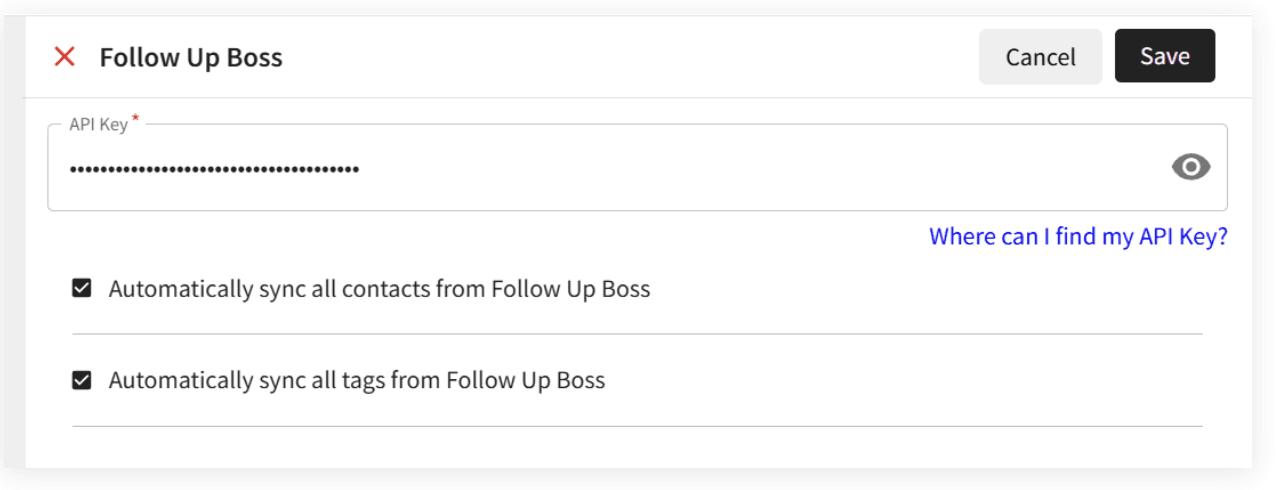
The dialog asks for one thing, an API key.
Step 3: In Follow Up Boss, create an API key named Trackxi
Follow Up Boss's own key page puts this under Admin, then API. The Trackxi page calls it Admin, Integrations, API Keys. Copy the key straight away, because the list shows only the last four digits afterwards.
Step 4: Paste the key, tick the two switches you want, and save
Automatically sync all contacts, and automatically sync all tags. Save activates the sync.
Step 5: Back in Follow Up Boss, enable the embedded app
Admin, Integrations, Embedded Apps, find Trackxi, Enable. Every user on the account now sees the Trackxi panel on the right of each lead profile and in the Inbox.
Step 6: Open a contact and create a transaction from the panel
Imported contacts prefill prospects and can be added as parties to buyer, seller or listing transactions in Trackxi.
The integration has been live since November 2024, and Follow Up Boss lists Trackxi under Transaction Management in its integrations directory. Once the embedded app is on, it is on for everyone, so tell the team what the new panel is before an agent asks.
How do you check the import?
Do the checks the same day, while the baseline CSV is fresh. Five confirm the first sync. Three are tests of what happens next, and they matter more, because neither vendor's page says what Trackxi does when a synced contact is edited, merged or deleted in Follow Up Boss. Use throwaway contacts for the merge and delete tests. A Follow Up Boss delete erases a contact permanently, and the Trackxi copy may or may not follow.
Import checks
- Count matches: the People total in Follow Up Boss equals the contact count in Trackxi, or you can name the difference.The export CSV from before you connected is your baseline.
- The key was used: Admin › API in Follow Up Boss shows Trackxi under Last Used when you hover.
- A contact with three phone numbers and two emails looks the same in Trackxi.
- A contact with a birthday in a custom date field shows that birthday in Trackxi.
- Tag counts match: pick two tags, compare the used count in Admin › Tags with what Trackxi shows for each.
- Edit test: change a phone number in Follow Up Boss, note the time, and watch Trackxi.Neither vendor publishes a sync interval. Your clock is the only figure you will get.
- Merge test: merge two throwaway contacts in Follow Up Boss and see whether Trackxi ends up with one or two.
- Create test: add a person in Trackxi and confirm it does not appear in Follow Up Boss.
If a count is off, filter the Follow Up Boss export by date added and compare the newest rows first. If a multi-number contact arrives with one phone, the integration page's singular “phone number” is doing exactly what it says, and the CSV is your record of the rest.
What happens when it breaks, and how do you undo it?
Follow Up Boss's page lists three failures. For API key errors, confirm the key is active in Follow Up Boss, or regenerate it and paste the new one into Trackxi. If connection validation fails, check that third-party integrations are allowed in Follow Up Boss and that Trackxi has permission to access the account. For sync delays, open the Trackxi settings and confirm automatic updates are on. Beyond that, Trackxi's support is [email protected] or 503-272-1071 by call or text.
Rollback is one click. Delete the Trackxi key under Admin, API, and Follow Up Boss says the integration loses access and stops working immediately. Disable the embedded app in the same Integrations screen and the panel disappears for everyone. Nothing on either page says the sync writes into a contact's stage, notes or deals, so expect your Follow Up Boss records to be where you left them, and open a handful after you disconnect anyway. Neither page says what happens to the copies Trackxi imported once the key is gone, so assume they stay in Trackxi until you remove them or cancel. On cancellation the Trackxi FAQ gives you access to the end of the billing cycle to download your data, after which it is deleted.
What about the files already under contract?
The integration moves people. It does not read the contract, set the deadlines or chase the lender, and a contact record in Trackxi is still a contact record until someone builds the transaction around it. For every file under contract, open a closing in DeedSpring by uploading the executed contract. It reads the price, deposits, contingencies and dates into deadlines on the file, checks every active file every hour, and drafts the chases for you to send. DeedSpring also lists a Follow Up Boss connector among its data connections.
Which tool runs the closing?
Follow Up Boss keeps the relationship. Trackxi, once connected, holds a copy of the people and the transaction's task list. DeedSpring is the coordinator for the closing itself: the contract read into dates, the hourly check on every active file, the drafted chases and client updates with anything sensitive or negotiable always waiting for a person, a portal for your buyers and sellers, and e-signing built in. If you were connecting Trackxi to get the closings out of spreadsheets, compare the two for that job before you pay for the plan tier. The Trackxi pricing and Follow Up Boss pricing pages have the plan detail.