
Comparison · Software comparisons and alternatives
dotloop vs zipForm: forms, signing and the move toward Transact
Buy dotloop Premium at $34.99 a month if you pay for your own software, and keep zipForm if your association gives it to you free, with Lone Wolf Transact next. This page covers what zipForm is now, where each one's forms and signatures come from, and what moves when you switch.
What is zipForm now?
zipForm is the forms program most agents met through their REALTOR® association. Its maker, zipLogix, was bought by Lone Wolf Technologies in April 2019, when zipForm Plus was still a national NAR member benefit. That national benefit is gone. NAR funded the program through the end of 2021 and the partnership has ended. What you can still get is a state or local association version, and Lone Wolf now sells the product as Transactions (zipForm Edition).
Take California. A C.A.R. membership gives you free access to Lone Wolf Transactions (zipForm Edition), with Authentisign, zipForm Mobile, MLS-Connect and Record-Connect thrown in. Texas REALTORS® members get both: zipForm stays a member benefit, and the agent edition of Lone Wolf Transact is added at no cost.
Transact is the part that makes this a 2026 decision. C.A.R. dates Lone Wolf's launch of it to October 1, 2025. It is the transaction-management piece of Lone Wolf's Foundation platform, in an Agent edition and a Broker edition. C.A.R. told its members in October 2025 that zipForm Standard, the desktop program, stays available until December 31, 2026, and that zipForm itself will likely be retired in 2027, with no firm date set. Lone Wolf's own Texas page puts it more softly: there are no current plans to discontinue offering zipForm, and you keep access to it while Transact is introduced. zipForm Edition is still getting monthly releases, with the next one scheduled for October 28, 2026. Plan for Transact either way.
How do the three line up?
DeedSpring, dotloop and zipForm on the things that decide the purchase
| Question | DeedSpring | dotloop | zipForm (Lone Wolf) |
|---|---|---|---|
| What an agent pays | Starter $15 a month for one closing. Standard $25 a closing. | Free for 10 transactions. Premium $34.99 a month or $344 a year. | No published price. Ordered through your association, and free to C.A.R. and Texas members. |
| Where the forms come from | Upload your association or brokerage PDFs. Texas contracts published. | Add an association with an NRDS ID. Forms for 150+ associations. | Board or association libraries, as ZFX forms with fields pre-placed. |
| Signing | Built in. Send to a buyer, seller, agent or title company. | Included on free and Premium. | Authentisign or DocuSign. Authentisign is in the C.A.R. and Texas benefits. |
| What happens next | Month to month. Cancel anytime. | Still sold as Premium, Teams and Business+. | Lone Wolf is moving members onto Transact. C.A.R. expects zipForm to retire in 2027. |
| Your templates if you move | Two default playbooks, written for your state, DeedSpring says. | Personal folders stay with you. Brokerage folders stay locked. | Personal templates migrate to Transact as Personal. Office templates once, by an admin. |
Where do your forms come from?
In zipForm, a form is a ZFX file with its fillable fields already placed, and forms arrive in libraries specific to your board or association. Fill a field once and the same information flows into the other forms in the transaction. MLS-Connect pulls the listing in by listing ID where your MLS partners with zipForm, and Record-Connect pulls property data from the national public records database. Whose libraries you see depends on who bought them: forms come from the libraries you purchase, and associations offer agent accounts as a member benefit.
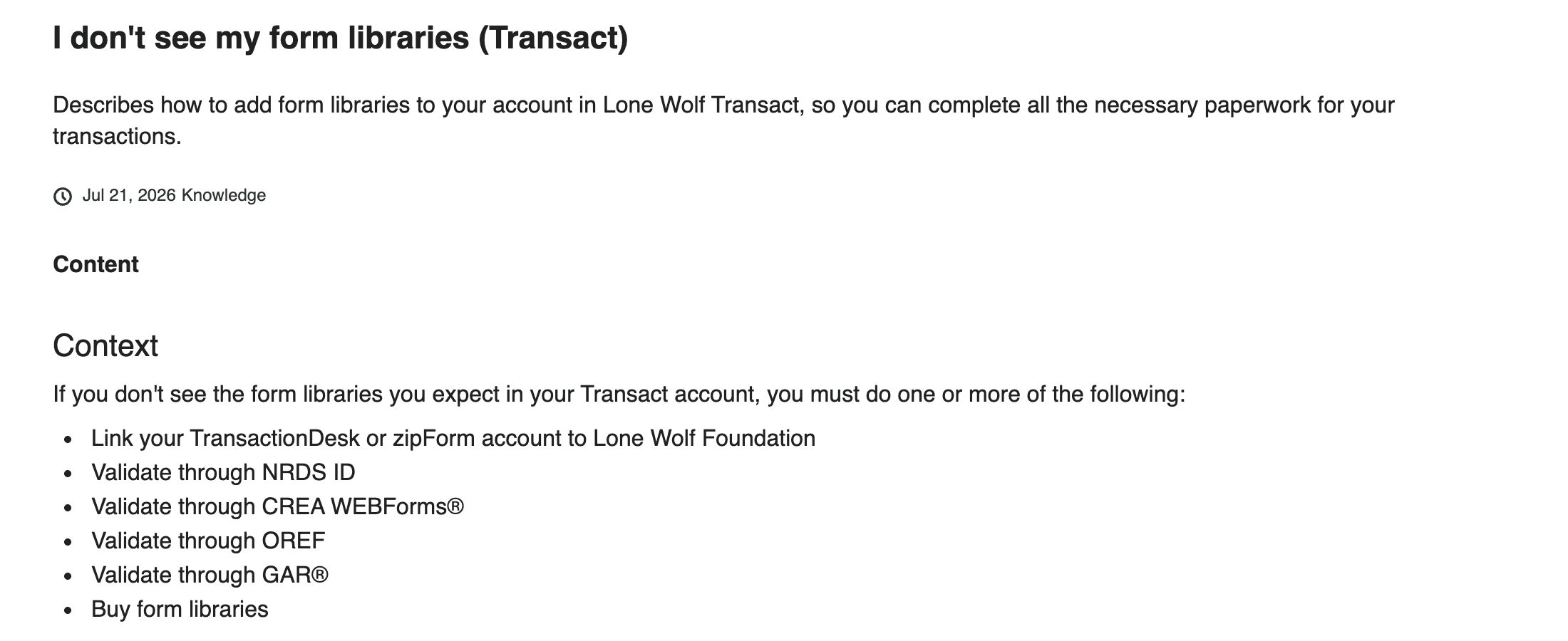
Transact changes how the libraries get to you. If your Transact account is missing forms, Lone Wolf gives you six ways to add them: link your existing zipForm or TransactionDesk account to Lone Wolf Foundation, validate with an NRDS ID, validate with CREA, OREF or Georgia credentials, or buy a form library with a card from inside the product. Linking the old account is the one that matters for a zipForm user. Any library you already hold shows up in Transact.
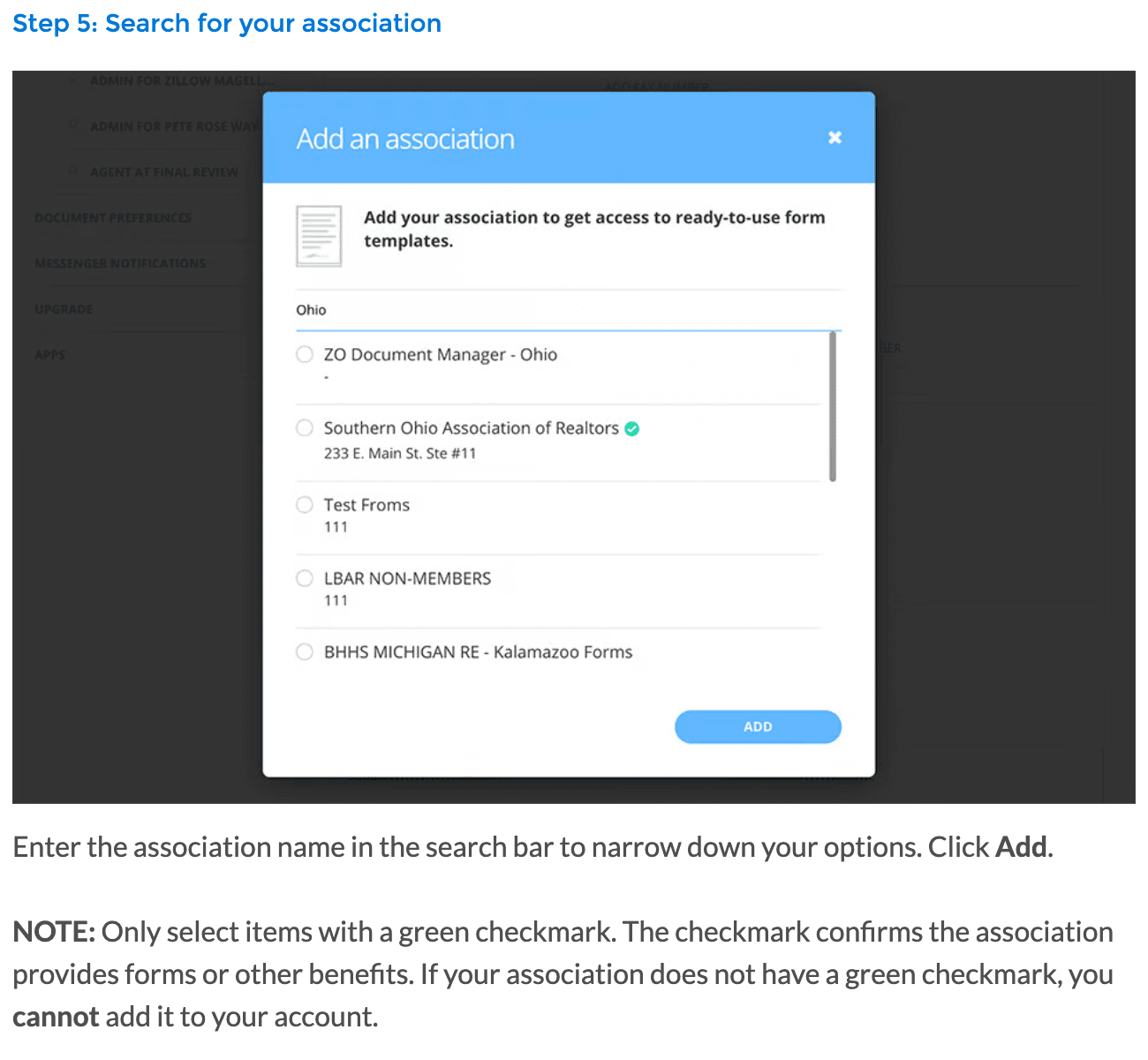
dotloop works the other way round. You add an association to your profile with an NRDS ID or an invitation code, and only associations marked with a green checkmark can be added. dotloop provides forms for more than 150 local and state associations. If your association has no agreement with dotloop, interactive forms are unavailable, and you are uploading flat PDFs and placing the fields yourself. Autofill only works on interactive forms from your brokerage, association or your own templates.
Once the forms are in, dotloop files brokerage and association folders beneath your own, locked. To fill one you add it to a loop or copy it to a personal folder, and a Premium, Teams or Business+ account can make a fully editable copy. When the association updates a form, your copy does not update. You copy it again.
How does signing work in each?
zipForm Edition signs through Authentisign, or DocuSign if you prefer. A signing has remote signers, reviewers who read but do not sign, and CCs who get the finished copy. It carries an expiry date and can send automatic reminders. Whether Authentisign costs you anything depends on your association. C.A.R. and Texas REALTORS® include it. On Transact bought any other way, Authentisign is an e-signature add-on that Lone Wolf says is available for an additional fee, and the Transact page gives no number for it. C.A.R. also notes that DocuSign does not yet integrate with Transact.
dotloop includes e-signatures on the free account and on Premium, so signing is never a separate line. A client or counterparty who gets a document to sign can sign and share it back without creating an account, provided each signer has their own email address.
Both tools stop when the last signature lands. zipForm fills its forms from your board, the public-records database and forms you filled before, and dotloop autofills interactive forms with the loop's transaction data. Neither reads the executed contract into deadlines, and chasing the lender when the appraisal is late is still your job. That is a coordinator's work, and it is what DeedSpring does beside whichever forms program your association hands you, from $15 a month.
What does each one cost?
dotloop publishes its agent price. Premium is $34.99 a month or $344 a year, which dotloop calls 18% off, and a free account gives you ten transactions with forms and e-signatures included. On a free account you can only add people to a loop for 90 days after it is created. Teams and Business+ are quote only. If your brokerage or association already pays for Premium, the upgrade screen simply tells you that you are a premium member.
Lone Wolf publishes no price for Transactions (zipForm Edition) or for Transact. The zipForm Edition page says Order it now and the Transact page says Get it now, and both send you to the zipForm order site, which asks you to pick your local or state association before it shows anything. The usual route is your association. C.A.R. members pay nothing extra for zipForm Edition. Texas REALTORS® members pay nothing extra for Transact, and a paid Transactions account in Texas moves to the free benefit at renewal. If you are not covered by an association, ask your broker whether the office holds a Lone Wolf agreement before you pay for anything. What Lone Wolf's broker editions and Authentisign cost outside a benefit is in TransactionDesk and Transact pricing: member benefits, licenses and add-ons.
What moves when you go from zipForm to Transact?
Lone Wolf's migration articles are specific. Personal zipForm templates migrate to Transact as Personal templates. Office or broker templates can be migrated only by a zipForm broker admin, and only once, and they land as Personal until the admin changes their ownership to Office or Global. Anyone who started using Transact after January 2026 had their templates moved automatically, and contacts followed for anyone who started after February 2026. Everyone else picks the templates under Templates, Forms and Checklists and clicks Migrate to Transact.
That is newer than what C.A.R. told its members in October 2025, when its FAQ said member-benefit templates would not transfer and would need recreating. Lone Wolf's February 2026 article and its Texas page both now say templates carry over, so check your Transact account before you rebuild anything. Brokers are on a different clock: C.A.R. says zipForm for Brokers changes only when the broker admin starts the switch with Lone Wolf.
dotloop has no migration to plan, but the same question applies if you change brokerages. Your Personal template folder is not deleted when you leave a brokerage. Folders the brokerage shared with you stay theirs.
Who should choose which?
Choose dotloop if you buy your own software, your association is one of the 150-plus with a dotloop agreement, and you want the whole file in one loop for $34.99 a month. It is the only one of the two with a public price.
Keep zipForm if your association pays for it and your forms library lives there. Create the Transact account when your association prompts you, link your zipForm account so the libraries follow, and confirm your templates migrated. If you are in Texas, Transact is already your benefit. If your brokerage runs zipForm for Brokers, the broker decides when you move.
Where does DeedSpring fit?
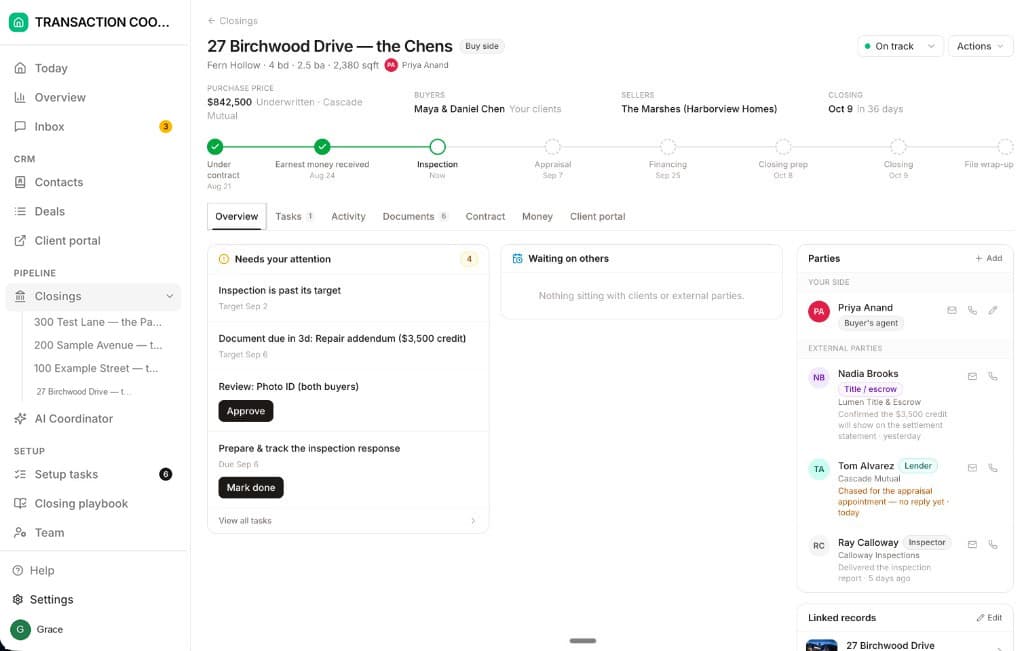
zipForm and dotloop get the contract filled and signed. DeedSpring picks the closing up from there. Upload the executed contract and it reads the price, deposits, contingencies and dates into deadlines on the file. It checks every active file every hour, flags what is slipping, and drafts the chases and client updates for you to send, with anything sensitive or negotiable always waiting for a person. E-signing is built in too: send a form to a buyer, seller, agent or title company and the signed copy files itself under the closing. Your association forms stay where they are.
How we compared
We compared dotloop Premium with Lone Wolf Transactions (zipForm Edition) and Lone Wolf Transact using both vendors' pricing and help pages, Lone Wolf's migration articles, and the NAR, C.A.R. and Texas REALTORS® benefit pages. Prices and pages were checked in October 2026.