
Case study · History, people and the future
Top Producer on a Palm Pilot: what a 2000s real estate CRM already did, and what still hasn't changed
In the mid-2000s Top Producer put an agent's day on a Palm handheld: a Today screen, action plans, a closing checklist and tasks for an assistant. Here is what that manual shows, what a TC still fights twenty years later, and the three things the record can do now that it couldn't then.
What was Top Producer for Palm?
Top Producer was the real estate CRM of the 2000s. Homestore bought it in 2000, and its 10-K for 2003 told the SEC it had an installed base of more than 125,000 agents. The Palm client was the mobile half of that. A Palm version that synced with the desktop System 6 was on sale by August 2000, and version 2.0 was out by early 2002. When Top Producer moved to the web as 7i, an Internet-based program you reached from a browser, a WAP phone or a handheld, the Palm client became the way to carry your online database around. Roughly 40,000 Realtors were using 7i in May 2005.
The manual we read is the 7i/8i-era user guide for that third Palm client, a 208-page PDF Top Producer still hosts. It is copyright 2003 to 2007, it lists Windows Vista in its requirements, and the file was generated in August 2008. Top Producer itself is still sold today. The manual calls Top Producer Systems a Move company, and Move sold it to Constellation Real Estate Group in 2021. The handheld is gone. The work it was built for is what this article is about.
What did an agent's day look like on it?
The day started on a screen called Today's Business. It showed how many appointments, calls and to-dos you had that day, by type. You tapped a count to see the list, did the thing, and marked it done or rescheduled it. You could make it the first screen after logon, and an untimed call or to-do could be set to appear a few days before it was due. Once marked done, an item dropped off the handheld after a number of days set on the desktop side, and the default sync filter never sent done items or pictures to the device at all. The Palm was the day's list. The history lived in the hosted database.
Every contact was built around the next conversation. A Next call button on the contact screen created a call linked to that person. A buyer's record held the house style, area and price range they wanted. A seller's held the property they had. And any contact could be put on an action plan from a chosen start date. Top Producer's own feature page described an action plan as a series of pre-written letters, postcards, emails, follow-up calls, to-dos and appointments released on a timer. The letters lived on the desktop or the web. On the Palm you saw only the time-released activities, landing in Today's Business on the day they fell due.
Leads worked the same way. They could be typed in, arrive from a website such as the REALTOR.com Marketing System, or come from a broker product, and they carried a four-step status: New, then Followed up once any follow-up activity was marked done, then Listing or Closing once one of those existed. The follow-up menu offered four moves: a new appointment, a new call, a new to-do, or apply a plan.
What happened when you handed a task to an assistant?
“Once you assign an activity to your assistant, it will no longer be visible in your appointment book in the Scheduler.”
Assignment was a transfer. To see the task again you opened the assistant's appointment book. The Scheduler and Today's Business each had an Assigned to selector, so you could look at an assistant's list, or another agent's who shared your database, reassign items and add new ones. But Today's Business opened on a summary for everyone and went back to it every time, the Scheduler showed one person's book at a time, and a new activity created while the selector said All belonged to the owner of the database.
Permissions ran the same way, from the owner outward. Deleting a lead or a closing could fail with a dialog saying the responsible agent had not granted you deletion rights, and telling you to contact the database owner. Each handheld was tied to one database. An assistant's handheld needed its own license, and the manual explains how to delete an assistant's device to free one up.
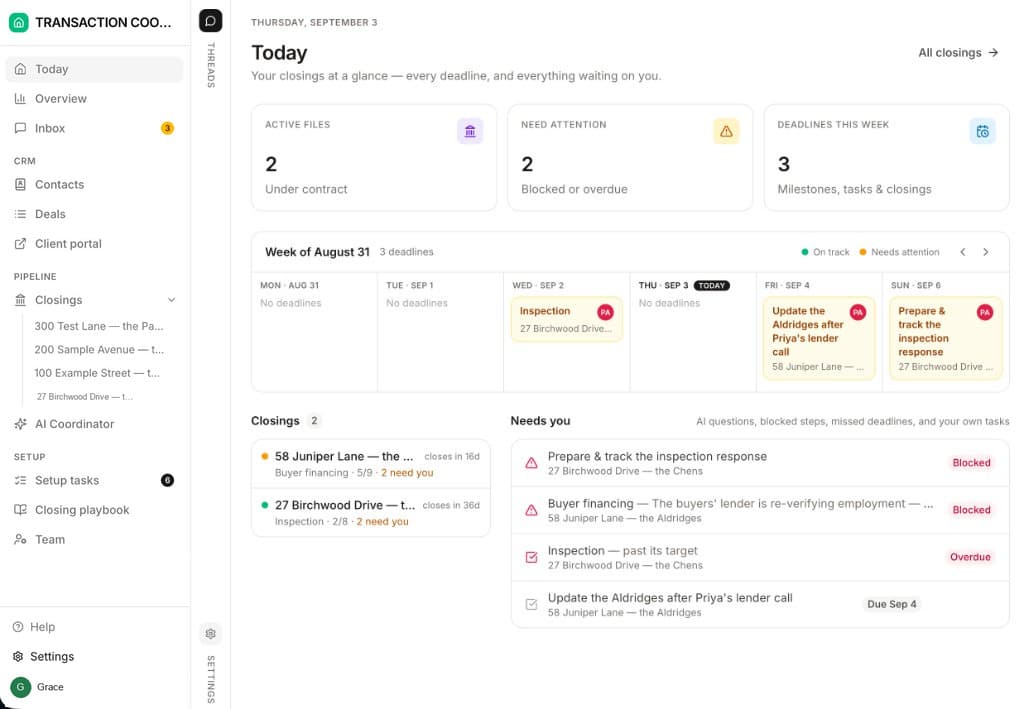
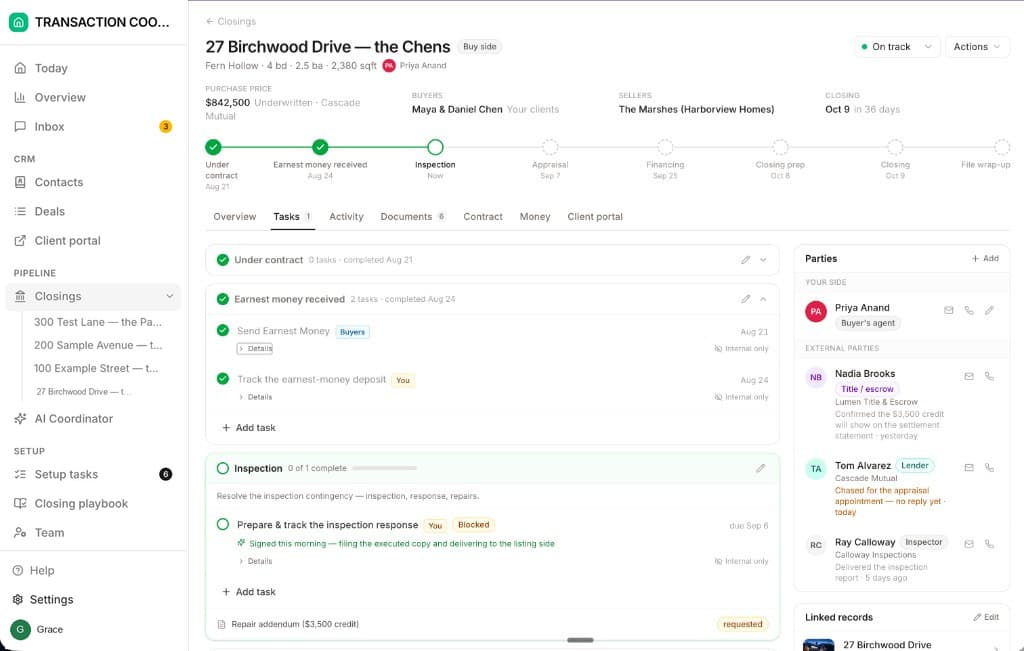
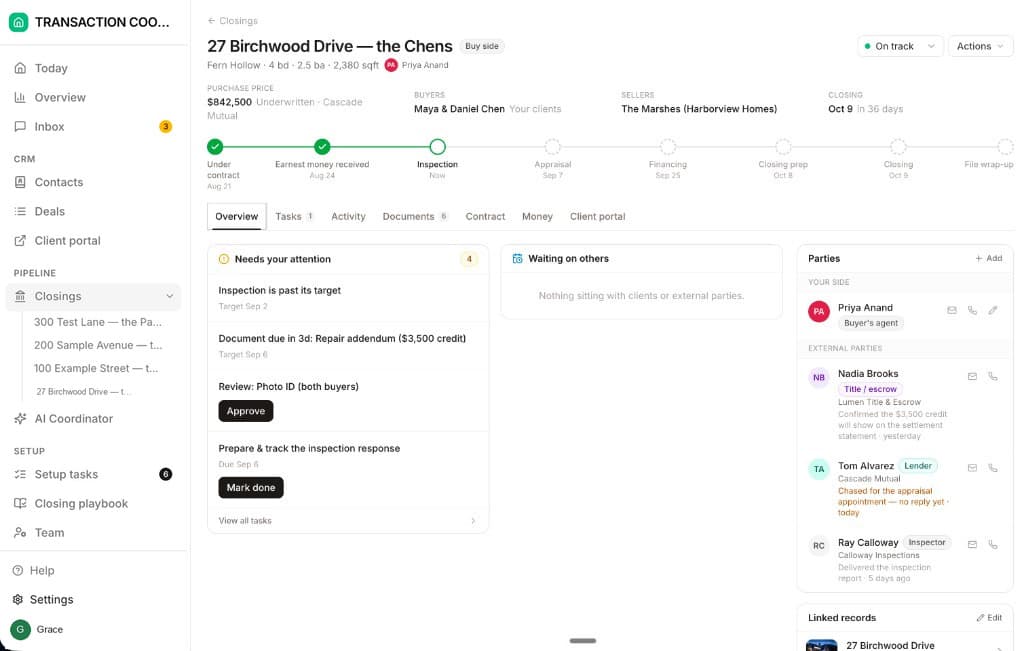
That single-owner model is the question a TC still asks of any tool: when I hand a task off, can I still see it? In DeedSpring every task on a closing names its owner, Deal owner, Client, External party or AI, and says whether it is internal or client visible. A task nobody has moved gets flagged on the Today page and on the closing's Overview. The AI coordinator works the chasing tasks assigned to it and keeps going until the item is confirmed in writing.
What did a closing record hold?
A closing on the Palm was a record with a plan attached. The record held the address, an MLS number typed by hand, a file number for your own reference, three dates picked from a calendar (acceptance, closing and possession), the sale price, the commission, where the seller came from, and which side you represented. Its status was one of six: four kinds of Pending, then Closed/Paid or Fell thru. Nothing on it described a contingency.
The dated work came from the plan. Tapping Plans offered the default Closing services checklist or any custom closing plan built in 7i/8i, and Apply generated its activities as dated items in your book or your assistant's. They were generated once. The manual has no way to shift them when the closing date moved. A Stop Reminder box hid the closing's activities from everywhere except its own list, and while it was checked you could not edit them.
The closing record, then and now
| DeedSpring | Top Producer for Palm | |
|---|---|---|
| Dates on the file | Read off the executed contract: price, deposits, contingencies and dates. You confirm them. | Acceptance, closing and possession, typed in by hand. |
| Where the tasks come from | A playbook for that side. Timings count from the contract or closing date. | A services checklist applied once. Activities generated at apply time. |
| When a date moves | The countdown, the client's timeline and the attention list follow. | The manual gives no way to shift them. Assume you re-entered them. |
| Who owns a task | Deal owner, Client, External party or AI, named on the task. | One person. Assign it and it leaves your book. |
| Who does the chasing | The AI coordinator checks every active file hourly and sends the chase. | You, from the day's list. |
| Status | On track, Caution or At risk, plus Mark as fell through and Mark as closed. | Four kinds of Pending, then Closed/Paid or Fell thru. |
A file that died was frozen. Set the status to Fell thru and a read-only copy of the contact and property was made and, to save space, kept off the handheld and out of the sync. You could still change the status and the notes and nothing else. If the contact or the property had been deleted since, the closing could not be revived, and deleting the main contact showed the closing as Contact deleted, with a warning that deleting that entry would take the closing with it. The only protection against losing a file was that warning.
Why did it have to sync every 30 days?
Because the handheld held a slice of the database, and the slice went stale. The Handheld Manager on the desktop chose which contacts reached the device and warned you if the result was too big. The limits were 7,500 contacts, 15,000 activities and 7,500 notes. Sync ran through the cradle to Palm Desktop on a PC and then over the Internet to 7i/8i, and while it ran every other user of the database was logged out.
It was also compulsory. You had to sync at least once every 30 days to stop the handheld getting too far out of step with the online database. Past the deadline it warned you each time you opened it, and after five warnings it refused to run until you synced. Delete a registered device from the Handheld Manager and every change still on it was lost. The limits were set by the device, and the manual printed them on one page.
What happened when two people changed the same field?
The manual's own example is an agent changing a contact's phone number on the handheld while the assistant changes the same number online. That was a conflict, and the default rule was that the latest change won, whichever side made it. You could switch to manual resolution, which prompted you during the sync, but even then only six kinds of field ever asked: names, company, primary address, phone, email and web address. Everything else went to the latest timestamp.
Four exceptions overrode the clock. A closing marked Closed/paid transferred online kept that status whatever the handheld said. A lead moved past Follow up on either side beat Follow up. A home phone had room for one number, so the online number stayed and the handheld's went to Other phones. And if one side made an activity repeating while the other linked it to a listing or closing, the repeating change always won and the link was lost. One more warning: change the time on the handheld, say by crossing a time zone, and the system could no longer tell which change was the latest.
HotSync is gone. The situation is not. An agent's CRM and a TC's transaction system still hold the same closing date, and the email thread still says something the record doesn't. What the Palm could not offer was one live record that everyone writes to. In DeedSpring every chase and every material change on a closing is a line on its Activity tab, so the question of who changed what, and when, has an answer.
What has changed in 20 years, and what hasn't?
In April 2004 an agent on the Getting Things Done forums, weighing Top Producer against other Palm software, objected that you did not own the database and could use it only as long as you paid for the service. That complaint predates every SaaS export argument since, and it is still the right question to put to any vendor.
What hasn't changed is the shape of the work. A contact becomes a lead, a lead becomes a closing, the closing gets a checklist, the checklist becomes dated tasks, and someone has to do them today. Top Producer had that whole loop on a device with a stylus.
What has changed is what the record knows. On the Palm the three dates on a closing were typed, the tasks were stamped once, and the person who typed them was the only one who could see what they had delegated. A modern file can read the executed contract, count the deadlines from it, move what depends on it when a date moves, and show every owner the same list. That is the gap DeedSpring was built for.
What does DeedSpring do that the Palm never could?
Upload the executed contract and DeedSpring reads the price, deposits, contingencies and dates into deadlines on the closing, you confirm what it found, and the playbook for that side builds the milestone chain with timings counted from the contract or closing date. Every task names its owner. The AI Transaction Coordinator checks every active file every hour, flags anything slipping on Today and on the closing's Overview, and drafts the chases and client updates for you to send, with anything sensitive or negotiable always waiting for a person. Move a date and the countdown, the client's timeline and the attention list follow. Your buyers and sellers get a portal, and e-signing is built in.
Starter is $15 a month for one closing a month. Standard is $25 a closing, less at volume, with unlimited agents and teammates and unused closings rolling over. Both are month to month.