
Comparison · Software comparisons and alternatives
SkySlope vs Open To Close: brokerage review and day-to-day coordination
SkySlope Suite is the brokerage's compliance system. Open To Close is the coordinator's own workspace. Here is who buys each, how review and task automation differ, what the SkySlope link actually moves, and how a TC runs both without doing the work twice.
Who buys each one?
SkySlope arrives with the brokerage. When you join one on SkySlope Suite, the brokerage creates your account, and when you leave, the account and the files in it stay behind. The public price is a floor, from $340 a month, and the page lists Forms as included with DigiSign and Books as add-ons. Inside the account, five roles decide who can do what. Agents and Limited TCs create files and submit documents. Office Managers see every file in the office but cannot accept or reject a checklist item. Only the Admin/Auditor role can.
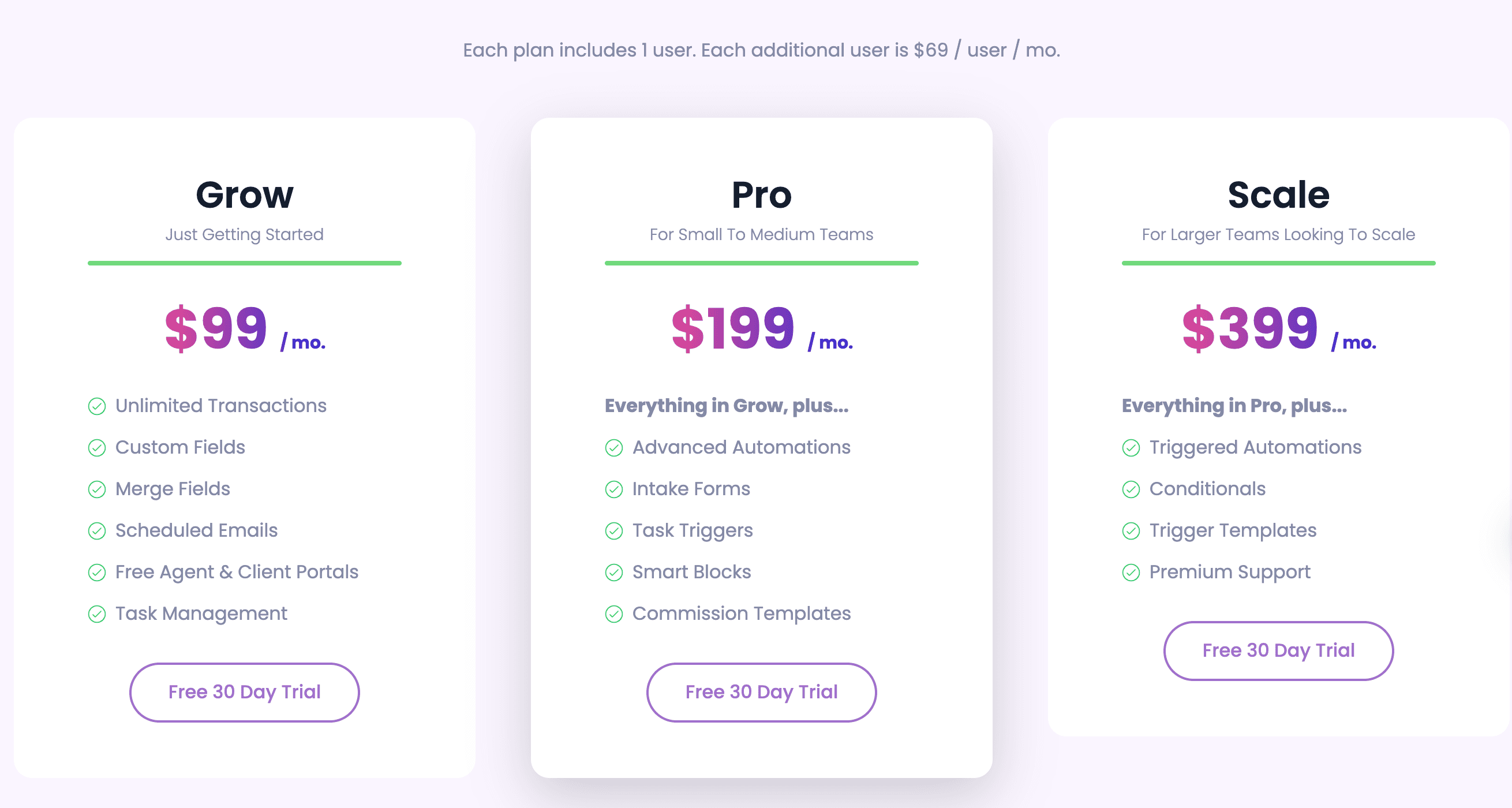
Open To Close is bought by the person doing the coordination. Grow is $99 a month, Pro $199 and Scale $399, each with one user, and every extra user is $69 a month. Agent and client portals are free on all three. DeedSpring is bought by whoever runs the file and priced by the closing rather than the seat: Starter is $15 a month for one closing a month.
Side by side
DeedSpring, Open To Close and SkySlope Suite on the things that decide the purchase
| DeedSpring | Open To Close | SkySlope Suite | |
|---|---|---|---|
| Who buys it | Whoever runs the file: agent, team or TC firm. | The coordinator or team. Agents get free portal logins. | The brokerage. It creates each agent's account. |
| Published price | $15 a month for one closing. $25 a closing on Standard. | $99, $199 or $399 a month with one user. $69 each extra user. | From $340 a month. What that covers is not on the page. |
| Who approves documents | The coordinator drafts. You approve anything sensitive before it goes. | The TC approves or rejects incoming files on each property. | Admin/Auditor accepts or rejects checklist items. Office Managers cannot. |
| Task automation | Playbook milestones with owners. AI-assigned tasks are chased until confirmed. | Task triggers send emails and texts. 3 on Grow, unlimited above. | A to-do list per file plus reminder emails. |
| How agents hand you a deal | Upload the executed contract. The dates fill themselves in. | Intake forms in a free agent portal. 4 forms on Grow. | TC Access lets you create the file for an agent. |
| Reads the contract | Yes. Price, deposits, contingencies and dates become deadlines. | Details come from the intake form or a SkySlope import. | Contract upload fills the file. California and Arizona only. |
| E-signature | Built in on every plan. | Through a DocuSign connection on Pro and Scale. | DigiSign add-on, $6.25 a month per account billed annually. |
| Getting files out | Audit exports on the Brokerage plan. | CSV export of contacts and properties on every plan. | One-click zip per archived file. Access ends when you leave the brokerage. |

How does broker review work in SkySlope?
Review happens in Quick Audit. The auditor opens a checklist item, reads the PDF in the center pane and clicks Accept or Reject. On a reject, the auditor leaves a comment for the agent, which Smart Assist prefills with the missing signatures or initials in the states where it runs. Before any of that, the broker can flag checklist items so the agent gets reminder emails until the document is uploaded, on a schedule the broker sets in Notifications.
A TC gets into this system one of two ways. With TC Access switched on, any TC in the agent's office can create files for that agent and work the files they created. It does not open the agent's existing files. For those, the agent shares the file with the TC by name, and that only works if the TC has a SkySlope account under the same brokerage. A TC with agents at several brokerages therefore needs an account under each one, or no account at all, with the agent doing the uploads.
What does Open To Close automate that SkySlope does not?
SkySlope's tasks are a to-do list on the file with an optional daily email of what is due. Open To Close's task triggers do the sending. A trigger fires when a task is completed or missed and sends an email or text, or adds the next task template. By default a triggered message waits in a queue for you to review. On Pro and Scale you can flip it to send without review and assign it to a role. Grow caps you at three triggers and never sends automatically. Trigger conditions and task locking are Scale only.
Agents never touch your triggers. They get a free portal where they see the transactions assigned to them, submit an intake form with the contract attached, and upload documents that land in your unapproved queue. You review that queue on the Documents tab, name the file, give it a role and approve it. Rejected files are gone for good, so reject only what you are sure you do not need.
What does the SkySlope link actually move?
Open To Close connects to SkySlope with an Access Key and Secret that each SkySlope user generates under My Account on the Integrations tab. The connection runs as that user and applies to the whole Open To Close organization. To work from more than one agent's SkySlope account, add a profile for each, with that agent's key. SkySlope shows the Secret once.
The link is per property and you start it. You search SkySlope for the listing or sale, assign it, and then pull the details and contacts across with a field map. Documents go one way. You can push a file from Open To Close into a SkySlope Sale, but you cannot pull one back, and SkySlope accepts no uploads to a Listing at all. A property can hold one of the three brokerage links, SkySlope, dotloop or Brokermint, at a time. If the file does not exist in SkySlope yet, Export Property creates it from Open To Close.
DeedSpring takes a different route to the same brokerage system. Its coordinator keys a closing into your transaction management system through a live browser you watch, on request.
How do you run both without doing the work twice?
Treat Open To Close as where the deal is worked and SkySlope as where the broker checks it. The SkySlope checklist carries only what the auditor needs to sign off.
What each system owns when a TC runs both
| Open To Close (the TC) | SkySlope Suite (the broker) | |
|---|---|---|
| Documents | Collected, approved and labeled here first. | Receives the executed copies. Only Sales accept uploads from Open To Close. |
| Deadlines | Task due dates live here. A missed one can fire an email or text. | The checklist the auditor signs off against. |
| Emails and texts | Sent from here. Queued for review or automatic on Pro and Scale. | Flag reminders and rejection comments go to the agent. |
| Approval | The TC approves what agents and clients send in. | The Admin/Auditor accepts or rejects, with a comment back to the agent. |
What goes back to the broker
What does it cost to run both?
SkySlope costs the TC nothing. The brokerage pays from $340 a month and, if the TC needs DigiSign, $6.25 a month per account billed annually, since each SkySlope account subscribes separately. Open To Close is the TC's bill. A solo coordinator on Pro pays $199 a month, a TC with two assistants pays $337, and at ten or more team members Open To Close asks you to contact them for enterprise pricing. Texts are 250 per user a month, with another 250 for $5. Open To Close AI is a separate product from the same company at a different address and price, and nothing in this article applies to it.
Who should pick which?
Brokers pick SkySlope, and the choice is already made for every agent and TC in the office. Buy Open To Close if you are the coordinator, you work from one brokerage's SkySlope, and what you lack is sending: triggered emails and texts, and a portal where agents submit intake forms. Start on Pro, because Grow's three triggers and no automatic sending leave the queue to you. Stay with SkySlope alone if the brokerage gives you TC Access and the agents are happy to do their own uploads.
Where DeedSpring fits
SkySlope reads a contract in California and Arizona. Open To Close takes its fields from the intake form or the SkySlope import. DeedSpring reads the contract and then works the file. Upload the executed contract and the coordinator reads the price, deposits, contingencies and dates into deadlines on the closing. It reads the mail on each file, sends the chases to lender and title until each item is confirmed in writing, and drafts the client updates for you, with anything sensitive or negotiable always waiting for your approval. A TC firm uses the same setup, with each client set up as a coordination client, and decides by role who sees which files.
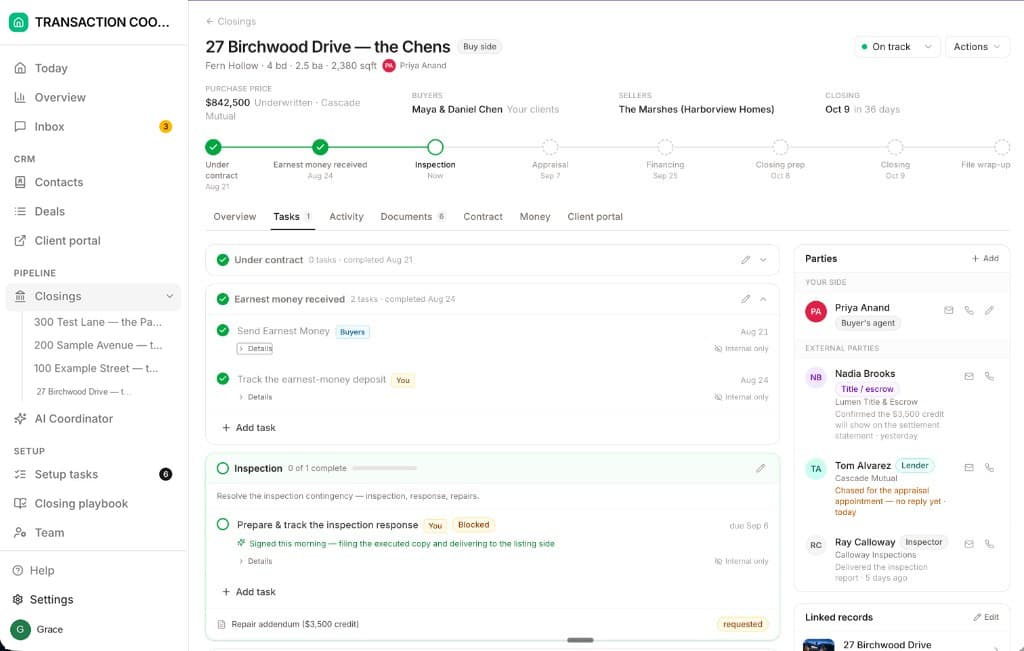
Starter is $15 a month for one closing a month. Standard is $25 a closing, less at volume, with unlimited agents and teammates and unused closings rolling over. Both are month to month.
How we compared
We compared SkySlope Suite as a brokerage buys it with Open To Close on its Grow, Pro and Scale plans, using both vendors' pricing pages and help articles on review, roles, task triggers and the SkySlope link. Prices and pages were checked in October 2026.