Workflow · Transaction coordinator operations
How to run a transaction coordinator business across several brokerages
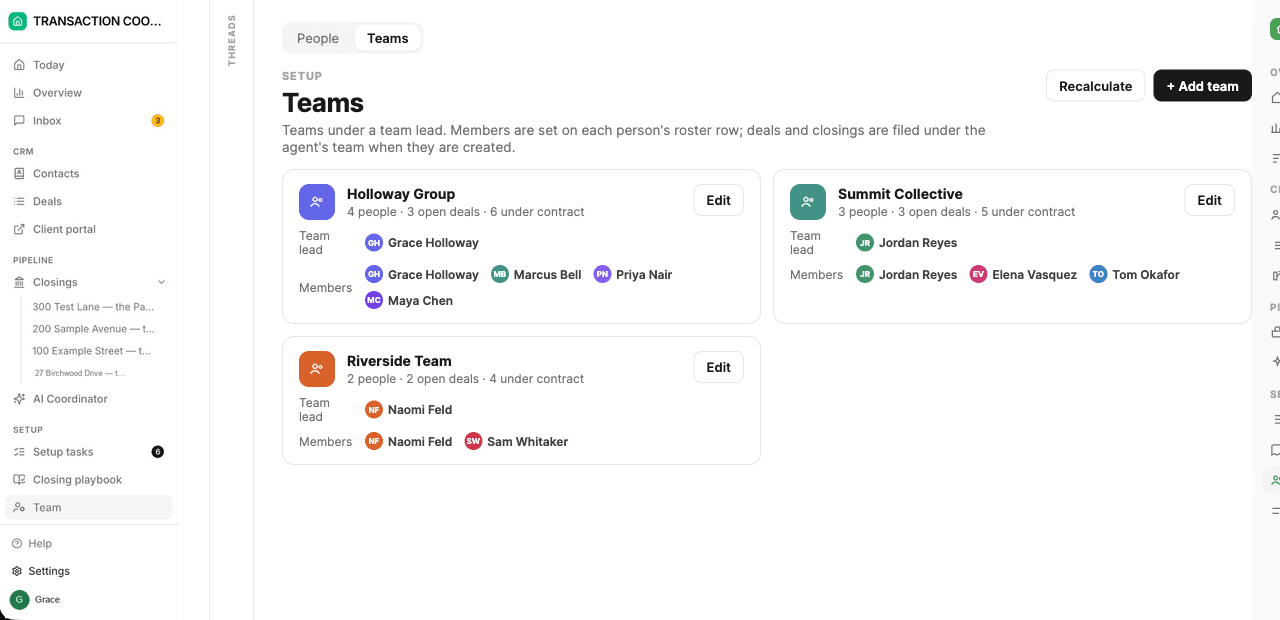
Keep one system of your own for the work and one named account per client brokerage for their compliance, never a borrowed login. Set each client up as its own team with its own playbook and sending identity, then run one queue across all of them. DeedSpring's Coordination clients mode is built for exactly this.
Why does each brokerage need its own login?
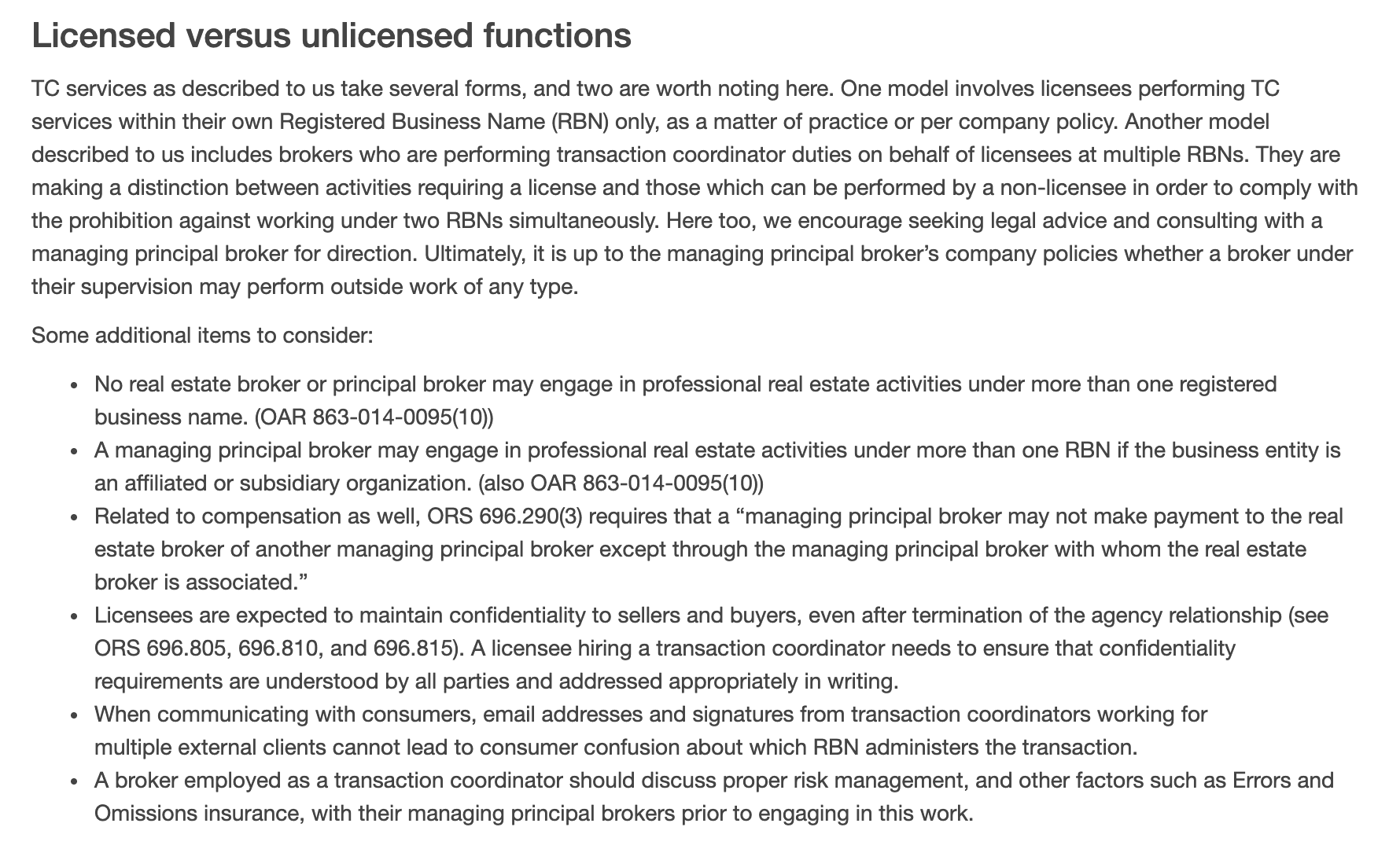
Because the two regulators that have written about multi-brokerage coordinators land on the same two things: who is acting, and under which brokerage's name. The Oregon Real Estate Agency's Commissioner's column on coordinators says no broker or principal broker may engage in professional real estate activity under more than one registered business name, that a licensee hiring a coordinator needs to ensure the confidentiality requirements are understood by all parties and addressed in writing, and that a coordinator's email addresses and signatures cannot lead to consumer confusion about which registered business name administers the transaction.
New Mexico went further and wrote the job into rule. Part 20 of the Commission's rules says a coordinator providing services for multiple brokerages other than their own must hold a current New Mexico qualifying broker's license, that a coordinator serving another brokerage must have a transaction-specific written agreement with that brokerage's qualifying broker detailing the services and any compensation, and that a broker who engages a coordinator for activities that may require a license is responsible for disclosing the coordinator's name in writing to the buyer, seller and brokers in the transaction. Where your state has no coordinator rule, take Oregon's list as the floor: one brokerage identity per file, confidentiality in writing, and a signature that says whose file it is.
The borrowed login fails both of those tests at once: nobody can tell who acted, or under whose name. An agent on r/realtors asked in November 2025 whether it was normal that agents in their brokerage hand their dotloop and SkySlope logins to their coordinators, and the replies split between coordinators working inside agents' accounts and coordinators with their own logins and admin access to the agents' loops. Only the second kind leaves a record. SkySlope says plainly that as long as the coordinator has their own TC account and is not using the agent's email and password, everything is recorded on the file's Log tab under whoever did it.
What does each brokerage's system let an outside TC do?
Less than you want, and differently in each. The table is the account map you will be maintaining: one column per system, one row per question you will be asked by every new client's broker.
How an outside coordinator gets into each system
| Question | DeedSpring | dotloop | SkySlope | zipForm (C.A.R.) |
|---|---|---|---|---|
| Whose account you work in | Your own firm's workspace; your coordinators sign in | Your own login, with a profile per brokerage or team | A TC account under the client brokerage | Your own login, inside the agent's account |
| How a client brokerage is modeled | A team, labelled a Coordination client | A profile attached to that brokerage, then loop-by-loop invitations | One brokerage per account, one office per file share | Agent by agent: each one invites you |
| What you can see | Closings you are added to, plus the deals and clients behind them | Everything in that loop: documents, people, tasks | Files you created for the agent, or were added to | What the agent's permissions allow |
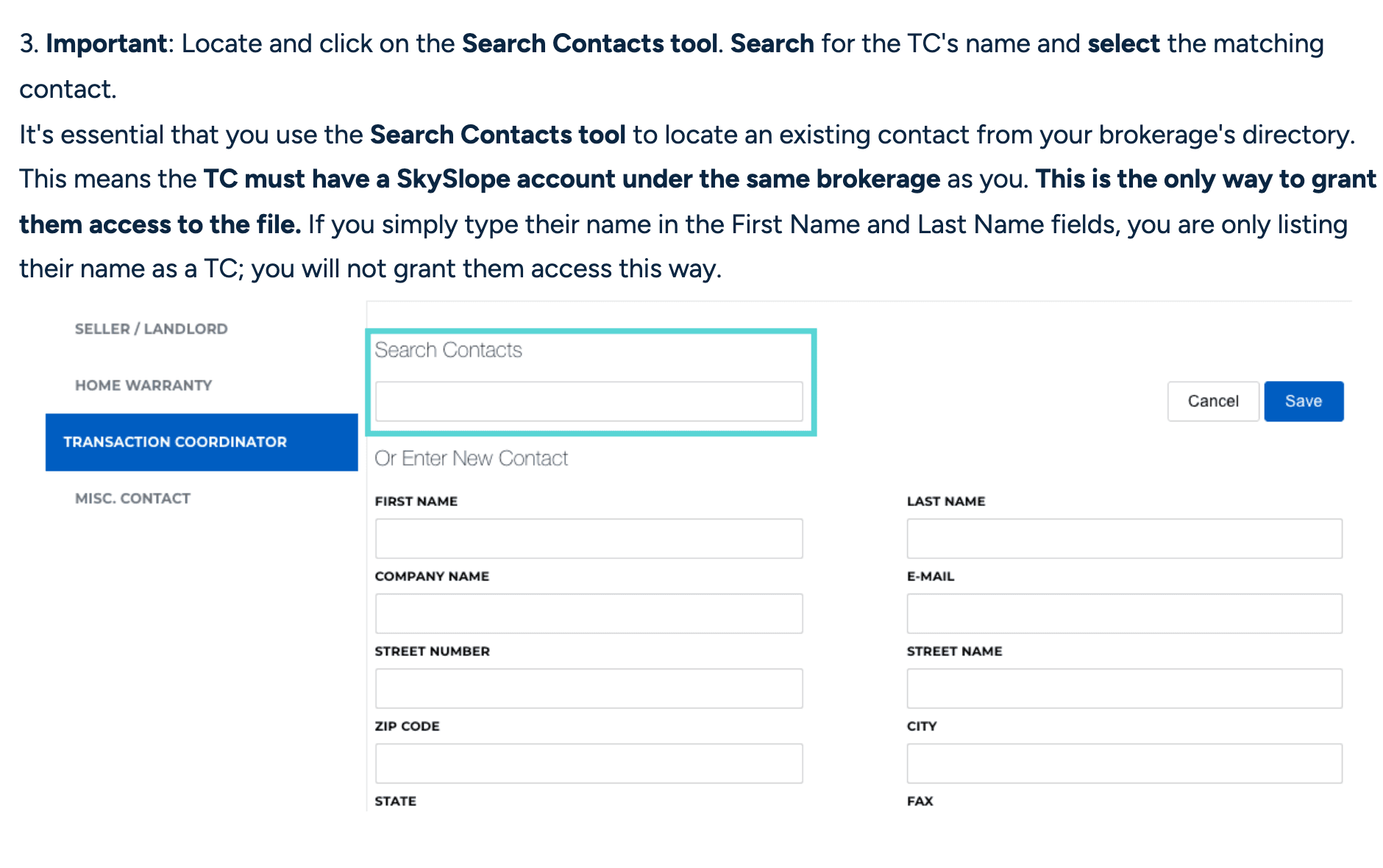
SkySlope is the strictest and the most useful to understand. Its TC Access switch lets coordinators create files on behalf of agents in the same office, and when an agent turns it on, any TC in that office can create files for them. It does not open the agent's existing files. For those, the agent adds you as the Transaction Coordinator contact on the file, and the help page is explicit that the TC must have a SkySlope account under the same brokerage as the agent, in the same office, for the access toggle to appear. A multi-brokerage coordinator therefore holds one SkySlope login per client brokerage, each a Limited TC account in that brokerage, which can create files, submit documents to the checklist and manage the file lifecycle, and cannot see every file in the office. SkySlope's DigiSign FAQ even names you: a TC with an account for each brokerage they service subscribes once per account, at $6.25 a month billed annually.
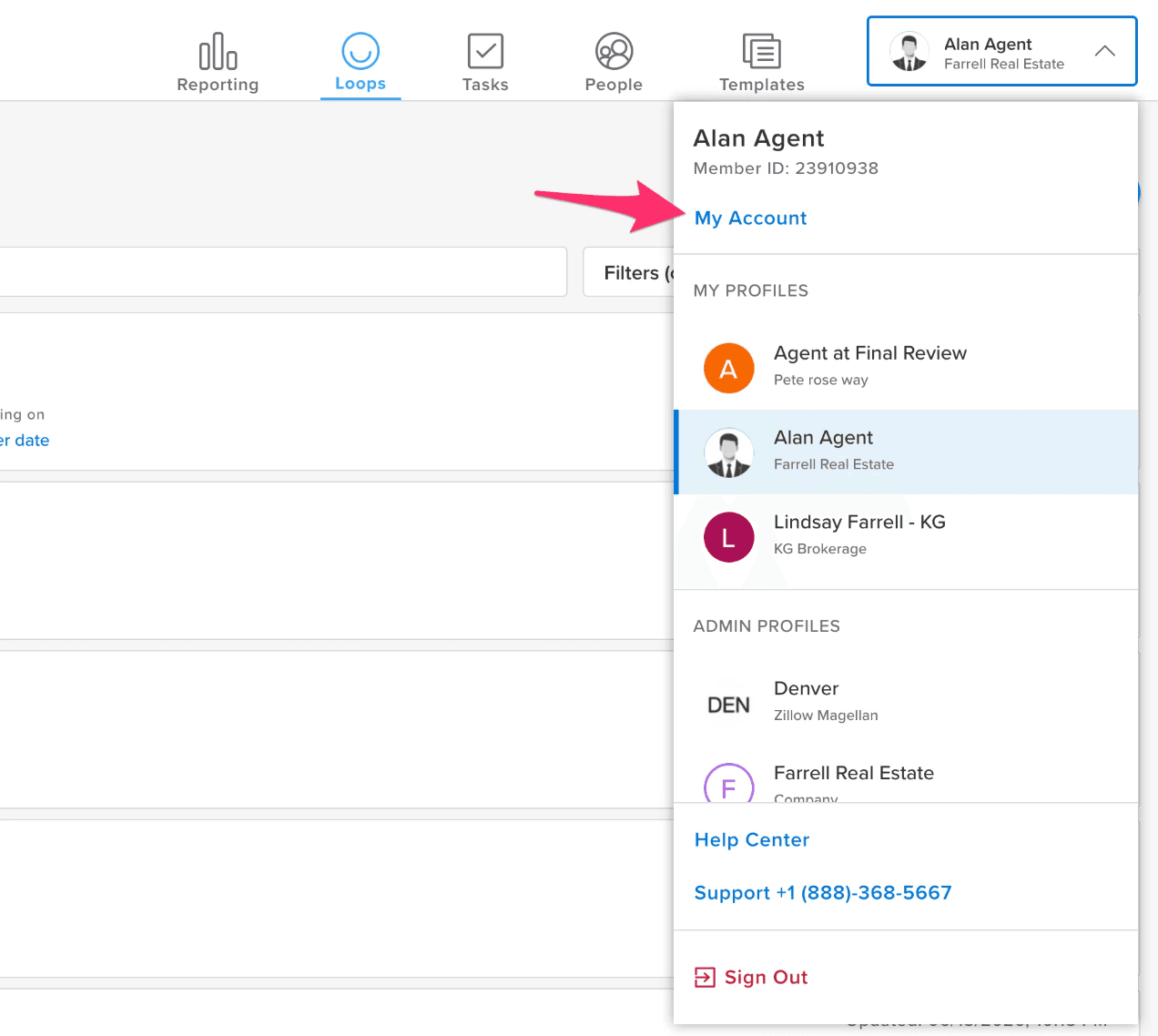
dotloop works the other way round. You keep one login and it holds a profile for each brokerage or team you belong to. The profile selector lists them, each profile shows the brokerage and associations it is attached to, and a team invitation can sit on an existing office profile or on a new profile connected only to that team. Work done in a profile the company did not provide is not accessible by the company, which is dotloop's answer to whose file it is. For an individual agent's loop, the agent invites you with Add to my team, which shares everything in that loop, documents, people and tasks, and cannot be undone for that loop. The catch is review. A coordinator added that way cannot submit the loop for review on the agent's behalf. The agent has to.
In zipForm, C.A.R. members can now invite a coordinator into their own account with permissions the agent sets, and the coordinator signs in with their own credentials. The coordinator-side tools have started to model the problem too. Open To Close lets you record a Brokerage profile for each agent with the brokerage's name, color and logo so the agent's intake form carries the right brand, gives a team member more than one email signature depending on whose transaction they are working on, and takes more than one dotloop, SkySlope or Brokermint profile when you work across accounts.
How do you set up a new client brokerage?
In this order, and do not open a file until step five is done. Most of it is a conversation with the broker, not the agent. The agent hired you. The broker stays responsible for the transaction.
Step 1: Get the agreement in writing
Scope, fee, who may be emailed in whose name, and the confidentiality terms. New Mexico requires the agreement to be transaction-specific and made with the qualifying broker, and Oregon expects confidentiality addressed in writing, so write it that way everywhere.
Step 2: Get your own named account in their system
SkySlope: a Limited TC account created by their admin, with TC Access switched on for each agent you serve. dotloop: your own account, invited per loop. zipForm: invited by the agent. If the broker offers a shared login instead, the engagement waits.
- If it fails
If the brokerage will not create an account, you work from your own system and the agent uploads to theirs. Say so in the agreement.
Step 3: Write the client's rule sheet
Their checklist and required documents by file type, who submits for review and when, their file naming, which forms library they use, and what the broker wants copied on. One page, dated. The checklist below is the field list.
Step 4: Build the client as its own team in your system
One team per brokerage, their agents on your roster as named parties who never sign in, and a playbook for that client where their process differs from your default. Fix a one-off on the closing and a pattern on that client's playbook, never on another client's.
Step 5: Set the sending identity for the client
The brokerage name the client's files show, the email address and signature you write from on their files, and the reply-to address. Check it against Oregon's test: could a consumer be confused about which brokerage is administering the transaction?
Step 6: Run one closed file through it
Take a file the agent closed last month and rebuild it under the new team, playbook and identity. Every document should land on its required-document line and every date should match what the file actually hit.
Step 7: Agree the exit
Who removes your access the day the engagement ends, and who keeps which records. In SkySlope the agent removes you from the file's Contacts tab. In dotloop a team addition cannot be reversed, so the agent removes you from the loop.
How do you keep one workload across several clients?
You cannot run the queue inside the clients' systems, because there are too many of them. C.A.R.'s Transaction Coordinator Directory lists 57 certified coordinators and asks each to name the transaction tools they work in. Of the 55 who answered, the median lists five, 34 list five or more, and 26 list two or more brokerage systems such as SkySlope, dotloop, Brokermint, Paperless Pipeline or KW Command. Forty-seven of the 55 list SkySlope. Those are the systems the coordinators' clients chose, and a client's system is the wrong place for a queue that spans every client.
“a private TC who does business for many agents with different brokers … brought her along when I changed brokerages”
So the queue lives in your system and each client is a filter on it. DeedSpring's Coordination clients mode is that structure. Switch on Teams, choose Coordination clients as what to call them, and each client brokerage or team becomes a team. Its agents sit on your roster as Roster only, named on files and never invited, and your own coordinators sign in and are assigned to the closings. The Closings and Deals pages filter by team and by coordinator, Overview shows coordinator workload, and a client can record the brokerage name shown on its files. A transaction coordinator role always sees the closings it is added to with the deals and clients behind them, and on Only theirs is limited to the files it is working.
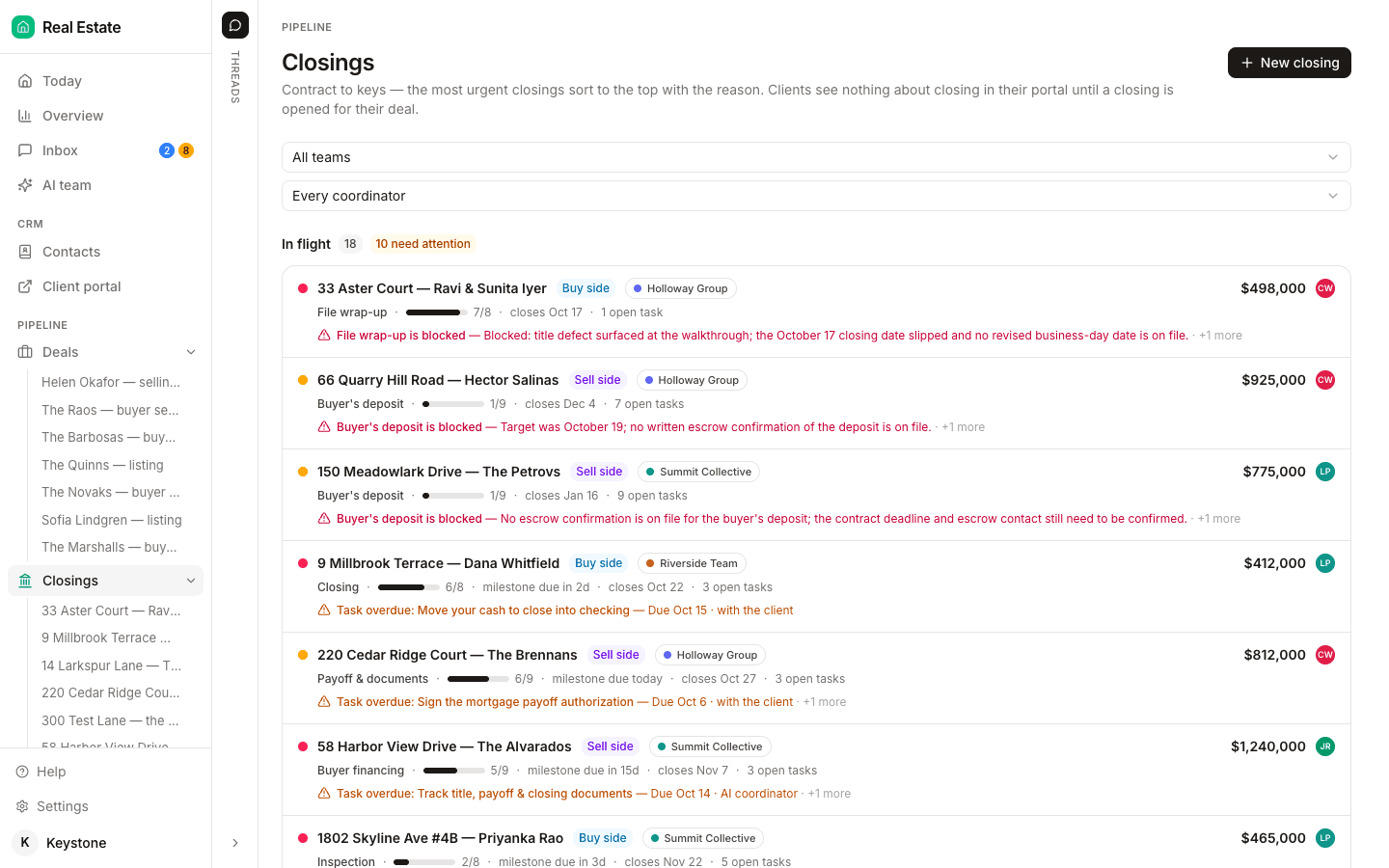
Playbooks do the per-client configuration. DeedSpring ships two defaults per workspace, one per side, and Add playbook is for a typical process that is not the default, including a different state's contingency calendar. Build one for each client whose required documents or review rule differ, name it after the client, and pick it when the contract comes in. Each closing owns its own copy of the playbook from the moment it opens, so one agent's odd file never rewrites another client's template.
The client configuration checklist
Fill one per brokerage before the first file, and keep it with the agreement. Everything on it comes from the broker or the agent. Nothing on it is a guess.
New client brokerage: configuration
- Written agreement signed, including scope, fee, confidentiality and sending identityTransaction-specific where the state requires it.
- Your named account in their compliance system, with the role and offices recordedSkySlope: Limited TC with TC Access per agent. dotloop: your own account. zipForm: invited by the agent.
- Their checklist and required documents, by file type and side
- Who submits for review, and when in the file it happensIn dotloop that is the agent if you were added On my team.
- Their forms library and e-signature tool
- File naming and folder rulesIf they have none, use our transaction coordinator checklist as the default and say so in the agreement.
- Brokerage name, email address, signature and reply-to you use on their files
- Who at the brokerage is copied on what, and who the escalation contact is
- Team, playbook and roster entries created in your own system
- One closed file rebuilt as a test and signed off by the agent
- Exit owner named: who removes access and who keeps the records
What does DeedSpring do for a multi-brokerage coordinator?
It is the one system of your own. Each client brokerage is a team labelled a Coordination client, with its agents on the roster, its own playbook, the brokerage name on its files and a sharing grid that sets, role by role, whether a person sees everyone's files, their team's or only theirs. Upload the executed contract and the AI coordinator reads the price, deposits, contingencies and dates into deadlines on the closing. It checks every active file every hour, chases the lender and title company on the tasks you assign it, and leaves anything about money, contract terms or bad news as a draft for you to send, from any address you may send from, including the coordinator's own address with a display name you set.